
← Back To Blog
Proven Web Developer Leads Strategies 2026
Most web developers don’t have a lead problem. They have a workflow problem.
The pattern is familiar. You open Upwork, refresh the feed, scan a pile of weak-fit jobs, write a few proposals by hand, wait too long for replies, then overcorrect by bidding on almost everything. Some weeks feel busy. Some feel dead. That’s not pipeline. That’s volatility.
A better approach is to treat web developer leads like an operating system, not a daily scramble. The teams that win consistently on Upwork usually do three things well. They respond fast, they personalize enough to sound like a human who read the brief, and they qualify hard so they don’t waste proposal time on low-intent clients.
Moving Beyond Manual Bidding and Low Reply Rates
Manual bidding feels productive because you’re doing visible work. You’re reading posts, writing responses, tweaking intros. But the output is uneven, and uneven input creates uneven revenue.
That matters because the opportunity is real. Businesses are creating 252,000 new websites daily around the world, and senior developers can command $90,000–$120,000 annually according to web development market statistics from Vrinsoft. There’s no shortage of demand. The bottleneck is your ability to reach the right buyers quickly enough and with enough relevance to get a response.

What manual bidding gets wrong
Most developers lose in one of three places:
- They respond too late. By the time the proposal goes out, the client has already skimmed earlier bids.
- They sound generic. The message lists skills instead of diagnosing the project.
- They chase bad-fit jobs. A vague brief, shaky budget, or unclear scope still gets a proposal because the pipeline feels thin.
This creates a false lesson. People assume Upwork is saturated when the actual issue is that their process can’t separate signal from noise.
The goal isn’t to send more proposals by force. It’s to build a lead engine that keeps surfacing qualified jobs and gets a strong response out while the client is still paying attention.
What a lead engine actually looks like
A usable system for web developer leads has a few moving parts:
- Fast alerts so you see the right jobs quickly. A faster Upwork alert workflow matters because stale opportunities convert worse than fresh ones.
- Clear qualification rules so you know when to ignore a post.
- Reusable proposal structure so speed doesn’t kill quality.
- Follow-up discipline so good opportunities don’t die after one message.
Teams that rely on memory and hustle eventually hit a ceiling. Teams that document what counts as a good lead, what message gets sent first, and when to follow up can scale without making their outreach feel robotic.
That’s the shift. Stop treating lead generation like a side task between delivery work. Run it like a sales function.
Optimizing Your Upwork Profile for Conversion
Your Upwork profile isn’t a resume. It’s a landing page.
Clients don’t hire because your stack looks impressive in isolation. They hire because your profile helps them believe you understand the business risk behind the project. That’s the difference between a technician and a strategic seller.
One of the clearest signals from industry conversations is that stronger sellers talk about outcomes, not just tools. As noted in this discussion on winning higher-value projects, the people landing better work are the ones who can talk about conversion rates, user psychology, and business goals, not just implementation.
Rewrite the title first
A weak title tells the client what you are.
A strong title tells the client what problem you solve.
Compare the difference:
- Weak: Full Stack Developer | React | Node | MongoDB
- Better: Full Stack Web Developer for SaaS, Lead Gen Sites, and Conversion-Focused Builds
The second version still implies technical capability, but it frames the work around buyer intent. That attracts better-fit web developer leads because the client can place you in a business context.
Fix the overview before you touch the portfolio
Most overviews fail in the first few lines. They open with years of experience, a tool list, or broad claims like “I deliver high-quality solutions.”
A better structure looks like this:
- Opening line: Speak to the buyer’s problem.
- Middle section: Explain how you approach that problem.
- Proof layer: Show relevant work categories or project types.
- Call to action: Invite a specific next step.
Practical rule: If your first paragraph could belong to any developer on the platform, it won’t convert well.
For example, “I build modern websites using React, Next.js, and Node” is weaker than “I help SaaS teams and service businesses fix slow, underperforming websites that hurt lead flow and trust.”
That wording does two jobs. It filters in the right clients and filters out buyers who only want the cheapest coder.
Make the portfolio sell the decision
Don’t upload random screenshots and call it proof. Each sample should answer a client’s silent question: “Have you solved my kind of problem before?”
Use a short caption format:
- Client context: What kind of business was it?
- Problem: What wasn’t working?
- Work delivered: What did you build or improve?
- Business angle: What mattered to the client?
A lead gen site redesign, an app frontend cleanup, and a CMS migration can all sit on one profile if each sample is framed clearly. The mistake is dumping code artifacts without commercial context.
A quick visual walkthrough helps if you’re refining your page positioning and messaging:
Cut what weakens trust
Remove anything that makes the client do extra interpretation:
- Long skill inventories that read like keyword stuffing.
- Broad niche claims such as “I work with all industries.”
- Low-context testimonials that praise effort but not relevance.
- Portfolio pieces that don’t match the projects you want now.
Your profile should make one thing obvious. You don’t just build websites. You help buyers move a project that affects revenue, usability, or growth.
Building Your Automated Lead Sourcing Engine
Most Upwork feeds are noisy. Good web developer leads are mixed in with weak briefs, unrealistic budgets, and clients who aren’t ready to buy. If you automate the wrong thing, you just create a faster version of bad targeting.
That’s why lead sourcing starts with qualification logic, not software.
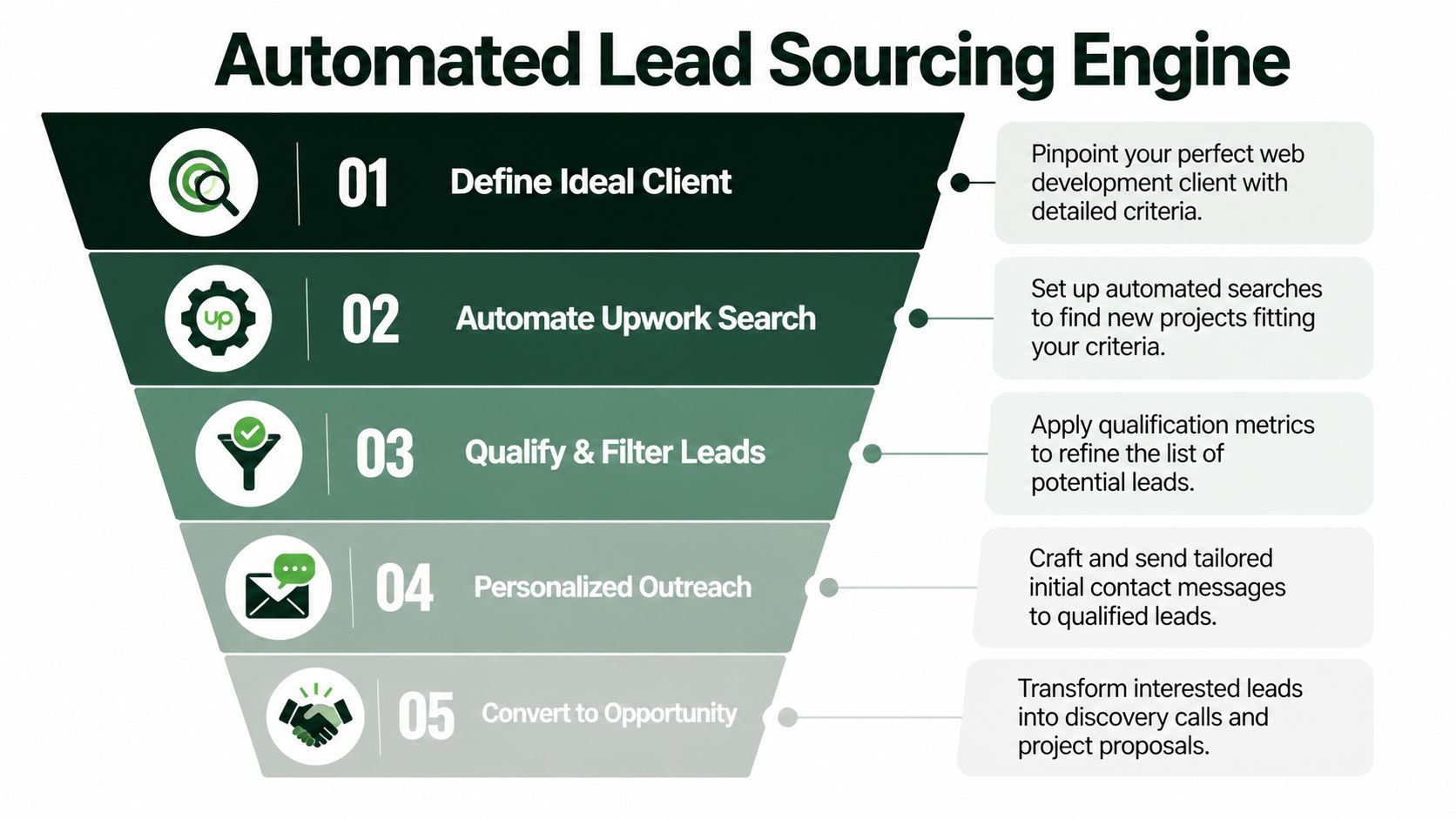
Industry analysis has pointed to a real gap here. AI tools can increase proposal volume, but they also create more low-intent opportunities unless you get better at lead intelligence. That problem is described well in this piece on AI, workflow change, and lead quality challenges.
Start with an actual ideal client profile
A usable ICP for Upwork is tighter than most agencies think. “Startup founder needing a website” is too broad. You need a filter set that tells a human or an automation layer what to prioritize.
Define your ICP across these dimensions:
- Project type: Marketing site, app build, redesign, bug-fix retainer, e-commerce, migration.
- Stack fit: WordPress, Shopify, React, Next.js, Node, headless CMS, or another setup you can sell confidently.
- Buyer quality: Clear brief, realistic scope, signs of decision authority.
- Commercial fit: Budget language, urgency, and willingness to discuss outcomes instead of only hourly cost.
If your team handles multiple service lines, build more than one ICP. A high-ticket app build and a fast-turnaround landing page redesign should not share the same sourcing logic.
Build green-light and red-flag rules
The process described next helps teams sharpen their focus quickly. Don’t ask whether a job sounds interesting. Ask whether it deserves proposal time.
Green lights usually look like this:
- Specific pain points. The client explains what’s broken or what they need to launch.
- Concrete constraints. Timeline, stack, handoff expectations, or business use case are visible.
- Decision quality. The post sounds like it came from someone responsible for delivery.
Red flags show up in different ways:
- Shopping-list briefs. The client names features but gives no reason they matter.
- Budget confusion. The post hints at a mismatch between scope and seriousness.
- No usable context. You’d have to guess what success means.
Bad leads don’t only waste connects. They consume the same mental energy you need for the buyers who are ready now.
Let automation learn from feedback
Compliant automation becomes useful. Not because it can blast proposals, but because it can learn your judgment.
A practical setup looks like this:
- Feed the system examples of jobs you’d take and jobs you’d reject.
- Tag patterns that matter, such as stack match, project clarity, and client seriousness.
- Review the matches regularly and keep correcting the model with simple yes or no feedback.
- Tighten the output until only qualified opportunities make it to the proposal stage.
That feedback loop matters because the first version of any automation is usually too permissive. Left unchecked, it starts treating broad relevance as good fit. That’s how teams end up with volume and no conversion.
Use search structure, not keyword chaos
Many developers rely on a few obvious keywords. That’s not enough.
Instead, split searches by intent. One search should catch redesign and CRO-style work. Another should capture frontend rebuilds. Another should pull in maintenance or performance projects. Then filter each stream differently.
For example:
- A redesign stream might prioritize weak UX language, conversion concerns, and landing page terms.
- An application stream might look for React, Next.js, API integration, or dashboard work.
- A retainer stream might focus on maintenance, bug fixing, speed optimization, and ongoing support.
This keeps your queue organized by commercial type, not just technology.
Keep the automation human-like and narrow
Aggressive automation causes its own problems. The safest systems behave like disciplined operators, not spam bots. That means limited volume, relevant job targeting, and messaging that reads like a human reviewed the post.
The trade-off is simple. The narrower your qualification rules, the fewer total jobs you hit. But the leads that reach proposal stage are stronger, easier to personalize, and less likely to waste delivery bandwidth after the call.
That’s the main point of automation on Upwork. It shouldn’t remove judgment. It should preserve judgment at scale.
Crafting Proposals and Follow-Ups That Convert
Fast proposals work. Generic proposals don’t.
Those aren’t conflicting ideas. The best Upwork operators build a repeatable proposal frame, then customize the parts that prove they understood the brief. That’s how you move quickly without sounding templated.
There’s good reason to prioritize this. According to lead generation guidance for technology developers, submitting personalized proposals within 10 minutes of a job posting can produce double-digit reply rates (10-20%), improve success rates by 2-3x over manual bidding, and shorten sales cycles by 30-50%.

The first two lines do most of the work
Clients skim. They don’t study.
So your opening has one job. Show that you read the post and already understand the likely problem behind it.
Weak openers say this:
- “Hi, I’m a full stack developer with extensive experience…”
- “I’d love to help with your project.”
Stronger openers do this instead:
- Mention the specific issue.
- Reflect the risk or friction it creates.
- Suggest a direct path forward.
Example:
It looks like the bigger issue isn’t just rebuilding the site. It’s getting a faster, easier-to-manage setup live without breaking the lead flow you already have.
That sentence sounds human because it interprets the brief. It doesn’t just echo it.
A proposal structure that scales
Use a consistent layout so your team can move fast. Keep it short enough to read in one screen.
I read your brief and the main challenge looks like [specific problem in the post].
I’d approach this by [brief solution path], with attention to [important risk such as speed, handoff, conversion, or maintainability].
Relevant background: I’ve worked on [similar project type or stack], especially where clients needed [business outcome or delivery condition].
A few quick questions before I outline the build in detail:
- [Question about scope or priority]
- [Question about timeline or constraints]
- [Question about success metric or current blocker]
If helpful, I can send a brief plan for how I’d structure the first phase.
This format works because it earns the next message. It doesn’t try to close the whole deal inside the bid.
If you want to operationalize the speed side of this process, a system for automating Upwork proposals helps only when the inputs are already qualified and the template logic is strong.
Personalization that matters
Don’t personalize fluff. Personalize decision-making.
Good variables to customize:
- The client’s stated bottleneck
- The likely hidden risk
- The delivery approach
- One relevant credibility point
- Two or three qualification questions
Bad variables to customize:
- Overusing the client’s name
- Repeating the title of the post
- Adding compliments with no substance
- Stuffing every framework you’ve used
Sales rule: If the personalization doesn’t change how the client sees the problem, it’s cosmetic.
Follow up without sounding desperate
Most freelancers either never follow up or they follow up awkwardly. A good follow-up reopens the conversation by adding clarity.
A simple cadence works well:
Just checking whether this project is still active. If it is, I can outline the quickest path to launch based on the stack and scope you mentioned.
If there’s still no reply, use a second follow-up that adds value:
One thing I’d watch closely here is [specific implementation risk]. If you want, I can send a short breakdown of how I’d avoid that in phase one.
Then stop. Endless nudging weakens your position.
What doesn’t convert
Proposal failure is usually mechanical, not mysterious. Watch for these patterns:
- You lead with yourself. The client cares about their problem first.
- You write too much. Long bids get skimmed and forgotten.
- You skip qualification. That creates calls with buyers who were never serious.
- You ask for a meeting too early. Earn the call by showing insight first.
The strongest proposals feel like the start of a useful conversation. They don’t feel like a cover letter.
Using Analytics to Refine Your Outreach
Improving proposals by instinct is too slow.
You need a small set of metrics that tell you where the breakdown is. Not vanity activity. Not “we sent a lot this week.” Just the numbers that show whether your outreach is being seen, answered, and turned into conversations.
That aligns with where developer workflows are already going. In the 2025 Stack Overflow Developer Survey, 84% of developers were using or planning to use AI tools, and 70% said AI reduces time spent on specific tasks. That makes analytics more important, not less. Once systems speed up execution, measurement becomes the only way to know if speed is helping or just multiplying errors.
Track three numbers
These are the only three I’d treat as core for web developer leads on Upwork:
- Proposal open rate. This shows whether your timing and first lines are strong enough to get attention.
- Reply rate. This tells you whether your message started a conversation.
- Interview booked rate. This measures whether your qualification and follow-up are leading to real opportunities.
You don’t need a giant dashboard at first. You need clean definitions.
Diagnose the bottleneck correctly
Different problems show up in different metrics.
If open rate is weak, look at:
- Timing: Are you getting proposals out fast enough?
- Opening lines: Are the first two lines specific?
- Lead quality: Are you targeting jobs that fit your offer?
If opens happen but replies don’t, the issue is usually message relevance. You read the brief, but you didn’t make the client feel understood.
If replies happen but interviews don’t, the problem often sits in qualification. You may be generating interest from buyers who are curious, not committed.
Good analytics don’t just tell you what happened. They tell you what to change next.
Extend automation into messaging, not just bidding
A lot of teams stop at sourcing and proposal submission. That leaves value on the table.
Smart automation can also support:
- Fast invitation replies that stay on-message with your positioning
- Context-aware follow-ups that stop once a meeting is booked
- Team workflows where multiple bidders can work from the same qualification standards
- Profile and proposal testing so improvements stack over time
Scale happens. Not by blasting more bids, but by removing lag between lead, response, and next step.
Review weekly, not occasionally
Set one recurring review. Look at the jobs that converted and the jobs that didn’t. Then ask:
- Which lead types produced actual calls?
- Which proposal openings got responses?
- Which follow-ups reopened stalled threads?
- Which clients looked good on paper but wasted time?
That habit compounds. The strongest Upwork sales machines don’t rely on heroic effort. They learn faster than everyone else.
Scaling Your Lead Generation Beyond Upwork
Once your Upwork system works, don’t treat it like a channel-specific trick. Treat it like the first version of a broader sales engine.
The core pieces travel well. You define who you want, qualify aggressively, write outreach around business problems, and track the few metrics that reveal where deals stall. That applies inside Upwork and outside it.
A lot of agencies expand too early by adding channels before they’ve built discipline. Better sequence matters. First, get your web developer leads process stable on one platform. Then port the same logic into content, outbound, referrals, and inbound conversion paths.
Apply the same qualification logic to content
Outside freelancing marketplaces, content can do some of the filtering for you. Technical blog posts, implementation guides, and benchmark-driven resources attract different buyer intent than broad thought leadership.
That approach has measurable upside. According to B2B lead generation guidance for IT and tech companies, a combined content and intent-data strategy can produce 15-30% conversion lifts, and gating technical benchmarks behind a simple form can increase submissions by 3x.
That doesn’t mean every asset should be gated. It means your best educational content should match the same commercial logic you use in proposals. Solve a real problem. Attract the right buyer. Make the next step easy.
Build one system, not five disconnected tactics
A mature agency eventually needs more than Upwork. But it doesn’t need random marketing.
You can extend the same playbook into:
- Niche landing pages built around project types you already close well
- Email nurture for leads that aren’t ready yet
- Intent-driven content that pre-qualifies readers
- Alternative channels such as those covered in this guide to platforms beyond Upwork for freelancers and agencies
The agencies that scale best usually don’t separate sales from delivery as sharply as people think. They use delivery insights to sharpen positioning, then use positioning to attract better-fit work.
That’s the loop worth building. Better targeting creates better conversations. Better conversations create better projects. Better projects give you better proof.
If you want that system without building every workflow from scratch, Earlybird AI helps agencies and freelancers run an always-on Upwork sales process with faster job discovery, human-like proposal automation, rapid replies, follow-ups, analytics, and multi-user workflows designed for scale.




