
← Back To Blog
How to increase client engagement: Master tips to win Upwork projects
If you want to win more clients, you need a strategy that blends speed, personalization, and strategic persistence. It’s about being one of the first to apply, but with a proposal that’s so relevant it can’t be ignored. From there, it's all about staying on the client's radar until you close the deal.
This combination is what turns a simple application into a steady stream of project wins.
The Rules of Upwork Engagement Have Changed

The old advice just doesn't cut it on Upwork anymore. The sheer volume of jobs posted—and the speed at which freelancers apply—has created a massive "engagement gap." On one side, you have talented freelancers. On the other, you have clients getting absolutely buried in proposals just minutes after posting a job.
Your carefully crafted, slow-and-steady approach gets lost in the noise. To break through, you need a modern playbook built on three core pillars. Nailing these is your first step to closing that gap and finally getting the traction you deserve.
Master the Principles of Modern Outreach
Winning on a platform that moves this fast all comes down to how you play the game from the moment a job goes live.
- Speed: Getting your proposal in first is a massive advantage. It's not about vanity; it's about visibility. Clients often start reviewing proposals as they roll in, so early birds get seen while latecomers get archived.
- Personalization: Speed means nothing if your proposal is just a generic template. You have to prove, instantly, that you’ve actually read the job post, understood the client's pain point, and have a clear idea of how to solve it.
- Persistence: Firing off one proposal and hoping for the best is a losing strategy. A single, well-timed follow-up can be the nudge a busy client needs to move you from their "maybe" pile to an interview.
The secret to increasing client engagement isn't about sending more proposals. It's about being faster, more relevant, and more persistent than everyone else in the client's inbox.
Trying to juggle all three of these manually is tough, if not impossible. This is where smart automation can give you an edge, ensuring you're always first in line with a bid that feels personal and relevant. This guide is your playbook for adapting to this new reality, bridging the engagement gap, and turning that initial contact into a signed contract.
Crafting a Profile That Attracts High-Value Clients
Your Upwork profile is your digital storefront, and it’s working for or against you long before you ever send a proposal. Think of it less like a static resume and more like a finely tuned landing page designed for one thing: conversion. A weak profile quietly repels the exact clients you're trying to land, while a great one acts like a magnet, pulling in relevant job invitations.
It all starts with a mental shift. You have to see your profile through your ideal client’s eyes. What’s keeping them up at night? What specific words are they typing into that search bar? Your title and overview need to answer those questions instantly.
Optimize Your Title and Overview for Search
When a client searches, the first two things they see are your title and the first couple of lines of your overview. These elements have to be sharp, specific, and focused on the benefits you provide. Generic titles like "Content Writer" or "Web Developer" just fade into the noise.
Instead, get laser-focused. A title like "AI Content Strategist for B2B SaaS" or "React Native Developer Specializing in Fintech Apps" does the heavy lifting for you. It immediately tells a niche client that you understand their world.
Your overview needs to carry that story forward. Hit them with a powerful opening sentence that summarizes the value you bring to the table.
A strong profile overview doesn't just list your skills; it shows how those skills solve a client's biggest problems. It flips the script from "what I do" to "what I can do for you."
For instance, ditch the "I have 10 years of experience in marketing..." opener. Try this instead: "I help e-commerce brands double their organic traffic and sales with data-driven SEO and content." See the difference? You’re immediately framing your expertise around a result they desperately want. If you're looking for more inspiration, you can explore our detailed guide for crafting a standout Upwork profile that gets noticed.
Showcase Results with Your Portfolio and Testimonials
Your portfolio isn't a scrapbook of past jobs; it's a curated gallery of your greatest hits. Each entry should tell a quick, compelling story: here was the client's problem, here's how I solved it, and here were the measurable results. Use strong visuals and short descriptions that scream "impact."
Testimonials are the final piece of the puzzle. When a happy client leaves positive feedback, it’s pure gold. This is the social proof that gives your next prospect the confidence to hire you. Highlighting these reviews builds instant credibility, which is crucial for increasing engagement from the very first touchpoint.
This is especially true for freelancers in hyper-competitive fields like SEO and development. For those using a tool like Earlybird AI, the platform intelligently scans job posts and helps craft proposals that automatically highlight your most relevant portfolio pieces and past wins. While industry-wide reply rates often struggle to hit 5-10%, Earlybird users consistently report responses in the double digits.
The proof is in the numbers. Recent statistics show that US clients alone drove $239M (72%) in revenue, showing just how effective a targeted approach can be in high-value markets.
Win the First Impression with Speed and Personalization
On a platform like Upwork, the first few minutes after a job goes live are a mad dash. The moment a client posts a project, they get buried in proposals. Your window to make a real impression isn't just small—it's closing with every second that ticks by. Speed isn't just an advantage; it's often the deciding factor.
The data doesn't lie. With thousands of new jobs hitting the platform every single day, clients are completely overwhelmed. Freelancers who get their proposal in within the first 10 minutes have a 60% higher chance of getting a reply than someone who waits an hour.
Let that sink in. Wait just over 30 minutes, and your engagement can crater by 40%. You're not just late; you're practically invisible.
This isn't just a local game, either. Your ability to react quickly and thoughtfully opens doors to a huge range of clients all over the world.
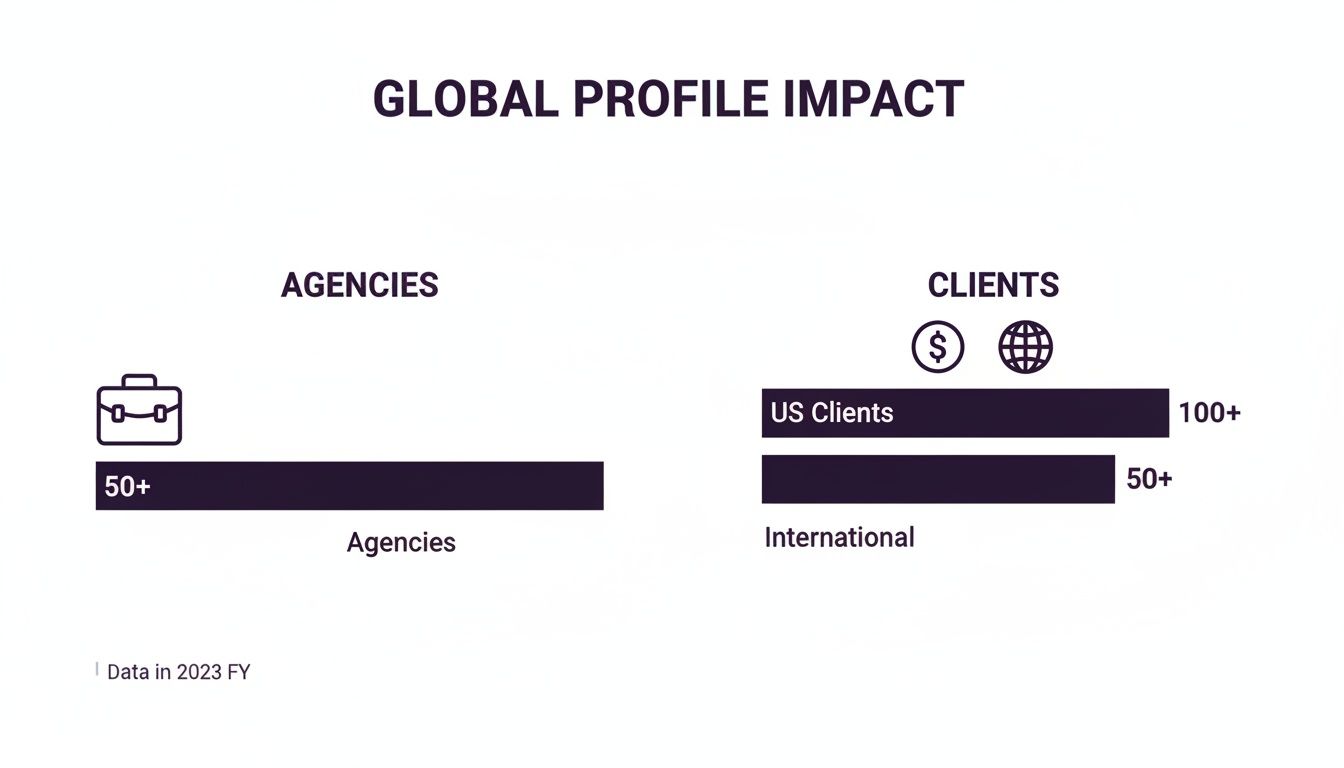
As you can see, a sharp, personalized approach helps you stand out to high-value clients and agencies, whether they're in the US or across the globe.
Go Beyond Speed with Hyper-Personalization
But here’s the critical part: being fast with a generic, copy-and-paste proposal is a complete waste of time and Connects. In fact, it's probably worse than being slow. Speed gets you a glance, but genuine personalization is what gets you hired.
Your immediate goal is to prove you've actually read and understood the job post—not just the title. It's about showing you get the client's core problem, and you can do it in seconds. Forget just dropping their name in the first line. We're talking about real, thoughtful engagement.
- Mirror the Client’s Language: Pay close attention to the specific words they use. If the job post says "drive organic traffic," don't write back about "improving SEO." Use their exact phrase. It shows you’re on the same page from the very first sentence.
- Speak to Their Pain Points: Figure out the real problem they need to solve and address it head-on. A powerful opener is something like, "I see you're looking for a way to lower customer churn for your SaaS platform. That’s a challenge I’ve tackled before by..."
- Ask a Smart Question: Nothing proves you've thought deeply about a project like an insightful question. Instead of the lazy "What's your budget?", try something that shows you're already thinking strategically: "Have you identified which user segments you’re targeting with these new landing pages?"
A truly personalized proposal doesn't read like a sales pitch. It feels like the beginning of a conversation—one that shows the client you're already thinking like a partner, not just a bidder.
Trying to nail this combination of lightning speed and deep personalization manually is next to impossible. You'd have to live on the platform, refreshing constantly. This is exactly where smart automation comes in. A tool like Earlybird AI can spot the perfect job for you and send a hyper-personalized bid in minutes—one that echoes the client's language and highlights your most relevant skills. It’s about being not just the first applicant, but the best applicant in their inbox.
Of course, nailing that first message is just step one. Keeping the momentum going is just as important. For more on that, take a look at our guide on essential client communication best practices to make sure you turn that initial spark into a long-term contract.
Turning Replies Into Revenue with Strategic Follow-Ups
Getting that first reply is a fantastic feeling. It means your profile, proposal, and timing were all on point. But this is precisely where so many freelancers stumble, letting a genuinely warm lead go cold. The real work starts now, and it’s all about mastering the strategic follow-up.
It’s a step many of us skip, mostly out of fear of being seen as pushy or desperate. The truth? A single, polite nudge is often exactly what a busy client needs. They’re juggling dozens of messages and meetings, and your follow-up isn’t just a reminder—it’s your chance to add more value and steer the conversation toward a "yes."
The Fine Line Between Persistence and Annoyance
So, what's the secret? It all comes down to timing and value. Firing off "Just checking in!" messages every few hours is a surefire way to get yourself ignored. The goal is to be helpfully persistent, not impatiently demanding.
A good rule of thumb I stick to is waiting 24-48 hours after their reply if the conversation stalls. This gives the client room to breathe but keeps your name fresh in their mind. The magic, though, is in what you say next.
- Offer More Insight: Don't just ask for an update. Add something useful. Try something like, "After thinking more about your project, I realized a similar approach I used for another client could really streamline your workflow. I can walk you through it if you're interested."
- Guide the Next Step: Make it incredibly easy for them to say yes. Suggest a clear, low-commitment action. For example, "Would a quick 15-minute call sometime this week help clarify how we can tackle the first phase?"
- Share a Relevant Resource: Send a link to a case study, a relevant article you wrote, or a portfolio piece that directly relates to their problem. This reinforces your expertise without you having to spell it out.
A great follow-up never asks, “Have you decided yet?” Instead, it shows, “I’m still thinking about your project and am ready to help when you are.”
Automate Your Persistence for Maximum Impact
Let's be real: manually tracking every conversation and timing every single follow-up is a job in itself. When you’re juggling multiple hot leads, it’s far too easy for a great opportunity to slip through the cracks. This is where a little bit of smart automation can be a game-changer.
Tools like Earlybird AI can handle this part of the process beautifully. Once a client replies, you can have the system send a perfectly timed, value-packed follow-up if the conversation goes quiet. It ensures no lead is ever forgotten, keeping you top-of-mind without you having to do a thing.
The impact of this is huge. Our on-platform data shows that freelancers who send two or three targeted follow-ups after an initial proposal see a 28% increase in client engagement and hires. Think about it: clients check their inboxes on their own schedule. These consistent, gentle nudges are what prevent nearly 70% of potential jobs from disappearing into the void.
By getting your follow-up game right, you close the loop and turn that initial flicker of interest into actual revenue. If you want to go even deeper on this, check out our complete playbook on how to follow up with clients to really seal the deal.
Measuring What Matters to Fine-Tune Your Strategy
If you're not tracking your performance, you're flying blind. To really get more client engagement, you have to stop guessing and start making decisions based on actual data. The best way to do this is to treat your outreach process like a sales funnel—it helps you see exactly where things are working and where they’re falling apart.
This is where getting familiar with your key performance indicators (KPIs) comes in. These numbers tell the story of your whole process, from the moment you hit "send" on a proposal to when you sign a contract. Think of them as the vital signs for your freelance business on Upwork.
The Four Essential Upwork KPIs
I like to think of the client journey as having four big milestones. Each one gives you a super clear signal about what's going well and where you might need to rethink your approach.
- Proposal View Rate: This is simply the percentage of proposals that clients actually open. It's your first hurdle. A high view rate tells you that your profile headline and the first couple of lines of your cover letter are doing their job. A low rate? That’s a sign your initial hook isn’t strong enough.
- Reply Rate: Of the proposals that get opened, how many get a response? This number is a direct referendum on the quality of your proposal itself. If clients are looking but not replying, the message is the problem—it’s likely too generic or isn’t hitting on their specific needs.
- Interview Rate: This one tracks how many of your conversations turn into a real interview or a scheduled call. If you're getting plenty of replies but not many interviews, your initial messaging is good, but you're not quite sealing the deal and guiding the client to that next step.
- Hire Rate: The big one. This is the percentage of your interviews that lead to a paid project. Getting lots of interviews but no offers means you need to work on your sales skills and how you communicate your value on a call.
Your Upwork KPIs aren't just vanity metrics; they're diagnostic tools. A low reply rate with a high view rate means the problem is your proposal, not your profile. Understanding that distinction is everything when it comes to fixing your funnel.
Using Data to Make Smarter Decisions
Once you start keeping an eye on these numbers, you can A/B test your approach with real confidence. For instance, you could try two completely different opening lines in your proposals for a week and see which one gets a better Reply Rate. This data-first approach takes the guesswork and emotion out of the equation.
This is where having a live dashboard becomes a game-changer. Tools like Earlybird AI have built-in analytics, so you can see how you're doing at a glance without having to mess around with spreadsheets. It helps you spot trends, find bottlenecks, and make smart tweaks that lead directly to better client engagement and more closed deals.
Troubleshooting Common Engagement Roadblocks
Even with a great strategy, sometimes you just hit a wall. You're putting in the work, sending out proposals, but the results aren't there. It's incredibly frustrating.
Learning how to increase client engagement isn't just about the wins; it's about knowing how to diagnose the problems that will inevitably pop up. Usually, the issue isn’t some massive failure, but one small, weak link in your chain. Finding it is the key to getting things moving again.
Proposals Sent but No Views
This one is maddening. You’ve crafted a brilliant proposal, but the view count is stuck at zero. If clients aren't even opening what you send, the problem is your first impression.
What they see before they click is your profile title and the first two lines of your proposal. That’s it.
- What's likely happening: Your title is probably too generic, like "Freelance Writer," which blends in with a hundred others. Or, your opening sentence is a copy-paste template that doesn't immediately connect to their specific project.
- Here's the fix: Get specific with your title. Instead of "Freelance Writer," try "B2B SaaS Content Strategist." Then, make sure the very first sentence of your proposal mentions something directly from their job post. This instantly proves you've actually read it and you're not just spamming.
Clients Reply Then Go Silent
This is almost more frustrating than getting no reply at all. You get their attention, exchange a message or two, and then… radio silence. It feels like you were so close.
The good news is your initial proposal worked! The bad news is that the conversation lost steam.
When a client goes quiet after replying, it’s not a rejection—it’s an opportunity. They’ve opened the door; it's your job to guide them through it with a value-driven next step.
This is a make-or-break moment. Your job is to make the next step as easy as possible for them. Instead of ending your message with a passive "let me know," take the lead. Suggest a specific time for a quick call or offer a small, valuable piece of insight related to their project.
Don't wait for them to drive the conversation forward—you have to be in the driver's seat.
Common Upwork Questions I Hear All the Time
As you get deeper into Upwork, you start running into the same roadblocks and questions. Let's tackle some of the most common ones that freelancers and agencies ask when they're trying to land more work.
How Many Proposals Should I Really Be Sending Every Day?
Forget the "spray and pray" approach. It’s a fast track to burnout and wasted Connects. The real magic isn't in volume; it's in precision.
Instead of aiming for a huge number, focus on sending 5-10 incredibly well-targeted proposals each day. You want to bid only on jobs where you know you're a top-tier candidate. This focus is what wins projects. Of course, crafting that many high-quality bids manually is a massive time sink, which is where having an AI assistant can make a world of difference.
What's the "Golden Hour" for Sending a Proposal?
This is a trick question. There isn't one. The best time to send a proposal is right after a great-fit job gets posted. Since top-tier clients post projects around the clock and across every time zone, waiting for a specific time block means you're already behind.
The single biggest factor in getting a client's attention is speed. You have to be one of the first freelancers they see. This makes 24/7 monitoring a non-negotiable if you want to snag the best opportunities.
Being "always on" is impossible for a human, but it's exactly what automated tools are built for. They can spot and bid on your ideal jobs in minutes, putting you at the front of the line, even if a project is posted at 3 AM your time.
My Proposals Get Views, but I Never Get a Reply. What's Wrong?
This one is a classic, and I know how frustrating it can be. First, the good news: if you're getting views, your profile headline and the first two lines of your proposal are doing their job. You've successfully hooked the client's interest.
The silence that follows usually means the body of your proposal isn't closing the deal. The client clicked, but what they read didn't convince them to reply. It might be too generic, not speak directly to their problem, or lack a strong call to action that tells them what to do next. It's time to take a hard look at your proposal's middle and end to make it more personal and compelling.
Ready to stop guessing and start winning? Earlybird AI acts as your automated sales team, sending hyper-personalized proposals within minutes to land you more high-value clients on Upwork. See how it works.




