
← Back To Blog
Win More Contracts With a Quicker Job Alert
Ever had that sinking feeling? You finally see the perfect job on your Upwork feed, but it's already gone. The client is no longer accepting proposals.
It’s a race against the clock, and the best gigs are often won or lost before most people even get the notification. A quicker job alert isn't just a nice-to-have; it's the one thing that can put you in the winner's circle for high-value contracts.
Why the Best Freelance Jobs Disappear in Minutes

It happens every single day. A fantastic project goes live, and within what feels like seconds, the proposal count jumps to "20 to 50." You know you were a perfect match, but the window of opportunity slammed shut before you could even open it.
If you’re relying on the platform's default email alerts or just manually refreshing the job feed, you're already behind. Those built-in notifications are notoriously slow. They often get bundled into a digest that might arrive hours late. By the time that email hits your inbox, the most proactive freelancers have already sent their proposals and are deep in conversation with the client.
The Power of Being First
Being first is a game-changer. Think about it from the client's perspective: a few excellent proposals land right after they post a job. They’re impressed. They start a conversation. Are they really going to wait hours to sift through another 50+ bids? Not likely. Early proposals don't just get seen first—they set the benchmark for everyone else.
The data backs this up completely. In the freelance world, speed is everything. We’ve seen that proposals submitted within the first 10 minutes of a job posting get over 70% of the client's initial attention.
The top earners I know are obsessed with speed. They typically reply to invites in under five minutes, which gives them a 35% higher chance of winning the job compared to someone who takes an hour. You can dig deeper into the data behind freelance market dynamics to see just how critical response time has become.
Picture this: a six-figure project is posted. Instantly, automated systems and freelancers with hyper-efficient alert setups are all over it. By the time the average person gets their daily email summary, the client has already shortlisted their top three candidates and closed the job to new bids.
This isn’t a rare occurrence. It's the standard operating procedure on competitive platforms in 2026. Your success isn't just about how good your portfolio is; it's about how fast you can get your foot in the door.
To win the projects you truly want, you need a system that puts you at the front of the line, every time. Let's build that system.
Crafting Job Filters That Actually Work
A fast job alert is useless if it’s just delivering junk. The real goal isn't just speed; it's precision. You want to transform your job feed from a firehose of irrelevant noise into a curated stream of genuinely good opportunities. And that all starts with mastering your search query.
Most freelancers I see make the same mistake: they set up an alert for "content writer" or "web developer" and call it a day. This is why their inboxes are flooded with low-paying gigs, roles they aren't qualified for, and outright spam. To get ahead, you have to build a smarter filter that does the hard work for you.
Get Surgical with Boolean Search
Your secret weapon for a highly targeted job search is Boolean search. It sounds technical, but it’s just a way of using simple commands—AND, OR, NOT—to tell the platform’s search engine exactly what you want. It's like giving it a very specific set of instructions.
Using these operators lets you connect or exclude terms, which dramatically improves the quality of every job that lands in your inbox.
- AND: This narrows your search. A query like
React AND "Project Manager"will only show you jobs that require both skills. - OR: This broadens your search. Something like
copywriter OR "content strategist"is perfect for finding jobs with similar, interchangeable titles. - NOT: This is for excluding terms, which is critical for cutting out the noise.
The difference between a basic search and a well-crafted one is staggering. It can take you from sifting through 200 junk jobs to seeing 5 perfect opportunities. Every alert becomes a real lead, not just another notification you have to swipe away.
Use Negative Keywords to Eliminate the Noise
This is where the real magic begins. Using the NOT operator, or its common shortcut, the minus sign (e.g., -PHP), is the single most effective way to clean up your job feed. It gives you the power to surgically remove jobs that mention a technology you don't use, a budget you won't accept, or an industry you want to avoid.
For example, I once helped a Python developer who was sick of seeing WordPress and PHP jobs clogging up his feed. We built this simple query:
"Python developer" AND Django NOT PHP NOT WordPress
That one change instantly cleared out the irrelevant roles, saving him a ton of time and frustration. A content strategist could do the same with "content strategy" NOT "academic writing" NOT "essay" to dodge student assignments and get in front of serious corporate clients.
Target High-Value Clients with Exact Match Phrases
Finally, get in the habit of using quotation marks to search for exact phrases. When you search for "SEO content writer" instead of SEO content writer without quotes, you’re telling the platform to find jobs that contain that exact phrase, in that order.
This is an incredibly powerful way to find roles that align with your specific expertise, especially for senior-level or niche positions. The real power comes when you combine it with the other operators.
Imagine you're a high-end branding expert. Instead of a generic search, you could build something like this:
("brand strategist" OR "identity designer") AND Shopify NOT logo NOT cheap
This query does a few things at once: it looks for senior-level titles, focuses on a specific e-commerce platform that high-value clients use, and actively filters out low-budget gigs by excluding words like "logo" and "cheap." By building filters with this level of detail, you ensure that every single alert you receive is a potential win.
Building Your Instant Notification System
Having a perfectly tuned search filter is a great start, but it's only half the job. If those ideal projects land in an email inbox you only check a few times a day, you’re already behind. The gap between winning a great contract and getting lost in the crowd is often just a matter of minutes. Simply waiting for a standard email to show up is a recipe for missed opportunities.
The key is to create a multi-channel alert system that makes it almost impossible to miss out. When a new job that fits your criteria pops up, you want your phone, your desktop—everything—to let you know immediately. This shifts you from being a passive job searcher to an active freelancer, ready to engage the moment a client posts.
Escape the Default Inbox
First things first: you need to get your job alerts out of the black hole that is your main inbox. By default, they’re mixed in with newsletters, promotional spam, and order confirmations. You need to give them the VIP treatment they deserve.
Set up a dedicated filter or rule in your email client, whether it's Gmail or Outlook. You can filter these emails based on the sender (like notifications@upwork.com) or keywords in the subject line, such as "[Upwork Job]".
Then, tell the filter to take a few crucial actions:
- Star the message or flag it as important. This makes it pop visually.
- Apply a unique label (e.g., "Job Alerts") or move it to its own folder. This keeps your primary inbox clutter-free while organizing all your leads.
- Most importantly, have it trigger a dedicated push notification to your phone.
This simple tweak ensures that a new job posting gets the five-star treatment, buzzing your phone the second the email actually arrives.
Tap into a Real-Time Job Feed with RSS
Email is good, but for pure speed, nothing beats RSS.
RSS (Really Simple Syndication) is a hidden weapon for freelancers. Most major platforms, including Upwork, generate a unique RSS feed for every saved search you create. This is a game-changer. Unlike email, which can get stuck in delivery queues, an RSS feed is a direct, live pipeline of job postings.
To get started, you'll need an RSS reader app like Feedly or Inoreader. Just find the RSS link for your saved search on the freelance platform and plug it into your reader app.
Think of an RSS feed as your own private, real-time job board. It updates the very instant a client posts a job, often a full 5-10 minutes before the platform's email notification even gets sent.
Set up your RSS reader to send push notifications, and you’ve just built one of the fastest alert systems possible.
You can dive deeper into finding the best opportunities by reading our guide on using an Upwork job finder tool. When you pair a powerful, refined search with the immediacy of RSS alerts, you create a powerful system that ensures you’re always among the first to know. Your devices will work in concert, turning into a coordinated machine for finding your next great gig.
From Alert to Action: Automating Your Bids
Getting an instant notification is a great start, but let's be honest—that's just the starting gun. The real race is won in the minutes that follow. A lightning-fast job alert gets you to the front of the line, but it’s a rapid, well-crafted response that actually lands you the interview. This gap between seeing the job and hitting "send" is where countless opportunities are lost.
This is precisely where automation stops being a buzzword and becomes your most valuable team member. I'm not talking about spamming clients with generic, copy-paste proposals. The goal is to use smart tools to instantly deploy your unique voice, skills, and experience, turning a fresh alert into a polished bid before your competitors have even finished reading the description.
The ideal setup ensures you get the message no matter what you're doing. A single job alert should trigger a cascade of notifications across all your devices, making it impossible to miss.
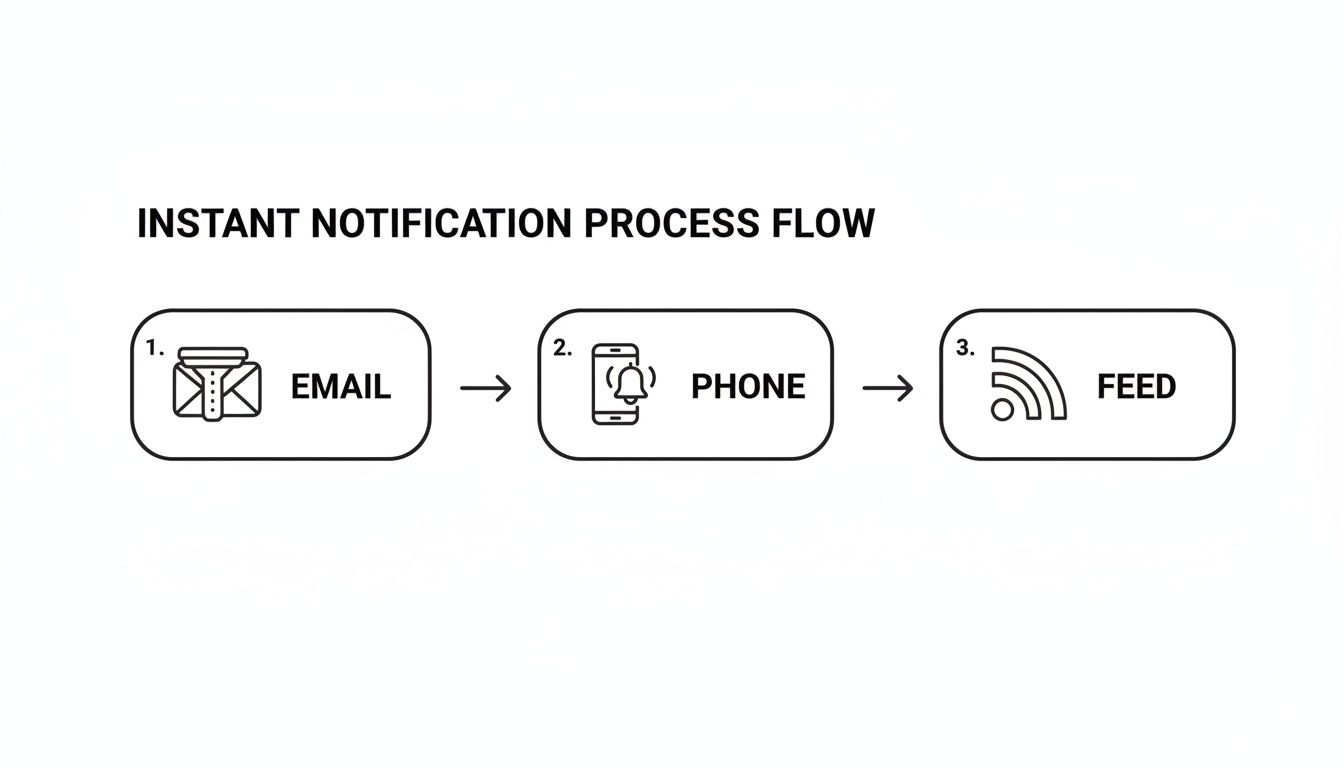
This kind of multi-channel approach is your safety net, ensuring every high-value project gets on your radar immediately.
From Alert to Application in Minutes
But the real magic happens next. Modern tools like Earlybird AI don't just tell you about a job; they start working on it for you. The moment an alert comes in, the system analyzes the client’s needs from the job description. It then compares that to your profile—your skills, your past projects, and even the tone of voice from your most successful proposals.
From there, it drafts a compelling, personalized opening line designed to grab the client's attention. The result is a proposal that feels authentic and thoughtful, as if you dropped everything to write it for 30 minutes, when in reality, it was sent just moments after the job went live.
This isn't just about saving time. It's about creating a decisive competitive edge. You're guaranteeing that every single opportunity matching your criteria gets an immediate, high-quality response, effectively putting your client acquisition on autopilot.
The Numbers Don't Lie: Speed Is Everything
On a crowded freelance marketplace, the window for success is incredibly small. Recent 2026 labor analytics paint a clear picture: 80% of clients on Upwork hire from the proposals they receive in the first 30 minutes.
Automated systems consistently hit a 90% submission rate within that crucial window. Manual freelancers? They barely reach 20%. This trend has only accelerated; by 2025, agencies were attributing 49% of their Upwork revenue to bids sent in under five minutes. These figures are backed by tools like Earlybird AI, which have been shown to shorten sales cycles by an average of 30%.
Scale Your Bids, Not Your Workload
For freelancers and agencies, this finally solves the age-old dilemma of quality versus quantity. You no longer have to choose between spending hours crafting a few perfect proposals or sending out a hundred generic ones hoping something sticks.
With an AI-powered bidding system, you can:
- Respond instantly to every single job that meets your quality filters.
- Keep your personal brand and unique voice consistent in every proposal.
- Spend your time on what matters: talking to warm leads and doing billable work.
This strategy lets you operate with the power of a large agency's sales team, ensuring you're always a top contender for the best projects. If you're ready to set this up, our complete guide to Upwork proposal automation breaks down the entire process. This is how top freelancers build a predictable and steady stream of high-value work.
Keeping Your Automated Bidding Account Safe and Healthy
Automating your bids is a game-changer for winning more work, but you have to be smart about it. The whole point is to gain an edge without putting your freelance account at risk. This isn't about spamming every job post; it's about using automation intelligently to protect your reputation on platforms like Upwork.
The first rule? Only use a system that plays well with the platform. Any tool you bring in should act like a savvy human assistant, not a mindless bot. That means staying within reasonable sending limits and avoiding repetitive, spam-like behavior that could get you flagged.
Don't Compromise on Account Security
Whenever you connect a third-party tool to your account, security has to be front and center. A trustworthy automation system will never ask for your password. Period. It should use secure, platform-approved methods to link up, keeping your login credentials completely private.
You should also check on the tool's digital footprint. The best systems operate from clean, regional IP addresses. This makes the tool's activity look like it's coming from you, working from your home city—not a sketchy server in a faraway data center. It's a small detail, but one that makes a huge difference in keeping your account safe.
Good automation tools are built with a "do no harm" mindset. Your account's safety should be their top priority, ensuring your hunt for a faster job alert doesn't backfire. They work by building in safeguards that align with platform policies, not by trying to find loopholes.
Train Your AI with a Simple Feedback Loop
Your automation is only as good as the instructions you give it. To make sure your proposals stay sharp and relevant, you need to set up a simple feedback loop. This is how you teach the AI what a "good" job actually looks like for your business.
With a tool like Earlybird AI, for instance, it's as easy as giving a thumbs-up or thumbs-down to the jobs it surfaces. Every time you do, you're training the AI to refine its search. It learns to filter out the noise and lock onto the high-value projects you really want. This simple interaction is what keeps your automated proposals targeted and personalized.
Watch Your Metrics to Keep Improving
You can't fix what you can't see. A healthy automation setup has to include analytics that show you exactly what's going on. You need to be able to track your key metrics to understand what’s working and what needs a tweak.
Keep a close eye on these numbers:
- Proposal Reply Rate: Are clients actually responding? A low reply rate is a huge red flag that your targeting or proposal copy is off.
- Interview Rate: How many of those replies turn into real conversations? This shows you if your proposals are truly hitting the mark.
- Profile Views: Is your automated activity driving more potential clients to your profile? This is a great sign that you're gaining visibility.
By watching these stats, you can make small, informed adjustments to your strategy. Maybe you need to refine your AI's training data, tighten your search filters, or refresh your profile. This cycle of action, feedback, and refinement is the secret to using automation to grow your freelance business sustainably, all while keeping your account in perfect standing.
Your Top Questions About Job Alert Systems, Answered
If you're thinking about building a smarter system for finding and bidding on jobs, you probably have a few questions—and maybe some healthy skepticism. That's a good thing. Getting this right can completely change your freelance business, so let's tackle the biggest concerns head-on.
Will Using Automation Get My Upwork Account Banned?
This is easily the most common worry I hear, and it’s a smart question to ask. The simple answer is no, as long as you're smart about it.
Freelance platforms like Upwork aren't against efficiency; they're against spam. Their rules are designed to stop low-effort, generic bids that flood the marketplace and frustrate clients. A cheap bot that sends the same terrible proposal to 100 jobs is a fast track to a banned account.
But that's not what modern, professional-grade automation does. Reputable tools are built to work within the platform's rules, mimicking how a top-tier freelancer would operate. They focus on quality, not just quantity, by sending highly personalized proposals for a curated list of jobs. When you're in control and the output is high-quality, you're not breaking rules—you're just working faster.
What's the Real Difference Between a "Quicker" Alert and Default Notifications?
Think of it this way: the standard alerts you get from a freelance marketplace are like bulk mail. They’re often delayed, batched together, and sent out on the platform's schedule, not yours. By the time that email lands in your inbox, a dozen other freelancers may have already submitted their proposals.
A quicker job alert is more like a direct, private line. It uses real-time tech like RSS feeds or dedicated push notifications to tell you about a new job the instant it's posted. That tiny head start—often just a few minutes—is a massive advantage when the first few proposals get the most attention.
This isn't just about speed, either. It’s about being first with a high-quality proposal, which is a powerful combination.
Won't My Proposals Sound Robotic if I Automate Them?
They will if you use a basic, template-spinning tool. But sophisticated AI systems work completely differently. They're not designed to sound generic; they're designed to sound like you.
Here's how it works: you train the AI on your own best work. You feed it your winning proposals, portfolio pieces, and case studies. The AI learns your tone, your unique selling points, and how you approach different types of projects.
It then uses that knowledge to generate brand new, context-aware proposals for each job. The result is an authentic bid that reflects your expertise and personality—it's your voice, just scaled.
Is This Kind of System Only for Big Agencies?
Not at all. In fact, you could argue these tools are even more impactful for solo freelancers. Your most limited resource isn't money; it's time.
Every hour you spend scrolling through job feeds and writing proposals from scratch is an hour you're not billing a client or working on your business. Automating the top of your sales funnel frees you up to focus on what actually moves the needle: doing great work.
Often, landing just one extra project through an automated bid can cover the cost of the service for months. It's one of the best investments a freelancer can make to compete with the reach of a larger team without having to hire one.
Ready to stop missing out on the best jobs? Earlybird AI acts as your always-on sales team, sending personalized, AI-crafted proposals for your ideal projects within minutes of them being posted. Transform your job search and start winning more contracts today.




