
← Back To Blog
Upwork Fees for Freelancers in 2026: Your Essential Guide

Let's be honest, trying to figure out Upwork fees for freelancers can feel like you're navigating a maze blindfolded. You know fees are eating into your earnings, but it’s not always clear by how much. Getting a handle on these costs isn't just about avoiding surprises; it's the first real step toward running a truly profitable freelance business.
Breaking Down the Real Cost of Upwork
This guide is designed to give you that clarity. We're going to pull back the curtain on every single fee Upwork charges, so you know exactly where your money is going. Think of this as your financial field manual for the platform.

We’ll walk through each deduction, share proven strategies to minimize them, and show you how to price your services so you can actually take home what you're worth.
What This Guide Covers
First, we need to get a firm grasp on the three main costs every freelancer on Upwork encounters. Once you understand these, you can start building a smarter financial strategy. We'll explore each one in detail throughout this guide.
- The Service Fee: This is the big one—the percentage Upwork takes from every payment you receive. It's not a flat rate, and knowing how it changes is key.
- The Connects System: Think of Connects as your currency for applying to jobs. You have to spend them to submit proposals, which makes them a direct cost of doing business.
- Withdrawal Charges: These are the small but significant fees you pay just to move your money from Upwork to your own bank account. They add up.
By the time you're done reading, you'll see the full picture. This isn't just about knowing the numbers; it's about using that knowledge to make better decisions, bid on projects more intelligently, and ultimately, grow your income.
The most successful freelancers don't just do great work; they understand the business of freelancing. Knowing your numbers, including every fee, is non-negotiable for long-term success.
Our goal is simple: to give you the tools and insights you need to master the financial side of Upwork. We’ll move from the basics to real-world examples and practical strategies, leaving you fully equipped to manage Upwork fees for freelancers like a pro.
Of all the different fees you'll encounter on Upwork, the service fee is the big one. This is the cut Upwork takes from every payment you receive, so getting a handle on how it works is absolutely essential for figuring out your actual take-home pay. And if you've been freelancing on the platform for a while, you'll need to forget the old tiered system—the game has changed.
Upwork has moved to a much more dynamic commission model. The fee you pay is no longer a simple calculation based on how much you've billed a specific client over time. Instead, it’s now tied to a whole range of market factors for each individual job.

This new approach means the service fee can swing quite a bit from one project to the next, creating a different financial outcome every time you land a new contract.
The New Variable Fee System Explained
Under the current system, the service fee you'll pay on new contracts can range anywhere from 0% to over 15%. This isn't just a random number. Think of it like surge pricing for your expertise—when your skills are in high demand, your fee can drop, sometimes dramatically.
So, what exactly determines the fee you’ll see? Upwork looks at a few key things:
- Your Skills: Are you a specialist in a hot field? Experts in high-demand areas like AI development or advanced data analytics often see lower fees.
- The Project: A quick, one-off gig might have a different fee structure compared to a complex, long-term engagement.
- Market Competition: If you're in a field where thousands of freelancers are bidding for the same jobs, the fee tends to be higher.
- Client Relationship: While the old billing tiers are gone for new contracts, your history with a client can still influence the fee on future projects with them.
For example, a freelancer with in-demand AI skills might land a major project and qualify for a 0% service fee, letting them keep the entire project budget. On the other hand, a freelancer in a more crowded market could face a 15% fee for a similarly priced job, which takes a much bigger bite out of their earnings.
This system directly ties your profitability to what’s happening in the market. Keeping your skills sharp and in-demand doesn't just help you win more work—it can literally reduce the fees you pay.
This big shift happened in May 2025. Before then, Upwork used a predictable tiered model: 20% on your first $500 with a client, then 10% on earnings up to $10,000, and 5% for anything above that. Now, all new contracts started after May 1, 2025, fall under this new variable system, with fees from 0% to over 15% based on market conditions.
What About Your Old Contracts?
If you have long-term clients you started working with before this change, don't worry. Any contract initiated before May 1, 2025, is considered a "legacy" contract and plays by the old rules.
For these projects, you'll continue to pay the flat-rate 10% service fee you're used to. This gives you a nice, predictable cost structure for those established client relationships.
Just keep in mind, once a specific legacy contract ends, any new work you start with that same client will fall under the new variable fee system. The good news is the change isn't retroactive, so your earnings from older projects are safe. As you manage these projects, it's always a good idea to fine-tune your payment process. For more tips on withdrawals and managing your money, check out our guide on how to get paid on Upwork.
Looking Beyond the Service Fee: Upwork's Other Costs
That main service fee is the big one, but it’s definitely not the only fee you'll come across on Upwork. If you want a truly accurate picture of your earnings, you have to account for a few other costs that can chip away at your profits. Think of them as the operating expenses of running your freelance business on the platform.
Knowing what these are ahead of time is half the battle. Let's break them down.
The Cost of Bidding: Upwork Connects
First up are Connects. These are basically Upwork's internal currency, and you have to spend them to submit a proposal for almost any job. Without them, you can't even apply for work, making them a fundamental cost of doing business.
Every job post requires a specific number of Connects to bid, usually anywhere from 2 to 16, depending on the size and potential value of the project. While Upwork gives you a small number of free Connects each month, if you're serious about freelancing, you'll burn through those in no time. That means you'll eventually have to buy more.
- Standard Cost: The going rate is $0.15 per Connect.
- How You Buy Them: They're sold in bundles, like 10 for $1.50 or 80 for $12.
This setup means every proposal you send has a real, upfront cost. Applying for a larger project that requires 16 Connects will set you back $2.40, and that’s just for the chance to be considered. These small amounts add up surprisingly fast, especially if you're actively hunting for new clients. This is why having a strong proposal strategy is so critical—you want every dollar to count.
If you want to get better at making your bids land, our guide on what Upwork Connects are and how to use them is a great place to start.
Getting Paid: Withdrawal and Transfer Fees
So you’ve landed the job, done the work, and the client has paid. After Upwork takes its service fee, there's one last step: moving your money from your Upwork account to your personal bank account. And yes, there are fees for that, too.
The cost depends entirely on the withdrawal method you pick.
- Direct to U.S. Bank (ACH): This is the best option for freelancers in the U.S. It’s completely free.
- Direct to Local Bank: If you're outside the U.S., transferring to your local bank account will usually cost you $0.99 per withdrawal.
- Wire Transfer: This is by far the most expensive method at $30 per transfer. It's really only practical for very large withdrawals where speed is the absolute top priority.
- Third-Party Payment Providers: Using a service like PayPal or Payoneer involves its own fees, which can vary depending on their rules and any currency conversion charges they apply.
That $0.99 fee might seem tiny, but if you withdraw your earnings weekly, that’s over $50 a year gone, just to get your own money.
Think of withdrawal fees as the "last mile" cost. You've done the work and paid the platform fee, but there's one final, small charge. Planning your withdrawals—like transferring larger sums less often—is a simple way to keep more of your money.
To Pay or Not to Pay: Freelancer Basic vs. Plus Memberships
Finally, Upwork has two membership plans for freelancers. Everyone starts on the Freelancer Basic plan, which is free. But there's also a paid option.
The Freelancer Plus plan costs $20 per month and comes with a few perks aimed at freelancers who are trying to scale up their business on the platform.
Here’s what you get:
- More Connects: You get a monthly allowance of 100 Connects.
- Custom Profile URL: This lets you create a cleaner, more professional link to your profile.
- See Your Competition: You can view the bid range (highest, lowest, and average) from other freelancers on a job, which helps you price your proposals more strategically.
- Keep Your Profile Visible: Your profile won’t be automatically set to private if you take a break from the platform.
So, is Freelancer Plus worth it? It really comes down to your activity level. If you find yourself consistently spending more than $20 a month on Connects and could use the bidding insights to win more work, the plan can easily pay for itself.
How Upwork Fees Reduce Your Real Earnings
It's one thing to read a list of fees, but it’s another to see how they actually eat into your earnings on a real project. A 10% or 15% fee might sound abstract, but when you see it deducted from your hard-earned cash, the impact is very real.
Let's walk through a couple of common scenarios to see how much of a project’s budget truly makes it into your bank account after Upwork takes its cut.
Example 1: The North American Web Developer
First up, let's meet Alex. He's a web developer in the U.S. with a strong portfolio, which helps him land high-value projects. He just won a new client for a $2,000 fixed-price project.
Because Alex has been on Upwork for a while and has built a good reputation, he qualifies for the lower 5% service fee on new contracts. He's on the Freelancer Plus plan, and it took him 16 Connects (costing $2.40) to win this particular job.
Here’s how the math works out for him:
- Initial Project Value: $2,000.00
- Upwork Service Fee (5%): -$100.00
- Cost of Connects Used: -$2.40
- Earnings Before Withdrawal: $1,897.60
When Alex is ready to pull his money out, he uses a free ACH transfer directly to his U.S. bank account.
Alex's Take-Home Pay: $1,897.60
All in, Alex paid $102.40 in fees for this project. That’s just a hair over 5% of the total project value—a pretty manageable cost of doing business, thanks to that favorable service fee.
Example 2: The South American Writer
Now, let's look at a different situation. Sofia is a talented writer from South America who is still building her client base in a very competitive field. She also lands a $2,000 project, but because she's a newer freelancer on the platform, she's subject to the standard 15% service fee.
Sofia is on the free Freelancer Basic plan and had to buy a bundle of Connects to keep applying for jobs. She also used 16 Connects ($2.40) to secure this project.
Here's Sofia's breakdown:
- Initial Project Value: $2,000.00
- Upwork Service Fee (15%): -$300.00
- Cost of Connects Used: -$2.40
- Earnings Before Withdrawal: $1,697.60
When it's time to withdraw her earnings, Sofia pays a small $0.99 fee for a direct transfer to her local bank.
Sofia's Take-Home Pay: $1,696.61
Sofia ended up paying a total of $303.39 in fees. That's over 15% of the project's value and nearly three times what Alex paid for a project of the exact same size.
Why Geographic Differences Matter
These two examples reveal a crucial truth about freelancing on a global platform: your location and the competitiveness of your niche have a massive impact on your real earnings. The playing field isn't level.
As of 2026, the average hourly rate for a freelancer in North America is $44, while in South America, it’s closer to $24. The global average sits around $39 per hour, but that number hides wild variations—some web developers can command over $300 per hour, while many beginners start out in the $10-$25 range. You can dig into more of these numbers by reviewing detailed Upwork statistics to see how different regions and skills stack up.
For Alex, that $102 fee is a reasonable expense. But for Sofia, losing over $300 is a significant chunk of her income. This is why freelancers in more competitive markets or lower-cost regions have to be extra strategic. Every percentage point you can save on fees and every Connect you use wisely makes a much bigger difference to your final take-home pay.
Ultimately, you can't just look at the sticker price of a project. You have to do the math and figure out your "real" earnings after all the Upwork fees for freelancers are deducted. Only then can you set prices that ensure your business is actually profitable.
Strategies to Boost Your Take-Home Pay
Knowing what the Upwork fees for freelancers are is one thing. Actually doing something about them is where the real money is made. It's time to move from just paying the fees to actively managing them, so more of your hard-earned cash stays right where it belongs: in your bank account.
One of the best, yet most underrated, strategies is to focus on building long-term relationships with your clients. Even though the old fee structure is gone for new contracts, a great working history with a client can still lead to better terms on future projects. Besides, happy clients often mean a steady flow of work, which means you're not constantly spending Connects hunting for your next gig.
Price Smarter, Not Harder
Let's be direct: the single best way to neutralize Upwork's fees is to build them into your rates from the very beginning. Too many freelancers set their price, then get a nasty surprise when they see the final payout. You have to flip that script.
Think of it like this: your client-facing rate isn't just your hourly wage; it's the total cost of doing business.
Here’s a simple way to figure out your "real" rate:
- Add Up Your Costs: Tally up the 10% Upwork service fee, a budget for Connects, and any withdrawal fees you expect to pay.
- Factor in Unpaid Time: Don't forget all the hours you spend writing proposals, chatting with potential clients, and handling admin work. That's part of the job, and it needs to be paid for.
- Calculate Your Public Rate: If you want to take home $50 an hour after all that, your rate on your profile needs to be quite a bit higher to cover everything.
When you price this way, the fees become a business expense covered by the project, not a chunk taken out of your personal earnings.
This is especially critical when you see how much rates can vary across the globe.
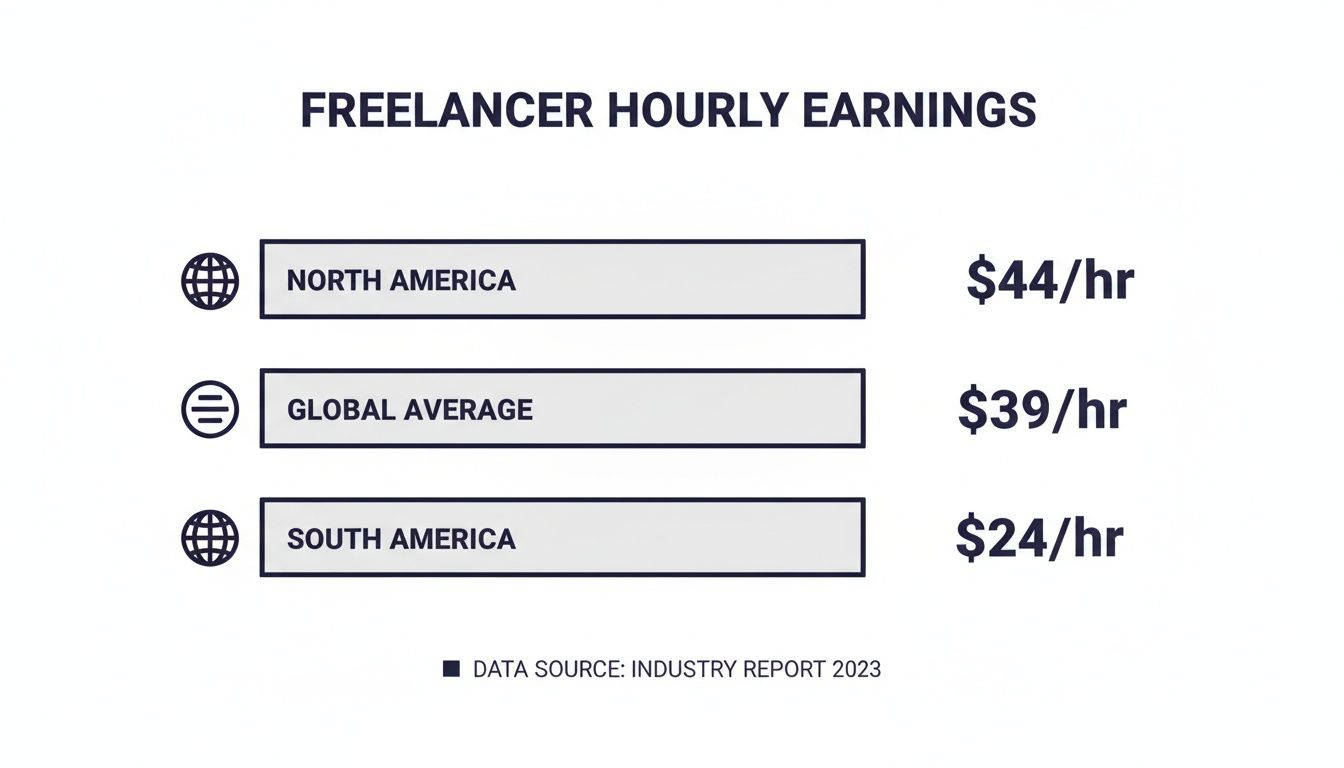
As you can see, someone earning a lower average rate in a region like South America is going to feel the sting of fees much more than a freelancer in North America. Smart pricing is non-negotiable for everyone.
Gain a Competitive Edge with Automation
In a marketplace as crowded as Upwork, speed and efficiency are your secret weapons. This is where tools like Earlybird AI can make a massive difference, helping you directly offset platform costs by simply winning more work, faster.
Think about the cost of Connects—each one is an investment. Earlybird AI helps you get a better return on that investment. It crafts personalized proposals based on your expertise and sends them moments after a job is posted. Getting your proposal in front of a client first dramatically boosts your odds of getting a reply.
By improving your proposal win rate, you make every Connect you buy more valuable. Instead of sending ten proposals to win one job, you might only need to send three, saving you time and money.
Winning projects more quickly also shortens your sales cycle. This means you can spread out fixed costs, like your Freelancer Plus membership, over more income. The cost of the platform feels a lot smaller when your earnings are bigger.
This strategy isn't just a nice-to-have; it's a smart business move that directly counters the Upwork fees for freelancers and grows your bottom line. If you want to dive deeper into building a profitable Upwork career, check out our detailed guide on how to make money on Upwork.
The numbers back this up. In 2023, Upwork brought in $95.83 million from U.S. freelancers alone, and its Freelancer Plus subscription revenue jumped 48% year-over-year in 2024. The platform thrives when you succeed, which makes investing in your own efficiency an obvious win-win.
Answering Your Top Questions About Upwork Fees
Even with all the numbers laid out, a few common questions always pop up about how these fees actually play out on a real project. Let's clear up some of the most frequent points of confusion so you can use the platform with total confidence.
How Do I Calculate the Total Fees for a Project?
Figuring out your true take-home pay is about more than just that main service fee. To get the real number, you have to account for a few different costs that chip away at the total project value.
First, take the project's total price. Then, subtract the sliding service fee, which could be anything from 0% to over 15%. Don't forget to also deduct the cost of the Connects you spent to land the job—that's usually between $0.30 and $2.40 per proposal. Finally, factor in the withdrawal fee, which is often a flat $0.99 for transfers to your local bank.
Think of it like this: Your Take-Home Pay = (Project Value) - (Service Fee) - (Connects Cost) - (Withdrawal Fee). Run this quick math before you ever submit a proposal. It’s the only way to know what you’ll actually earn.
Is the Freelancer Plus Membership Worth the Cost?
At $20 per month, the Freelancer Plus plan can be a fantastic investment, but it really depends on how you use Upwork. The most obvious benefit is the 100 Connects you get each month. Since Connects are $0.15 a pop, that credit alone is worth $15.
But the real make-or-break value is in the other features:
- See Competitor Bids: This is the big one. You can see the highest, lowest, and average bid on a job. This intel is gold for pricing your proposals just right, helping you win projects you might have otherwise priced yourself out of.
- Custom Profile URL: It’s a small detail, but having a clean, professional URL makes it much easier to share your profile and look established.
- Profile Visibility: Your profile is protected from being set to private due to inactivity, so you’re always visible to clients searching for talent.
If you find yourself consistently spending more than $15 a month on Connects anyway, the Plus plan is a no-brainer. The bidding data alone can easily pay for the subscription many times over if it helps you land just one extra project.
What Are the Risks of Taking Clients Off Upwork?
It’s tempting, I get it. The idea of dodging the service fee by taking a client off-platform seems like an easy win. But the reality is that the risks are massive and almost never worth the reward. Upwork's terms of service strictly forbid this, and getting caught will get both you and your client permanently booted from the platform.
Even more important, you lose every bit of protection Upwork provides. If a client simply decides not to pay you, you’re on your own. There’s no recourse. The platform's payment protection and escrow service are your safety net, ensuring you’re paid for the work you deliver. When you step off the platform, you give all of that up.
How Are Fees Handled if a Client Disputes Work?
Disputes are a freelancer's worst nightmare, and they can be a financial hit. If a client files a dispute and wins a refund, Upwork will first take that money from your Upwork balance. If the balance is empty, they’ll charge the card you have on file.
Here’s the painful part: you don’t get the service fee back. From Upwork’s perspective, they delivered on their end by connecting you with the client and providing the platform. The project's outcome doesn't change that. In a worst-case scenario, this means you could lose the entire project payment and still be out the service fee on money you never truly collected. It’s a tough lesson that makes clear communication and high-quality work your absolute best insurance policy.
Managing Upwork fees for freelancers boils down to two things: pricing intelligently and winning projects more efficiently. An automation tool like Earlybird AI can give you a serious advantage by crafting and sending personalized proposals just minutes after a relevant job is posted, which can skyrocket your reply rate. Instead of wasting money on Connects for bids that go nowhere, you can start winning more of the clients you actually want. Learn more about Earlybird AI.




