
← Back To Blog
How to Get Paid on Upwork: Your Guide to Fast, Secure Payments
Getting paid on Upwork is pretty simple once you’ve got everything set up correctly. It boils down to a few key things: verifying your identity, linking a way to get your money (like a bank account or PayPal), and filling out the right tax forms. After that, your payment schedule depends on your contract—you’ll get paid weekly for hourly work or as you hit milestones on fixed-price projects.
Laying the Groundwork: Setting Up Your Account for Smooth Payments

Before you even send your first proposal, the most critical step is to get your financial house in order within your Upwork account. This isn't just a box-ticking exercise; it’s what ensures every dollar you earn actually reaches you without a hitch. I've seen too many new freelancers trip up here, leading to frustrating payment holds and delays.
Think of this as setting up the back office for your freelance business. A brick-and-mortar shop needs to register and open a bank account, and your Upwork profile is no different. Getting these details right from the start builds trust with both Upwork and your clients, showing them you’re a serious professional ready for business.
First Things First: Identity and Tax Info
The first hurdle every freelancer on Upwork has to clear is identity verification. Upwork needs to know you are who you say you are, so you'll have to submit a government-issued photo ID. This is a non-negotiable security step that keeps the platform safe from fraud and gives clients peace of mind. It’s a one-time thing, but it’s the key that unlocks your ability to get paid.
Next up is your tax information. This is a legal requirement, plain and simple. The form you need depends on where you live:
- For U.S. Freelancers: You’ll need to fill out a Form W-9. This gives Upwork your Taxpayer Identification Number (TIN) for their records.
- For Non-U.S. Freelancers: You'll complete a Form W-8BEN (if you're an individual) or a W-8BEN-E (if you're a business). This confirms your foreign status and might help you get benefits under tax treaties between your country and the U.S.
Take my word for it: complete these forms accurately the moment you sign up. Upwork has to follow financial regulations, and an incomplete tax profile is a huge red flag that will get your funds frozen until you fix it.
Connecting Your Bank Account or Payment Service
Once you're verified, you have to tell Upwork where to send your hard-earned money. You can add a few different withdrawal methods for flexibility, but you’ll need to pick one as your primary.
Each option has its own pros and cons regarding fees and speed:
- Direct to Local Bank (ACH): This is the go-to for most U.S.-based freelancers. Why? It's cheap—usually free or just a tiny fee per transfer. It’s rock-solid reliable, though it might take a few business days for the money to land.
- PayPal: A great option if you need your money fast, as transfers often happen within 24 hours. The trade-off is that PayPal has its own fee structure for receiving and withdrawing funds, which can definitely eat into your profits over time.
- Payoneer: This is a fantastic solution, particularly for international freelancers. Payoneer essentially gives you a virtual U.S. bank account, which can be a much more cost-effective way to receive payments in USD.
The best choice really depends on your location and how quickly you need access to your cash. Do yourself a favor and set this up right away, so you aren't scrambling to figure it out when your first paycheck is waiting. Proper planning is a huge part of winning on this platform. For more on that, check out our guide on how to be successful on Upwork.
With U.S. freelancers contributing $1.5 trillion to the economy in 2024 alone, the potential is massive for those who set themselves up for success from day one. Discover more insights from Upwork's research.
Choosing Between Hourly and Fixed-Price Contracts
The contract you choose on Upwork is more than just a formality—it's the engine that drives your entire cash flow. Whether you go with an hourly or a fixed-price project determines everything from how you track your work to the exact day you can access your money. Getting this right from the start is fundamental to getting paid reliably.
Neither structure is inherently "better," but for any given project, one is almost always a smarter fit. Making the right call protects your time, secures your income, and, just as importantly, sets crystal-clear expectations with your client.
The Dynamics of Hourly Contracts
Hourly contracts are your best friend for projects where the scope is a bit fluid or likely to evolve. Think ongoing social media management, a complex software build where requirements might change, or any consulting gig where the client is paying for your time and expertise.
To get paid for hourly work, you absolutely must use the Upwork Desktop App. This app is more than just a timer; it's your ticket to Upwork's Payment Protection. The app logs your activity by periodically taking screenshots of your screen and tracking your keyboard and mouse movements. This "work diary" is then automatically bundled into a weekly invoice for your client.
The process runs on a strict weekly schedule:
- Work Week: You track all your hours from Monday through Sunday.
- Review Period: The client then has until the following Friday to look over your work diary and dispute any logged time.
- Payment Processing: Once that review window closes, Upwork processes the payment. It then becomes available for you to withdraw after a standard five-day security period.
This automated system creates a predictable payment rhythm, but it requires you to be disciplined. You have to be diligent about running the tracker and, crucially, adding meaningful work memos that describe exactly what you're doing. Those memos are your primary evidence if a client ever disputes your time.
Mastering Fixed-Price Projects and Escrow
Fixed-price contracts are perfect for projects with a well-defined scope and concrete deliverables. We're talking about things like writing a 1,500-word blog post, designing a company logo, or building a specific feature for an app. The beauty here is the simplicity: you and the client agree on one price for a specific outcome.
The absolute cornerstone of fixed-price work on Upwork is the escrow system. Before you type a single word or design a single pixel, the client must fund the project (or at least the first milestone) into escrow. This means Upwork holds the money safely until you deliver the work and the client approves it.
Never, ever start work on a fixed-price project until the milestone is fully funded in escrow. This is your non-negotiable protection. If the money isn't in escrow, you have no guarantee of payment.
For larger jobs, breaking the work into smaller, logical milestones is a brilliant strategy. It keeps your cash flow moving and makes the project feel less overwhelming for both you and the client.
For example, a $2,000 website project could be broken down like this:
- Milestone 1 ($500): Wireframe and Homepage Design Mockup
- Milestone 2 ($1,000): Full Site Development and Content Integration
- Milestone 3 ($500): Final Revisions and Site Launch
This way, you get paid as you complete key phases, rather than waiting for one lump sum at the very end. Once you finish a milestone, you formally submit the work through the platform. This sends a notification to the client, prompting them to review your work and release the funds from escrow.
Choosing the right structure directly impacts your earnings. While Upwork freelancers average $21.80 per hour, specialists in high-demand fields can command much higher rates. The platform's standard 10% fee applies to both contract types, but by strategically picking the model that fits the project, you make your workflow more efficient and your income more secure. For a deeper dive into what you can earn, it's worth exploring the platform's potential. You can learn more about Upwork's earning potential and stats to better inform your own pricing strategy.
Navigating Upwork Fees and Payment Protection
Let's talk about the money side of things. Getting a handle on how Upwork's fees and protections work is absolutely critical. If you don't, you could be in for a nasty surprise when you see your payout, or worse, find yourself unprotected if a project goes south. Think of this as the fine print you actually need to read.
Upwork basically acts as the intermediary between you and the client. For that service, they take a cut. But more importantly, they offer a safety net to make sure you get paid for the work you do—if you play by their rules. This protection isn't a given; you have to do your part.
Decoding the Upwork Service Fee
Thankfully, Upwork has simplified its fee structure over the years. These days, it’s a flat 10% service fee on all new contracts. Simple as that. The fee is calculated on your total earnings from any given client.
So, if you land a $1,000 fixed-price project, Upwork takes $100, and you pocket $900. The same goes for hourly jobs; the 10% comes right off the top of what you bill the client.
This flat rate makes it so much easier to figure out your take-home pay when you're bidding on a job. You no longer have to mess with tracking those old, confusing tiered percentages based on how much you've billed a client over time. Knowing exactly what you'll earn helps you price your services more effectively from the get-go.
If you're weighing your platform options, comparing fees is a big deal. You can see a full breakdown of how Fiverr vs. Upwork vs. Freelancer compare in our detailed guide.
How Upwork Payment Protection Works
Upwork’s Payment Protection is your best friend when it comes to preventing non-payment, but it works very differently for hourly and fixed-price contracts. You have to know the rules for each to stay covered.
For Hourly Contracts
With hourly projects, your protection is tied directly to using the Upwork Desktop App and its Time Tracker. To be protected, you must:
- Have an active contract with a client whose payment method is verified.
- Log every single minute using the Time Tracker. Manually logged time is not protected.
- Write clear, descriptive work memos for each time segment.
- Keep a reasonable level of activity (keystrokes, mouse clicks) while the tracker is running.
As long as you tick all these boxes, you’re guaranteed to be paid for the hours you log, even if the client disappears or refuses to pay.
For fixed-price contracts, escrow is everything. Your protection is limited only to the amount of money the client has funded in escrow for the current milestone. Never, ever start working on a milestone until you see that the funds are secured in escrow.
Once you submit your work for a funded milestone, the client gets 14 days to review it. If they approve it—or if they simply don't respond in that window—the money is released to you automatically.
Common Mistakes That Void Your Protection
I’ve seen too many freelancers learn this lesson the hard way: payment protection is not unconditional. A few simple mistakes can leave you completely exposed.
The cardinal sin is taking communication or payments off the platform. This is called circumvention, and it’s a surefire way to get permanently banned from Upwork. It also completely voids any payment protection you might have had. Don't do it.
For hourly projects, vague work memos are a huge problem. Notes like "working on project" or "client tasks" are useless if a dispute arises. Be specific. "Drafting copy for the new landing page hero section" or "Fixing the mobile navigation menu bug" provides concrete evidence of your work.
And of course, the most basic mistake is just forgetting to turn the Time Tracker on. It's a simple slip-up, but it means those hours are completely unprotected.
Withdrawing Your Earnings: Methods, Fees, and Timelines
You've done the work, the client loves it, and the money is sitting in your Upwork account. This is the best part: actually getting that money into your hands. But it's not quite as simple as clicking a button. The withdrawal method you pick can make a real difference in how much you end up with and how fast you get it.
First things first, every payment has to go through Upwork’s standard five-day security period. This hold starts as soon as a client pays, whether it's an approved fixed-price milestone or the end of a weekly billing cycle for an hourly project. After those five days, the money is officially available for you to withdraw.
This flowchart gives you a clear picture of how Upwork's service fees are deducted before you even get to the withdrawal stage. It's the first cut you need to factor into your financial planning.
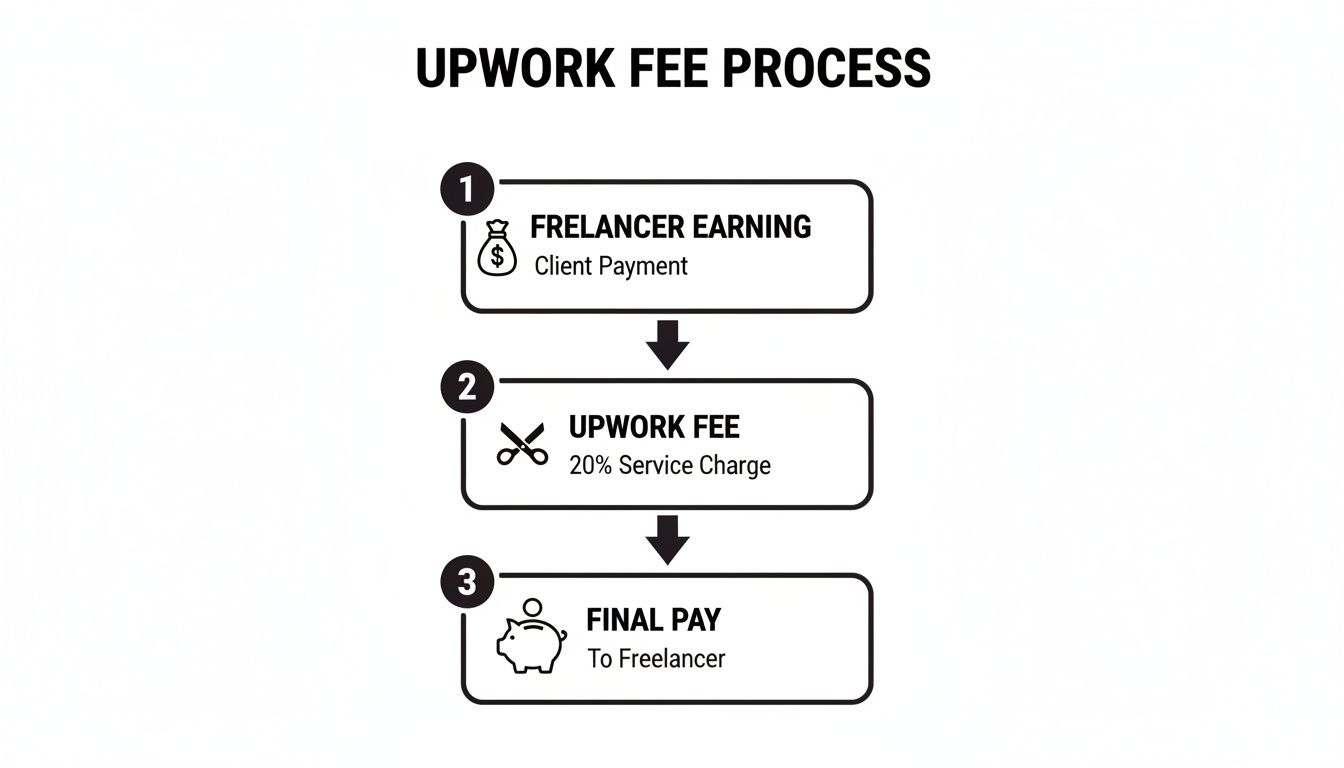
As you can see, what lands in your Upwork account is your earnings minus the platform's service fee. Now, let's talk about getting it from there to your bank.
Comparing Your Withdrawal Options
Choosing how to get paid is a classic trade-off between speed and cost. Let’s break down the main options so you can figure out what works best for your situation.
- Direct to Local Bank (ACH): If you're based in the U.S., this is probably your best bet. It’s cheap, costing just $0.99 per transfer. It’s not instant—funds usually take two to five business days to appear—but it's a reliable and cost-effective method for regular payouts.
- U.S. Dollar Wire Transfer: Need your money now and moving a decent amount? A wire transfer is the express option. It comes with a hefty $30 fee per transaction, so it’s definitely not for small amounts. But, the funds typically arrive in a single business day, making it worthwhile when you're in a pinch.
- PayPal: A go-to for many freelancers worldwide, especially if speed is a priority. Transfers to PayPal usually land within 24 hours. Upwork charges a $2 fee for the service, but don't forget PayPal has its own fee structure for receiving and withdrawing money, which can vary by country. It's fast, but do the math to see the total cost.
- Payoneer: Another favorite for international freelancers. Payoneer also has a $2 Upwork withdrawal fee and offers quick transfers. Its real strength is helping you manage different currencies and offering a virtual U.S. bank account, which can make getting paid by American clients much smoother.
Understanding Fees and Timelines
The fees don't just stop with Upwork. Your own bank might charge for incoming transfers, and currency conversion rates can quietly eat away at your earnings if you aren't paying attention.
Let’s put it into perspective. A $1,000 withdrawal can look very different depending on the route it takes:
- ACH: You pay $0.99 and get $999.01.
- Wire Transfer: You pay $30 and get $970.
- PayPal: You pay $2 to Upwork, but PayPal might take its own cut (e.g., 2.9% + $0.30), leaving you with even less.
My advice? Run a small test withdrawal the first time you use a new payment method. Send a small amount to see exactly how long it takes and what the final fees are, end-to-end. This simple test can save you a lot of money and headaches down the road.
Setting a Withdrawal Schedule
One of the smartest things you can do is put your withdrawals on autopilot. Upwork lets you set up an automated schedule to transfer your available balance weekly, bi-weekly, monthly, or even quarterly.
Automating your payouts helps create a more predictable cash flow, turning your freelance income into something that feels more like a regular paycheck. This makes budgeting and financial planning so much easier.
You can even set a minimum balance for withdrawals, so the transfer only happens once you’ve accumulated a certain amount. This is a great way to cut down on paying transaction fees for a bunch of tiny payments. And of course, you always have the option to make a manual withdrawal whenever you need it. The goal is to make Upwork's payment system work for you.
Strategies for Faster and More Reliable Payments
Getting your payment settings right is one thing, but top-earning freelancers know that getting paid quickly is an art. It’s about shifting from a passive mindset—where you wait for approvals—to a proactive one where you guide the process.
This isn't about chasing down payments. It’s about building a system where prompt payment is the natural outcome of a well-managed project. It all boils down to clear communication and setting expectations right from the very first proposal you send. When a client trusts you, they're far more likely to approve milestones without hesitation.
Win High-Quality Gigs from the Start
Honestly, the best way to guarantee you get paid reliably is to work with great clients from the get-go. Clients who have a history of positive reviews, clear project goals, and who genuinely value your expertise are almost never a problem. The real challenge is grabbing their attention before everyone else does.
On Upwork, speed is everything. The most promising projects often get flooded with proposals within the first hour. If you're slow to respond or send a generic, copy-pasted proposal, you’ve already lost.
This is where a tool like Earlybird AI can make a massive difference. It helps you send out hyper-personalized proposals just moments after a perfect-fit job gets posted. By automating that initial outreach with thoughtful, tailored content, you immediately establish yourself as a serious professional, which dramatically boosts your chances of landing the clients who pay well and on time.
The data backs this up. In Q1 2025, Upwork’s revenue hit $193 million, even though the number of active clients actually fell by 7%. How? The platform's growth was fueled by top freelancers winning higher-value gigs, pushing the average spend per client up 3% to $4,912. The takeaway is clear: focus on winning better projects, not just more of them. You can explore more about Upwork's financial trends here.
Structure Your Contracts for Success
The way you structure your contract is just as critical as the work itself. For fixed-price projects, this means breaking the work down into smaller, logical milestones. Don't wait for one big payday at the end.
Let’s say you’ve landed a $3,000 web design project. Instead of one lump sum, you could structure it like this:
- Milestone 1 ($750): Discovery call and initial wireframe approval.
- Milestone 2 ($1,500): Full homepage mockup and development of key pages.
- Milestone 3 ($750): Final revisions and site migration.
This approach is smart for two reasons. First, you get paid as you go, which keeps your cash flow healthy. Second, it creates natural checkpoints for client feedback, which helps you avoid huge, project-derailing misunderstandings that could easily lead to payment disputes down the line.
Master the Art of Proactive Communication
Good communication is your secret weapon for getting paid faster. You have to be willing to professionally manage the payment process. This doesn't mean pestering your clients; it means being a helpful partner who keeps the project on track.
When you turn in a milestone, don't just hit the "Submit" button and cross your fingers. Follow it up with a brief, friendly message summarizing what you've done and what comes next.
Pro Tip: A simple nudge in your submission message works wonders. Try something like, "Hi [Client Name], I've just submitted the wireframes for your review. Please let me know if you have any feedback, and once you approve this milestone, I'll begin work on the homepage mockup. Thanks!"
This simple act does so much. It keeps the project momentum going and gently reminds the client that the next phase of work depends on their approval. It reframes the payment as a key step in the project's progress, not just an invoice they have to deal with. These soft skills are invaluable, and you can check out our guide on how to follow up with clients for more tips.
When you build strong relationships through great work and clear communication, you'll see benefits beyond just getting paid on time. Happy clients leave glowing reviews, hire you again, and sometimes even give you a bonus. They become your champions on the platform, making it that much easier to land your next great contract.
Answering Your Top Questions About Upwork Payments
Even when you think you've got the Upwork payment system down, questions always pop up. Let's be honest, dealing with a client dispute or a payment delay is stressful. But knowing how to handle these situations ahead of time is half the battle.
Here are some clear, no-nonsense answers to the most common questions I hear from freelancers about getting paid on Upwork. Think of this as your quick-reference guide for navigating the trickier parts of the payment cycle, so you can stay focused on what matters: your work.
What Should I Do If a Client Won’t Approve a Milestone?
This is a classic freelancer fear, but don't panic. Upwork has a process for this exact scenario. Your first move should always be to talk to your client. A friendly, professional message asking if there’s an issue with the submitted work can often clear up a simple misunderstanding. Maybe they're just busy or missed the notification.
If a conversation gets you nowhere and the milestone is fully funded in escrow, you have options. It's time to file an official dispute.
- When you do this, an Upwork mediator joins the chat.
- They’ll look at the original project requirements and the work you turned in.
- The mediator's job is to help you and the client reach a fair agreement.
For hourly projects, it's a different story. As long as you used the Time Tracker correctly—with good memos and solid activity levels—Upwork's Hourly Payment Protection has your back. You'll almost always get paid for the hours you logged.
How Long Does It Really Take to Get My Money?
This is a two-part waiting game. First, every single payment, whether it's from an hourly week or a released milestone, goes into a mandatory five-day security period. This hold starts the second the client's payment is processed, and there's no way around it.
After that five-day hold clears, the transfer speed depends on the withdrawal method you picked:
- Direct to Local Bank (ACH): This is the standard, and it usually takes 2-5 business days for the money to show up in your account.
- PayPal: Generally one of the fastest options. Funds often appear within 24 hours.
- Wire Transfers: Can be quicker than ACH, but they come with much higher fees, so they're usually not worth it for smaller amounts.
Make sure you account for both the security hold and the transfer time when you're planning your finances.
A huge number of new freelancers get tripped up by the five-day security hold. They see the money in their "Pending" balance and assume it's ready to withdraw, which leads to a lot of frustration. Plan your cash flow with this delay built-in.
Can a Client Just Pay Me Outside of Upwork?
Absolutely not. This is the cardinal sin of Upwork. Taking payments off-platform for a client you met on Upwork is a major violation of their Terms of Service. It’s called circumvention, and Upwork takes it very seriously. Getting caught can lead to a permanent ban for both you and the client.
Keeping all payments on the platform is the only way to maintain your account. More importantly, it’s the only way to be covered by Upwork Payment Protection. That protection is your safety net—don't throw it away to save the client a few bucks in fees.
Do I Have to Pay Taxes on My Upwork Earnings?
Yes, you do. As an independent contractor, you are running a business, and you're responsible for reporting all your income and paying your own taxes. Upwork doesn’t withhold anything for you.
Depending on how much you earn and where you live, Upwork might send you a tax form, like a 1099-K if you're a U.S.-based freelancer. I strongly recommend chatting with a tax professional to figure out your specific obligations. It's much better to get it right from the start than to face a surprise tax bill later.
Winning the best projects is the first step to reliable payments. Earlybird AI helps you get there by automatically finding your ideal jobs and sending hyper-personalized proposals within minutes. Stop competing and start winning by being the first to apply. Visit https://myearlybird.ai to see how it works.




