
← Back To Blog
Upwork Web Scraping: A 2026 Safe Guide to Freelance Data
Think of Upwork web scraping as your own private market intelligence unit. It’s not just about grabbing data for the sake of it; it's about systematically pulling public information to get a real leg up on the competition. This approach is what separates the freelancers who are just getting by from the ones who are truly thriving.
Turning Upwork Data Into a Competitive Advantage

For any serious freelancer or agency, Upwork is a treasure trove of information. The problem? Manually digging through it is a complete waste of time. You simply can't keep up. This is where automating your data collection transforms raw, messy information into a clear strategic roadmap.
Instead of guessing what clients want or what your competitors are up to, you can build a real-time picture of the marketplace. You start making decisions based on solid data, not just gut feelings.
Pinpoint High-Value Jobs Before Anyone Else
One of the best uses for scraping Upwork is to spot the truly great projects before they get buried under 50+ proposals. You can set up a scraper to automatically filter jobs based on metrics that actually signal a quality client. Think total spend, average hourly rate paid, or even their hire rate for past jobs.
This lets you stop wasting time on low-ball offers and focus your energy where it counts. It’s all about working smarter, not bidding harder.
By analyzing a client’s spending history and the rates they've paid on previous projects, you can instantly tell who is looking for a cheap fix and who is ready to invest in expertise. Honing this skill alone can completely change the quality of your proposals.
Deconstruct Your Competition
Scraping also lets you get a clear-eyed view of other freelancers in your niche. You can pull data on their hourly rates, the skills they feature, their Job Success Scores, and what kind of projects they're landing. This intel is gold for positioning yourself in the market.
With this competitive data, you can start making some real moves:
- Price with confidence: Stop guessing your rate. See what the market is actually paying for your skill set and experience level, and price your services to win.
- Optimize your profile: Discover which skills are popping up in high-paying job posts and weave them into your own profile to attract the clients you want.
- Write winning proposals: See what makes the top freelancers in your field stand out, and then borrow their successful patterns for your own bids.
Ultimately, effective Upwork web scraping gives you the foundation to win more of the work you actually want. While you can build your own scraper, many find that a dedicated Upwork job finder tool is a much faster and more reliable way to get these insights. It’s about turning all that platform data into decisions that grow your income.
Designing a Resilient Upwork Scraping Bot
Pulling data from a static website is simple. But trying to scrape a dynamic, JavaScript-heavy platform like Upwork is an entirely different beast. You can't just throw a basic script at it; you need a smart, adaptable bot that can navigate the site just like a human would.
A good scraping setup has a few critical parts that need to work together. The heart of your operation is the scraping engine. This is usually built with Python, using a library like Scrapy for big crawling jobs or BeautifulSoup for parsing specific pages. This engine is what sends requests and organizes the data you pull.
But here's the catch: the engine alone can't see most of Upwork's content. That's where a headless browser comes in.
Combining an Engine with a Headless Browser
If you've spent any time on Upwork, you know that job feeds, freelancer profiles, and search results don't load all at once. The content appears as you scroll and click around, all thanks to JavaScript. A simple Python request only grabs the initial HTML, which is often just an empty shell.
This is why a headless browser is a non-negotiable tool for any serious Upwork web scraping project. Tools like Selenium or Puppeteer let you run a real browser (like Chrome) in the background, completely invisible.
Your scraping engine then acts as the puppeteer, telling this invisible browser what to do. It mimics real user actions:
- Scrolling down the page to make new job listings appear.
- Clicking buttons to expand job details or navigate to the next page.
- Waiting for elements to load before trying to scrape the data inside them.
This setup lets your bot see the fully rendered page, just as you would. For example, a bot built to collect thousands of jobs would use the headless browser to scroll down the feed endlessly. As new HTML loads, the Python engine can pass it to BeautifulSoup to quickly parse and extract the job titles, descriptions, and client info.
The most stable and efficient architecture I've found separates these two jobs. Let the headless browser handle only the interaction—the scrolling, clicking, and waiting. Once the content is on the page, hand the raw HTML over to a faster library like BeautifulSoup to do the actual data extraction.
Designing for Specific Scraping Scenarios
The way you build your bot depends entirely on its mission. A bot designed to quickly scan for new job posts will look very different from one built to carefully extract deep data from a few hundred freelancer profiles.
A job-scanning bot is all about speed. It needs to chew through a high volume of pages, grabbing just the essentials—job URLs, titles, and when they were posted—without getting bogged down.
On the other hand, a profile-scraping bot needs to be slow and steady. It has to navigate to an individual profile, patiently wait for all the sections to load, and then meticulously extract dozens of data points like skills, work history, and portfolio examples. This kind of detailed work demands smarter logic to handle different profile layouts and a more human-like pace to avoid raising red flags. Building this type of efficient workflow shares principles with many other automated tasks; you can learn more by checking out our guide on how to automate repetitive tasks.
How to Evade Blocks and Rate Limits
Let's be honest, building a successful Upwork web scraper is less about elegant code and more about a constant game of cat and mouse. If your scraper acts like a machine—firing off requests at a lightning-fast, predictable pace from a single IP address—Upwork's defenses will spot it and shut it down in a heartbeat. The real trick is to make your bot blend in with the crowd by acting more human.
The most obvious giveaway is your IP address. Firing hundreds of requests from the same IP is a massive red flag. This is exactly why smart proxy management isn't just a nice-to-have; it's essential.
Smart Proxy Management
When it comes to proxies, you'll generally find two main options: datacenter and residential. Datacenter IPs are the cheaper, faster choice, but they have a fatal flaw—they're incredibly easy for platforms like Upwork to identify as non-human traffic coming from a cloud provider. More often than not, they're blocked on sight.
Residential proxies, however, are a different story. These are real IP addresses assigned by Internet Service Providers (ISPs) to actual homes. By routing your scraper’s traffic through them, it looks like a regular person browsing from their laptop. They do cost more, but that legitimacy is what keeps you in the game.
I've seen people make this mistake countless times: they buy a cheap, shared residential proxy to save a few bucks. The problem? If someone else using that same IP gets it flagged, your scraper goes down with them. Do yourself a favor and invest in a high-quality, private residential proxy provider. Make sure to rotate your IP regularly to avoid building up a suspicious history from one address.
The architecture for a bot that can handle this kind of sophisticated logic looks something like this.
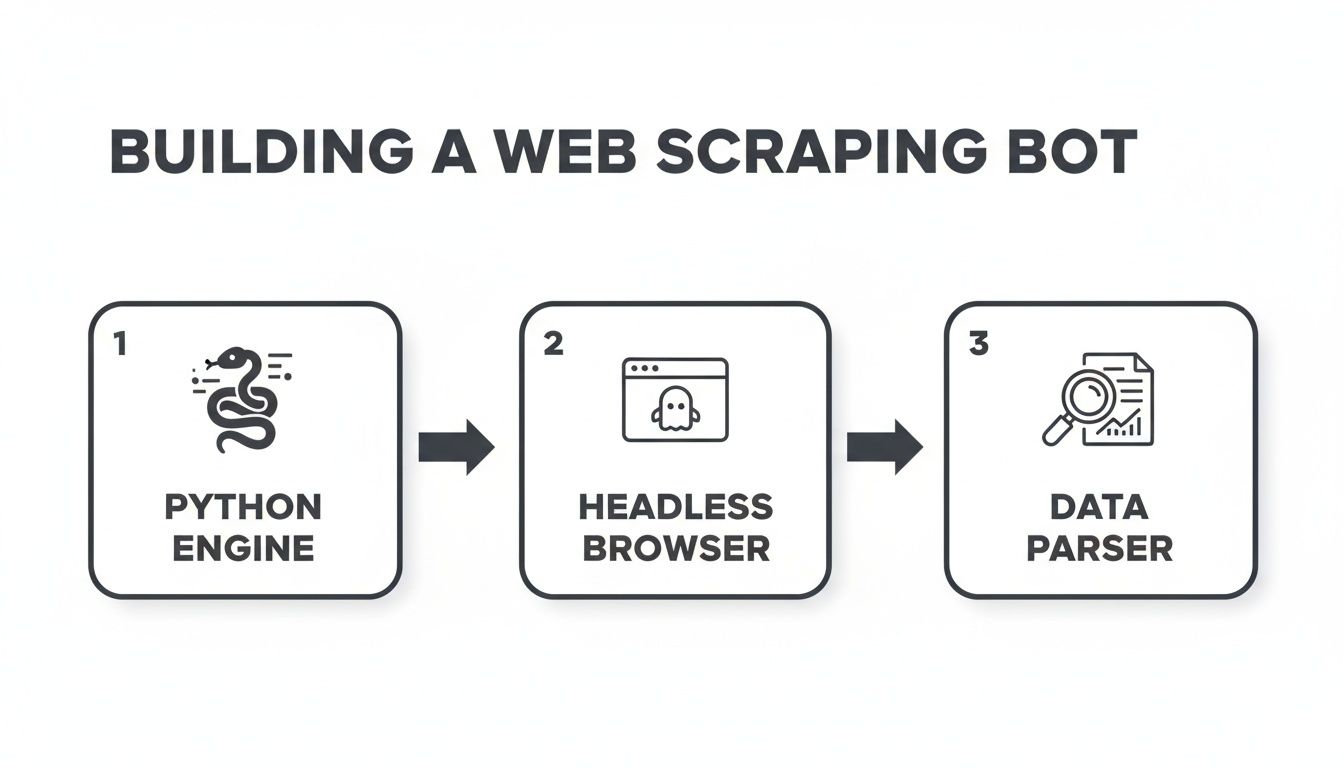
Here, you can see how the main Python script acts as the brain, controlling the headless browser, which then passes the raw page source to your parser to pull out the data you need.
Mimicking Human Browsing Patterns
Beyond just your IP, the way your bot behaves is a dead giveaway. You absolutely have to introduce some randomness and variation to stay under the radar.
Here are a few battle-tested strategies to make your scraper less predictable:
- Rotate User Agents: The User-Agent string is a piece of data that tells a website which browser you're using. If every single one of your requests uses the exact same string, you might as well be waving a flag that says "I'm a bot!" Keep a list of common, real-world User-Agent strings and cycle through them with each new session.
- Implement Randomized Delays: No human on earth clicks through web pages with a perfect, one-second delay between every action. You need to build in random pauses between requests—waiting between 2 to 7 seconds is a good starting point—to mimic how a person would actually read and interact with the content.
- Vary Your Navigation: Don't just program your bot to jump directly to a list of job or profile URLs. A real person doesn't do that. Make it visit the homepage first, maybe perform a search, and then click into the results. This creates a much more believable and human-like footprint.
While these techniques are fundamental, they demand a lot of upkeep. For anyone serious about growing their business on Upwork without the legal and technical headaches, it's worth looking into compliant automation instead. If that sounds like you, check out our guide on Upwork profile automation for some safer strategies.
Structuring and Storing Your Scraped Data
So, you've successfully pulled down the raw HTML from Upwork. Great. The problem is, it's a chaotic mess of code. The real magic of Upwork web scraping happens when you sift through that chaos and organize it into clean, structured data you can actually use. This is the step that turns a jumble of information into a powerful asset for market analysis and lead generation.
To do this, you need to tell your scraper exactly what to look for. This is where selectors—most commonly CSS selectors or XPath—come in. Think of them as your map and compass, guiding your script through the page's code to pinpoint the exact HTML elements you care about.
For instance, you might instruct your script to find a specific <div> that contains a client's feedback score or a <span> element holding the job's budget. This precise targeting is the foundation for building any useful dataset.
Turning HTML Into a Usable Dataset
Once your selectors are dialed in, your script can loop through countless job listings or freelancer profiles, methodically extracting the data points you've targeted. You're essentially building the columns for a custom spreadsheet or database from scratch.
When looking at an Upwork job post, I typically focus on grabbing these key pieces of information:
- Job Title: The name of the project.
- Job Description: The full text detailing what the client needs.
- Budget or Hourly Rate: The price range on offer.
- Client History: Key metrics like total spend, location, and average hourly rate paid.
- Required Skills: The specific skills the client has tagged.
By structuring this data, you’re no longer just browsing jobs—you’re analyzing the market. You can start asking strategic questions like, "What's the average budget for projects needing both 'Python' and 'Scrapy'?" or "Which clients are consistently paying premium rates?"
This gets even more powerful when you start looking at your competition. The market for web scraping freelancers on Upwork has clear tiers: beginners often charge around $12/hour, more experienced freelancers sit near $42/hour, and true experts can command $135/hour or more. By scraping competitor rates alongside job data, you can position your own pricing with confidence. You can get a better sense of how freelance web scraping rates on Upwork are typically structured.
Choosing the Right Storage Format
After all that work parsing the data, you need somewhere to put it. The format you choose really depends on your end goal. There's no single best answer; it's all about what you plan to do next.
For quick, straightforward analysis, a CSV (Comma-Separated Values) file is usually my first choice. It’s simple, lightweight, and opens right up in Excel or Google Sheets, which is perfect for sorting, filtering, and getting a quick feel for the data.
If your plan involves feeding this data into another application or a custom dashboard, JSON (JavaScript Object Notation) is a much better fit. Its key-value structure is ideal for handling more complex, nested information—like a freelancer’s complete work history—in a format that’s easy for other software to read.
Finally, for any serious, long-term project, you'll want to use a proper SQL database like PostgreSQL or MySQL. This is the professional standard for managing massive datasets, letting you run complex queries and track trends over time without breaking a sweat.
Navigating the Legal and Ethical Gray Area
Before you write a single line of code, we need to have a serious talk about the legal and ethical tightrope you’re about to walk. Scraping public data feels like it should be fair game, but when you’re dealing with a platform like Upwork, you're playing in their sandbox, and they make the rules.
Let's be blunt: Upwork’s Terms of Service (ToS) are crystal clear. They strictly forbid any kind of automated data collection—no robots, no spiders, no scrapers. Violating their ToS is the fastest way to get your account shut down for good, putting your income and hard-earned reputation on the line.
Understanding the Platform's Perspective
From Upwork's point of view, this isn't just about being difficult. They have legitimate reasons for these rules. Unchecked scraping can hammer their servers, slowing the site down for everyone else. It also opens up a can of worms regarding data privacy and protecting the value of their own ecosystem.
The whole "public vs. private data" debate is interesting, but in this context, it's a distraction. Even though a freelancer's profile or a job posting is visible to the public, Upwork considers the act of systematically copying that information to be an unauthorized use of their service.
The real issue isn't whether the data is public; it's that you agreed not to automate collecting it when you signed up. Breaking that agreement has direct consequences, no matter what the broader legal arguments are.
This is exactly why there's a thriving market for scraping specialists. On freelance sites, web scraping is a big deal, with experts charging a median rate of $30 per hour to handle these complex jobs for other businesses. It’s a reflection of the skill needed to work around sites with tough defenses, as you can see by checking out the cost of hiring web scrapers on Upwork.
The Real-World Consequences
Ignoring the ToS is a huge gamble. The most likely outcome? An immediate and permanent account ban. If Upwork is a major source of income for you or your agency, that's a catastrophic hit.
Beyond getting banned, you're also risking your professional reputation. Being known as someone who cuts corners and violates platform rules won't help you build trust with the high-value clients you want to attract.
This is precisely why so many successful businesses and top-tier freelancers don't even bother with manual scraping. The potential payoff just isn't worth the risk of losing access to the entire marketplace. They choose safer, fully compliant automation alternatives that operate within the rules, protecting their accounts while still helping them grow.
A Safer Path to Upwork Automation
So, after laying out all the technical headaches and legal tightropes of scraping Upwork, you might be wondering if there's a better way. There is. The constant fear of getting your account banned just isn't a sustainable way to build a business.
For serious freelancers and agencies, the risk simply outweighs the reward. Thankfully, you don't have to choose between manual drudgery and a high-stakes gamble with a fragile scraper.
This is where compliant automation platforms like Earlybird AI enter the picture. These tools were built from the ground up to help you find great leads and win more jobs, but they do it by working with Upwork's rules, not against them.
How Compliant Automation Actually Works
Instead of brute-forcing data extraction, compliant tools operate much more intelligently. They don't aggressively scrape thousands of pages, which is a huge red flag for Upwork. Instead, a tool like Earlybird safely monitors job feeds and uses AI to surface the best fits for your specific skills and history.
This shift reflects a much bigger trend. By 2023, data-focused work was exploding on freelance platforms. In fact, 47% of the roughly 30 million freelancers were in knowledge-based fields like IT, programming, and data services. This growing market is exactly why smarter, safer tools are becoming so essential.
The choice becomes pretty clear for anyone looking to scale professionally. Why pour your time and money into building a brittle scraper that could get you kicked off the platform, when a secure and professional solution is ready to go? The goal is to grow your business, not put it in jeopardy.
For anyone serious about growth on Upwork, the benefits are hard to ignore. You get automated lead discovery and even AI-assisted proposal writing without the technical maintenance or the constant anxiety of an account suspension.
This is how the pros scale their Upwork income—securely and sustainably, building a business on a rock-solid foundation.
Frequently Asked Questions
When it comes to pulling data from Upwork, a lot of questions—and misinformation—tend to float around. Let's clear the air and tackle some of the most common things freelancers and agencies ask.
Is It Legal to Scrape Upwork?
This is usually the first question on everyone's mind. While the act of scraping public data exists in a legal gray area, that's not the real conversation here. The moment you create an Upwork account, you agree to their Terms of Service.
And those terms are crystal clear: they strictly prohibit any kind of automated data collection. So, while you're unlikely to end up in a courtroom, you're absolutely playing with fire when it comes to your account. Breaking the rules gives Upwork every right to shut you down permanently.
Can Upwork Actually Detect and Ban Scrapers?
Yes, and they’re very good at it. Upwork has sophisticated security systems designed specifically to spot and block non-human activity. Think of it as a digital bouncer.
Their systems look for tell-tale signs like a flood of requests from one IP address, robotic browsing patterns, or outdated browser fingerprints (user agents). If your activity trips their alarms, your account can be suspended instantly, no questions asked. For anyone whose business depends on Upwork, that's a risk you just can't afford to take.
What's the Best Language for Building a Scraper?
For those who understand the risks and still want to experiment, Python is the hands-down favorite in the scraping world. It has a gentle learning curve and an incredible ecosystem of tools built for this exact purpose.
A few key libraries you'd end up using are:
- Requests: For handling the fundamental HTTP requests to fetch web pages.
- BeautifulSoup: Your go-to tool for digging through messy HTML and pulling out the specific data you need.
- Scrapy: A much larger framework designed for building complex, high-volume scrapers from the ground up.
- Selenium: Absolutely essential for navigating modern websites. It lets you control a headless browser to interact with JavaScript and mimic real user behavior.
How Can I Get Upwork Data Without Scraping?
The only truly safe and sustainable way to get an edge with Upwork data is to use a compliant automation tool designed to work with the platform, not against it. These tools are built to respect Upwork's rules while still helping you find the best jobs and leads.
This way, you get the speed and data insights you're looking for without constantly worrying about your account being shut down. It's the professional approach for anyone serious about growing their business on the platform.
Stop gambling with your Upwork account. Earlybird AI helps you find and win more high-value projects safely and automatically. It acts as your always-on sales team, sending personalized proposals within minutes so you’re always first in the client’s inbox. Grow your freelance business securely at https://myearlybird.ai.




