
← Back To Blog
How to Automate Upwork Proposals and Win More Clients
If you're running an agency on Upwork, you know the drill. A good chunk of your day is spent hunting through job feeds, picking out the gems, and then the real grind begins: writing a personalized proposal for each one.
This whole process is a massive time-sink. Let's be real—a well-written, thoughtful proposal can easily take 25-35 minutes. That means, on a good day, you're maybe getting out 3-5 bids. It’s a bottleneck that directly caps how many clients you can even talk to.
And for all that effort? You’re often looking at a response rate of just 8-12%. Clients get swamped with proposals minutes after posting a job, so if you're not fast, you're already behind. It's a frustrating cycle of missed opportunities.
The Problem of Diminishing Returns
The manual approach puts you in a tough spot. You're forced to choose between quality and quantity, but you can't really win either way. Spend too much time on one perfect proposal, and you miss out on ten other great jobs. Rush to send more, and the quality drops, tanking your response rate.
It feels like you're entering a Formula 1 race on a bicycle. While you're carefully crafting a single message, automated systems have already submitted dozens, grabbing the client's attention before you even get a chance.
The core issue here is that your agency's growth is directly chained to the number of hours your team can spend physically writing proposals. This creates a hard ceiling on your potential earnings and ability to land new clients.
Beyond Time: A Costly Bottleneck
The cost isn't just about the hours you lose; it's about the opportunities you never get. Every high-value project that slips through your fingers because you were too slow is a direct hit to your revenue.
This is exactly why what sales automation is has become such a critical conversation for freelancers and agencies. The manual grind isn't just inefficient—it's a massive strategic disadvantage that keeps your business stuck in a loop of low volume and unpredictable income.
Building Your Automated Proposal Engine
Think of this as building a custom engine for your business, not just flipping a switch. You're creating a smart system that learns to hunt down your ideal projects on Upwork. The first step, naturally, is to securely connect your Upwork account. This is the simple, non-negotiable handshake that gets everything started.
With your account linked, the real work—and fun—begins: training your AI. This isn't some black-box coding mystery. It's more like teaching a new team member what to look for, using a simple thumbs-up or thumbs-down on the jobs it finds.
Teaching Your AI What a Perfect Job Looks Like
Let's say you run a web design agency that builds high-end eCommerce sites. You’d give a thumbs-up to a job asking for custom Shopify Plus development with a healthy budget. But that low-ball offer for a quick WordPress theme tweak? That gets an immediate thumbs-down.
Every time you give this feedback, the algorithm gets a little bit smarter. It quickly learns your specific tastes and deal-breakers. Soon enough, it's automatically filtering out all the junk and bubbling up the high-value opportunities that are a perfect match for your agency's skills. This initial training is absolutely critical—it’s what makes sure your automated proposals are hitting the right targets from the very beginning.
Most freelancers and agencies get stuck in a frustrating cycle of high effort and low returns, which puts a hard cap on growth.
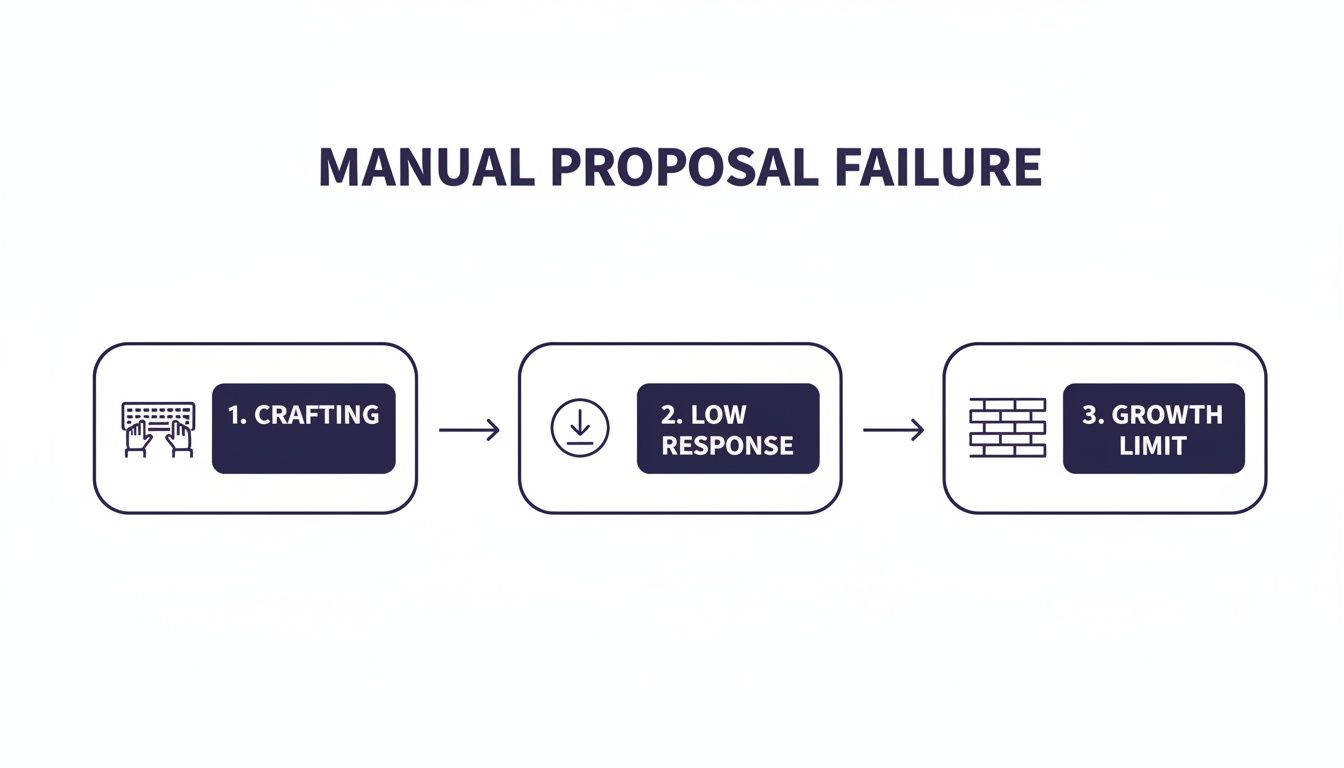
As you can see, spending hours writing personalized proposals just to get a handful of replies is a recipe for burnout.
The payoff for this training comes faster than you'd think. One study tracked a cohort of users and saw impressive results. In the first week, their automation sent 50 proposals, landing an 18% response rate and a 2.5% hire rate, which translated to $5,000 in new business. But by the fourth week, after the AI had been consistently trained, the numbers jumped to a 28% response rate and a 5.5% hire rate, generating $11,000. The results literally doubled as the system learned what works.
The goal is never just to send more proposals. It's to send more of the right ones. A well-trained automation engine makes sure your bids are precisely targeted, massively boosting your odds of landing clients who are a fantastic fit.
Key Things to Focus on During Setup
To get your engine firing on all cylinders from day one, make sure you dial in these inputs:
- Define Your Ideal Client Profile: Don't just stop at keywords. Think about budget size, the client's hiring history (are they verified? how many people have they hired?), and the potential project length.
- Set Up "Knockout" Criteria: These are your non-negotiables. Create firm rules to automatically dismiss jobs that are obvious duds, like those with vague scopes or budgets well below your minimum project fee.
- Prep Your Portfolio Snippets: Get modular case studies ready to go. You’ll want different versions that your automation can plug in depending on the specific service the client is asking for.
Getting this foundation right turns automation from a simple time-saver into a core part of your growth strategy. For any growing agency, having the right systems is everything. In fact, picking the best software for a digital marketing agency is one of the most important decisions you'll make for your entire sales pipeline.
Crafting Automated Proposals That Feel Personal
Let's be honest. If your idea of automation is just blasting out generic, cookie-cutter proposals, you’re doing it wrong. That isn't saving time; it's just spamming clients on a grander scale. The real magic of a smart automation system isn't just the speed—it's the ability to scale genuine personalization, making every single proposal feel like you wrote it just for them.
The aim is to get way beyond the simple "Hello, [Client Name]" mail merge. Modern tools can build dynamic templates that intelligently pull key details straight from the job description. This is how you turn a robotic message into a thoughtful, relevant pitch that actually gets a reply.

Think about it. A client posts a job looking for help with a "fintech app using Node.js." A basic template says you're a developer. A smart template, on the other hand, generates an opening line like, "I saw you're building a fintech app and need an expert in Node.js, which lines up perfectly with my recent work..." Right away, that one sentence proves you've actually read and understood their specific problem.
Using Dynamic Variables and Logic
Stop thinking of your proposal as a static document. Instead, treat it like a set of smart, interchangeable building blocks. By using variables and conditional logic, you can have your system assemble the most compelling message for each unique job, making sure you always lead with your strongest, most relevant points.
Here’s how you can put these dynamic templates to work:
- Keyword Extraction: The system can spot key skills or project goals in the job post (like "Shopify migration" or "increase conversion rates") and weave them directly into your introduction.
- Conditional Case Studies: You can set up rules that automatically attach your most relevant portfolio piece. If the job mentions a "SaaS dashboard," the system knows to pull your case study on that SaaS project, complete with all the juicy metrics.
- Tone Matching: Some of the more advanced systems can even analyze the client's tone—whether it's formal, casual, or urgent—and subtly adjust your proposal's language to match. This creates an instant rapport before you’ve even spoken.
This level of detail makes your automated bids almost indistinguishable from one you would have spent 30 minutes writing by hand. It shows you’re attentive, not just fast. If you need some inspiration, checking out a well-written Upwork proposal sample can give you a solid foundation for what a winning structure looks like.
The secret to great automation isn't removing the human touch. It's using technology to replicate your best, most personalized outreach at a scale you could never dream of achieving manually.
A/B Testing for Continuous Improvement
Once your dynamic templates are up and running, the real work begins. This is not a "set it and forget it" machine. You need to treat your proposals like a digital marketing campaign, constantly testing different elements to see what truly connects with clients in your industry.
The key is to test just one variable at a time so you can accurately measure its impact. For instance, you could experiment with:
- Different Hooks: Try leading with a pointed question versus a direct statement about their project. Which one gets more opens?
- Calls-to-Action (CTAs): Compare the reply rate for "Let's schedule a call" against something softer like, "Would you be open to a 10-minute chat about your goals?"
- Portfolio Presentation: Test sending a link to your entire portfolio against attaching a single, hyper-relevant PDF case study.
By carefully tracking your reply rates for each variation, you’ll start to gather hard data on what works. This iterative process turns your proposal system from a simple tool into a constantly evolving engine, ensuring your bids aren’t just automated—they're optimized to win.
Once your proposal lands in a client's inbox, the clock starts ticking. Winning the job isn't just about who has the best portfolio; it's often about who is the first to start a real conversation. This is where speed becomes your secret weapon, and a little automation can put you right at the front of the line.
Imagine a potential client replies to your proposal. Before you've even had a chance to see the notification, an automated workflow can shoot back a personalized response in under five minutes. This isn't some generic, "Got your message, thanks!" reply. It’s a smart, strategic message that acknowledges their interest, confirms you're looking over their comments, and immediately suggests a call. Right away, you look incredibly responsive and professional.
This kind of immediate engagement can shrink your sales cycle significantly. While your competition is still sifting through their morning emails, you're already guiding the conversation toward a discovery call and closing the deal.
Re-Engaging Quiet Leads with Smart Follow-Ups
But what about the leads that go silent? It happens all the time. A promising client seems interested, then... nothing. This is where most freelancers and agencies drop the ball, letting a warm lead fizzle out. An automated follow-up sequence keeps the conversation going without you having to manually track it or sound desperate.
You can set up a simple workflow to gently nudge prospects who haven't replied after a certain number of days. The trick is to add value every time you reach out, not just to ask, "Any updates?"
Here's an example of a polite, automated follow-up sequence that actually works:
- Day 3 (No Reply): "Hi [Client Name], just wanted to follow up on my proposal for the [Project Name] role. To give you a better sense of how we work, here’s a short case study from a similar project we just wrapped up. Happy to answer any questions."
- Day 7 (No Reply): "Hi [Client Name], circling back one last time. I sketched out a quick two-slide roadmap that outlines how we'd tackle the first phase of the project. Would you be open to me sending it over for a quick look?"
These messages feel helpful, not needy. They show you're still engaged and have the expertise to back it up, which is often enough to pull a busy client back into the conversation.
Automating your follow-ups means no lead ever slips through the cracks because you forgot to check in. It’s a simple change that can maximize the value of every single proposal you send.
And the data backs this up. Recent case studies revealed that web design agencies using this method saw a 120% boost in proposal visibility and a staggering 140% jump in their reply rates. They collectively landed over $4 million in contracts. On a platform that gets millions of monthly visits, speed and smart systems are what give you the edge.
By letting technology handle the tedious parts of client communication, you can automate Upwork proposals and the crucial conversations that seal the deal. This gives you more time to focus on what really matters: strategy, building client relationships, and winning more projects.
Using Analytics to Scale Your Agency’s Growth
Automating your proposals isn't just a time-saver; it’s how you build a predictable, scalable sales machine. This is where your analytics dashboard stops being a bunch of numbers and becomes the engine driving your agency's growth.
When you start tracking the right metrics, you can finally ditch the guesswork. Instead of just celebrating how many proposals you've sent, you get a crystal-clear picture of what's actually moving the needle for your bottom line.
Moving Beyond Vanity Metrics
The real magic happens when you can track performance across your entire team. A centralized analytics hub gives a sales manager a single command center, turning Upwork into a reliable revenue stream rather than a constant gamble.
You can see at a glance which team members are hitting it out of the park and which proposal templates are actually converting. That kind of visibility is the key to scaling because it tells you exactly where to focus your resources.
Instead of guessing, you can track and optimize the metrics that matter:
- Reply Rate: What percentage of your proposals actually get a response from a client?
- Win Rate: How many of those conversations turn into a hired contract?
- Proposal Volume: The total number of high-quality bids sent by each person.
By keeping a close eye on these figures, you’ll start seeing patterns. If one of your bidders consistently has a higher win rate, you can dig into their templates and strategies, then apply those winning tactics across the entire team.
This data-first approach shifts automation from being a simple convenience to a powerful business intelligence tool. It gives you the insights needed to scale effectively, potentially even replacing the need for a full-time sales development rep.
Identifying Your Top Performers
With a clear dashboard, you can spot your best-performing strategies and people in minutes. Imagine discovering that one of your bidders is consistently landing projects over $10,000 with a 15% win rate, while another team member is struggling to even get replies.
This isn't about micromanaging—it's about smart coaching. You can give targeted help to the person who’s struggling or maybe shift them to a different type of project where their skills are a better match.
This level of insight is no longer a "nice-to-have." The direction of Upwork's automation landscape shows agencies using these tools to scale in ways we couldn't have imagined a few years ago. Teams are now sending 50+ high-quality bids daily, pushing win rates from the typical manual 1-3% to a solid 8-12%.
When you use analytics to automate Upwork proposals, you’re doing more than just sending messages. You're building a scalable, data-backed system that consistently drives growth and turns your agency's outreach into a well-oiled machine.
Advanced Tips for Safe and Effective Automation
Once you've got your automation running, the real work begins. It's not a "set it and forget it" system. Think of it as a high-performance engine; you need to fine-tune it to get the most out of it while making sure you don't blow a gasket and put your Upwork account at risk.
A huge part of this is getting incredibly specific with your job filters. Go beyond basic keywords and budget ranges. Start layering in client history filters. For instance, you could target clients who have hired more than 10 freelancers or whose average hourly rate is above $50. Just as important are negative keywords to screen out the noise—think "logo design" if you're a web developer, or "entry-level" if you're a seasoned pro. This is how you stop wasting bids on junk and focus only on premium gigs.
Keep Your Account Safe—It's Your Livelihood
Let's be clear: when you're automating proposals, your number one job is to protect your Upwork profile. The whole point is to have a smart assistant, not a clumsy robot that gets you flagged. You need a system that’s built from the ground up to mimic how a real person works.
Here are the non-negotiables for safe automation:
- Human-Like Behavior: The system absolutely must have built-in delays and sensible daily limits. It should act like a human, not a script firing off proposals every 30 seconds.
- Clean Regional IPs: Your activity should come from a clean, residential, or business IP address located in your region. This looks natural to Upwork and avoids the massive red flags that come with data center IPs.
- Zero Password Storage: A trustworthy platform will never, ever ask for your Upwork password. It should connect to your account through secure, official methods that don't expose your credentials.
The goal isn't to trick the system; it's to work smarter within its rules. The best tools respect the platform and are designed for the long-term health of your freelance business.
Don't Fall for These Common Automation Traps
I've seen freelancers make the same mistakes over and over again. The biggest one? Trusting the machine completely. Automation should draft the proposal, but you—the human expert—should always give it the final look-over. Keep a "human-in-the-loop" workflow to catch any awkward phrasing and add that final touch of personality before it goes out.
The other major pitfall is ignoring the feedback loop. Your analytics dashboard is your report card. If your interview rate suddenly tanks, the answer isn't to just crank up the volume and send more proposals. That’s a recipe for disaster. Instead, dive into the data. See which templates are underperforming, A/B test a new opening line, and tweak your targeting. Smart automation is about precision and learning, not just brute force.
Got Questions About Automating Upwork Proposals?
Jumping into automation for the first time? It's natural to have a few questions, especially when it comes to keeping your Upwork account safe and getting real results. I've heard them all, so let's tackle the big ones.
Is This Actually Safe for My Upwork Account?
This is usually the first thing people ask, and for good reason. The short answer is yes, but only if you're smart about it.
A well-built automation tool is designed to fly under the radar by acting like a human, not a bot. This means it uses smart delays between actions and sends proposals from clean, regional IPs so it looks like you're just working efficiently.
Key takeaway: A reputable system will never ask for or store your Upwork password. It works through secure, approved methods that keep your login details completely private. If a tool asks for your password, run.
Okay, But Does It Really Work? What Results Can I Expect?
This is where things get exciting. If you've been sending proposals manually, you know the grind. You're probably seeing a win rate somewhere in the 1-3% range, which is pretty standard.
A properly trained and configured automation system changes the game completely. Based on performance benchmarks, freelancers using this approach regularly see their win rates jump to 8-12%.
What does that mean in practice? It means you can scale up your bidding from a handful of proposals a day to over 50, without spending all day doing it. You're effectively doubling or tripling your client pipeline. The data shows that this approach can dramatically improve outcomes for freelancers and agencies.
How Much Time Does It Take to Set Up?
You can get a basic system up and running in a single afternoon. The most important part is the initial training—this is where you teach the AI what a good job looks like for you.
You'll feed it examples of jobs you'd apply for and ones you'd ignore. Once you lay that groundwork, the system starts learning and gets smarter over time. It refines its own targeting, delivering better and better proposals with very little work on your end.
Tired of the manual grind and ready to start landing more clients? Earlybird AI acts like your personal sales team, sending hyper-personalized proposals in minutes and handling the follow-ups until you have a meeting booked. See how it works and get your time back at https://myearlybird.ai.




