
← Back To Blog
Mastering Feedback for Client Upwork Contracts
Leaving thoughtful feedback for a client on Upwork is way more than just a final step to close a contract. Think of it as a strategic play that cements your reputation and, frankly, helps you land better gigs down the road. The reviews you give and receive are the bedrock of your social proof on the platform.
Why Upwork Feedback Is Your Most Valuable Asset

It’s easy to dismiss feedback as just a star rating, but in reality, it’s the engine that drives your entire freelance business on Upwork. Every single review, both the ones you leave and the ones you get, directly shapes how visible and desirable your profile is in a very crowded marketplace. Consistently strong, positive feedback acts like a powerful magnet, pulling high-value clients toward your profile instead of your competitors'.
Your feedback history is essentially a living, breathing resume. It tells a much more compelling story about your professionalism, communication style, and work quality than your profile description ever could on its own. A solid track record of glowing reviews immediately lowers a potential client's perceived risk, making them far more likely to send you that coveted invitation or hire you outright.
The Direct Impact On Your Success
Your Job Success Score (JSS) is the single most critical metric that client feedback sculpts. This score is a direct reflection of how satisfied your clients have been, and it’s one of the first things anyone sees on your profile. A high JSS isn't just for bragging rights; it unlocks some serious advantages.
Platform data has shown that keeping your JSS above 90% can lead to 50% more job invites and, ultimately, higher earnings. Client feedback is the primary driver of how the algorithm shows your profile to the pool of over 796,000 active clients. Recent platform updates have even started giving freelancers more transparency and tools to report unfair feedback, which just goes to show how much weight it carries. You can learn about Upwork's JSS updates and what they mean for freelancers.
Proactively managing your feedback isn't just a "nice to have"—it's a core business activity. Let's break down how this focus pays off across your freelance career.
How Strategic Feedback Management Impacts Your Upwork Career
As you can see, the ripple effects are significant. Every contract is an opportunity to strengthen these areas.
Building Trust Through Social Proof
Beyond the algorithm, feedback builds the one thing that matters most in business: trust. When a potential client lands on your profile and sees a long history of successful projects and happy partners, it provides incredibly powerful social proof. This public validation immediately addresses their biggest concerns:
- Are you reliable and professional?
- Do you hit your deadlines and communicate well?
- Is the quality of your work actually worth the price tag?
A stellar feedback history answers all of these questions with a loud and clear "yes" before you even write a single word in your proposal. It's like having a silent salesperson working for you around the clock, building the confidence a client needs to click that "Hire" button. In this guide, we'll give you the playbook for turning every single contract into a powerful, reputation-building asset.
How to Ask for Client Feedback Without Being Pushy

Let's be honest, asking for that 5-star review can feel a bit awkward. You've done great work, the client seems thrilled, but how do you turn that quiet satisfaction into public praise without coming across as needy?
The trick is to stop thinking of it as an awkward afterthought. Instead, treat the feedback for a client on Upwork as the natural, professional final step of a successful project.
This isn't something you bolt on at the end. The best freelancers I know lay the groundwork for a great review from their very first message. It’s all about creating an experience so positive that leaving feedback feels like the obvious, easy conclusion.
Set the Stage From the Beginning
Right from the get-go, frame the entire project around the client's success. Your job isn't just to check off tasks on a list; it's to help them hit a specific goal. This simple shift in perspective changes the entire relationship from a transaction to a true partnership.
When you consistently communicate this way, your final feedback request becomes a simple, logical question: "Hey, did we hit the target we aimed for?" This makes the ask about their satisfaction, not your profile stats.
If you want to nail that collaborative tone from the very start, check out these powerful cover letter examples for Upwork that can help.
Timing Your Request Perfectly
Timing is everything. Jump the gun, and you look presumptuous. Wait too long, and your project is ancient history in the client's mind. They’ve already moved on to the next fire they have to put out.
Key Takeaway: The absolute best time to ask for feedback is the moment the client confirms they're happy with the final delivery. You want to capture that positive emotion while it's still fresh.
Don’t just upload the final files and abruptly end the contract. That’s a missed opportunity. A quick closing message is all it takes to wrap things up nicely and guide them toward leaving that review.
Gentle Nudges vs. Formal Closing Messages
You have to read the room. The way you'd talk to a laid-back startup founder is completely different from how you'd communicate with a formal project manager at a Fortune 500 company.
For the busy, informal client: A simple, friendly nudge is often all you need. Once they say they love the work, something like, "Awesome, so glad you're happy with it! If you have a second, feedback on the contract would be amazing," works perfectly.
For the corporate partner: A slightly more structured closing message is the way to go. You can build this right into your final delivery note. It reinforces the project's success and presents feedback as the final administrative box to check.
A Simple Template You Can Steal
Here’s a script I’ve used countless times. It’s polite, professional, and you can tweak it for any situation.
Example Closing Message:
"Hi [Client Name],
I've just attached the final files for [Project Name]! I'm really proud of how this came together and genuinely enjoyed working with you.
If you're happy with the outcome, I'd be grateful if you could share your feedback on the completed contract. It really helps me grow my presence here on Upwork.
Hope we get the chance to work together again soon!
All the best,
[Your Name]"
See how that works? It's positive and appreciative, not demanding. It positions feedback as a standard part of the Upwork process, making it incredibly easy for a happy client to click "submit" on that glowing review.
Leaving Professional Feedback That Protects You and Helps Others
The feedback you leave for a client on Upwork is more than just a star rating—it's a public entry in your professional history. Other freelancers will see it. They'll use your words to decide if they want to take a chance on that same client. Because of that, you need to be thoughtful and objective.
This isn't just about being polite; it’s about being smart. A great review is always truthful, professional, and built on specific examples. This approach keeps you from using emotional language that might make you look bad, even if the client was a genuine headache.
A Framework for Fair Client Reviews
Before you write a single word, take a step back and score the client on a few key areas. This simple mental exercise pulls the emotion out of the process and gives you a solid, structured way to look back on the entire project.
I find it helpful to break it down into three core categories:
- Communication: How were they to work with? Were their instructions clear? Did they get back to you in a reasonable amount of time, or did you have to chase them for answers?
- Clarity of Scope: Did you know exactly what you were supposed to do from day one? Or did the project slowly expand with "scope creep" that wasn't matched by new milestones or adjusted pay?
- Professionalism and Payments: Simple stuff, really. Did they treat you with respect? Were milestones funded on time, and were payments released promptly once work was approved?
Using these points as your guide helps ensure your feedback for a client on Upwork is balanced and fair, whether the project was a dream or a total disaster. It gives you a strong foundation to write a review that’s both helpful to others and a good reflection on you.
Handling the Tricky Negative Review
Let's be honest: leaving negative feedback can be nerve-wracking. You feel a responsibility to warn your fellow freelancers, but you also don't want to sound like a difficult person or burn a bridge you might need later. The secret is to stick to the facts and leave the feelings out of it.
Stick to objective statements about the process. Instead of saying, "The client was a nightmare," try something like, "There were several unexpected delays in communication that impacted our project timeline." It states the exact problem without making it a personal attack.
This approach is your best defense for your own reputation. Potential clients do look at the feedback you leave for others. A calm, fact-based review shows them you're a mature professional who can handle conflict gracefully. In a marketplace as huge as Upwork—hosting 796 thousand active clients who spend nearly $4 billion a year—your ability to navigate professional challenges is always on display. You can see more about the size of the Upwork client base on Backlinko.
Think of it this way: your feedback helps create a more transparent and trustworthy platform. When you leave honest, objective reviews, you give other freelancers the information they need to make better decisions. And that raises the bar for everyone.
Turning Negative Feedback into a Professional Win
Getting hit with negative feedback stings. It’s easy to take it personally and want to fire back a defensive reply right away. But hold on. Your public response is actually a golden opportunity to show every future client looking at your profile just how professional you are.
The trick is to take a step back and separate your emotions from the business problem at hand. Take a deep breath, read the client's comments objectively, and try to see things from their point of view—even if you completely disagree. A knee-jerk emotional response will almost always make things worse.
Your Immediate Action Plan
Before you type a single word, you need to know your options. Upwork has very specific rules about feedback disputes and removals, and understanding them is the first step in forming a smart strategy.
Generally, you only have a real shot at getting feedback removed if the client has violated Upwork's Terms of Service. This usually boils down to a few key situations:
- Payment Coercion: The client threatened you with a bad review to try and get a refund or free work.
- Off-Topic Rants: The feedback has nothing to do with your work or the project itself.
- Abuse or Discrimination: The review contains hateful, discriminatory, or abusive language.
If the feedback is just their opinion—they didn't love the final design, for instance—Upwork is highly unlikely to remove it. In these more common scenarios, your public response is your best and most powerful tool.
This decision tree gives you a clear visual of the process, from the moment a contract ends to how you should react based on the client's satisfaction.
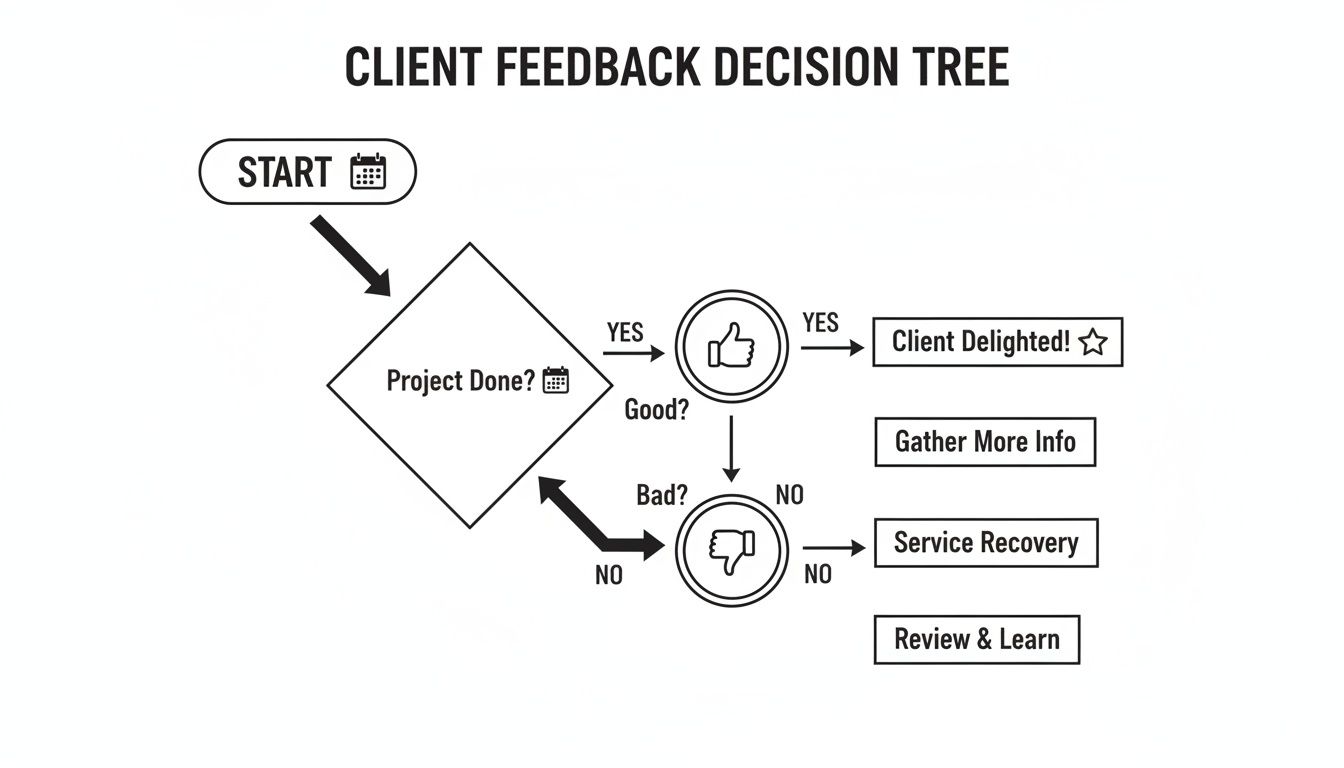
As you can see, the path forward—whether it's celebrating a win or doing some damage control—is dictated entirely by what the client says.
Crafting a Professional Public Response
When getting the feedback removed isn't on the table, a carefully worded public reply can do wonders. It demonstrates to potential clients that you're accountable, mature, and dedicated to making things right. Remember, the goal isn't to win an argument; it's to showcase your professionalism.
A stellar public response is always polite. It acknowledges the client's viewpoint and briefly states your side without assigning blame. Keep it short, sweet, and focused on a positive, forward-looking tone.
Here’s a simple, effective template you can adapt:
Example Professional Response:
"Hi [Client Name], thank you for sharing your feedback. I'm sorry to hear the final result wasn't what you had hoped for. We aim for 100% client satisfaction, and I appreciate you sharing your perspective on the project. I wish you the best of luck with your future endeavors."
This kind of reply is professional, it doesn't pick a fight, and it gracefully closes the loop. This skill is absolutely crucial on a platform built on trust. With Upwork's Gross Services Volume hitting $4.1 billion in 2022 and continuing to climb, that trust is everything. As you can read in these Upwork growth statistics, that massive volume is built directly on the feedback system.
How you handle feedback for a client on Upwork, especially in tough situations, directly shapes your reputation and long-term success.
Streamlining Your Feedback Workflow to Save Time
When you're juggling multiple projects, manually chasing down feedback for every contract becomes a serious time suck. You've done the hard part and delivered great work, but now you're stuck doing admin follow-ups instead of finding your next gig. It's a classic scaling problem, but thankfully, the fix is pretty straightforward.
The idea is to build a smarter, repeatable workflow so you never miss a chance to get a stellar review. You want an efficient system that brings in those 5-star ratings while you focus on what actually grows your business—doing amazing work for your clients.
Bake Feedback Into Your Process
The single best way to make sure you get feedback is to build it right into your project wrap-up. Don't treat it like an afterthought you might get to later. Make it a standard, non-negotiable part of what it means for a project to be "done."
This all starts with a simple project completion checklist. This isn't anything fancy, just a list that includes things like delivering the final files, sending the last invoice, and—most importantly—sending your closing message that asks for a review. By making it a routine step, you take the guesswork out of it and stay consistent with every single client.
Here's what that checklist might look like:
- Final Deliverable Confirmation: First, get a quick "looks great!" confirmation from the client in writing.
- Send Closing Message: Next, fire off your pre-written thank you message that gently guides them toward leaving feedback for a client on Upwork.
- Leave Your Feedback: Finally, promptly leave your own professional feedback for the client. This sends them a notification and often gives them the nudge they need to return the favor.
The Power of Gentle Automation
You don't need a complex, enterprise-level system here. A little bit of light automation can make a huge difference. We're not talking about sending robotic, impersonal messages, either. It’s more about using simple tools to keep your communication consistent and positive, so that final feedback request feels like the natural next step.
Tools like Earlybird AI can be a huge help, making sure you're sending regular check-ins throughout the project. When a client is used to hearing from you, your final message doesn't come out of left field; it feels like a natural conclusion to a great working relationship. You can learn more about how this works in our guide on what is sales automation.
By creating a simple yet powerful system, you transform the process of getting feedback for a client on Upwork from a game of chance into a reliable part of your business operations. A solid workflow is what separates a busy freelancer from a scalable business owner.
Answering Your Top Questions About Upwork Feedback
The Upwork feedback system has its quirks. You can follow all the best practices and still run into situations that leave you scratching your head. Let's clear up some of the most common questions freelancers run into when it comes to giving and receiving reviews.
What Happens If a Client Ends a Contract Without Leaving Feedback?
When a client closes a contract and doesn't leave a review, it has a neutral impact on your Job Success Score (JSS). Think of it as a non-event. Since only contracts with feedback count towards your score, this setup protects you from a potentially bad rating on a project that just fizzled out.
But here's the thing: it's also a missed opportunity. You get a 14-day window to leave your own feedback for the client. If you do, Upwork pings them with a notification, reminding them to do the same for you. If the project went well, it's always smart to leave a thoughtful, positive review. It’s a gentle nudge that often gets you the glowing feedback you earned.
Can I Ask a Client to Change Their Feedback?
Yes, you can, but the clock is ticking. You have just 14 days from when the contract ends to make this happen. On top of that, the client needs to have enabled the setting that allows freelancers to request changes in the first place.
Your approach here is everything. Don't be demanding. Instead, open a professional conversation to understand their concerns. If you can fix the issue they raised, do it. Once you've made things right, you can politely ask if they'd consider updating their review. After that 14-day window slams shut, all feedback is set in stone.
Is Private Feedback More Important Than Public Feedback?
Without a doubt. The private feedback a client gives directly to Upwork weighs much more heavily on your Job Success Score than the public star rating everyone sees. This is a critical detail that trips up a lot of freelancers.
A client could leave you a 5-star public review to be nice, but then privately tell Upwork they wouldn't recommend you. That "Likelihood to Recommend" score is a major JSS driver. This is why you can have a profile full of 5-star reviews and still see your JSS dip. For a closer look at how these systems work, our guide on whether Upwork is a legitimate platform provides some valuable context.
How Does a "No Feedback" Contract Affect My JSS?
A single contract closing without any feedback won't harm your JSS. The system simply ignores it.
The problem comes from a pattern. If you have too many contracts ending this way over time, Upwork's algorithm might see it as a red flag. It can be interpreted as a sign that your projects aren't finishing successfully. While one or two won't matter, a long history of them could eventually drag your score down. Your best bet is to always aim for a formal, positive close-out on every single project.
Ready to stop chasing clients and start automating your success on Upwork? Earlybird AI acts as your always-on sales team, sending personalized proposals within minutes of jobs being posted. See how our members are doubling their reply rates and landing more clients with less effort. Learn more about Earlybird AI.




