
← Back To Blog
The Right Way: how to find web designer in 2026
Most advice on how to find web designer starts in the wrong place. It tells you to scroll portfolios, admire Dribbble shots, and pick the person with the prettiest work.
That’s how teams hire designers who impress in a gallery and disappoint in a project.
A strong web designer isn’t just a visual stylist. You’re hiring someone who has to absorb business goals, work inside constraints, communicate clearly, handle feedback, and keep a project moving when details get messy. If they can’t do that, a polished homepage mockup won’t save you.
I’ve seen the same failure pattern repeatedly. The client hires based on aesthetics alone. A few weeks later, deadlines slip, revisions spiral, and nobody can explain why the design choices matter. The underlying problem wasn’t talent. It was a weak hiring process.
Beyond the Portfolio Why Most Hiring Processes Fail
The market is big enough that bad hiring gets expensive fast. The global web design services market reached $61.23 billion in 2025, and the US had over 202,000 web design businesses operating at that point, while 1.1 billion websites competed for attention online, according to Figma’s web design statistics roundup. There’s no shortage of options. There is a shortage of reliable filters.
Pretty work hides operational weakness
A portfolio usually shows the end result. It rarely shows the hard part.
You don’t see whether the designer asked sharp questions. You don’t see whether they met milestones without chasing. You don’t see whether they understood conversion goals, stakeholder politics, content gaps, SEO constraints, or accessibility trade-offs.
That’s why teams keep making the same mistake. They judge the artifact, not the working relationship.
Practical rule: Hire the person who can explain decisions, not just display screens.
The best designers usually do three things well before they touch visuals:
- They clarify the objective. They ask what the site needs to do, not just how it should look.
- They define scope early. They identify what’s included, what isn’t, and what could create delays.
- They communicate in plain language. They can talk to founders, marketers, developers, and clients without turning every discussion into design jargon.
A designer is a project partner
If you treat the hire like buying artwork, you’ll get artwork. If you treat the hire like bringing in a business partner for a defined outcome, your odds improve.
That shift changes what you evaluate:
- response habits
- process maturity
- niche familiarity
- revision handling
- handoff discipline
- ability to defend choices with user logic
A mediocre-looking portfolio from a disciplined operator can outperform a flashy portfolio from someone disorganized. That doesn’t mean visuals don’t matter. They do. It means visuals are only one layer of the decision.
The right hire usually feels less like “the most talented artist I found” and more like “the person I trust to get this live without drama.”
Scouting for Talent Where to Find Your Next Designer
Where you search shapes who you find. That sounds obvious, but many still mix up channel and fit.
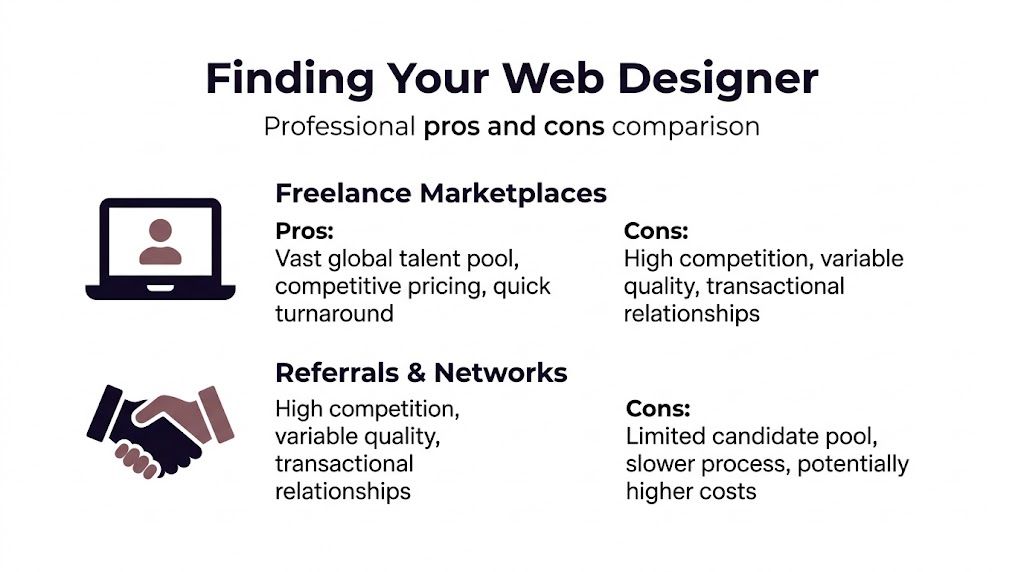
If you need fast iteration and broad access, marketplaces can work. If you need category knowledge and lower screening risk, referrals and professional networks usually produce better conversations. If you need a full team and strategic coverage, an agency may be the cleaner choice.
Marketplaces give you speed and volume
Freelance marketplaces are useful when you need options now. You can post a brief, compare applicants quickly, and spot patterns in how people present themselves.
That matters because the workforce is split across different working models. As of 2025, 35% of the web design workforce operates as freelancers, while 42% works in-house, and 74% of executives hiring freelancers say college degrees are irrelevant when vetting them, according to Hostinger’s web design statistics. In practice, that means portfolios, communication, and proof of execution matter more than credentials.
Use marketplaces when you want:
- Speed: Good for urgent landing pages, small redesigns, and one-off interface work.
- Range: You’ll see generalists, specialists, solo operators, and small teams.
- Price flexibility: You can test different budgets and engagement structures.
The downside is screening load. You’ll spend time separating people who can talk well from people who can deliver. If you’re comparing platform options, this review of alternatives to Upwork is a useful starting point.
Referrals reduce uncertainty
Referrals usually produce fewer candidates, but the average signal quality is better. Someone in your network has already seen the designer work under pressure, take feedback, and finish real projects.
That’s valuable because web design failure often starts in the gray areas. A referral can tell you whether the designer is dependable when content arrives late, whether they disappear during revision rounds, and whether they collaborate well with developers.
Referrals are strongest when:
- The project is business-critical
- You need trust quickly
- You care about long-term fit more than raw price
The trade-off is obvious. Your pool is smaller, and the process can move slower.
Agencies solve a different problem
A design agency isn’t just a source of designers. It’s a source of delivery structure.
If your project includes discovery, UX, design systems, copy coordination, stakeholder reviews, and developer handoff, an agency can reduce management overhead. You’re paying for process, redundancy, and accountability, not only design labor.
That’s often worth it when one freelancer would be stretched too thin.
A solo designer can be great for execution. An agency is often better when the project has many moving parts and no one on your side has time to orchestrate them.
Social networks and portfolio communities are best for targeted scouting
LinkedIn and Dribbble work best when you already know what kind of designer you need.
Don’t browse endlessly. Search for clues:
- designers who show before-and-after thinking
- designers who mention industries they’ve worked in
- designers who explain constraints and outcomes
- designers whose work resembles your problem, not just your taste
The best channel depends on the project. For a startup homepage, a marketplace may be enough. For a healthcare product or finance site, targeted outreach and referrals usually beat open browsing.
Crafting a Project Brief That Attracts Top Talent
Weak briefs attract weak matches. Strong designers often skip vague listings because they can already tell the project will be messy.
If you want better applicants, write a brief that shows you know what you’re asking for.

What a good brief includes
Start with business context, not design style. A designer can’t make good decisions if all you give them is “modern, clean, premium.”
Include these pieces:
- Company and offer: What you sell, who buys it, and why the site exists.
- Project goal: Lead generation, credibility, product education, recruiting, ecommerce, or something else.
- Audience: Who the design needs to persuade or help.
- Scope: Pages, templates, components, or flows required.
- Constraints: CMS, brand guidelines, content limitations, internal approvals, dev limitations.
- Timeline: Desired start, review windows, launch target.
- Budget range: Enough to help candidates self-select.
- Examples: A few references with notes on what you like and dislike.
- Definition of success: What must be true when the project is done.
This is also where you can set expectations for communication. Say whether you want async updates in Slack, comments in Figma, weekly calls, or milestone reviews.
If you’re posting on a marketplace, this guide to writing an Upwork job description can help tighten the listing.
What top candidates look for
Good designers are screening you too.
They want to know:
- whether the scope is coherent
- whether the stakeholder group is manageable
- whether content exists
- whether the timeline is realistic
- whether feedback will be centralized
If your brief is fuzzy, senior candidates will either pass or pad the price to account for chaos.
The brief doesn’t need to be long. It needs to remove ambiguity.
Outreach copy you can actually use
For a freelancer:
Hi [Name], I’m looking for a web designer for [project type]. We need help with [core scope], and the main goal is [business goal]. We already have [brand assets/content/dev support], and the biggest constraint is [constraint]. I reached out because your work on [relevant example or industry] looks aligned. If this sounds like a fit, I’d like to see how you’d approach the project and what your process looks like.
For an agency:
Hi [Agency Name], we’re evaluating partners for a web design project that includes [scope]. The project matters because [business reason]. We need a team that can handle [discovery/UX/design system/handoff/etc.] and work within [constraint]. If you’re interested, send over relevant examples, your typical process, and how you structure timelines and approvals.
Short, direct outreach performs better than grand speeches. Designers want enough detail to assess fit. They don’t need a manifesto.
Vetting Designers Beyond Their Best-Of Reel
A portfolio gets someone onto the shortlist. It should never close the deal.
The cleanest hiring process has three checks. First, inspect the portfolio for evidence of problem-solving. Second, run a focused screening conversation. Third, give finalists a paid trial task.
If you’re hiring through a marketplace, reviewing how candidates present their portfolio in Upwork can reveal a lot about clarity, positioning, and professionalism.
Read the portfolio like an operator
Don’t ask, “Does this look good?”
Ask better questions:
- What problem was this project solving?
- What constraints shaped the design?
- Is there consistency across different project types?
- Can the designer explain structure, hierarchy, and decision-making?
- Does the work feel copied from trends, or adapted to context?
A weak portfolio often has polished thumbnails and no substance. A strong one gives just enough process to prove the person thinks clearly.
Look for signs of systems thinking. Landing pages are easy to glamorize. The harder test is whether they can design repeatable page types, mobile states, and messy real-world content modules.
The screening call should test thinking
The interview doesn’t need to be formal. It needs to be sharp.
Ask things like:
- How do you start a project when the client’s goals are vague?
- What do you need from us before design starts?
- How do you handle conflicting stakeholder feedback?
- What do you consider before handing designs to developers?
- How do you think about accessibility, content structure, and responsive behavior?
Listen for direct answers. Good designers can explain trade-offs in simple language. Weak ones hide behind buzzwords, software names, and trend terms.
A few tool questions are useful too. Ask what they use for wireframes, prototypes, file organization, and collaboration. Figma is common, but the exact stack matters less than whether they have a repeatable workflow.
Use a paid trial task
Here, a lot of expensive mistakes get prevented.
Keep the task small. You’re testing judgment, not asking for free strategy. A good trial might be:
- a wireframe for one high-value page
- a redesign of one weak section
- a mobile-first treatment of an existing desktop concept
- a short prototype for a specific conversion flow
What you’re watching:
- Did they ask clarifying questions?
- Did they respect the brief?
- Did they present rationale, not just layouts?
- Did they accept feedback without getting defensive?
- Did they hit the agreed deadline?
Hire from behavior under constraint, not from polished samples created in ideal conditions.
Add a simple usability benchmark
Most hiring guides stop at “review the work.” That’s not enough.
A more rigorous way to vet a designer is to test whether users can complete critical tasks on a prototype. According to Dribbble’s guide to measuring web design success, top-tier designers produce work where critical user tasks have a 100% Task Success Rate, and testing a prototype with 5+ users with a target TSR above 90% helps you avoid the poor design that causes 38% of users to abandon a site.
That sounds advanced, but it’s practical.
A lightweight TSR test
Pick a handful of tasks that matter:
- find pricing
- submit a contact or demo request
- locate a relevant case study
- understand what the company does
- go to the right service page
Give the prototype to a small set of target users and observe whether they can complete each task without help.
You don’t need a lab. A simple remote walkthrough works. What matters is whether the design supports action.
Lead-in for a quick walkthrough:
What the results tell you
If users hesitate on obvious actions, miss key navigation, or misunderstand the offer, the issue isn’t cosmetic. It’s structural.
That’s exactly why some visually attractive designs underperform. They photograph well and fail in use.
A designer who can produce a solid prototype and pass a simple task test is usually far safer than one with a glamorous portfolio and no evidence of user-centered thinking.
Navigating Pricing Timelines and Red Flags
Once you’ve found a promising candidate, the conversation usually gets messy in two places. Price and expectations.
At this stage, people either over-negotiate and sour the relationship, or skip hard questions and pay for confusion later.
Pick the pricing model that matches the work
There isn’t one correct pricing structure. There’s a correct match between structure and project shape.
Hourly works when scope is fluid
Use hourly when the project is exploratory, when stakeholder input is likely to evolve, or when you need ongoing design support rather than a tightly bounded deliverable.
Hourly pricing works best if:
- You want flexibility
- You can monitor progress through milestones
- You expect revisions or changing priorities
The risk is drift. Without tight management, hours can expand while decisions stay unresolved.
Fixed price works when scope is defined
Use fixed pricing when deliverables are clear. Specific page counts, defined templates, agreed revision rounds, and a known handoff format all make fixed bids workable.
It reduces ambiguity for both sides. It also forces you to write a better scope.
The danger is pretending the project is fixed when it isn’t. If content, approvals, or functionality are still unclear, “fixed” quickly becomes a negotiation problem.
Retainers work for ongoing design capacity
Retainers make sense when your team needs continuous support. That might include landing pages, CRO experiments, campaign assets, or iterative product marketing work.
This model is often better than constantly spinning up one-off projects because it preserves continuity. The designer learns your brand, systems, and approval habits.
Timelines fail before the work starts
Bad timelines usually come from missing dependencies. Teams assume design starts immediately, then forget they still need content, brand decisions, stakeholder alignment, or technical input.
Before agreeing to dates, ask:
- Who approves each stage?
- Is content final, draft, or nonexistent?
- Does development begin during design or after sign-off?
- How many revision rounds are expected?
- What can block progress on your side?
If a designer gives you a fast timeline without asking those questions, be cautious. They may be guessing.
The red flags that matter most
Commonly recognized warnings include: Poor spelling. Generic pitches. Thin portfolios.
The bigger risks are subtler.
According to a video discussing hiring blind spots, response time and niche fit are often overlooked, even though fast replies often correlate with better communication and generic designers can struggle in specialized industries such as finance or healthcare.
That matches what experienced hiring managers see in practice.
Watch for these:
- Slow replies during courtship: If someone takes too long to answer basic pre-sale questions, don’t assume they’ll become organized after payment.
- No clear niche fit: A broad generalist can still be excellent, but for regulated, technical, or category-heavy work, lack of domain familiarity creates expensive friction.
- Vague process language: “I’ll make it modern” is not a process.
- No pushback at all: Strong designers challenge weak assumptions. If they agree with everything immediately, they may be trying to win the job rather than improve the work.
- Timeline certainty without discovery: Confidence is good. Certainty without inputs is not.
- Revision ambiguity: If revision rounds, feedback windows, and approval flow aren’t discussed, expect conflict later.
Fast communication isn’t a cosmetic advantage. It’s often the earliest sign of whether a project will keep momentum.
When negotiating, stay direct. Ask what assumptions the price depends on. Ask what would change the timeline. Ask what’s excluded. Clear conversations at this stage save more money than aggressive haggling ever does.
Finalizing the Hire Contracts and Onboarding Checklist
A good hire can still fail in the handoff between “yes” and “start.”
That’s why contracts and onboarding matter more than often realized. The contract protects the relationship. The onboarding process gives it traction.
Contract terms that shouldn’t be optional
This isn’t legal advice. It’s a practical checklist.
Your agreement should define:
- Scope of work: Deliverables, page counts, file types, and what’s outside scope.
- Milestones and payment terms: When invoices are issued, what triggers payment, and what happens if approvals stall.
- Revision boundaries: How many rounds are included and what counts as a revision versus new work.
- Timeline responsibilities: What the designer owes, and what your team must provide to keep dates intact.
- Ownership and IP: When files transfer and what rights each side keeps.
- Confidentiality: Especially if the project touches unreleased products, customer data, or internal strategy.
- Termination conditions: How either side can end the project and what gets paid if that happens.
If any of those are vague, the project can go sideways even with a capable designer.
Onboarding should remove friction on day one
Teams lose momentum because they hire first and organize later.
Set up the basics before kickoff:
- Brand assets ready: Logos, fonts, color standards, and existing guidelines.
- Content inventory prepared: Current pages, draft copy, missing copy, and who owns approval.
- Access collected: Hosting, CMS, analytics, tag manager, Figma, asset libraries, and anything else the designer needs.
- Examples documented: Competitor sites, inspiration references, and notes about what to emulate or avoid.
- Stakeholder list finalized: One decision-maker is ideal. Too many approvers slows everything.
- Communication rules set: Slack, email, comments in Figma, meeting cadence, and expected response windows.
- Success criteria written down: What the finished work has to accomplish for the project to count as successful.
A clean start is a competitive advantage
Design projects rarely collapse because the designer can’t move pixels. They collapse because the client can’t provide direction, approvals, content, or constraints in time.
A structured onboarding process prevents that. It also makes strong designers want to keep working with you, because organized clients are rare.
If you want better results from web design hires, treat the first week like part of the project, not admin overhead. That’s where trust gets built and confusion gets eliminated.
If your agency finds web designers and other freelancers through Upwork, Earlybird AI helps you move faster where speed matters most. It learns your ideal projects from simple feedback, automates personalized proposals and replies, and keeps outreach active without turning your team into a manual bidding operation. For agencies juggling multiple bidders, it’s a practical way to improve consistency, cut response lag, and stay in front of the right opportunities.




