
← Back To Blog
How to Qualify Sales Leads: Quick Steps for Higher Conversions

It feels productive to chase every single lead that pops up on Upwork, but experience shows that it's usually a trap. The simple truth is that learning how to qualify sales leads is all about filtering out mismatched clients before you invest your time. This one skill can radically improve your win rate and focus your energy where it actually pays off.
Why Smart Lead Qualification Is Your Biggest Advantage

For any freelancer or agency, time is money. Every minute you spend writing a detailed proposal for a low-budget, unclear, or poor-fit project is a minute you can't get back. It's time you could have spent landing a client who genuinely values your expertise. This is the core challenge on competitive platforms like Upwork—the pressure to bid on everything creates a frustrating cycle of wasted effort.
This scattergun approach is more than just annoying; it's a silent drain on your business. Imagine spending hours chasing down leads only to find out later that 67% of those lost opportunities were due to poor qualification from the very beginning. That's a staggering number. It shows that not vetting leads properly is the biggest reason deals fall through, beating out other factors like pricing or competition.
The Real Cost of Chasing Bad Leads
The consequences of weak qualification aren't just theoretical. Think about all the time sunk into discovery calls with clients who eventually reveal their budget is a tiny fraction of your minimum project fee. Or the endless back-and-forth on proposals for projects with goals that shift like sand. These aren't just minor inconveniences; they're direct hits to your bottom line.
A disciplined filtering process, on the other hand, changes the entire game. It shifts your mindset from one of scarcity to one of strategic focus. By zeroing in only on leads that match your ideal client profile, you can achieve some powerful results:
- Skyrocket your proposal-to-win ratio: When you only bid on projects you're a perfect fit for, your proposals become incredibly targeted and compelling. Your success rate naturally goes up.
- Boost your overall profitability: You'll spend far less non-billable time on dead-end conversations and more time delivering high-value work for clients who can actually afford it.
- Protect your team's morale: Saying "no" to bad-fit clients is liberating. It frees up mental and emotional energy, preventing burnout and keeping everyone focused on doing great work.
By learning to spot the difference between a genuine opportunity and a time-wasting distraction, you take back control of your sales pipeline. This isn't about being picky; it's about being strategic.
The Upwork Edge
On a platform as busy as Upwork, this discipline becomes your secret weapon. While your competitors are carpet-bombing every new job post with generic, copy-pasted bids, you can be surgical. A sharp qualification process lets you instantly identify the clients with a history of high spending, clear project descriptions, and professional communication.
This allows you to invest your time where it matters most, building a more sustainable and profitable business. To go deeper on this, you can learn more about how to scale your lead generation strategy for an Upwork agency in our detailed guide.
Build Your Ideal Client Profile for Upwork

Before you can even think about qualifying sales leads, you need to know exactly who you're looking for. It's a simple truth many freelancers and agencies overlook. Chasing every opportunity that pops up on Upwork is a fast track to burnout, not success. You end up somewhere, sure, but rarely where you intended to go.
That’s where an Ideal Client Profile (ICP) comes in. This isn't just a fuzzy idea of a "good client." It's a concrete, written-down description of the clients you want to work with—the ones who see the value you bring, pay what you're worth, and make projects a pleasure, not a pain.
Think of your ICP as your North Star. It’s the filter that instantly separates high-value jobs from all the noise, letting you make quick, confident decisions instead of agonizing over every single job post. It's the absolute foundation of a solid lead qualification process.
Define Your Core Criteria
So, where do you start? The best place is your own history. Look back at your past projects, especially the home runs. Which ones were the most profitable? The most fulfilling? Who were those clients? The patterns you find in your best work are the building blocks of your ICP. This isn't guesswork; it's using your own data to define future success.
On Upwork, this means getting specific about a client’s history. Key metrics to dig into include:
- Total Spend: Look for clients who have a track record of investing in talent. Someone who has already spent over $10,000 on the platform is a much safer bet than a client with zero spend history.
- Average Hourly Rate Paid: This tells you everything you need to know about whether they value quality work. If their average rate is miles below yours, it's an immediate red flag.
- Client Location and Time Zone: Simple logistics matter. Working with clients in time zones that have a decent overlap with yours makes communication infinitely smoother.
- Hire Rate and Number of Reviews: A high hire rate (think above 50%) combined with glowing reviews shows they’re serious about hiring and are great partners to their freelancers.
Key Takeaway: Defining these firmographic and behavioral traits transforms lead qualification from a vague "gut feeling" into a repeatable, systematic process. You stop hoping for good clients and start actively targeting them.
Look Beyond the Numbers
While the data is crucial, don't forget the human element. The qualitative signs are just as important for painting a complete picture of your ideal client. These "softer" signals often tell you more about a client's professionalism and what it will actually be like to work with them.
Pay attention to these qualitative clues:
- Clarity of the Project Brief: A detailed, well-thought-out job description is a massive green flag. It shows the client has done their homework and respects your time. Vague, one-line posts? Usually a sign of chaos.
- Professional Communication: Read the job post carefully. Does the tone sound professional and respectful? The way they write their post is often a preview of how they'll communicate with you.
- Industry and Company Size: Do you do your best work with nimble startups or large, established enterprises? Focusing on a specific industry allows you to tailor your proposals and showcase hyper-relevant experience.
This process is absolutely essential for anyone serious about winning on the platform, especially for agencies. If you want to go deeper, we have a whole guide on how top-performing agencies thrive on Upwork by mastering these principles.
Remember, your ICP isn't a "set it and forget it" document. It's alive. Revisit and refine it after every project to keep it sharp and perfectly aligned with your business goals.
Build a Lead Scoring System That Actually Works

Now that you have your Ideal Client Profile (ICP) locked in, you know exactly what a dream client looks like on paper. The next step is turning that profile into a practical tool that helps you spot those dream clients in the wild. This is where a lead scoring system comes in.
At its core, lead scoring is just a way to rank incoming leads by assigning points to their different characteristics. It’s a simple concept, but it's powerful. Instead of running on gut feelings alone, you're creating an objective system that tells you where to focus. You’ll be able to see at a glance which leads deserve your immediate attention and which can be safely moved to the back burner.
This shift moves qualification from a subjective art to a repeatable science. It gets everyone on your team on the same page, using the same yardstick to measure every lead. Consistency and efficiency naturally follow.
Assigning Points to Key Attributes
The heart of any good scoring model is assigning points—both positive and negative—to the criteria you outlined in your ICP. The key is to keep it simple enough to be used quickly but detailed enough to be genuinely useful.
Start by jotting down the biggest indicators of a high-quality lead and the most glaring red flags. From there, assign a point value to each one based on how much it matters to your business.
Positive attributes (Green Flags): These are the traits that scream "good fit."
- Verified Payment Method with High Spend: When a client has already spent a significant amount (think over $10,000) on the platform, you know they're a serious buyer. This is a massive green flag.
- High Client Hire Rate: A hire rate of over 50% shows they aren't just window-shopping. They post jobs with the intent to hire.
- Detailed Project Brief: A clear, well-written project description signals that they’ve thought through their needs and value your time.
Negative attributes (Red Flags): These are the warning signs that a lead might be a time-waster.
- Vague, Single-Sentence Post: We've all seen them: "Need SEO help." with zero context. It’s a classic sign of an unprepared client.
- Unverified Payment Method: This often means the client is new or non-committal, which increases your risk.
- Historically Low Hourly Rates: If their past projects paid a fraction of your minimum rate, it’s a long shot they'll suddenly meet your price.
A Practical Lead Scoring Example
Let's see how this works in a real-world scenario. Imagine you’re a freelance web developer hunting for projects on a platform like Upwork. Your scoring model might look like this:
- Client has spent >$10k on Upwork: +20 points
- Project brief is detailed and clear: +15 points
- Client's average hourly rate is in your range: +10 points
- Urgent timeline mentioned: +5 points
- Project brief is vague or a single sentence: -10 points
- Payment method is unverified: -15 points
By tallying the score for each new job post, you can instantly categorize opportunities. A lead with over 30 points is "hot"—drop everything and write a proposal. A lead with a negative score? Disqualify it and move on without a second thought.
This data-driven approach takes the emotion and guesswork out of the equation. It gives you the confidence to prioritize your efforts, ensuring your valuable time is spent only on the leads most likely to become great clients.
Ask Sharp Questions to Qualify or Disqualify Leads
Your lead scoring system has just flagged a hot prospect. So, what’s next? A great proposal might catch their eye, but it’s the questions you ask that will seal the deal. This is your chance to shift from just analyzing data to actively engaging a potential client.
The real goal here isn't just to sell—it's to qualify. Your questions should be laser-focused on uncovering their true intentions, who holds the purse strings, and if they're actually ready to pull the trigger. It’s your opportunity to steer the conversation toward a clear "yes" or a quick "no."
A Freelancer's Twist on the BANT Framework
For decades, sales teams have relied on a trusty framework called BANT—Budget, Authority, Need, and Timeline—to qualify leads. As freelancers and small agencies, especially on platforms like Upwork, we can take this classic model and make it more conversational and less like a stiff corporate interrogation.
Here’s how you can gently probe for each element without coming across as aggressive:
- Budget: The classic "What's your budget?" can put people on the defensive. Instead, frame it around value. A good approach is to say something like, "To make sure I'm proposing the right solution, could you share a ballpark budget you have in mind? That way, I can focus on the features that will deliver the most impact for you."
- Authority: You absolutely need to know if you're talking to the person who makes the final call. A simple, non-threatening way to find out is to ask, "Besides yourself, who else will be involved in looking over the proposal and making the final decision?" This little question tells you everything you need to know about their approval process.
- Need: This is where you dig deeper than the job post. Go for the "why" behind the project. Try asking, "What’s the core problem you're hoping to solve with this?" or, a personal favorite, "If we fast-forward six months from now, what does a successful outcome from this project look like to you?"
- Timeline: Is their "ASAP" a genuine fire, or just wishful thinking? Uncover the real urgency by asking, "What’s the key deadline driving this project forward?" or "Ideally, when do you need this completed and launched?" This helps you gauge if their expectations are grounded in reality.
By mastering these conversational tactics, you turn a simple follow-up into a powerful diagnostic tool. You’re no longer just another bidder; you're a consultant guiding them to the right solution.
The Power of Professional Disqualification
Knowing how to qualify leads is only half the battle; knowing when to walk away is the other. This isn't a defensive move—it's a strategic one that protects your most valuable asset: your time. In fact, sales leaders estimate that a staggering 50% of the clients they engage are not a good fit for their business. This stat really drives home why disqualifying leads early is crucial for anyone trying to build a sustainable business. You can dive deeper into this and other key sales insights by exploring the latest findings from sales experts.
Don't ever be afraid to professionally disqualify a lead. If a prospect is cagey about their budget, has a completely unrealistic timeline, or can't clearly explain their needs even after you've prompted them, those are massive red flags.
It’s perfectly fine to say something like, "Based on our conversation, it sounds like my services might not be the best fit for what you need right now. I'd be happy to reconnect down the road if your requirements change." This approach is professional, leaves the door open for the future, and—most importantly—frees you up to focus on leads who are a perfect match.
Automate Your Lead Qualification and Outreach
So, you've defined your ideal client and built a smart lead scoring model. That's a huge step. But if you’re still manually sifting through every single job post on a platform like Upwork, you're burning precious time.
As a freelancer or agency owner, your most valuable hours are spent talking to promising prospects and closing deals—not scrolling through endless listings. This is where you need to get smart and let automation do the heavy lifting for you.
Think of it this way: instead of spending hours every day filtering jobs, what if you had a system working for you 24/7? With the right tools, you can turn lead qualification from a tedious daily chore into a hands-off, automated process that runs quietly in the background.
How AI-Powered Automation Can Help
The whole idea is pretty straightforward: you teach an AI what a perfect client looks like, and it goes out and finds them for you.
Take a platform like Earlybird AI. You start by connecting your Upwork account and giving feedback on job posts with a simple thumbs-up or thumbs-down. This is how you train the AI. Each click teaches it more about your specific ideal client profile and the scoring rules you've mentally established.
Once it's trained, the system takes over. It scours for jobs that fit your exact criteria, drafts a personalized proposal based on your previous winning bids, and sends it off. The best part? This often happens within minutes of a new job being posted, giving you a massive speed advantage.
This approach essentially puts the top of your sales funnel on autopilot. The system can even manage the first few replies and follow-ups to get a meeting booked. You only step in when a lead is genuinely interested and ready for a real conversation. For a closer look at how this works, you can read more about the fundamentals of sales automation.
Putting a Framework Like BANT into Practice
A classic qualification framework like BANT—Budget, Authority, Need, and Timeline—is the bedrock of any solid sales process. It ensures you're not wasting time on deals that are destined to fail.
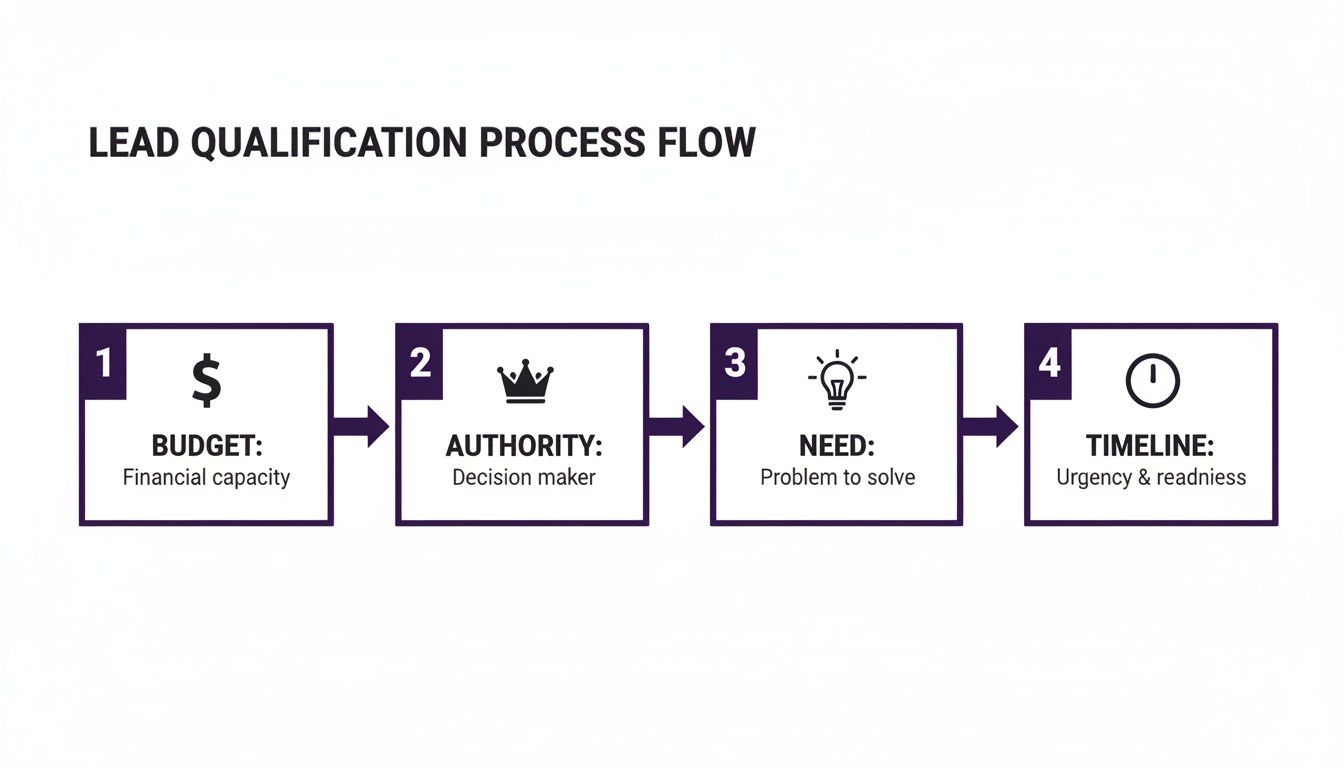
Think of each of these four elements as a pillar. If even one is missing, the whole deal could collapse. While automation can help pre-screen for some of these points, your follow-up questions are crucial for confirming the rest.
When you blend these qualification checks with an automated outreach system, you build a powerful and efficient sales pipeline. The data backs this up. In one benchmark, an autonomous AI sales agent outperformed manual efforts using ChatGPT by 20% in generating personalized outreach and 16% in engaging leads.
This isn't just about saving time. The numbers show that AI built for sales qualification actually delivers better results. It creates more relevant and compelling first-touch messages, freeing you up to focus on what humans do best: building relationships and closing deals.
Answering Your Top Questions About Lead Qualification
Even with a solid plan, you're bound to have questions as you start qualifying leads. It's a natural part of the process. Let's dig into some of the most common ones we hear from freelancers and agencies, especially when they're navigating a busy platform like Upwork.
Getting these answers straight will help you sharpen your process, sidestep some common traps, and ultimately build a much stronger sales pipeline.
How Long Should This Whole Process Take?
Your first pass at qualification should be lightning-fast. Seriously. When you're scrolling through job posts, you should know within a minute if an opportunity is even in the ballpark of your Ideal Client Profile (ICP). Speed is your best friend here—the whole point is to toss out the bad fits immediately.
The next stage, which happens after you've sent a proposal and are exchanging messages, might take a day or two. But remember, the real game-changer is how quickly you can disqualify the wrong leads, not just qualify the right ones.
This is where an automation tool like Earlybird AI can be a massive time-saver. It essentially cuts that initial vetting time down to zero by filtering jobs against your criteria for you. It even engages the good ones, so you're only spending time on conversations that are already pre-qualified.
What's the Real Difference Between an MQL and an SQL on Upwork?
These corporate-sounding acronyms actually have a simple, practical meaning for freelancers.
Think of a Marketing Qualified Lead (MQL) as a job post that just passed your initial sniff test. It’s in the right niche, the budget looks okay, and something about it caught your attention. It's a lead that's worth a closer look.
A Sales Qualified Lead (SQL) is a whole different beast. This is a prospect you're actively talking to. They’ve replied to your proposal, maybe you've confirmed the budget and timeline, and they have a genuine need you can solve. They've gone from being a possible client to a probable one, and they’re ready for a real sales conversation or a discovery call.
Can I Overdo It and Qualify Myself Out of Good Gigs?
Yes, absolutely. This is a very real danger if your criteria are way too strict. Being too rigid is a surefire way to miss out on some incredible opportunities.
For example, let's say your ICP states that a client must have an Upwork spend of over $100,000. If you stick to that religiously, you'll automatically ignore promising startups or new divisions in huge companies that have massive potential but just haven't spent money on the platform yet.
The key is finding the right balance. Your ICP and lead scoring are meant to be a compass, not a cage.
- Set firm, but realistic, criteria. Know your absolute deal-breakers, but build in some wiggle room elsewhere.
- Keep an eye on your lead flow. If you're consistently coming up empty, it’s a strong signal your filters are too tight.
- Revisit and tweak your criteria regularly. Your business changes, and your qualification process should change right along with it.
Smart qualification isn't about building a wall that keeps everyone out. It's about channeling your precious energy where it has the best chance of paying off.
Ready to stop wasting time on manual bidding and start closing more deals? Earlybird AI acts as your 24/7 sales assistant, finding perfect-fit leads on Upwork and sending personalized proposals in minutes. Discover how our members are doubling their reply rates and landing better clients.




