
← Back To Blog
How to Start Getting Work on Upwork Without Experience
You've opened your account, scrolled through job posts that look perfect, and hovered over the submit button. Then doubt kicks in. You have no reviews, no history on the platform, and no clear sense of which jobs are worth chasing.
That pause is normal, and it's useful too. Learning how to start getting work on Upwork isn't about firing off as many bids as possible on day one. It's about building a profile clients can judge quickly, picking a focused service you can prove, and treating every proposal as money and time spent from a small sales budget. Once you can read your own results, you can fix the right thing instead of guessing.
What Upwork Requires Before You Send a Single Bid
You can't submit proposals until your profile meets Upwork's minimum. According to Upwork's official beginner guidance on profile requirements, you need at least a profile photo, a profile overview, one employment-history entry, and one skill before you can bid.
Think of that profile as your storefront. Clients use it to judge your expertise, fit, and credibility before they reply. When you have no reviews yet, that first impression does almost all the work.
The Minimum Versus a Shortlist Version
- Profile photo: A clear headshot or brand image gets you started. A well-lit, professional photo of you earns more trust.
- Profile overview: A written introduction meets the rule. An outcome-led overview that names your niche and a result gives clients a reason to stay.
- Employment history: One entry is enough to bid. Past work described by what it achieved is stronger.
- Skills: One skill enables bidding. Specific skills that match the jobs you want help you appear relevant.
- Portfolio items: These aren't required to bid. Three to five relevant samples with context help you get shortlisted.
- Hourly rate: Pick a rate you can defend. Base a stronger rate on niche research and sample quality.
- Payment details: Connect these before applying. Verify and test them before your first bid.
Upwork also recommends adding a portfolio item, relevant work experience, degrees or certifications, and an introduction video where useful. If you're still at the account stage, follow the steps for creating your Upwork account in the right order before you rush ahead.
Your Starting Sequence
Work in this order. First, choose one primary service category. Second, write an outcome-focused overview. Third, upload several relevant samples. Fourth, list specific skills. Fifth, set a clear rate. Sixth, complete your payment details.
Keep your overview short enough to read comfortably on a phone. Clients skim, so put your service and result in the opening lines, not buried at the end.
Readiness test: Could a client in your niche tell within ten seconds what you sell and what result you deliver?
If the answer is no, fix the profile before you spend anything on bids.
Choosing a Niche You Can Sell in Your First Month
"I do everything" sounds flexible, but clients read it as vague. If your profile lists unrelated services, a client with one specific problem has no reason to pick you over a specialist.
"Pick a niche" is also too vague on its own. You'll do better by pairing a service you already have with a measurable outcome a client can picture.
A Three-Part Filter
Before you commit, ask three questions about your candidate niche.
- Visible demand: Can you see steady, recent job posts asking for this work right now?
- Provable skill: Can you produce a convincing sample within a few weeks?
- Client language: Can you describe the result in the client's own terms, not just your job title?
If you can't answer yes to all three, the niche will be hard to sell in your first month, even if you enjoy the work.
Adjacent Pairings That Make Sense
You don't need to reinvent yourself. Add an outcome to a skill you already own. Marketing can pair with workflow automation. Development can pair with AI integration. SEO can pair with content production. Design can pair with brand-asset automation, and operations can pair with data preparation.
Don't call yourself a generic "AI expert." That claim is broad and hard to prove. Sell human judgment plus implementation instead, such as reviewing automated output, setting up the workflow, and making sure the result fits the client's business.
Run a One-Week Test
Spend a week reading recent posts in your candidate area before you rewrite anything. Note the tools, budgets, and deliverables that repeat. Patterns matter more than one exciting post.
Then rewrite your overview around the top two repeated needs. If clients keep asking for the same deliverable, name it directly and match your skills and samples to it.
There's a trade-off to accept. A narrow niche gets you shortlisted faster, but it offers fewer total jobs. That's why you should launch with one primary service and keep one secondary service in reserve, not five equal offers competing on one profile.
Building Portfolio Samples Without Paid Client Work
Without reviews, your samples carry your profile. Clients often judge the work itself before they weigh your experience, so a focused set of samples can substitute for a history you don't have yet.
Start by reviewing what a client would see when they open your portfolio.

Three Routes to a Credible Sample
Build a spec project. Solve a realistic problem in your niche. Rewrite a landing page for a local café, draft a three-email onboarding sequence for a software product, or build a dashboard from a public dataset. Label it clearly as a sample project.
Redesign a public piece. Take an existing public example and improve it. Add a short before-and-after note that explains what you changed and why. The reasoning shows judgment, not just output.
Take a discounted or volunteer job. This can work if you agree on written scope first and get permission to publish the result. Don't work without boundaries just to get a sample.
For practical layout ideas, see the guidance on building a portfolio in Upwork that clients can scan quickly.
Give Every Sample the Same Four Parts
- The problem: State the client's problem in one sentence.
- Your approach: Explain what you did and why you chose it.
- The result: Show the visible or measurable outcome.
- The tools: Name the tools you used.
Aim for three to five samples that all show one kind of work. Remove unrelated older work and any sample with no context. A tight, focused set reads as a specialist profile.
This walkthrough shows how to present sample work clearly before you publish it.
Never publish client material without written permission. If you can't share exact figures, anonymize them or describe the result without inventing numbers.
Finding Jobs Worth Bidding On and Tracking the Results
A job can look perfect and still bring silence. Maybe you matched the skill list, wrote a careful proposal, and heard nothing. Without a record, you can't tell whether the problem was the job, your opening line, your rate, or your proof.
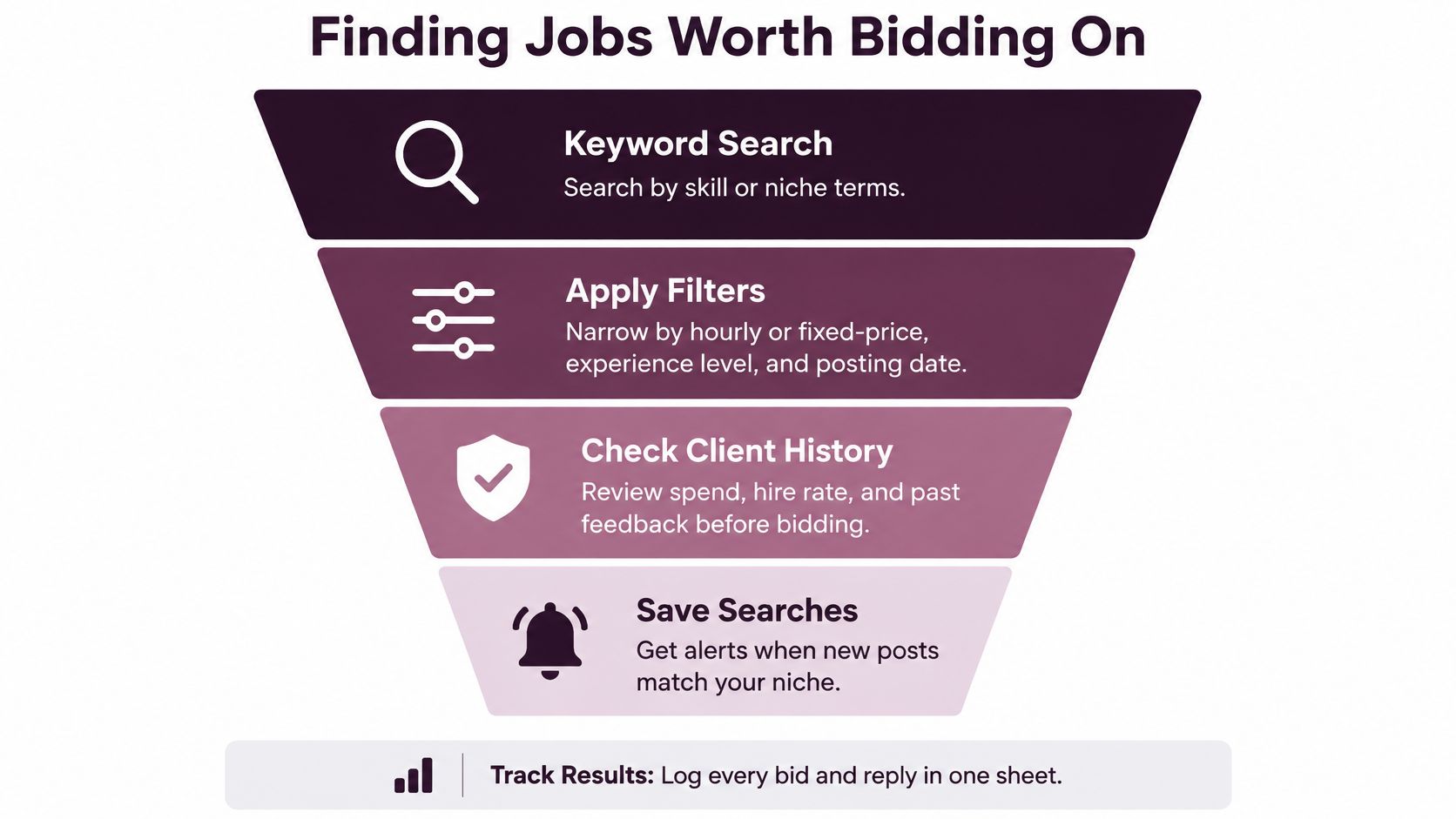
Start with better searching. Use keyword search for your niche terms, then filter by hourly versus fixed-price, experience level, client history, and posting date. Save searches so new posts in your niche reach you without constant manual checking.
Screen Every Job Before You Bid
- Budget fit: Does the budget fit the work being asked?
- Clear scope: Can you tell what's included and what success looks like?
- Client history: Does the client have a payment history you can check?
- Sample match: Does the deliverable match a sample you already own?
- Timeline fit: Can you start within the timeline stated?
If a job fails several points, skip it. Your time is part of the cost, even before Connects enter the picture.
Upwork's acquisition process works as a funnel. You find a relevant job, spend Connects, present terms and a cover letter, then move through client review, interviews, an offer, and delivery. Upwork's freelancer guide on proposals and Boosted Proposals says Boosted Proposals can increase the chance of being hired by 24%, but boosting uses extra Connects, so reserve it for strong fits.
Read Your Funnel Like a Diagnosis
- Jobs screened: Log relevant posts you read in full. If most fail your screen, tighten your saved-search filters.
- Proposals sent: Log the count and Connects spent. High volume with few replies suggests generic proposals.
- Client views or replies: Log views and replies per proposal. Views without replies suggest your opening line doesn't match the post.
- Interviews: Log calls or chats started. Replies without interviews suggest a scope, timeline, or rate mismatch.
- Offers: Log offers received and accepted. Declined offers suggest your rate or proof isn't convincing.
- Completed contracts: Log finished contracts and reviews. Finished work without reviews often means you didn't ask at close.
Tools can help you monitor new posts and keep this record organized. Earlybird AI, for example, connects to your Upwork account and surfaces jobs based on feedback about which projects fit you. Whether you use software or a simple sheet, review it every Friday.
Change one variable at a time. If you rewrite your overview, rate, and proposal style in the same week, you won't know what caused the change.
What Each Bid Costs in Connects
A proposal can look free until you count the tokens and time it takes to send. Upwork uses Connects to apply for jobs. Upwork's guidance on how Connects work says Connects cost $0.15 each and are sold in bundles.
The number needed varies by job and may change while a listing is open. Check the Connects cost on each post before applying. A budget based on yesterday's listings may not match today's.
Before buying more, check your current Connects balance and whether you already have enough for the jobs you want to pursue. For an explanation of the basics, read what Upwork Connects are and when you spend them.
A Simple Budget Illustration
The examples below assume 12 Connects per proposal. This is for illustration, not a fixed rate. Your actual spend depends on each job's listed cost.
- 10 proposals per month: 120 Connects, or $18 at $0.15 each.
- 20 proposals per month: 240 Connects, or $36 at $0.15 each.
- 40 proposals per month: 480 Connects, or $72 at $0.15 each.
Use these figures to set a ceiling, then track what you really spend. Connects and proposal-writing time are both part of your sales budget.
Work Out Your Break-Even Point
A few applications provide too little evidence to judge your results. Start with 15 to 20 proposals in one niche, then record replies and wins. Convert the Connects you spent into dollars at $0.15 each, and divide that cost by your number of wins. The result is your cost per win.
Compare it with the typical project value in that niche. If winning a project costs more in Connects than the project pays, sending more proposals will not solve the problem. Reconsider your niche, positioning, or proof.
Include unpaid hours in the calculation. Reading listings, preparing proposals, and answering early questions take time. A job that looks profitable on Connects alone may not be worthwhile once you count those hours.
Spending rule: A low-paid first project may be worth the Connects if it can produce a credible case study, a review, a reusable asset, or repeat work.
Apply that rule before you bid. Prioritize listings where a sample you already have matches the client's requested outcome. That match gives you a reason to spend both Connects and proposal time on the opportunity.
Writing Proposals That Earn Replies
Start with an opening clients skip every day. "I am a passionate developer with years of experience" could be sent to any job, so it tells the client nothing about theirs.
Compare it with a specific opening. "Your checkout drops users at the shipping step, so I would audit that flow first and report in three days." The second version names the problem, the first step, and the timing. A client can picture working with you.
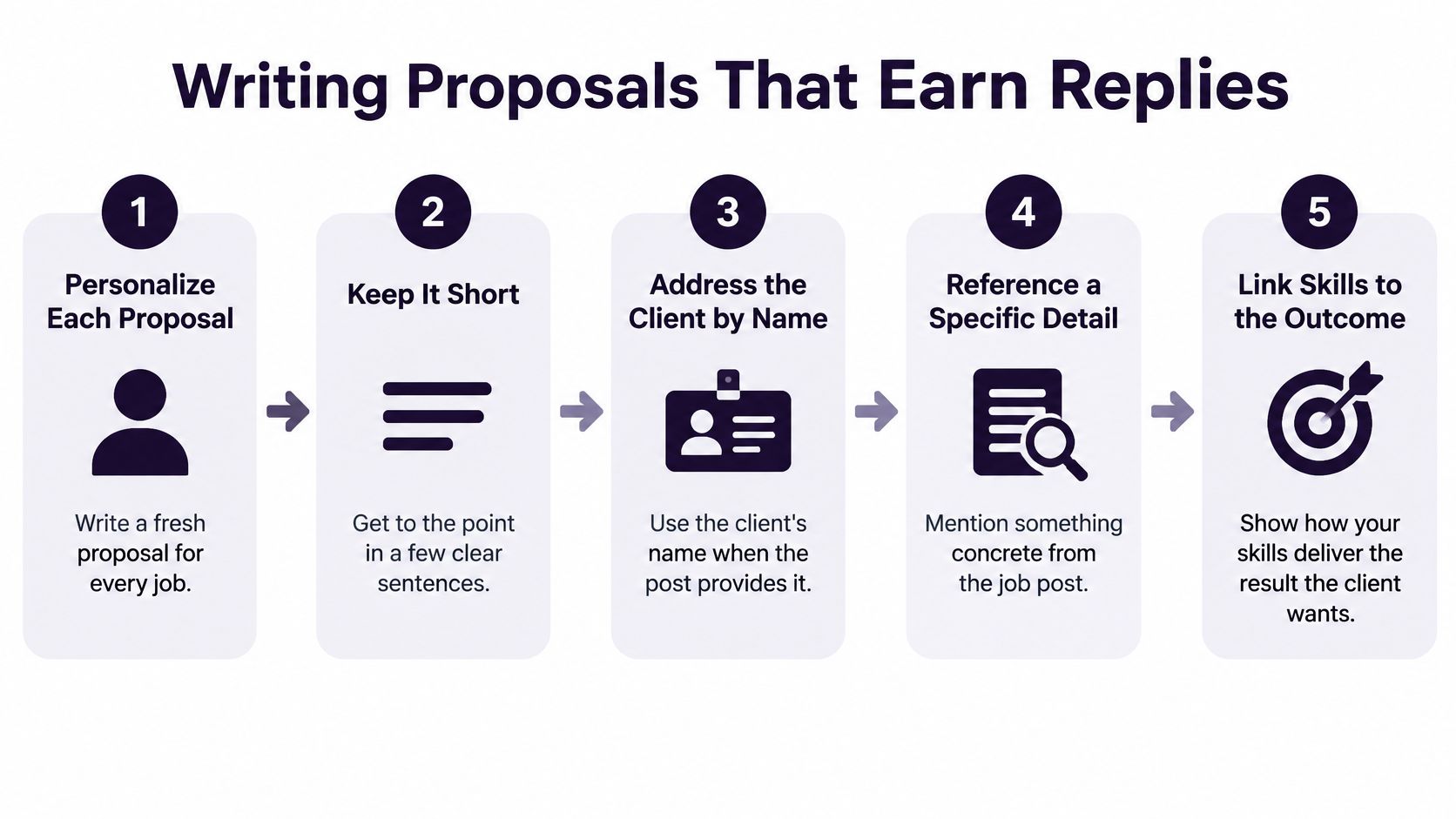
Upwork's guidance on becoming a freelancer and writing proposals recommends personalized proposals that address the client by name when possible, refer to something specific in the project, and connect your skills to the requested outcome. It also advises keeping proposals short and keeping your profile current.
A Five-Step Proposal Structure
- Open with a specific detail: Mention something concrete from the post, such as the tool, audience, or bottleneck named.
- State the outcome and first step: Say what you'd deliver and what you'd do first. A clear first step lowers the client's risk.
- Show one relevant sample: Link one sample that matches the request and add a one-line result. Don't attach everything you own.
- Propose timeline and terms: Give a timeline and a rate, or suggest a fixed first milestone if the full scope is unclear.
- End with one question: Ask one easy question that invites a reply, such as which version or dataset you'd start from.
Keep the full proposal short. You're trying to start a conversation, not deliver the whole project plan before you've been hired.
Handling Replies and Unclear Budgets
When a client replies, answer within a few hours during their working day if you can. Ask one scoping question that moves the project forward. Don't push for a call before the client asks for one, because that can feel rushed.
Some posts have no clear budget. Don't guess a full price for undefined work. Propose a paid discovery milestone instead, with a defined output such as an audit, outline, or technical check. The client gets useful information, and you avoid pricing blind.
Don't send the same text to every listing. Personalization takes longer per proposal, but it protects your Connects budget because each bid has a clearer fit. Fewer, stronger applications also give you cleaner funnel data. If replies stay low, you'll know the issue is your opening, proof, or job selection, not random volume.
Apply regularly to projects that fit, and update your profile as you finish samples or earn testimonials. Your proposal and profile should tell the same story every time a client clicks through.
Shipping Your First Project and Asking for a Review
Price your first project by what you'll really keep. Upwork's explanation of the Freelancer Service Fee states the fee ranges from 0% to 15% per contract, appears when you submit a proposal or receive an offer, and is locked once sent.
Use the displayed percentage, not one assumed platform-wide rate. For example, a $500 contract leaves $450 at a 10% fee and $425 at a 15% fee. That difference affects whether the project is worth your time.
Deliver Without Surprises
Send a kickoff message that confirms scope, timeline, and number of revisions. Share progress at each milestone instead of waiting until the end. When you deliver, add a short summary of what you did and what the client should check.
If the client asks for something new, name it clearly as an addition. Quote it separately or ask them to approve an added milestone before you start. That protects both sides from quiet scope creep.
If a client goes quiet after delivery, send one polite follow-up after three working days. Don't send daily reminders. If there's still no response, follow the contract process to close properly.
Ask for the Review at Close
Ask while the result is fresh. Thank the client, name the result you delivered, and request a review in one short message. For example, mention the completed emails, page, or dashboard and ask if they'd be willing to leave feedback.
Then log the outcome in your funnel sheet. Record the Connects spent, fee paid, hours worked, and whether a review arrived. Compare it with your earlier proposal numbers, so your next bid starts from evidence, not hope.
If screening jobs, watching for fresh posts, and tracking every proposal is taking hours you should spend delivering, Earlybird AI can connect to your Upwork account, learn which projects fit you from your feedback, and help you send personalized proposals and follow up with clients. Visit the site to set up your profile, define your ideal jobs, and start building a measured pipeline for your first contracts.




