
← Back To Blog
Is Upwork Safe? Your Guide to Secure Freelancing
So, is Upwork actually safe? The short answer is yes, but with a big asterisk: your safety really comes down to how you use the platform.
I like to think of Upwork as a bustling, well-lit city. It has solid infrastructure—things like Payment Protection and a formal dispute process—to keep everyone safe. But just like in any city, you still need to be smart, keep your wits about you, and know which back alleys to avoid.
Understanding Upwork's Core Safety Pillars
Before diving headfirst into bidding on projects, it's natural to ask, "Is my time and income going to be secure here?" It's a question I hear all the time from new freelancers and agency owners, and it's the right one to ask.
The good news is that Upwork has staked its reputation on creating a secure marketplace. This isn't just marketing fluff; it's a system built from the ground up to protect both sides of the contract. For you, this means you can pour your energy into doing great work instead of stressing about whether you'll get paid.
The Foundation of Trust
Upwork’s commitment to safety goes deeper than just its user-facing features. The company has serious cybersecurity measures in place to protect your data, backed by a risk management program that covers everything from physical security to the tech running the platform.
This isn't just an afterthought; it's a core part of their business model. If you’re curious about the technical details, you can even find details on Upwork's cybersecurity commitments in their SEC filings.
Let's break down the key features that keep you protected in a practical way. This table gives you a quick snapshot of what Upwork does to keep your business safe.
Upwork Safety Features at a Glance
Safety FeatureHow It Protects YouBest ForPayment ProtectionUses an escrow system for fixed-price jobs and a logged-hours guarantee for hourly projects.Securing payment for completed work and preventing non-payment from clients.Dispute ResolutionProvides a formal, third-party mediation process to resolve disagreements over payments or deliverables.Settling conflicts fairly without needing to resort to legal action on your own.Verified Client HistoryLets you see a client’s payment verification status, past spending, and reviews from other freelancers.Vetting potential clients and spotting red flags before you accept a contract.Secure On-Platform CommunicationKeeps all messages, files, and payments within Upwork's system, which is required for protection.Ensuring all interactions are documented and covered by Upwork's Terms of Service.
These aren't just features on a list; they are the tools you'll use every day to protect your business.
Think of these pillars as your safety net. By understanding how they work and making a habit of using them, you're not just avoiding risk—you're building a foundation for a predictable and successful freelance career.
How Upwork Payment Protection Secures Your Earnings
For any freelancer, the number one question is always the same: "Am I actually going to get paid for this?" Upwork stakes its reputation on answering that question with a confident "yes," and they back it up with a system called Payment Protection.
This isn't just a marketing slogan; it's a real safety net with two distinct parts, one for fixed-price jobs and one for hourly contracts. Getting to know how each works is the key to feeling secure on the platform and focusing on your work instead of worrying about invoices. Let’s dive into how Upwork protects your income.
Escrow for Fixed-Price Projects
When you take on a project with a set price, Upwork uses an escrow system. It’s pretty simple, really. Think of Upwork as a neutral third party that holds the client's payment in a secure account before you write a single word or line of code.
Before you start, the client has to fund the first milestone. You can log in and see for yourself that the money is there, locked and loaded. This completely removes the classic freelancer nightmare of delivering great work only to have the client vanish into thin air. The payment is already secured.
Once you submit your work for that milestone and the client hits "approve," Upwork releases the funds from escrow and sends them straight to your account. This system guarantees the client is serious and has the budget, making fixed-price work far less of a gamble.
It turns a handshake deal into a transparent, protected transaction. You know the money is there, and the client knows they only pay when they approve the work.
Hourly Protection with the Work Diary
For hourly contracts, the safety net is called Hourly Protection. This relies on the Upwork Desktop App, which you’ll need to install on your computer. As you work, the app tracks your time and periodically snaps screenshots of your screen, compiling everything into what’s called a Work Diary.
This diary becomes your proof of work. If you follow the rules, your pay is guaranteed for the hours logged—even if a client disputes the hours, disappears, or their credit card gets declined. It takes all the stress out of chasing down payments.
To make sure you're covered, your tracked time needs to meet a few simple conditions:
- You must have an active hourly contract.
- The client needs a verified payment method on file. (Always double-check this!)
- You have to use the Upwork Desktop App to log time; manually added hours aren't protected.
- Your Work Diary screenshots must show you're actively working on the client's project.
- The memos you write for each time block need to clearly describe what you were doing.
Follow these steps, and you create an airtight record of your work. It makes hourly billing on the platform remarkably safe, turning every minute you log directly into money in the bank.
Recognizing and Avoiding Common Upwork Scams
While Upwork’s Payment Protection acts as a fantastic safety net, the best defense is always a good offense. Learning to spot trouble before it even starts is a skill that will serve you well. The platform is incredibly safe when you play by the rules, but scammers are always looking for ways to pull freelancers into a bad spot.
Their primary goal is almost always the same: get you to work for free or, even more dangerously, lure you off the platform where you have zero protection. Recognizing their tactics is what separates a potential victim from a savvy professional. Upwork knows this, which is why, according to its 2023 Impact Report, it actively filters sketchy jobs and educates freelancers on fraud. You can get the full rundown on Upwork's ongoing safety initiatives in their report.
Scammers rely on a few time-tested playbooks. Here’s a quick guide to help you identify and shut down the most common schemes you'll encounter.
Common Upwork Scams and How to Spot Them
Scam TypeRed Flags to Watch ForYour Safest ActionThe "Free Sample" TrapAsks for a "quick test" or "sample" before hiring. Phrases like "show me what you can do first" are common. They may try to get full projects done piece by piece from different freelancers.Politely decline and explain that your portfolio demonstrates your skills. Offer to do a small, paid trial project with a funded milestone. Never work for free.Off-Platform Payment PloyClient offers to pay you directly via PayPal, wire transfer, Venmo, etc., usually promising to "save you on fees." They'll often pressure you to move the conversation to Telegram, WhatsApp, or email immediately.Immediately refuse and state that all communication and payments must remain on Upwork to comply with its Terms of Service. This is non-negotiable.The Phishing SchemeYou're asked to click a link to a third-party site to "register" or fill out an "application." The site looks official but is designed to steal your Upwork login credentials or personal information.Never click on suspicious links. All necessary hiring steps can and should happen within the Upwork platform. Verify the client's identity through Upwork's messaging system only.The Check Cashing ScamClient "accidentally" sends you a check for more than the agreed amount and asks you to deposit it and wire back the difference. The initial check is fraudulent and will eventually bounce, leaving you responsible for the full amount.Never accept physical checks or any form of overpayment. Upwork's escrow system is the only legitimate payment method. Report the client immediately.
Remember, any request that feels unusual or too good to be true probably is. Trust your gut and stick to the platform's rules.
The Off-Platform Payment Ploy Deserves a Closer Look
This one is the most dangerous scam of them all. A client might sound charming and professional, dangling the idea of saving you from Upwork's fees by paying you directly. It's a tempting offer, but it’s a trap, plain and simple.
Once you communicate or accept payment outside of Upwork, you are completely on your own. If the client disappears without paying, Upwork’s support and dispute resolution cannot help you.
Legit clients get it. They understand that the platform fees are what fund the very security that makes the transaction safe for everyone. Any push to take things to a personal email, Telegram, or WhatsApp before a contract is in place is a massive warning sign. For a deeper dive into platform rules like this, our guide on whether Upwork is a legit platform for freelancers is a great resource.
More Red Flags to Keep on Your Radar
Beyond those big scams, you should also develop an intuition for other suspicious behaviors. Think of it like a sixth sense for spotting bad clients. If a job post just feels off, it probably is.
Keep an eye out for these warning signs:
- Vague Project Descriptions: Scammers often post jobs with fuzzy requirements to attract as many people as possible.
- Suspiciously High Pay: An offer that promises a fortune for simple work is almost always a bait-and-switch.
- Pressure to Start Immediately: They’ll create a false sense of urgency to rush you into making a bad decision.
- Requests for Personal Info: You should never have to provide your bank details, a copy of your ID, or your home address.
- A Ghostly Client Profile: Be extra careful with brand-new accounts that have no hire history or a verified payment method.
How to Properly Vet Clients and Contracts
The safest projects don't start when you sign a contract; they start the moment you click on a job post. Learning to be your own detective is one of the most important skills you can develop on Upwork. By proactively vetting clients and picking apart contracts, you can sidestep potential headaches before they ever cost you time or money.
Your first stop should always be the client’s profile. Don't just glance at it—really dig in. The first thing to look for is the little blue "Payment method verified" checkmark. If it's not there, that's a huge red flag, because Upwork's Hourly Protection won't cover you without it.
Next, check their history on the platform. A client with a long track record, a solid amount of money spent, and positive feedback from a bunch of other freelancers is a much safer bet than a brand-new account with zero history. Think of it like a client's credit score; a higher score means lower risk for you.
Reading Between the Lines of a Job Post
Once the profile looks good, it’s time to dissect the job post itself. Is it clear and detailed, or is it vague and confusing? A well-defined project scope with specific goals tells you the client knows what they want and respects your time. Vagueness, on the other hand, can be a warning sign of a disorganized client or a project doomed to endless revisions.
After reading the post, dive deep into the reviews other freelancers have left. Don't just look at the star rating; the real story is in the comments.
- Average Hourly Rate: Look at what they've paid other freelancers. Does it match your rates, or do they have a history of lowballing?
- Feedback Details: Do the comments praise the client for clear communication and quick payments? Or are there hints of scope creep, delayed responses, and other frustrations?
- Hire Rate: A super low hire rate could mean the client is just "window shopping" for free ideas and has no real intention of hiring anyone.
Doing this groundwork helps you build a clear picture of who you'd be working with. Sending a great proposal is only half the battle; our guide on writing winning cover letter examples for Upwork can help you grab the attention of the top-tier clients you find.
Building a Bulletproof Contract
After you've done your due diligence and are ready to move forward, the contract becomes your most important safety net. It doesn't matter if it's an hourly or fixed-price job—clarity is everything.
For fixed-price projects, always insist on breaking the work into smaller, manageable milestones. Each milestone needs a clear deliverable and a corresponding payment that is funded in escrow before you start the work for that piece. This approach dramatically reduces your risk and ensures you get paid as you go.
For hourly projects, lay out all the expectations before you log a single minute. Get on the same page about the scope, the estimated hours per week, and how you’ll report your progress. This prevents misunderstandings down the road and gives you a solid foundation for your Work Diary entries. Upwork’s growing revenue and massive base of over 796,000 active clients show the platform has the stability to back these payment systems. You can learn more about Upwork's impressive platform statistics and why that matters for your security.
A strong contract isn't about mistrust; it’s about creating mutual understanding. When both you and the client know exactly what to expect, the project is set up for success from day one.
Navigating Automation and Agency Tools Safely
If you're a growing agency or a freelancer who's serious about scaling, you know the grind. Manually sending proposal after proposal can quickly become a full-time job in itself, completely bottlenecking your growth. Automation tools look like the perfect answer, but they come with a huge question: will using one get my Upwork account banned?
The truth is, it completely depends on the tool you choose.
There's a world of difference between a cheap, sketchy bot and a professional, compliant automation platform. The risky bots are basically spam cannons. They blast out generic, cookie-cutter proposals, often from shared IP addresses that are already on Upwork's naughty list. This is a fast-track to getting your account suspended because it's a blatant violation of Upwork's Terms of Service.
What Safe Automation Actually Looks Like
On the flip side, reputable automation tools are built with one thing in mind: account safety. They're designed to work in a way that’s completely indistinguishable from you, ensuring every action falls well within Upwork's guidelines. Think of it as having an incredibly efficient virtual assistant, not a rogue robot.
How do they pull this off? It comes down to a few key things:
- Mimicking Human Behavior: These tools don't just fire off proposals at machine-gun speed. They introduce natural-seeming delays and variations in activity, just like a real person would.
- Using Clean IP Addresses: You get a dedicated, clean IP address assigned only to you. This means your activity never gets lumped in with spammers or flagged for suspicious behavior.
- Operating Within Platform Limits: Good tools are hardwired to respect Upwork's rules. They're programmed to avoid anything that could possibly be seen as spam or abuse.
This smart approach is the core of modern sales automation for service-based businesses, and it’s what lets you scale your client outreach without putting your account on the line.
Secure Workflows for Agency Teams
This focus on safety becomes absolutely critical when you're an agency managing multiple freelancers under one roof. The temptation to have several team members log into a single Upwork account is a recipe for disaster and will get you flagged almost instantly.
Good platforms solve this problem with secure, multi-user workflows. This lets each person on your team work from their own login while contributing to the agency’s central outreach efforts—all without breaking Upwork's rules or jeopardizing anyone's account.
This structure is the only way to scale an agency safely on the platform. Your team can collaborate on finding leads and sending proposals without tripping any of Upwork's security wires.
By picking tools designed for compliance from the ground up, you turn automation from a potential risk into a powerful, secure asset for growing your business.
What to Do When Something Goes Wrong
Let's be realistic: even with careful planning and the best intentions, things can go sideways. A project can hit a snag, or you and a client might just not see eye to eye. When that happens, it's reassuring to know you aren’t left to fend for yourself.
Upwork has a formal mediation process designed to step in when disagreements pop up. Think of it as having a neutral third party on call. This system ensures that both you and the client get a fair hearing, turning a potentially stressful situation into a structured, manageable one.
Filing a Dispute for Different Project Types
How you get help depends on the type of contract you're working on—hourly or fixed-price.
For hourly projects, disputes usually revolve around the hours you've logged. If a client challenges your Work Diary, you have the right to dispute their claim. An Upwork mediator will then review your diary's screenshots and activity memos to determine if the hours qualify for Payment Protection.
With fixed-price projects, it’s all about the money held in escrow. If you submit a milestone and the client won't approve the release of funds, you can file a dispute. This kicks off a mediation where you, the client, and an Upwork mediator try to find common ground. If you can't reach an agreement, the case can move to paid arbitration for a final decision.
Reporting Suspicious Activity
Keeping the platform safe is a team sport. If you spot a job post that screams "scam" or a client asks you to break Upwork's rules (like paying you outside the platform), reporting it is the best thing you can do.
You can easily flag a suspicious job right from the posting itself. You can also report a specific user from their profile or even directly from your message history. Every report you file helps protect the entire community, making it a safer place for freelancers and clients alike.
This flowchart maps out the key decisions for keeping your automation workflows safe and compliant.
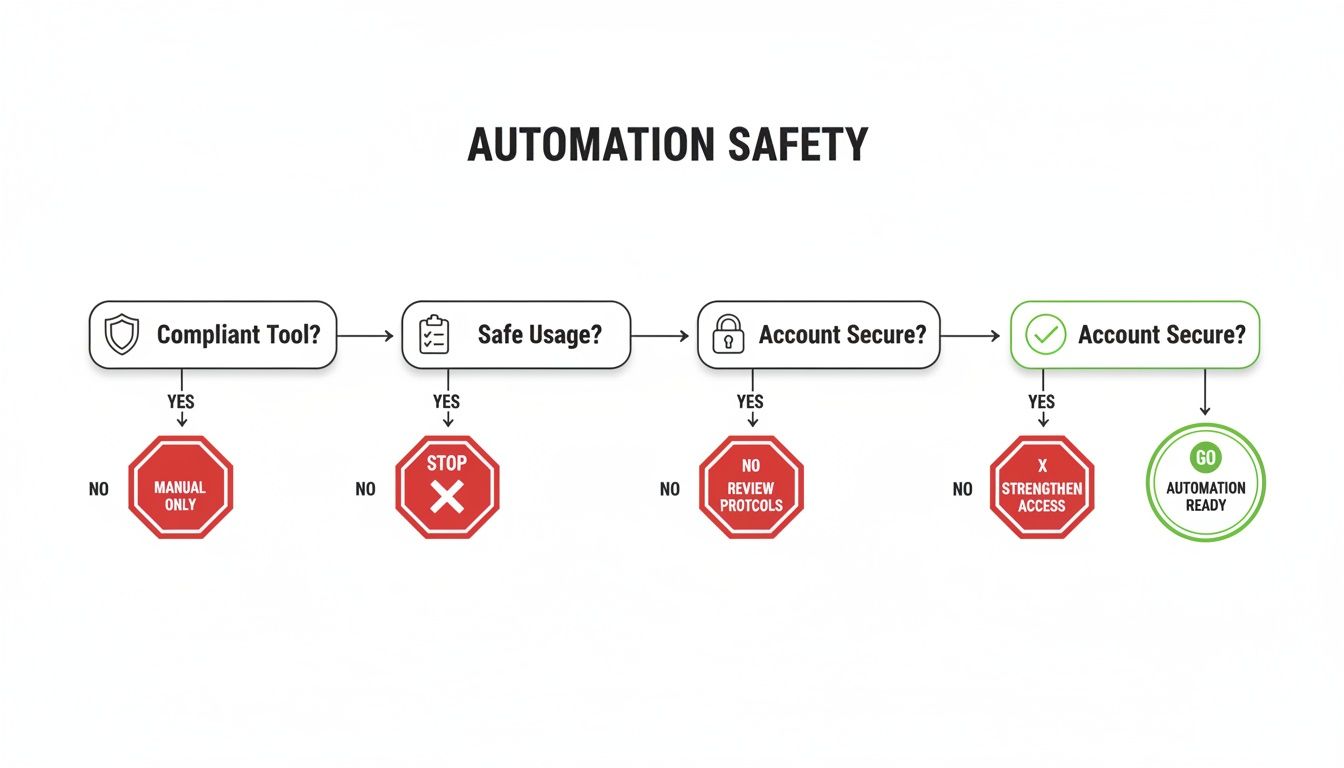
As the visual shows, solid account security really comes down to choosing the right tools and using them responsibly.
A Few Final Questions About Upwork Safety
To wrap things up, let's tackle some of the most common questions that pop up for freelancers and agencies trying to navigate Upwork safely. Think of this as a quick-reference guide to help you move forward with confidence.
Can Upwork Ban My Account for Using Automation?
Yes, they absolutely can—but it’s not the automation itself that’s the problem. The issue is how it's done. Upwork's Terms of Service are designed to stop spammy, poorly-coded bots that degrade the platform experience.
A well-designed, reputable automation tool is a different story. These platforms are built from the ground up to respect Upwork's rules. They mimic natural human behavior, manage IP addresses carefully, and operate well within the platform's guidelines to keep your account from getting flagged. The secret is choosing a tool built for compliance, not just brute-force speed.
How Does Upwork Protect My Data?
Upwork takes data security seriously, employing several layers of defense. They use strong data encryption to protect your sensitive personal and financial information, partner with fully compliant payment processors, and maintain a dedicated in-house security team.
They also adhere to strict data privacy protocols and undergo routine security audits to safeguard user data against breaches, a commitment they detail in their public SEC filings.
Ultimately, Upwork provides a secure framework, but your awareness is the key to using it effectively. By following best practices, you can confidently build a secure and profitable freelance business.
What if a Client Refuses to Pay?
This is precisely where Upwork Payment Protection becomes your best friend. For hourly projects, as long as you've used the desktop time tracker correctly, your payment for those hours is guaranteed.
On fixed-price contracts, the client's funds are secured in an Escrow account before you even start. If they refuse to release the payment after you submit the work, you don't have to chase them down. You simply file a dispute, and an Upwork mediator will review the work and communications to make a fair decision.
Ready to scale your agency on Upwork without compromising safety? Earlybird AI automates your outreach with compliance-first technology, so you can win more clients while your account stays secure. Learn how Earlybird AI can transform your sales process.




