
← Back To Blog
Project Management AI: A Practical Guide for Agencies
You're already doing the same dance every week. Five bids go out late at night, two client threads are open in Slack and email, a milestone slips because nobody caught the dependency, and Sunday turns into reporting cleanup instead of delivery work.
That's where project management AI starts to matter for agencies and freelancers, not as a shiny add-on, but as a way to stop losing time to the parts of the job that never stop. The market is already big enough to be a real software category, with AI in project management valued at $3.67 billion in 2025 and projected to grow from $4.14 billion in 2026 to $13.29 billion by 2034, a 15.70% CAGR that points to durable enterprise demand, not a fad (Fortune Business Insights). At the same time, adoption is showing up in live teams, not just vendor decks. One 2025 survey reported 66% of professionals now use AI tools for project management, up from 41% in 2023 (2025 AIPM Research).
The Day an Agency Owner Stops Doing Everything Manually
The agency owner's day usually doesn't fail in one dramatic moment. It fails in fragments, a proposal that should've been sent before lunch gets written after midnight, a client reply waits because the inbox is split across accounts, and a delivery note is still half-finished when the next discovery call starts. The work looks manageable until the week piles up, then every manual handoff becomes a bottleneck.
That's the practical reason explore Donely's AI platform is relevant here. Tools in this category only matter if they reduce the work that keeps getting repeated across bidding, follow-up, status reporting, and scheduling. Agencies don't need another dashboard that asks for more attention, they need systems that take over the repetitive coordination work already eating the calendar.
Why this feels different from enterprise software
Most AI project management content talks like everyone is running a PMO with clean data and neat stage gates. Agency life is messier. One freelancer may be juggling Upwork bids, a design handoff, and a client call across three time zones, while another person is trying to keep proposal quality high without rewriting the same positioning from scratch every day.
That's why automation advice for generic corporate teams misses the point. The problem isn't only tracking tasks. It's the constant switching between prospecting, communication, delivery, and reporting, often inside different tools and different logins.
For that reason, a useful way to think about project management AI is as an always-on operations layer that reduces the drag between those jobs. It doesn't remove judgment. It removes repetition, which is usually where small agencies lose momentum first.
Practical rule: if a task repeats, depends on similar inputs, and needs fast response times, it belongs on the automation shortlist.
For teams that want a narrower starting point, the first useful move is often to automate repetitive work before touching the broader delivery process. A useful primer is this guide on repetitive-task automation, because the strongest AI rollout usually starts with one annoying workflow, not the entire business.
What Project Management AI Actually Means
Think of project management AI as an operations autopilot. It handles the repetitive cockpit work, the checks, the reminders, the data sorting, the first-pass drafting, so the human can stay focused on the flight path. In an agency, that means the system helps with planning, routing, and reporting while people still handle the client relationship and the final call on strategy.
The useful technical pieces, translated for agency work
The main building blocks are easier to understand when mapped to real tasks. Machine learning helps forecast what's likely to happen next, which is useful when you're predicting whether a proposal needs a follow-up or whether a project is likely to slip. NLP, or natural language processing, helps read and draft messages, briefs, and status updates, which matters when inbox speed is a competitive advantage. Neural networks and deep learning are the pattern-recognition layers that help systems spot recurring risk signals or make better scheduling decisions from historical project data.
The most important part is not the model label. It's whether the feature is doing the work you need. A real AI PM feature should help with structured, high-volume decisions such as planning, resource allocation, risk prediction, and status monitoring, which aligns with IBM's summary of where these systems are strongest (IBM). A glorified macro can only shuffle templates. A useful AI layer can reason over inputs and produce a better next action.
What to ask before you trust a tool
The most technical requirement is a specification-first design. The feature spec should define the model task type, input and output schema, minimum acceptable accuracy or task metric, p95 latency target, fallback behavior, and a held-out evaluation dataset before integration begins (InstitutePM). That sounds formal, but it's the difference between a feature that helps and a feature that creates hidden failure modes.
The safest tools are the ones that can prove their behavior on your kind of work before they touch live operations.
If a platform can't explain how it handles bad inputs, edge cases, and human override, it's not ready for agency operations. The best systems feel less like magic and more like a disciplined assistant that knows exactly when to defer.
The Core Capabilities That Change Agency Operations
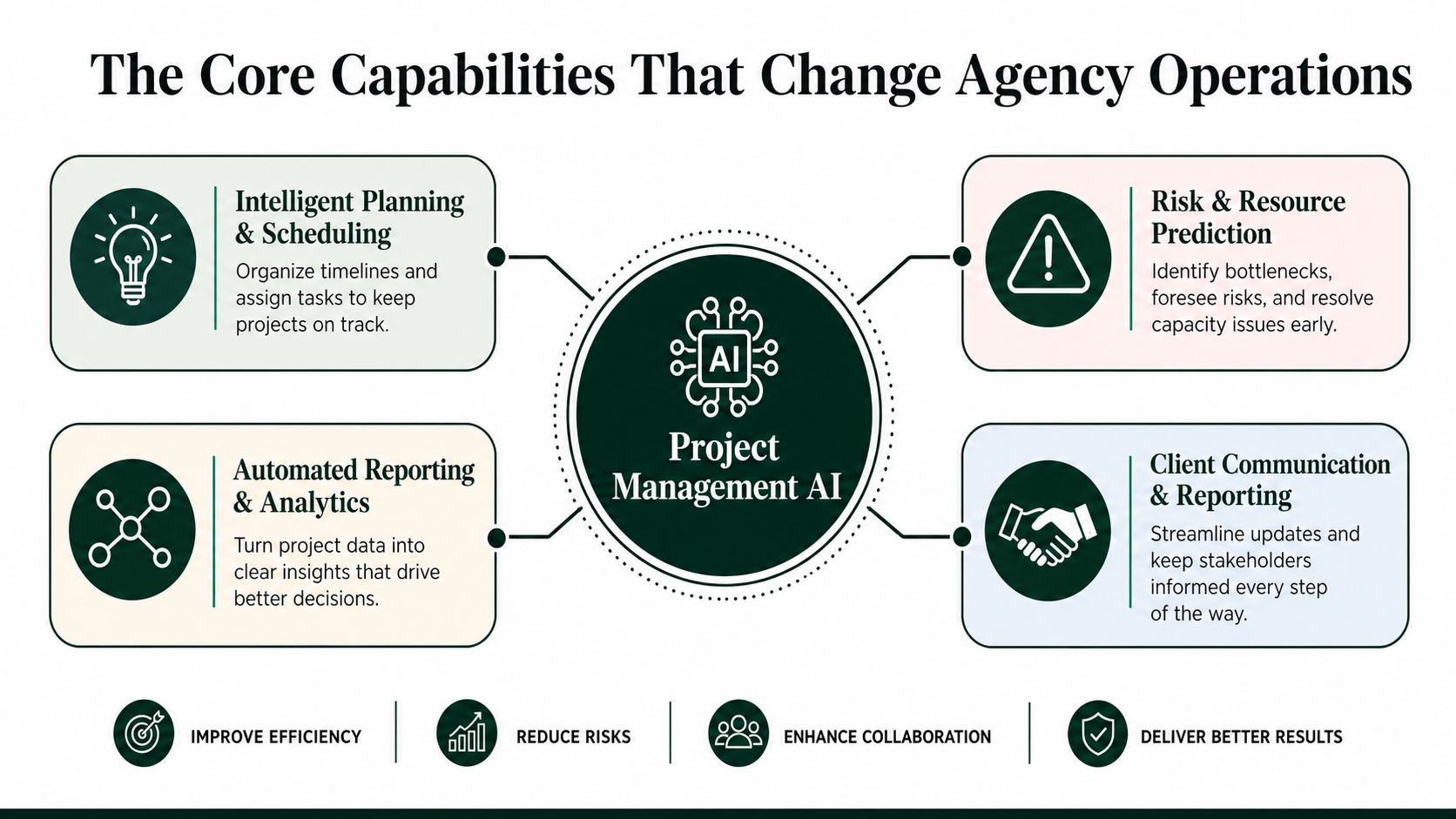
The category only becomes useful when you separate it into jobs. In agency and freelancer work, the highest-impact capabilities usually fall into four buckets, and each one replaces a specific kind of manual effort.
Planning and scheduling
This is the most obvious win. AI can sort through deadlines, dependencies, and available capacity to produce cleaner schedules than a person can build in a hurry. In practice, that means fewer last-minute reshuffles and less time spent deciding who should do what first.
The literature review evidence points to resource allocation, scheduling, risk prediction, and decision support as the most common uses, with strongest application in planning and monitoring (FH Wedel literature review). For an agency, that translates into faster internal assignment and fewer conflicting priorities.
Risk and resource prediction
AI surfaces problems before they become visible to the client. If a project is trending toward overload, missed handoffs, or unrealistic timing, a good system can flag it early. That matters because manual risk checks often arrive after the schedule is already under pressure.
IBM's framing is useful here too, because the value comes from analyzing large project datasets and finding patterns humans miss in real time (IBM). The practical payoff is earlier intervention, not prettier dashboards.
Communication and reporting
AI also saves time in the least glamorous part of agency life, the updates. It can draft status reports, summarize meetings, and assemble client-facing progress notes from the underlying work history. That means fewer blank-page moments on Friday afternoon and less weekend reporting cleanup.
Agency reality: the best automation is usually invisible to the client. They just experience faster replies and cleaner updates.
A useful place to compare broader marketing workflow tools is this tool directory from The AI CMO, especially if you're mapping project handling against content, campaign, or client delivery operations.
Analytics that actually inform decisions
Analytics only matter when they change behavior. AI-driven reporting is useful when it helps an owner decide whether to push, pause, reassign, or escalate. It's not enough to know what happened. The system has to help decide what happens next.
For a more specific agency software stack, it also helps to compare this layer against marketing agency management software options, because the key question is how the AI sits inside the rest of the operations stack rather than replacing it.
A Real Workflow From Upwork Bid to Client Delivery
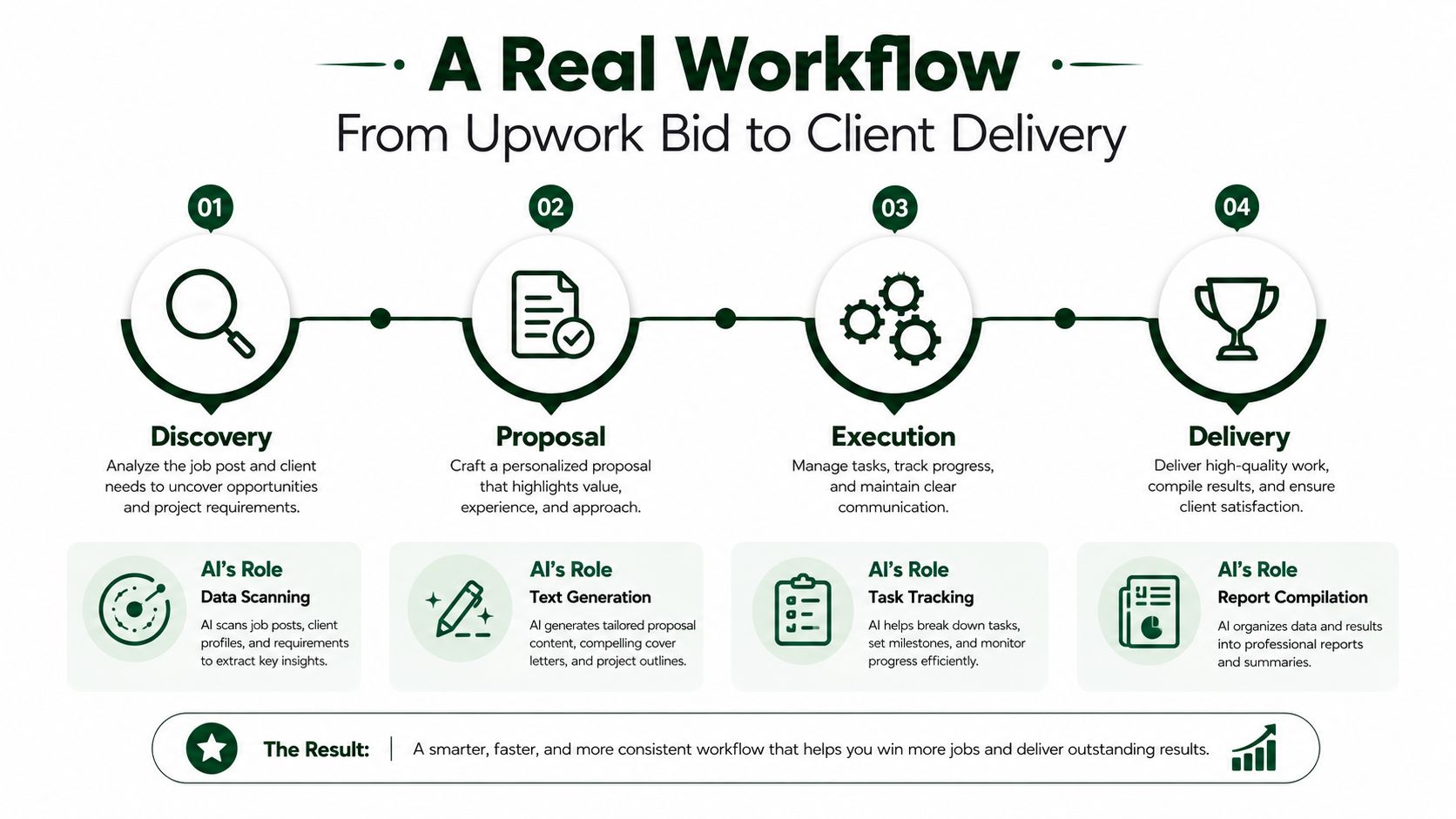
The cleanest way to understand this category is to follow one lead from start to finish. On Upwork, speed matters from the first feed scan to the final report, and the workflow breaks down fast when one human has to do every step manually. AI earns its keep when it keeps the whole chain moving.
Discovery and bid selection
The first job is reading the market faster than everyone else. An AI layer can scan incoming postings, compare them with your past wins, and flag the jobs that fit your profile and feedback pattern. That saves the mental load of manually sorting through low-fit opportunities.
The most useful part is not broad browsing. It's filtering to the few jobs worth attention before your competitors even see them. For agencies running multiple bidder accounts, that timing advantage is where the operational value starts.
Proposal drafting and client replies
Once a job is worth pursuing, AI can assemble the first draft from your profile, portfolio, and prior proposal language. That turns the work from writing from scratch into editing for fit. In the sales side of the workflow, that's often the difference between sending one careful bid and sending a timely one.
The same logic applies after the first client message. If the tool can draft a reply in minutes and keep the thread warm until the prospect confirms intent, the lead doesn't go cold while someone is in another call. Earlybird AI is one example of a system built around that motion, with automated bidding, messaging, profile optimization, and multi-user workflows for agency teams.
Operational advantage: fast replies don't just save time, they keep the conversation alive long enough for a call to happen.
For deeper process mapping, this Upwork automation guide is a useful companion, especially if you're trying to decide where automation should end and human follow-up should start.
Delivery and reporting
After the deal closes, the workflow changes, but the logic stays the same. AI can break the project into tasks, help monitor progress, and assemble the final report from notes, updates, and completed items. The owner still has to manage scope and client tone, but the system can remove the drudgery around it.
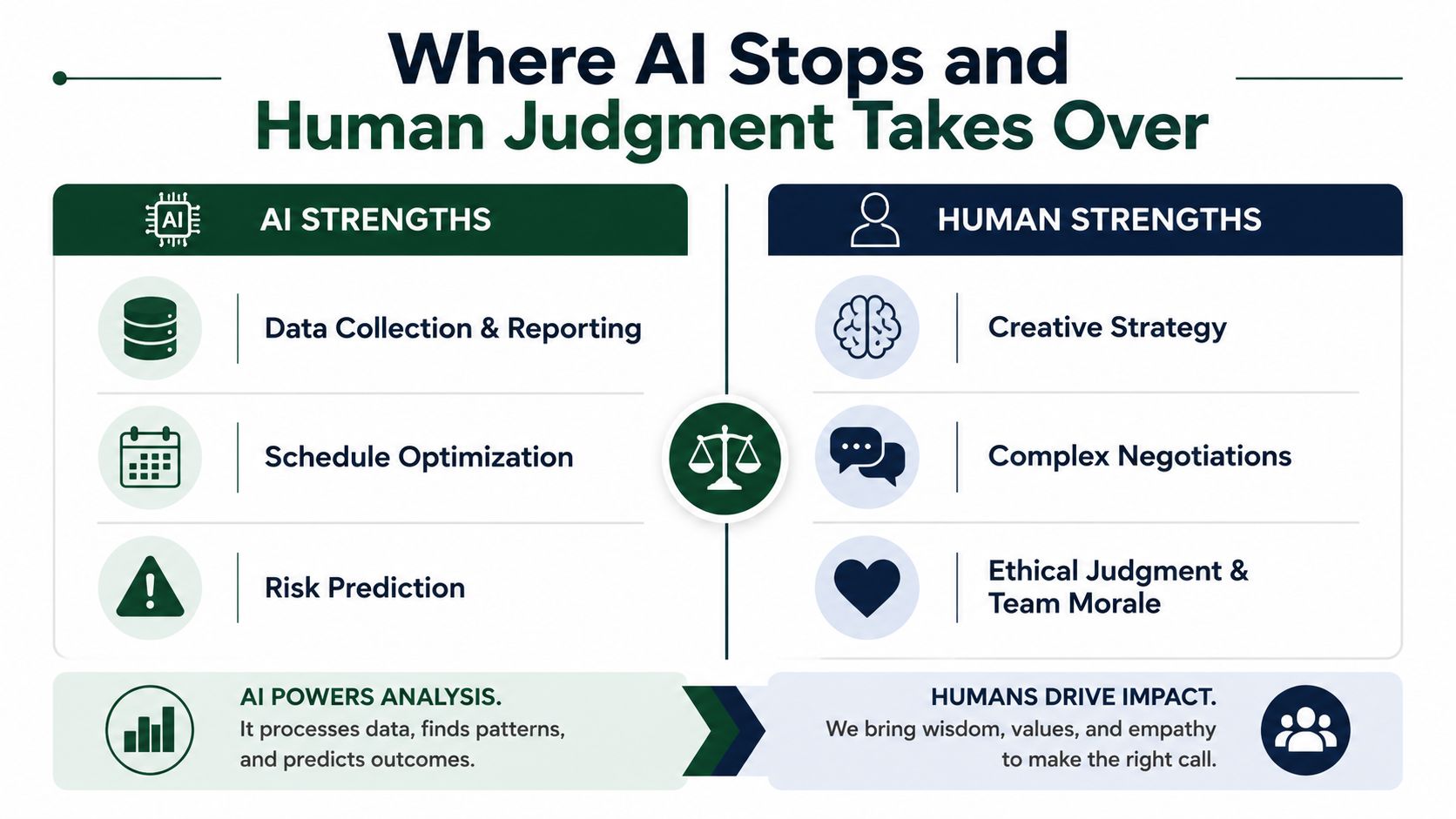
The practical boundary is simple. Let AI do the scanning, drafting, scheduling, and compilation. Keep strategic calls, pricing judgment, and client positioning in human hands.
Where AI Stops and Human Judgment Takes Over
AI is strongest where the work is structured. It handles data collection & reporting, performance monitoring, and similar analytical tasks well because those jobs have repeatable inputs and recognizable patterns (PMI community report). It is much weaker where the work depends on trust, nuance, and relationship management.
The hard boundary
PMI's global work also points to the weak spots clearly. Stakeholder management and project communication sit in the low-impact zone for AI, and the 2025 follow-up says effectiveness remains limited for negotiation, empathy, relationship-building, and stakeholder management (PMI SE report). That's the part many vendors blur, and it's where agencies make expensive mistakes.
If you automate the relationship side too aggressively, you can damage the very trust that won the project. Clients tolerate fast automation for scheduling and updates. They do not tolerate robotic handling when they're worried about scope, timing, or outcomes.
The real blockers are organizational
The biggest problem is usually not model capability. It's readiness. PMI-based research points to skills gaps, internal resistance, and ROI uncertainty as major blockers, with one study reporting 56.5% skills gaps, 47.8% internal resistance/change management, and 43.5% ROI uncertainty (PMI SE report). That lines up with what agencies feel in practice, because a weak rollout usually fails before the tool itself does.
Practical rule: if your team doesn't trust the output, the model doesn't matter.
So the right mental model is augmentation. AI handles the cockpit, people fly the plane. Agencies that confuse those roles usually over-automate the wrong thing and then spend months repairing the process.
Rolling Out Project Management AI Without Breaking Things
A rollout that survives contact with real clients needs phases. Start with the bottleneck, not the entire business. Then prove the change with a metric that a skeptical owner, partner, or CFO can inspect.
Audit, pilot, expand, optimize
The first phase is the audit. Map where time disappears, especially in bid management, first response, scheduling, and reporting. If you can't name the bottleneck, you'll automate around it instead of through it.
The second phase is the pilot. Pick one workflow, one account, one team, or one service line, then measure a baseline before the AI touches anything. Good KPIs here are bid-to-reply rate, time-to-first-response, proposal-to-call conversion, milestone slippage, and hours spent on reporting.
The third phase is expansion. If the pilot works, connect more of the workflow, but keep human review in place where risk is high. That's especially important in client communication, because tone errors are expensive even when the underlying task is correct.
The last phase is optimization. At that point, the goal is to refine prompts, thresholds, routing rules, and handoffs so the system gets easier to trust. Many teams rush this part and skip calibration.
Safety and platform discipline
On Upwork, safety and compliance matter as much as speed. Keep account isolation across bidders, use clean regional IPs, follow human-like patterns in behavior, and never share passwords with third-party tools. If a platform can't operate inside those limits, it's not a fit for agency work.
A sane rollout also needs simple governance. Limit access, document who approves what, and make sure the team knows when AI can draft a message versus when a human has to take over. That keeps the workflow fast without turning into a mess of hidden errors.
What Agencies Should Do Next
The next 30 days should be narrow. Pick one repetitive workflow, write down the baseline, run a controlled pilot, and measure whether the AI saved time or improved response speed. If it doesn't move the metric, don't scale it yet.
The bigger strategy is straightforward. Agencies that systematize bidding, communication, scheduling, and reporting free senior people to focus on delivery quality and client relationships. That's where the durable edge comes from, not from pretending AI can run the whole account on its own.
If you want an Upwork workflow that runs with less manual chasing, Earlybird AI is built to handle bidding, replies, follow-ups, and reporting in one system. It's a practical fit for agencies that want to move faster without giving up control of the client relationship.




