
← Back To Blog
Upwork Automation: Master upwork automation to win more projects
Picture this: a dedicated sales team working around the clock, scouting for your ideal projects and firing off perfect proposals the second they pop up. That's the real magic behind Upwork automation—a smart system built to run your sales pipeline on the platform for you.
What Is Upwork Automation, Really?
Let's be clear: Upwork automation isn't about spamming clients with generic, robotic bids. It’s a strategic way to handle the repetitive, time-sucking tasks that are essential for any successful freelance or agency business. Think of it as your own personal sales assistant, just powered by smart software.
This approach automates the most draining parts of finding new clients. It frees you up to focus on what actually moves the needle: talking to prospects, closing deals, and doing incredible work. In a marketplace where the best jobs get flooded with proposals in under an hour, trying to do it all by hand is a fast track to burnout.
The Core Functions of Automation
At its core, Upwork automation is all about giving you a massive speed advantage. It takes the tasks that drag you down and turns them into a consistent, proactive system for winning new business.
Here’s what it typically handles:
- Intelligent Job Discovery: It constantly scans Upwork for new jobs that are a perfect match for your skills, experience, and ideal client profile.
- Instant Proposal Generation: The software reads a new job post and instantly drafts a personalized proposal, pulling in your most relevant case studies and qualifications for that specific project.
- Rapid Submission: It sends that tailored proposal within minutes of the job going live, landing you at the top of the client’s inbox.
- Automated Follow-ups: It can send a polite nudge to clients who haven’t viewed your proposal, making sure promising leads don't slip through the cracks.
Upwork automation fundamentally changes your job description. You go from being a full-time job hunter to a strategic business owner. The system takes care of the grind, so you can focus on building relationships and doing billable work.
Why Manual Bidding Is a Losing Battle
The hard truth about Upwork is that speed and volume win. With millions of freelancers vying for the same projects, the first few proposals a client sees get the most attention. Manually refreshing the job feed, reading every description, and writing a custom proposal from scratch every single time is completely inefficient.
It's a tough environment. Agencies using automation are sending out five times more bids every day, leading to a 30% higher project win rate than those still clicking away manually. The data doesn't lie: proposals sent within the first 30 minutes are 50% more likely to be viewed by a client. That’s a pace you just can't keep up with on your own. This is the edge Upwork automation gives you the ability to compete at the speed the platform demands. You can also explore how this fits into the bigger picture of what sales automation is and why it's so effective.
How Automation Turns Bids Into Booked Calls
Let's get one thing straight: modern Upwork automation isn't just a simple bidding bot. It’s a complete, multi-stage engine built to handle your client acquisition from the first glance to the final handshake. Think of it like a smart assembly line—each step adds a little more value, nudging a potential project closer and closer to a booked meeting. It takes the chaotic, manual grind of winning work and turns it into a predictable, well-oiled machine.
The whole thing kicks off with intelligent filtering. The system pores over the thousands of jobs posted on Upwork every hour, using AI to zero in on the opportunities that are a perfect match for your skills, experience, and ideal client. Just this first step alone rescues you from the mind-numbing task of scrolling through endless, irrelevant job feeds.
Crafting Personalized Proposals at Scale
Once the system flags a perfect-fit job, it moves on to the proposal. Instead of blasting out generic templates that clients can spot a mile away, modern AI actually reads and understands the job description. It figures out what the client needs, identifies their key pain points, and then drafts a personalized proposal that speaks their language.
And this draft isn't just fluff. It strategically pulls in your most relevant skills, highlights the right portfolio pieces, and showcases past successes that mirror what the project needs. Right from the first sentence, it positions you as the perfect candidate by showing you get it. The result is a highly relevant, compelling proposal that’s ready in seconds.
The AI powering this is becoming standard practice. Today, a staggering 78% of organizations use AI in at least one part of their business, and 71% are already using generative AI for tasks like writing proposals and client messages. The payoff is huge—generative AI delivers an average of 43% time savings on this kind of repetitive work. For freelancers and agencies, that’s not just an improvement; it’s a total game-changer. You can dig into the current state of AI from Upwork's own research to see the data for yourself.
Gaining the First-Mover Advantage
With a sharp, personalized proposal drafted, the system’s next job is to get it in front of the client. Fast. Speed is everything on Upwork. The first few freelancers who apply almost always get the most attention. Automation makes sure your bid lands in their inbox almost instantly, often just minutes after the job goes live.
This gives you a massive first-mover advantage. Your proposal is sitting at the top of the pile before the client gets buried under dozens of other applications. It completely flips the script, making you one of the first candidates they seriously consider, not just another name lost in the crowd. For a deeper dive on this, check out our guide on Upwork bidding automation.
From First Reply to a Closed Deal
Getting a reply is a great feeling, but the job isn't done. This is where truly smart automation proves its worth. The system doesn't just send the bid and clock out; it keeps managing the conversation for you.
Upwork automation isn't just about sending proposals; it’s about starting and nurturing conversations. Its ultimate goal is to get you off the platform and onto a discovery call with a qualified lead.
When a client writes back, the automation can handle that first touchpoint, maybe answering a common question or just confirming you’re eager to chat. Even better, it can send polite but persistent follow-up messages if a lead suddenly goes quiet. This automated follow-through keeps promising opportunities from slipping through the cracks and actually shortens your sales cycle.
By taking care of all these crucial but time-sucking steps, the system builds a solid bridge from a simple bid to a booked call. It transforms a scattered, manual effort into a streamlined workflow that consistently fills your calendar with high-quality client meetings.
The True Business Impact of Automation
Saving time is a great start, but let's be honest—the real reason to get excited about Upwork automation is its direct impact on your bottom line. This isn't just about clawing back a few hours; it's about fundamentally overhauling how you win clients. When you set up this kind of system, you're not just speeding up a tedious task. You're building a strategic engine designed to bring in more revenue, more consistently.
The benefits go way beyond simple efficiency. We're going to break down how automation leads to more clients actually replying to you, how it closes the gap between proposal and project start, and how the return on investment can easily outperform hiring a dedicated salesperson. This is the point where automation stops being a "nice-to-have" and becomes a core part of your growth strategy.
Achieving Higher Client Reply Rates
Everyone who has used Upwork knows the feeling. You see a perfect job post, spend an hour writing a brilliant proposal, and hit send... only to see that 50+ other freelancers have already applied. Your proposal, no matter how good, is now buried.
Automation flips this script completely. It gets your bid in front of the client's eyes almost instantly, often within the first few minutes of the job being posted. That's when the client is most engaged and ready to hire.
But speed alone isn't enough. A good automation tool doesn't just fire off a generic template. It uses AI to analyze the job description and weave relevant details into your proposal, making it feel personal and specific to their needs. This one-two punch of speed and relevance is what makes clients stop scrolling and actually hit "reply."
This simple flow is what makes it so powerful: you go from a job being posted to a customized, polished proposal being submitted in minutes.
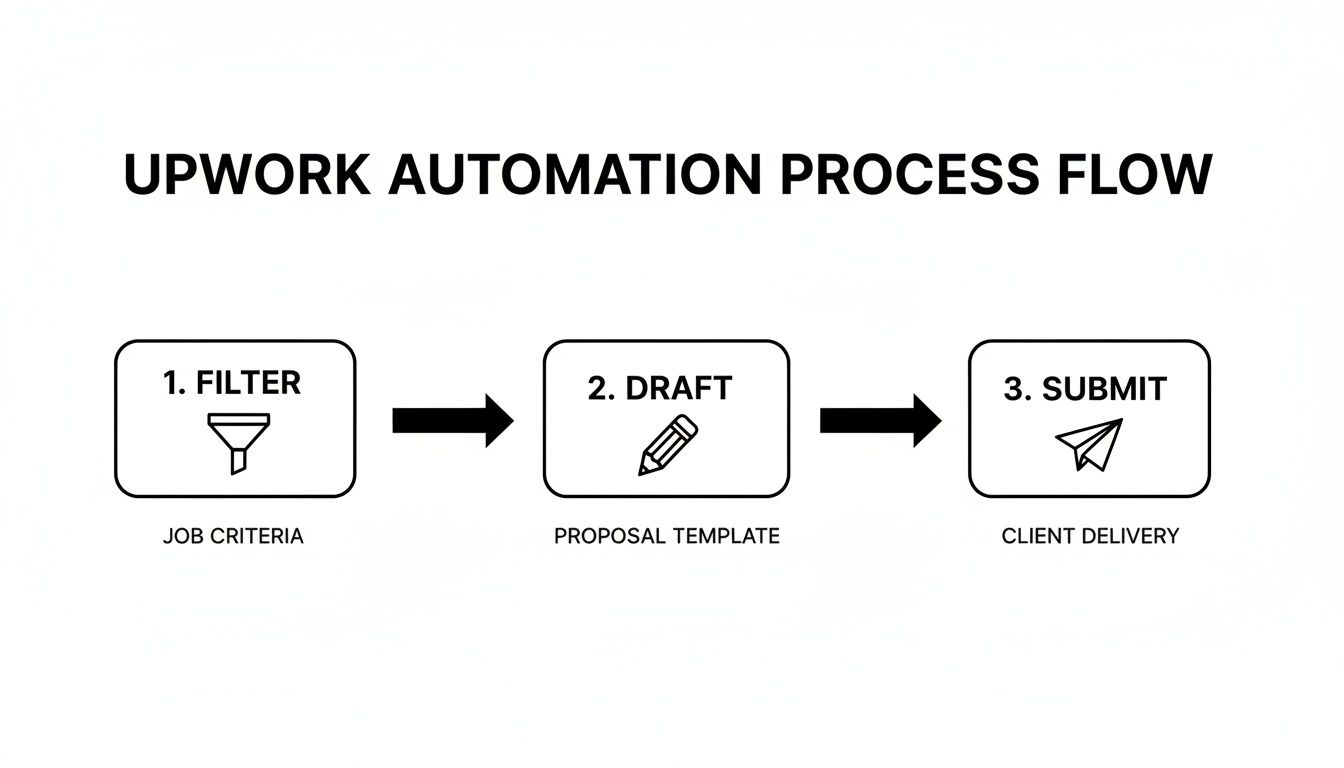
This workflow ensures your proposal lands in the client's inbox while their problem is still top of mind, which is exactly how you get a fast response.
Shortening Your Sales Cycle
We've all been there. You send a fantastic proposal, the client replies with enthusiasm, you have a great back-and-forth... and then, crickets. Manually keeping track of every single conversation and remembering when to send a friendly nudge is a full-time job in itself. It's how promising leads fall through the cracks.
This is where automation becomes your secret weapon for closing deals faster. You can set up smart systems to automatically send polite, well-timed follow-ups to prospects who have gone quiet.
By preventing promising leads from going cold, Upwork automation effectively shortens your sales cycle. It maintains momentum in the conversation, moving prospects from initial interest to a booked call much faster than a manual process allows.
This automated persistence keeps you on the client's radar without you having to do a thing. The result is a much shorter and more predictable path from that first "hello" to the project kick-off.
Calculating the Measurable ROI
At the end of the day, it all comes down to the numbers. The best way to think about Upwork automation isn't as a software subscription, but as an investment in a full-time sales development representative (SDR) that works for you 24/7—at a tiny fraction of the cost.
Let's break it down:
- Cost of an SDR: Hiring a sales rep will set you back thousands of dollars every month in salary, not to mention benefits and training.
- Cost of Automation: A solid automation platform is a small monthly fee in comparison.
- Impact: For most freelancers and agencies, landing just one new client through automation can easily pay for the tool for an entire year.
The value proposition is crystal clear. You get a consistent, predictable way to fill your sales pipeline without the massive overhead of hiring more staff. For anyone serious about scaling their business on Upwork, this is how you grow revenue in a way that just isn't possible by hand. The ROI isn't just a spreadsheet fantasy; it's a real, tangible boost to your income.
Using Automation Without Risking Your Account
Let's be honest, the first question anyone asks about automation is, "Is this going to get me banned?" For any freelancer or agency whose livelihood depends on Upwork, protecting your account is priority number one. The whole idea of using a tool to automate your work can feel a bit nerve-wracking, raising some very real concerns about staying on the right side of Upwork's Terms of Service.
But here’s the thing: not all automation is created equal. The real danger isn’t in the concept of automating tasks, but in the kind of tool you choose to do it.
Cheap, sketchy bots are what give automation a bad name. These are the tools that just mindlessly spam hundreds of copy-pasted proposals across the platform. They’re a one-way ticket to getting your account flagged because they operate on a brute-force model, completely ignoring the details of a job post. Upwork’s systems are built specifically to catch and shut down that kind of activity.
A professional Upwork automation platform, on the other hand, is a completely different beast. It's designed to be a strategic tool, not a blunt instrument, with safety baked into its very core.
Mimicking Human Behavior to Stay Compliant
The secret to safe automation is simple: it needs to act like a real, highly efficient human, not a machine. A well-designed system doesn't just fire off proposals at an inhuman speed. Instead, it operates with smart pacing and natural-looking variability, sending a steady stream of bids just like you would if you were having a very productive day.
This approach is built on a few key safety measures:
- Intelligent Pacing: The system deliberately avoids sending a massive burst of proposals at once, which prevents it from looking like spam.
- Varied Activity: It mirrors real work patterns, incorporating pauses and different response times to avoid tripping any automated red flags.
- Personalization at Scale: Every single proposal is generated from scratch based on the client's job post. This ensures you're always relevant and never get dinged for duplicate content.
By focusing on quality and behaving like a person, these platforms keep your activity well within the bounds of fair use, safeguarding your account's reputation.
The Importance of Secure Connections and IP Management
Another piece of the safety puzzle is how the tool accesses your Upwork profile and where it looks like it's operating from. You should never, ever store your password on some random external server—that's a huge security hole. Likewise, having your account accessed from IPs in different countries is a classic trigger for fraud alerts.
Reputable automation platforms are built to protect your account's integrity. They use secure, API-based connections that don't need your password and give you a clean, dedicated regional IP address so all your activity looks completely legitimate.
This technical foundation is an absolute must-have for safe Upwork automation. From Upwork's point of view, every action—from bidding to messaging—appears to be coming directly from you, just as if you were logged in and sending proposals from your own computer. You can learn more about how to present your business professionally and safely in our guide on Upwork profile automation.
Ultimately, using automation responsibly boils down to picking the right partner. When you choose a platform that’s transparent about its safety features—like human-like behavior, secure connections, and smart IP management—you can scale your outreach with total confidence. You get all the benefits of automation without ever having to worry about putting your hard-earned reputation on the line.
Setting Up Your First Automation Workflow
Diving into automation might feel like a huge leap, but it's really just a series of small, logical steps. Getting your first Upwork automation workflow off the ground isn't about getting tangled in complex tech. It’s about teaching an AI what a perfect opportunity looks like for your business. It all comes down to having a clear strategy from the get-go, making sure the system serves you, not the other way around.
Think of this first setup like drawing up a blueprint for your dream client. When you define your targets with laser precision, you give the AI a clear set of instructions to cut through the noise and zero in on high-value projects. This groundwork is absolutely the most critical piece of the puzzle for building an automation strategy that consistently brings in the right kind of leads.
Define Your Ideal Client Profile
Before you can automate a single thing, you have to know exactly who you're talking to. Your Ideal Client Profile (ICP) is the foundation of your entire automation engine. It’s a crystal-clear description of the client and project type that makes the most sense for your business.
A solid ICP gives the AI its marching orders. It tells the system which jobs to go after and—just as critically—which ones to completely ignore. Without that clarity, your automation efforts will feel like you're just throwing proposals at a wall and hoping something sticks.
Your ICP needs to be built on specific criteria the AI can actually recognize.
- Industry and Niche: Are you after SaaS companies, healthcare startups, or e-commerce brands? The more specific, the better.
- Project Budget and Client History: Set a minimum project value and tell it to look for clients who have a proven track record of hiring and paying well on Upwork.
- Required Skills and Keywords: List the non-negotiable skills, technologies, or keywords that must pop up in a job post.
- Exclusion Criteria: What are your red flags? Maybe it's clients with consistently poor reviews or job posts that are way too vague. Tell the system what to avoid.
Your Ideal Client Profile is the single most important input for your Upwork automation system. A sharp, well-defined ICP ensures the AI brings you qualified leads, while a vague one results in irrelevant proposals and wasted Connects.
Connect and Configure Your Account
Once your ICP is locked in, it's time for the technical part—which is easier than it sounds. Any reputable Upwork automation platform will make this process simple and secure. You'll typically authorize the tool to access your Upwork account through a secure API connection. This means you’re giving it permission to act for you without ever handing over your password.
After you're connected, you’ll start plugging your ICP into the tool’s settings. This is where you translate your blueprint into commands the system can follow. You’ll set up your job search filters, decide how often you want to bid, and create rules for how the AI should approach drafting those first proposals. This is your chance to really fine-tune the engine before you turn the key.
Train the AI with Continuous Feedback
Here’s something most people miss: automation isn't a "set it and forget it" machine. It’s a learning system that gets sharper with your input. The final step is really an ongoing one: training the AI. Most of the better platforms have a feedback feature, usually a simple "thumbs up" or "thumbs down" on the jobs it surfaces and the proposals it suggests.
This feedback loop is what makes the whole thing work long-term. Every time you approve or reject a suggestion, you're teaching the AI what you really want. It learns from your choices, getting better and better at finding the right jobs and saying the right things. Consistent feedback turns a good automation tool into a great one, making sure it grows with your business. This hands-on management keeps your Upwork automation perfectly aligned with your goals, constantly boosting its performance and the quality of leads it brings you.
Common Questions About Upwork Automation
Diving into Upwork automation is a big step, and it's totally normal to have some questions. I hear the same concerns all the time: "Is this safe for my account?", "Will the proposals sound like a robot wrote them?", "How much time will I really save?"
Let's clear the air. In this section, I'll tackle these common questions head-on with straightforward answers based on real-world experience. The goal is to give you the clarity you need to decide if this is the right move for your freelance business or agency.
Can Automation Get My Upwork Account Banned?
This is always the first question, and for good reason. The short answer is: it depends entirely on the tool you use.
There's a massive difference between a cheap, spammy bot and a professional automation platform. The dangerous ones are just brute-force machines, blasting out hundreds of identical, low-quality bids. Upwork's systems are smart and built to sniff out that kind of activity. Using a tool like that is a fast track to getting your account flagged or even suspended.
But legitimate Upwork automation platforms are built from the ground up with safety in mind. They're designed to act like a highly efficient human, not a mindless robot.
- Intelligent Pacing: They don't send a hundred proposals at once. They send them at a natural rhythm, just like a person would, avoiding any suspicious spikes in activity.
- Unique Proposals: Every single proposal is generated from scratch. It reads the client's job post and writes a response tailored to their needs, so you never send duplicate content.
- Secure Connections: Reputable tools use secure, official methods (like API connections) that don't require you to hand over your Upwork password, keeping your account secure.
When you choose a tool that prioritizes compliance and mimics how a top freelancer operates, you get all the power of automation without the risk. It’s about working smarter, not just blasting the platform.
How Much Time Will I Actually Save?
The time savings are immediate and, honestly, one of the biggest wins. Think about your current routine. You spend hours every day just scrolling through the job feed, trying to spot the good ones, analyzing the requirements, and then staring at a blank page trying to write the perfect proposal. And that's before you even think about following up.
This non-billable "admin grind" eats up a huge chunk of your week.
Most professionals who switch to a smart automation system save anywhere from 10 to 20 hours per week. That's not just free time—it's high-value time you can reinvest directly into your business.
The hours you get back aren't just for taking a longer lunch. This is time you can redirect from tedious tasks to strategic work: jumping on client calls, refining your service offerings, or delivering that 'wow' factor that turns a one-off project into a long-term relationship.
That reclaimed time is where the real growth happens. For a solo freelancer, it could mean finally having the bandwidth to take on that bigger, more exciting project. For an agency, it means your team can focus on strategy and client success instead of just lead generation.
Do AI Proposals Sound Robotic?
This is a valid fear, probably because we've all seen terrible examples of "automation" from the past. Old-school tools were basically just mail-merge templates that would swap [Client Name] and call it a day. The results were generic, impersonal, and painfully obvious to clients.
Today's generative AI is in a completely different league. A sophisticated Upwork automation platform doesn't use templates at all. It acts more like a research assistant, analyzing several key pieces of information to build a draft:
- The Job Description: It actually reads and understands what the client needs, what their problems are, and what they're trying to achieve.
- Your Profile: It pulls from your skills, your bio, and your unique selling points to position you as the perfect fit.
- Your Portfolio: It intelligently selects the most relevant work samples or case studies to mention for that specific job.
- Your Past Wins: It can even learn from your most successful proposals, identifying the language and structure that gets replies.
By pulling all of this together, the AI crafts a unique, personalized draft that feels authentic and speaks directly to the client. It’s not meant to replace your judgment; it’s designed to give you a fantastic, 90%--complete starting point. You just review, tweak, and hit send, beating the "blank page" problem every time.
Is Automation Only for Big Agencies?
Not at all. In fact, Upwork automation can be a game-changer for solo freelancers. Think of it as your personal sales assistant, working 24/7 to find opportunities and draft proposals. It levels the playing field, allowing you to compete with larger teams without the massive overhead of hiring a sales rep.
For agencies, it’s a different kind of superpower. Automation provides the system and structure you need to scale your client acquisition predictably. It allows you to manage lead flow across multiple profiles from one central place, ensuring a consistent pipeline and freeing up your team to focus on closing deals and delighting clients.
Whether you're a one-person shop or a growing team, the core benefit is the same: building a scalable, predictable machine for winning clients on Upwork.
Ready to stop the manual grind and start winning more projects? Earlybird AI acts as your always-on sales team, sending personalized proposals within minutes and managing follow-ups until a call is booked. See how our members are doubling their reply rates and shortening their sales cycles. Transform your Upwork outreach by visiting https://myearlybird.ai to learn more.




