
← Back To Blog
Winning More Bids With Upwork Bidding Automation
Not landing enough interviews on Upwork? The problem probably isn't your talent—it's your timing. In a marketplace this crowded, the best projects get flooded with proposals almost instantly. This is where Upwork bidding automation becomes less of a luxury and more of a necessity for anyone serious about winning.
Why Manual Bidding on Upwork Is a Losing Game

If you’ve ever found the perfect job post only to see it already has "20 to 50 proposals," you know exactly what I'm talking about. The platform moves at a pace that's impossible for a human to keep up with.
By the time you spot a great lead, write a personalized proposal, and dig up the right portfolio samples, the client is already drowning in applications.
This speed-to-lead problem is a massive bottleneck. Every hour you spend hitting refresh on the job feed is an hour you're not billing a client or growing your business. For agencies trying to scale, this manual grind quickly becomes a costly, unsustainable mess.
The Unseen Costs of Going It Alone
The true cost isn't just about wasted time. It's about the incredible opportunities you never even see. The best clients, the ones with clear project briefs and solid budgets, tend to hire fast. Getting your proposal in front of them first is a huge advantage, putting you in the running before they get overwhelmed and start skimming.
Here’s a scenario that plays out every single day:
- A fantastic, high-value project gets posted at 2 AM your time.
- When you log on at 9 AM, it already has over 50 proposals.
- The client has already shortlisted a few candidates and isn't even looking at new bids.
This cycle is frustrating, and it leaves a lot of talented freelancers feeling stuck. You're essentially playing with a handicap, where being quick often matters more than being the most qualified.
The hard truth is that on Upwork, speed is everything. Bidding manually almost guarantees you'll be late to the best opportunities, capping your earning potential before you even hit "submit."
A Strategic Response to a Crowded Marketplace
This is exactly where Upwork bidding automation fits in. It’s not about blasting out spammy, generic proposals. It's about leveling the playing field with a smart, strategic tool. Think of it as a key part of your client acquisition machine, much like other forms of what sales automation is for modern businesses.
The scale of Upwork is staggering. With over 796,000 active clients spending more than $4 billion a year, the competition is fierce. The top jobs really do get proposals within minutes, making it almost impossible to compete manually.
Automation simply gets you to the front of the line, ensuring your carefully crafted proposal actually gets seen by the client.
Pinpoint Your Ideal Client Before Hitting 'Go'
Jumping into Upwork bidding automation without a clear target is like sailing without a map. It’s not about blasting out proposals to every job that pops up; it’s about surgical precision. Before you touch any software, you have to get crystal clear on the exact projects and clients you’re after.
If you skip this step, you’re just automating chaos. Your inbox will flood with low-quality leads, burning through your time and expensive Connects.
The real starting point is building a detailed ideal client profile (ICP) designed specifically for the Upwork ecosystem. Think of it as your playbook—a strict set of rules for your automation tool, making sure it only flags high-value opportunities. Forget vague goals like "more clients." You need specifics.
An agency specializing in enterprise software, for example, will hunt for long-term SaaS projects, while a freelance content strategist is better off targeting clients who consistently leave excellent reviews. The idea is to trade in your wide net for a finely-tuned spear.
Crafting Your Upwork ICP
To build a profile that actually gets results, you need to focus on concrete, filterable data points you can find right on the platform. These are the signals that separate serious clients from the time-wasters. Your ICP needs to have non-negotiable parameters for the following criteria.
- Client History: You want to work with clients who have a solid track record. I always look for a hire rate over 50% and at least five previous hires. This tells me they're serious about finding talent and know how to manage freelancers effectively.
- Budget and Spend: Set a minimum project budget or hourly rate that makes sense for your business. But here’s the pro tip: pay more attention to their "Total Spent" on Upwork. A client who has already invested $10k+ on the platform is far more likely to appreciate quality than a brand-new account with zero spend.
- Keywords and Phrases: This is where you get strategic. Don't just look for simple job titles. Dig deeper and identify key phrases inside job descriptions that signal a perfect match. For an agency looking to get SEO clients, terms like "monthly retainer," "long-term partnership," or "Ahrefs audit" are gold. At the same time, build a list of negative keywords—like "urgent," "cheap," or "test project"—to automatically weed out the bad fits.
A Real-World Example
Let's say you run a mobile app development agency. A powerful, well-defined ICP would look something like this:
We only engage with clients who have a verified payment method, a 4.9-star rating or higher, and have spent at least $20,000 on Upwork. Job posts must contain keywords like "React Native" or "Flutter," while automatically excluding phrases like "simple bug fix" or "clone." The project must be a fixed-price contract over $5,000 or an hourly role paying above $75/hr.
This isn't just a filter; it's a strategy.
This level of detail turns your automation tool from a basic notification bot into a highly intelligent lead qualification machine. By defining precisely who you want to work with from the start, you ensure every automated proposal is a genuine opportunity, not just another piece of junk mail.
Selecting and Setting Up Your Automation Tool Safely
Okay, you've nailed down your ideal client profile. Now for the make-or-break decision: choosing the right automation tool for your Upwork bidding. This isn't just about bells and whistles; it's about safeguarding your Upwork account. The wrong tool can get you banned, while the right one becomes your most valuable sales assistant.
Your number one priority has to be account safety. Look for tools designed to work with Upwork's rules, not against them. That means they should mimic human behavior—no firing off 100 proposals in an hour. A good tool won't ask for your password and will use clean, regional IP addresses that don't trigger Upwork’s security alarms.
Let's face it, the competition on Upwork is insane. There are now 64 million Americans freelancing, adding $1.27 trillion to the economy. By 2027, that number is expected to hit 86.5 million. In this environment, you need an edge. Smart automation gives you that edge, helping you find and bid on the best jobs before they're buried. For more on this trend, Upwork's own research is pretty eye-opening.
Non-Negotiable Features in an Automation Tool
When you're shopping around, you need to be picky. Don't fall for a slick landing page. A truly effective and safe tool needs to have a few core features that actually help you win more work.
Here’s what I always look for:
- Intelligent Job Filtering: The tool has to be smarter than Upwork’s basic search. You need the ability to filter by the detailed ICP criteria you just defined—things like client spend history, hire rate, and especially negative keywords to weed out the junk.
- AI-Powered Proposal Generation: The AI needs to be teachable. Can you feed it your past winning proposals? Your case studies? Your personal brand voice? If it can't learn to sound like you, it's useless.
- Human-in-the-Loop Workflow: This is a big one. I never trust a system that sends proposals without my final say-so. The best tools will draft a killer proposal based on your training and then queue it up for you to review, tweak, and hit 'send' yourself. You maintain control.
This whole process really hinges on translating your client profile into the tool’s settings. Think of it like this:
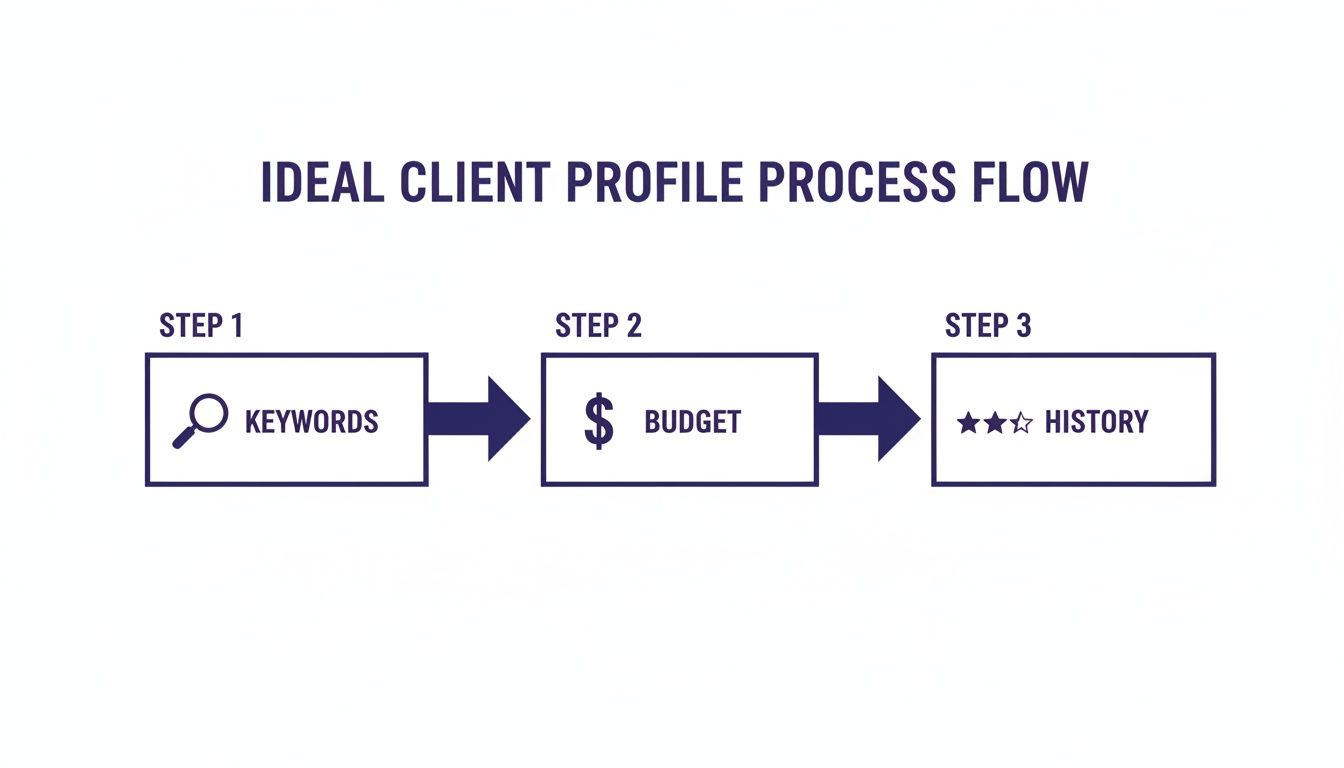
As you can see, your strategy comes first. The tool is just there to execute on the targeting decisions you’ve already made.
Initial Setup and Configuration
Once you've picked your software, the setup is where the magic begins. Don't rush this part. A thoughtful setup now pays dividends for months to come.
First, you'll securely link your Upwork account. This is usually done through an official API or a browser extension that's been vetted for safety. This gives the tool the access it needs to see new jobs and submit your bids.
Immediately after connecting, you'll start plugging your ICP directly into the tool's filters. This is where you input your target keywords, minimum budget, desired client hire rate, and anything else that separates a great client from a waste of time.
Your initial setup is basically your first training session with the AI. The more specific and clear you are with these first instructions, the better the quality of jobs it will find for you.
Finally, it’s time to start teaching the AI. Upload your best-performing proposals, your portfolio, and any other materials that show off how you solve problems for clients. This is what helps the AI capture your unique voice and style, making its drafts feel authentic. If you want to dig deeper into platform safety, we have another guide that tackles whether Upwork is safe and how to protect your account.
How to Personalize Proposals Without Actually Writing Them
The biggest fear people have with Upwork bidding automation is coming across like a robot. It’s a totally valid concern. Clients have a sixth sense for lazy, copy-paste proposals, and hitting "archive" on those is second nature to them.
But let's be clear: modern automation isn't about spamming clients with the same tired template. It’s about using AI to create highly personalized proposals at a speed and scale you could never match on your own. The real objective isn't just to pump out more bids; it's to send better bids, way faster.
The trick is to train the AI to be your digital twin. You don't hand it a generic script. Instead, you feed it a collection of your greatest hits—all the proposals and projects that made you successful. This is the source material it uses to learn your voice, your style, and how you solve problems.
Training the AI to Sound Like You
This training phase is what sets you apart from everyone else. The AI is only as good as the material you give it, so feeding it quality examples is how it learns the small details that make your proposals win. A good automation tool will let you upload a few key documents to build its brain.
To get the best results, give it a mix of your best stuff:
- Past Winning Proposals: Start with 5-10 examples of bids that actually landed you an interview or a job. The AI will break down the structure, tone, and key phrases that worked for you in the past.
- Portfolio Pieces and Case Studies: Upload your best work. This isn't just for show; it teaches the AI how to talk about the results you get for clients, so it can pull concrete examples for new proposals.
- Your Resume or CV: This gives the system the foundational knowledge of your skills, your history, and your professional journey.
Think of it like onboarding a new assistant. The more context you give them, the quicker they'll learn to represent you effectively. This process ensures your automated bids are a true reflection of your skills and experience.
Crafting Dynamic Content That Feels Human
Once the AI is trained, it doesn’t just spit out your old proposals. It uses them as a blueprint to build brand-new, relevant bids for every single job. The system can scan a new job description, pull out key details—the client's name, their company, a specific problem they're facing—and weave them right into the proposal.
The real magic of automation isn't just the speed. It's the ability to write a super-relevant, personal opening line for dozens of jobs a day, making each client feel like you wrote it just for them.
So, instead of a boring "I can help with your project," a well-trained AI will generate something much more compelling.
For instance:
"Hi David, I saw you need help optimizing the user flow for your e-commerce app, specifically the checkout process. I recently helped another Shopify store increase their conversion rate by 15% by redesigning their payment screen, and I see a lot of parallels with what you're trying to achieve."
This is the kind of detail that separates smart Upwork bidding automation from the old-school spam bots. It immediately shows you've read the job post, you understand the problem, and you have the exact experience to solve it. It turns automation from a risky shortcut into your most powerful tool for making a killer first impression.
Using Analytics to Refine Your Bidding Strategy
It’s easy to fall into the trap of thinking Upwork bidding automation is a "set it and forget it" solution. That’s one of the most expensive mistakes you can make. The real magic isn't just in sending proposals; it's in the data you get back. Think of every automated bid as a tiny experiment, and the analytics are your cheat sheet to winning more work.
When you start looking at the numbers, you stop guessing and start making strategic moves that actually grow your income. You’ll know exactly which levers to pull to get replies instead of just hoping for them.
Identifying Your Core Bidding KPIs
Before you can fix anything, you have to know what to measure. Every automation tool has its own dashboard, but a few key performance indicators (KPIs) are universal for understanding how well your bidding engine is really performing.
You should be obsessed with these three metrics:
- Proposal View Rate: What percentage of your proposals are clients actually opening? A low view rate is a huge red flag. It often means your timing is off or the first two lines of your cover letter aren't strong enough to make someone click.
- Interview Invite Rate: This is the big one. Of the proposals that get viewed, how many turn into an actual conversation? This metric tells you everything about the quality of your proposal's content, your portfolio, and your call-to-action.
- Win Rate: At the end of the day, this is what pays the bills. What percentage of your interviews lead to a contract? This number reflects your sales skills in the chat, your pricing, and whether the automation is bringing you the right kind of leads.
These numbers tell the story of your entire client acquisition funnel. Learning to read that story is how you turn a simple tool into a client-generating machine.
Your analytics dashboard is a direct feedback loop. A high view rate with a low interview rate isn't a failure—it's a crystal-clear signal that the body of your proposal needs A/B testing, and fast.
Turning Insights into Actionable Adjustments
Data is completely useless if you don't do anything with it. The real skill is spotting a weak link in your funnel and then running small, targeted experiments to fix it. This cycle of review and adjustment is the heart of a winning Upwork bidding automation strategy.
Let’s say your view rate is great, but your interview rate is in the gutter. The problem is squarely inside your proposal. It's time to A/B test your call-to-action. For a week, try ending with an offer for a "free 15-minute strategy call." The next week, switch to a "custom 2-slide plan of action." You'd be amazed how tiny changes in framing the next step can have a massive impact.
Or maybe you’re getting tons of interviews, but they’re all for low-budget, low-quality projects. The issue here isn't your proposal—it's your targeting. This is a direct signal to go back into your automation tool and get much stricter with your search filters. Add negative keywords like "entry-level" or "test project" and bump up your minimum filter for client spending.
By checking in on your KPIs regularly and making these kinds of data-backed tweaks, you shift your bidding from a game of chance to a predictable system for attracting the clients you actually want.
Your Top Questions About Upwork Automation, Answered
Jumping into Upwork bidding automation feels like a big step, and it's totally normal to have some reservations. I get it. Questions about account safety, whether it actually works, and if you’ll sound like a robot are things I hear all the time. They're valid concerns.
Let's clear the air and tackle these questions head-on. My goal here is to give you the straight answers you need to move forward with confidence, knowing you’re making a smart move for your freelance business.
Is This Going to Get My Upwork Account Banned?
This is easily the most important question, and the answer comes down to one thing: how you use the tool. Upwork is laser-focused on stopping spam and keeping its marketplace fair. If you use a bot to blast out hundreds of generic, copy-paste proposals, you’re practically asking for a suspension. Don’t do that.
But that’s not what we’re talking about here. Smart, compliant Upwork bidding automation is all about a "human-in-the-loop" system. The software does the heavy lifting—finding the right jobs and drafting the proposals—but you are always the one who gives the final green light. You review and approve everything before it goes out. This approach keeps you firmly within Upwork's rules because a human is making the final call, which prevents spam while still saving you an incredible amount of time.
Will My Proposals Sound Like They Were Written by a Robot?
That's a fair worry, but today’s AI is a world away from the clunky templates of the past. The secret to making proposals sound genuinely like you is all in the training. A good automation tool doesn't just pull from a generic library; it learns directly from your own successful bids.
You feed the AI your best proposals, your most compelling case studies, and your top portfolio pieces. From there, it learns to mimic your unique voice, your tone, and the way you structure a winning argument. It then applies that knowledge to new job posts, weaving in specific details from the client's description. The result isn't a robotic template; it's a personalized draft that sounds authentic, just created in seconds instead of hours.
Good automation isn't about replacing your expertise. It’s about taking your proven strategy and applying it faster and more consistently than you ever could alone. You bring the voice; the tool brings the velocity.
How Fast Will I Actually See Results?
Look, anyone promising you overnight success is selling snake oil. While some freelancers do get a win in their first week, it's much more realistic to set your sights on a 30-day ramp-up period. The first couple of weeks are all about feeding the system data and dialing things in.
You'll be tweaking your job filters, giving the AI feedback to sharpen its writing, and maybe even A/B testing a few different opening lines. Think of it this way: automation is an amplifier. If you already have a clear idea of your ideal client and a history of solid proposals, you'll see your view and interview rates climb much faster. The system gets smarter with every single bid you send.
Ready to stop missing out on the best Upwork projects and start winning more bids? Earlybird AI acts as your always-on sales team, finding ideal jobs and crafting personalized proposals in minutes. Ditch the manual grind and let automation secure your next client. Get started with Earlybird AI today.




