
← Back To Blog
How to Get Top Rated on Upwork: The 2026 Roadmap
You’re probably in one of two places right now.
You’re either good at what you do and not getting enough traction on Upwork, or you’ve already won some work but the whole thing feels fragile. Proposals go out. Some get viewed, many don’t. A client replies, then disappears. You land a project, but you’re never fully sure whether the next month will look the same.
That’s usually the point where freelancers and agency owners start asking the wrong question. They ask how to get more proposals sent. The better question is how to move into the part of the marketplace where clients trust you faster, invite you more often, and hesitate less on price.
On Upwork, that shift is tied to one status more than anything else: Top Rated. If you want durable momentum, not random wins, learning how to become top rated on upwork is one of the most impactful actions you can make.
The Real Value of Being Top Rated on Upwork
A client opens your proposal, clicks your profile, and decides in a few seconds whether you feel safe to hire. That decision happens before they read your full work history, before they compare your process, and often before they message you back. Top Rated improves that first impression in a way that directly affects pipeline quality.

Why the badge changes client behavior
On Upwork, trust has to travel fast. Clients sort through crowded search results, invite lists, and proposal queues. A Top Rated badge reduces hesitation. It signals that the platform has already seen enough strong performance to put your profile in a lower-risk category.
That changes how sales conversations start.
With the badge, fewer prospects come in trying to verify whether you are legitimate. More of them start by asking about scope, timeline, and next steps. That is a better place to sell from, especially if you run an agency and need consistent lead flow instead of one-off wins.
I have seen the difference in how clients behave once an account crosses into stronger platform trust signals. Response quality improves. Price resistance softens. The profile starts doing more of the pre-selling work for you, which means your proposals and follow-ups do not have to carry the whole load.
What it gives you beyond credibility
Top Rated affects more than vanity or status. It improves the economics of how you acquire work on the platform.
For freelancers and agencies, the practical gains usually look like this:
- Higher-quality conversations: Clients arrive with more confidence and fewer basic objections.
- Better pricing pressure: You spend less time proving why your rate is not the cheapest in the inbox.
- Stronger invite potential: A profile that looks proven is easier for clients to shortlist.
- More stable momentum: Good contracts stack on top of each other instead of each project feeling like a full reset.
There is also an operating advantage that gets ignored. Once you have a profile that converts better, every system around it becomes more effective. Faster proposal response, tighter follow-up, and selective bidding all produce better returns when the account already carries trust. That is where safe automation starts to matter.
Used carefully, tools like Earlybird AI can help you react to relevant jobs faster, stay consistent with outreach, and protect response times without turning your account into spam. The badge gets more valuable when your process is fast enough to capitalize on it.
Top Rated does not replace strong delivery. It amplifies it. If your work is solid and your systems are disciplined, the badge becomes a business asset that lowers friction, improves lead quality, and makes growth on Upwork easier to sustain.
Understanding the Official Top Rated Requirements
A freelancer closes two good contracts, sees strong public feedback, and assumes the Top Rated badge is close. Then nothing happens. In almost every audit I do, the problem is the same. They are watching visible wins and missing the eligibility system running underneath them.
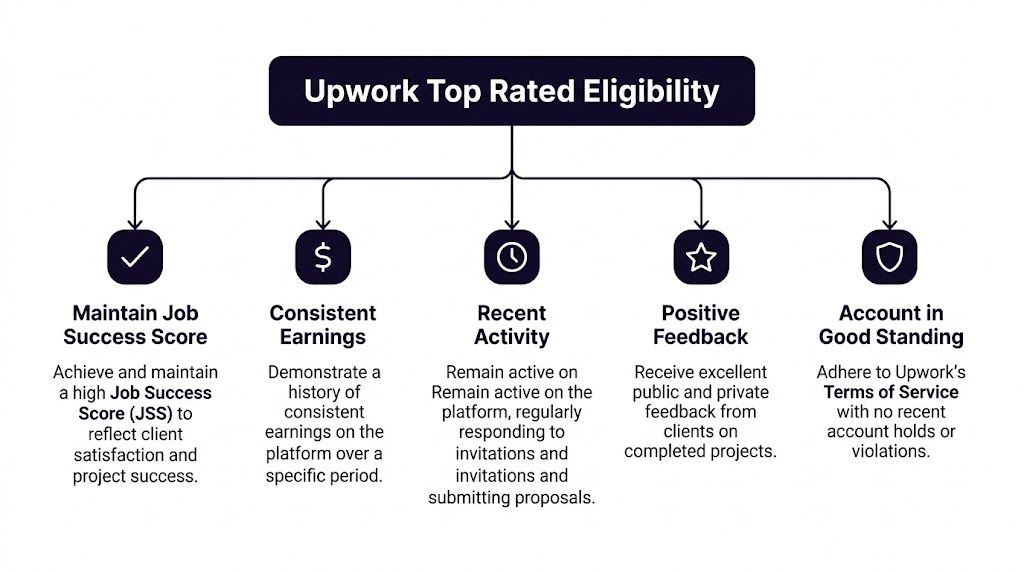
Upwork does not award Top Rated for talent alone. It rewards accounts that show consistent client satisfaction, steady platform activity, meaningful earnings history, and clean account behavior over time.
The JSS requirement
Job Success Score is the metric that carries the most weight day to day.
For Top Rated, your account generally needs a JSS of 90% or higher for at least 13 of the last 16 weeks. The part that catches people is the rolling window. Eligibility can improve slowly, and it can also slip if a few recent contracts end with friction.
In practice, I treat JSS as an operational metric, not a reputation metric. Public stars matter less than many freelancers assume. Private feedback still shapes the score, and private feedback usually drops when scope was loose, communication slowed down, or delivery became harder than the client expected.
That changes how you manage the account:
- Protect recent contract outcomes more carefully than older ones
- Price and scope work so you can deliver cleanly
- Avoid stacking shaky-fit projects just to increase volume
- Watch for warning signs early, especially delayed replies and revision creep
Fast response times help here. Safe automation can help you reply to good-fit opportunities sooner and keep your pipeline full enough to stay selective. That matters because bad-fit work hurts JSS faster than slow growth does.
The earnings and history requirement
Upwork also looks for enough real transaction history to trust the account.
The baseline usually includes at least $1,000 in lifetime earnings, a history of completed projects, and enough time on the platform for Upwork to evaluate consistency. Exact details can change, so I tell teams to treat the published threshold as the floor, not the target.
A practical mistake shows up here. Freelancers chase interviews, send lots of proposals, and celebrate short-term activity. Eligibility moves from completed work and satisfied clients, not inbox motion. If your profile needs stronger proof before those projects come in, add sharper work samples and case studies. A better portfolio in Upwork often does more for badge progress than sending another batch of weak proposals.
Activity and account standing
Top Rated also depends on account health.
You need recent activity, profile completeness, and an account in good standing. Accounts that go quiet for long stretches or drift too close to policy issues create avoidable risk. Upwork favors reliable operators.
Here is the checklist I use when reviewing an account before pushing for Top Rated:
- Keep a buffer above the minimum
Sitting right at the threshold creates fragile eligibility. One rough closeout can delay the badge. - Prioritize finished contracts over busywork
Completed jobs with clean feedback move the account forward. Unfocused interviewing does not. - Review open contracts every week
Long silences, unclear next steps, and bloated revision cycles often turn into disappointing feedback later. - Keep workflows policy-safe
Automation should help with speed, follow-up, and organization. It should never create spam, fake activity, or misleading proposals.
That last point matters for agencies and high-volume freelancers. Tools like Earlybird AI are useful when they help your team spot relevant jobs quickly, organize bidding, and respond while the opportunity is still fresh. They become a liability if they push low-fit outreach at scale. Top Rated is easier to get when automation supports judgment instead of replacing it.
Why agencies need a stricter system
Agencies lose Top Rated eligibility in quieter ways than solo freelancers do.
One salesperson overpromises. One account manager misses a handoff. One contractor delivers work that was never scoped correctly. The client does not care where the breakdown happened. The account absorbs the result.
That is why agency owners should run Top Rated like an internal control system. Proposal standards need to be shared. Scoping needs approval rules. Client handoffs need written context, not Slack fragments and memory. Open contracts need weekly review, especially if multiple people touch delivery.
The badge comes from meeting the rules. Keeping it comes from repeatable operations.
Optimize Your Profile to Attract Premium Clients
A Top Rated profile doesn’t start with the badge. It starts with a profile that already looks like it deserves one.
Most Upwork profiles fail because they read like résumés. Clients aren’t hiring a biography. They’re hiring risk reduction. They want to know whether you understand their problem, whether you’ve handled similar work before, and whether you’ll be easy to work with.
Fix your title first
Your title is not the place for creativity. It’s the place for clarity.
Bad titles are broad and self-centered. “Expert Digital Professional” tells the client nothing. Strong titles combine skill, niche, and business outcome. Think more along the lines of a specialist who solves a specific problem for a specific kind of buyer.
A strong title usually does one of these well:
- Names a niche clearly
“B2B SaaS Copywriter for Product Pages and Email Sequences” - Names a deliverable clients buy
“Upwork Proposal Writer for Agencies and Technical Freelancers” - Names a result without hype
“UX Designer for Conversion-Focused SaaS Onboarding Flows”
The point is simple. Help the client self-select.
Write the overview like a sales call opener
The first lines of your overview do the heavy lifting. They should sound like you understand the work, not like you’re trying to sound impressive.
Upwork profile visibility also rewards proven trust signals. A published analysis notes that the platform favors Top Rated freelancers with consistent 90%+ JSS, supports 20-50% higher hourly rates, and correlates strong Top Rated profiles with 2-5x visibility gains, especially when feedback is strong and recent, according to this review of common Top Rated mistakes.
That means your overview has two jobs. It has to convert humans, and it has to reinforce the signals that help the algorithm keep showing you.
A practical structure looks like this:
- Lead with the client problem
- Show relevant specialization
- Explain how you work
- Give proof through examples or categories of work
- End with a simple next step
If your overview starts with “Hi, my name is…” you’ve wasted the highest-value real estate on the page.
Build a portfolio that answers objections
A weak portfolio shows finished work. A strong portfolio shows why the work mattered.
Clients want context. What was the problem? What was delivered? What kind of business was it for? What constraints existed? Even without using unsupported metrics, you can still make your work feel specific and commercially relevant.
Good portfolio entries include:
- The project type
Landing page rewrite, app onboarding redesign, cold outreach system, technical SEO cleanup - The client context
Early-stage startup, established ecommerce brand, agency white-label support, founder-led consultancy - Your role
Strategy, execution, revision cycle, stakeholder communication - The business angle
Better clarity, faster handoff, stronger positioning, cleaner user flow
If you need help structuring that section, this guide on building a stronger Upwork portfolio is a useful reference.
Use specialized profile language, not keyword stuffing
A lot of freelancers hear “SEO” and start stuffing every service they can think of into their profile. That hurts more than it helps.
Use the language your buyers use. If you build Shopify stores, say Shopify. If you write investor decks, say investor decks. If you run paid search for law firms, say law firms. Specificity attracts premium buyers because it reduces their mental work.
After you rewrite the profile, review it against this filter:
- Would a client know exactly what I do?
- Would a client know who I do it for?
- Would a client see evidence that I’ve done it before?
- Would a client feel I’m easier to hire than the next five profiles?
A short walkthrough can help if you’re tuning the page visually and structurally:
Premium clients notice restraint
One of the clearest profile upgrades is subtraction. Remove weak services. Remove beginner language. Remove generic claims like “hardworking,” “passionate,” and “dedicated.”
Clients assume professionalism. They don’t pay more for adjectives. They pay more when the profile feels narrow, credible, and easy to trust.
That’s what profile optimization is on Upwork. Not decoration. Positioning.
Develop a High-Conversion Proposal and Messaging System
I’ve reviewed a lot of Upwork proposals over the years, and most lose in the first two lines.
They open with a greeting, announce experience, then dump credentials the client didn’t ask for. That’s why good freelancers feel invisible. Their proposal reads like everyone else’s.
The proposals that win do something different. They enter the client’s situation quickly and make the next step feel easy.
What a weak proposal sounds like
A weak proposal usually follows this pattern:
- “Hello sir/madam”
- “I have many years of experience”
- “I can do this project perfectly”
- giant skill list
- “Please award me the job”
Nothing there helps the client feel understood. It only tells them you want work.
What a strong proposal does instead
A strong proposal feels like the first minute of a useful sales call. It proves relevance fast.
Here’s the structure I recommend.
- Open on the job, not yourself
Refer to the actual problem, deliverable, or constraint. - Show pattern recognition
Let the client know you understand what usually goes wrong in this type of project. - Offer a practical path
Briefly explain how you’d approach it. - Reduce the next-step friction
Ask a question or offer a clear next move.
For example, compare these openings.
Weak:
Hi, I’m a full-stack developer with extensive experience in web apps, APIs, AI, blockchain, and more. I’d love to help.
Better:
You don’t need another generalist here. You need someone who can clean up the handoff between your frontend and API layer so the bugs stop reappearing after each release.
The second one sounds like someone who has seen the problem before.
Use proposals as diagnostics
The best proposals aren’t mini-cover letters. They’re diagnostics.
If the client wants a landing page, talk about conversion clarity, message hierarchy, and revision process. If they want SEO support, talk about indexing, content structure, and implementation coordination. If they want an executive assistant, talk about responsiveness, task ownership, and documentation discipline.
A proposal should answer the client’s silent questions:
- Do you get what I need?
- Have you done this kind of work before?
- Will you make my life easier or harder?
- Are you worth replying to right now?
If you’re still refining your process, this article on submitting a proposal on Upwork gives a solid tactical base.
Don’t try to sound expensive. Try to sound precise. Precision is what clients read as premium.
Messaging after the proposal matters just as much
A lot of freelancers lose deals after getting the reply.
The client sends a message. The freelancer answers with a wall of text, pushes for a call too early, or waits too long and loses the timing. The best operators treat message handling as part of sales, not admin.
When a client replies:
- Respond quickly
Momentum matters on Upwork because buyers often compare several vendors at once. - Answer directly first
If they asked for timeline, budget fit, or process, answer that before adding anything else. - Keep the thread moving
End with one clear question, not five. - Guide toward commitment
That might be a quick scope clarification, a call, a paid trial, or a first milestone.
A practical message flow that works
After the initial reply, keep things simple.
First response:
- confirm fit
- answer their main question
- mention one relevant observation
- ask one advancing question
Second response:
- clarify scope
- remove uncertainty
- suggest the next action
Third response:
- summarize agreement in plain language
- define the first deliverable
- make starting feel low risk
That’s it. Most proposal systems break because they’re too elaborate.
Follow up without sounding needy
Clients get distracted. A missed reply doesn’t always mean disinterest. It often means they opened your message between meetings and forgot.
A good follow-up is short and useful:
Checking in on this. If helpful, I can outline the first step I’d take to get this moving cleanly.
That kind of message works because it lowers the effort required to re-engage.
What doesn’t work is guilt, pressure, or repeated “just following up” notes with no substance.
For top rated on upwork, proposal quality matters because your early contracts shape everything downstream. The clients you win through clear, disciplined messaging are usually easier to satisfy, easier to retain, and less likely to create the feedback problems that damage your score later.
Master Client Relations to Protect Your Job Success Score
A freelancer lands a solid contract, delivers decent work, then loses ground on JSS because the client felt confused, waited too long for updates, or let the contract sit open with no clear ending. That happens on Upwork every day.
Top Rated status is protected in delivery. Client management is the part that keeps good revenue from turning into weak feedback, poor private ratings, or messy contract outcomes.
The core rule is simple. Remove uncertainty before it turns into friction.
Set the working rules before the first deliverable
JSS problems usually start with a blurry agreement, not a bad final file. If the client expects daily access, unlimited edits, and strategy help, but the contract only covers one production task, the relationship is already under pressure.
I fix that with a short written agreement inside Upwork messages before work begins. It covers:
- what is included
- what is excluded
- what the client needs to send
- when updates will happen
- what approval looks like
- what triggers a scope change
That message does two jobs. It gives the client confidence, and it creates a clean record if the project drifts later.
Use milestones to create early proof
Milestones are not just a payment structure. They are a control system.
Small approvals early in the project reduce the odds of a surprise at the end. They also make it easier to reset scope without turning the whole contract into a conflict. On fixed-price work, I break projects into stages the client can evaluate quickly. On hourly work, I still define checkpoints so the client knows what progress should look like by a certain date.
Clients stay calm when they can see movement.
Send updates before the client asks
Silence creates doubt fast. A short update prevents that.
Good client communication on Upwork is operational, not performative. Send a brief note that covers four points:
- what was completed
- what is in progress
- what is blocked, if anything
- what decision or input is needed next
For agencies, this needs to be standardized. If one account manager is precise and another disappears for two days, your service quality becomes inconsistent, and inconsistent service is how score problems start. The fix is a repeatable cadence, templates, and clear ownership.
This is also where safe automation helps. We use reminders, inbox triage, and response workflows so no client message sits too long without a reply. That keeps communication fast without handing relationship management over to a bot.
Close inactive contracts on purpose
Old contracts that sit open can become a problem. They clutter your history, confuse the client, and leave too much room for an engagement to end without a clean outcome.
Upwork discusses this in its JSS guidance, and this breakdown of how Upwork Job Success Score works is a useful reference if you want the mechanics behind it.
The practical move is simple. If work has stopped and there is no clear next milestone, close the loop.
A message like this works well:
It looks like we’ve wrapped the current scope. I’m going to close this out so your account stays tidy on both sides. If you want to restart later, I can reopen with a fresh milestone.
That protects your history and makes you look organized.
Intervene early when the fit is wrong
Some contracts should not continue as planned. Scope changes. The client bought the wrong service. Your team discovers the brief is incomplete. A stakeholder appears halfway through and changes the goal.
Handle that early.
State the issue plainly. Restate the original agreement. Offer a realistic path forward, whether that means a revised milestone, a reduced scope, or a clean stop. If the project is heading toward resentment, a respectful exit is usually cheaper than dragging it to the finish line.
I would rather protect the relationship with a partial reset than force a bad-fit contract into a review.
Process protects the badge
One awkward contract is manageable. Repeated avoidable friction is what hurts.
The freelancers and agencies that keep Top Rated status over time do not rely on personality alone. They use a delivery system that makes misunderstandings less likely, catches problems early, and keeps communication tight across every contract. That discipline matters even more once you start scaling outreach and winning more work through automation, because more opportunities only help if the client experience stays consistent.
Accelerate Your Growth with Safe Automation
A familiar Upwork scenario looks like this. Your team starts getting traction, more invites come in, more good-fit jobs appear, and response speed starts slipping. One bidder catches a strong opportunity in five minutes. Another sees a similar post two hours later, sends a weaker proposal, and sets the wrong expectation before delivery even begins.
That inconsistency is expensive.
For agencies, and for freelancers who want to scale without spending all day inside the job feed, automation is useful for one reason. It helps you keep standards high while increasing speed. The Top Rated badge gets easier to reach, and much easier to keep, when your process does not depend on one person manually watching every job post and every reply.
Agencies need process, not just hustle
A lot of Upwork advice is written for solo freelancers. The mechanics change once multiple people touch the account.
One person writes tight proposals. Another writes vague ones. One account manager qualifies leads well. Another accepts work that should have been declined. The account ends up with uneven outreach, uneven client expectations, and preventable stress around reviews.
I have seen this pattern often. The problem is rarely effort. The problem is variation.
Safe automation reduces that variation. It gives your team a consistent starting point for job selection, proposal drafting, follow-up timing, and reply handling. That does not replace judgment. It gives judgment a cleaner operating system.
What safe automation should handle
Upwork growth should never run on spam, generic copy, or fake activity. Those shortcuts create account risk and poor-fit contracts.
Useful automation supports the repetitive parts of the workflow that benefit from speed and consistency:
- Job discovery
Filter posts by budget, client history, keywords, and service fit so your team spends time on viable opportunities - Proposal drafting
Generate first drafts based on your positioning, proof points, and offer structure, then let a human tighten the specifics - Reply monitoring
Surface client responses quickly so warm leads do not sit untouched - Follow-up timing
Keep good conversations alive without relying on memory or scattered Slack messages - Performance tracking
Show which bidder, offer, proposal angle, and client type produce strong contracts instead of noisy win rates
Automation should remove delay and admin load. It should not remove qualification, positioning, or client judgment.
How automation supports Top Rated status
The direct benefit is not just sending more proposals. It is protecting quality at a higher volume.
A well-run system helps your team stay selective, answer faster, and maintain the same tone and standards across every conversation. That matters because Top Rated status is tied to outcomes that come after the proposal. Bad-fit clients, rushed discovery, and uneven communication show up later in private feedback, refund pressure, and weak contract histories.
Used properly, automation helps prevent those downstream problems by improving the first part of the pipeline.
That is the advantage.
The trade-off is still real
Automation makes a strong process faster. It also makes a weak process fail faster.
If your niche is fuzzy, your proposals promise too much, or your team closes clients outside your delivery strengths, adding speed will increase the number of messy contracts you have to manage. Agencies get the best results from automation after they define their positioning, qualification rules, and communication standards.
I would not automate chaos. I would standardize first, then speed it up.
A practical setup that works
If I were building an Upwork acquisition system today, I would set it up in this order:
- Clear niche and offer
- Profile and portfolio aligned to that offer
- Proposal framework with reusable proof and strong opening lines
- Rules for qualification, scoping, and response handling
- Delivery and closure standards that protect reviews
- Safe automation layered on top for speed, consistency, and tracking
That order matters. Automation performs best when it sits on top of a working sales process.
If you want help with that final layer, Earlybird AI is built for this exact use case. It helps freelancers and agencies move faster on Upwork with job discovery, personalized proposal drafts, fast replies, follow-ups, analytics, profile optimization, and multi-user workflows, without turning outreach into a mess. For teams that want a controlled way to scale bidding and protect account quality, it is a practical addition to the stack.




