
← Back To Blog
The Upwork Proposal Tool That Wins Jobs Faster
At its core, an Upwork proposal tool is software built to help you find the right jobs and write personalized proposals, letting you apply much faster than everyone else. Think of it as a smart assistant that sifts through thousands of job listings and gets your first draft ready, so you can spend your time actually winning the work. This gives you a massive edge on a platform where the first handful of applicants nearly always get the client's attention.
Winning the Upwork Race Before It Starts

You know that sinking feeling when you find the perfect job post, only to see it already has 20-50 proposals? It feels like you've shown up late to a race you were born to win. In the cutthroat world of Upwork, speed isn't just a nice-to-have; it's often the single thing that separates you from getting the interview or being ignored completely. Clients get flooded with applications, and let's be honest, they usually only look at the first few that come in.
This reality turns every new job post into a mad dash where every second is critical. The big problem for freelancers and agencies is that finding the right job, carefully reading the project details, and then writing a truly thoughtful proposal just takes time. By the time you've written something you're proud of, the client might have already started interviewing.
Getting a Head Start in a Crowded Field
This is exactly where an Upwork proposal tool flips the script. It’s like having your own personal starting blocks for a 100-meter sprint. While your competition is still scrolling through jobs and typing out "Dear Sir/Madam," the tool has already put you way ahead. It handles the boring, repetitive parts of the process, freeing you up to focus on what actually wins clients over.
A great proposal tool doesn't just send proposals—it creates opportunities. It automates the initial heavy lifting so you can pour your energy into the high-value stuff, like personalizing your pitch, showing off what makes you different, and actually connecting with clients.
Instead of burning hours sifting through the job feed, you can apply your expertise to crafting killer solutions for jobs that are a perfect match. The benefits become pretty obvious, pretty fast:
- First Mover Advantage: You can get your proposal in just minutes after a job is posted, making sure you’re one of the first people the client sees.
- Time Reclamation: You get back hours every single week that were once lost to searching and drafting. That's more time for billable work or growing your business.
- Improved Quality: When you're not exhausted from writing endless proposals, the quality of each one goes way up, and so do your odds of getting hired.
In the end, using a smart Upwork proposal tool is about changing from a grind to a system. It's a strategic move that helps you learn how to be successful on Upwork by letting you work smarter, not just harder.
What Exactly Is an Upwork Proposal Tool?
Let's cut through the jargon. What are we really talking about when we say "Upwork proposal tool"?
Think of it less like a simple template filler and more like a dedicated sales assistant who works for you 24/7. Its main purpose is to automate the most draining, time-consuming parts of finding new clients on Upwork, giving you a serious competitive edge.
At its core, the tool plugs into your Upwork account and acts as a super-intelligent filter for the job feed. It goes way beyond basic keyword searching. Instead, it analyzes the full job description to pinpoint projects that are a perfect match for your skills, your past work, and the kind of clients you actually want to work with. The result? You stop wasting hours scrolling and start seeing a handpicked list of high-value opportunities.
But spotting the right jobs is just the beginning. The real magic happens when it starts writing.
From Job Discovery to AI-Powered Drafting
Once a great-fit job pops up, a good Upwork proposal tool uses AI to instantly generate a personalized first draft of your cover letter. It reads the client’s project details, pulls out their specific needs and pain points, and crafts a proposal that speaks directly to them. This isn't some generic, copy-and-paste message—it’s a relevant, contextual pitch built to get you noticed.
The goal isn't to replace you. It's to empower you. A proposal tool handles the 80% of proposal writing that’s repetitive, freeing you up to focus on the critical 20%—adding your unique insights, asking smart questions, and injecting that personal touch that actually wins the contract.
The best tools today even learn from you. You can "train" them using your past successful proposals, so they start to adopt your unique tone of voice. This makes sure every draft sounds genuinely like you and reflects your personal brand.
Beyond Automation: A Focus on Safety
There's a massive difference between a cheap, risky script and a professional-grade tool: safety and compliance. Well-built platforms are designed from the ground up to operate within Upwork's Terms of Service by mimicking natural human behavior. They help you avoid the kind of robotic, high-speed activity that can get your account flagged.
This human-like operation is key. It includes things like:
- Paced Submissions: Sending out proposals at natural, varied intervals instead of blasting them all out at once.
- Seamless Integration: Using secure, approved methods to connect to your account so you never have to hand over your password.
- Intelligent Learning: Getting smarter and more effective based on your feedback and edits, just like a real assistant would.
At the end of the day, a true Upwork proposal tool is a strategic business asset. It brings together smart job discovery, personalized AI drafting, and safe automation to create a reliable system for generating quality leads. It transforms the manual, unpredictable grind of finding clients into a scalable process you can count on.
Why Manual Proposals Are Costing You Money
It’s easy to feel productive when you spend hours scrolling through Upwork and carefully writing proposals. But is that time actually making you money? For most of us, the old-school manual approach is a silent killer of profitability and a major drain on energy.
Think about it this way: every minute you spend hunting for jobs, reading descriptions, and writing pitches is a minute you're not getting paid. It's unbillable admin work, plain and simple. If your hourly rate is $50, and you spend two hours a day on this grind, you're leaving $500 a week on the table. That’s $2,000 a month in lost potential income. This is the opportunity cost of doing everything by hand.
Beyond the math, there's the very real problem of proposal fatigue. After writing dozens of proposals, they all start to blur together. The initial spark and excitement you had for a new project gets replaced by the pressure to just get another application out. This burnout inevitably leads to generic, copy-paste bids that clients can spot a mile away, killing your chances before you even get started.
This infographic breaks down how a smart tool can take over the most draining parts of this process.
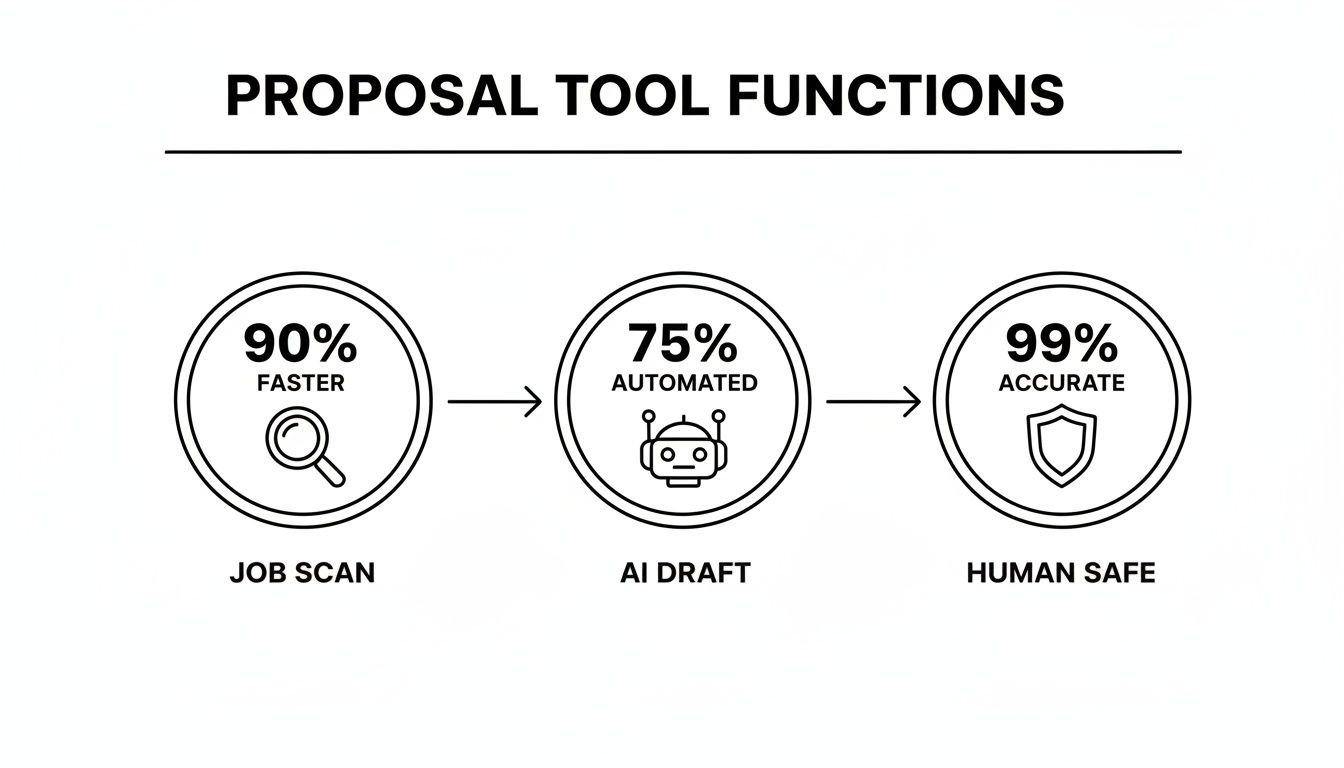
As you can see, the goal is to automate the heavy lifting—like scanning jobs and getting a first draft ready—while keeping a human in the loop to ensure quality and compliance.
The High Cost of Being Too Slow
On a platform as crowded as Upwork, speed is your secret weapon. A client might get 20-50 proposals for a single job, but they often only read the first 5-10 that land in their inbox. If it takes you 15-20 minutes to write each proposal from scratch, you can only send a handful before you’re completely wiped out.
This creates a serious bottleneck. You end up missing out on amazing opportunities simply because the client hired someone before you even hit "send." For agencies trying to manage multiple freelancer profiles, this slow, manual pace puts a hard ceiling on how much you can earn. For a deeper dive, check out these proposal strategies that have won over $300k in contracts.
The real cost isn't just the time you spend; it's the high-value projects you never even had a chance to win. By the time your perfect, handcrafted proposal is ready, the client may have already hired someone who was simply faster.
Using an Upwork proposal tool isn't about cutting corners. It's a smart business move. By handing off the repetitive, low-value tasks to automation, you can finally put your time and energy where they actually count:
- Personalizing the final pitch with your unique insights and expertise.
- Focusing on billable client work that directly grows your revenue.
- Scaling your freelance business instead of getting buried in the proposal grind.
Ultimately, making the switch from a manual to an automated system is about maximizing your return on investment. You get your valuable hours back, sidestep burnout, and put yourself first in line for the best jobs on Upwork. It’s how you turn client acquisition from a soul-crushing chore into a well-oiled, profitable machine.
Key Features to Look For in a Proposal Tool
Picking an Upwork proposal tool feels a lot like hiring a new team member. You wouldn't hire the first person who walked in the door, right? You'd look for someone with the right skills and the right fit. It's the same with these tools. The market is crowded, but only a handful have the strategic features that will actually move the needle for your business.
Your goal isn't just to send more proposals; it's to send smarter ones. This means digging deeper than surface-level features to find a system that helps you find the perfect jobs, craft compelling bids, and give you the data you need to sharpen your entire approach to winning work.
Intelligent Job Matching and Filtering
The first thing a truly great Upwork proposal tool does is find the needle in the haystack for you. I'm not talking about basic keyword searches. You need a system that uses smart algorithms to read between the lines of a job description, looking at the context, budget, client history, and required skills.
This is what stops you from wasting time—and precious Connects—on jobs that aren't a great fit. A top-tier tool lets you dial in your filters precisely and, more importantly, learns from your feedback. It should get smarter over time, zeroing in on what an ideal project looks like for you.
AI-Powered Personalization and Voice Training
Let's be honest: generic, robotic-sounding proposals get ignored. They’re the junk mail of Upwork. The best tools use AI to generate highly personalized drafts that sound like they actually came from you. And this goes way beyond just slotting in the client's name.
A tool that truly gets it right should be able to:
- Analyze the Job Post: It needs to understand the client's specific problem and then craft an opening that shows you get it, too.
- Learn Your Voice: You should be able to feed it your past winning proposals so it can mimic your unique style, tone, and way of explaining things.
- Integrate Your Portfolio: The system should be smart enough to suggest the most relevant case studies or portfolio pieces to back up your claims.
This is the kind of personalization that gets replies. In fact, customized Upwork proposals are 3-5 times more likely to land a response than generic templates. On a platform with over 18 million freelancers, that's a massive edge. The sweet spot is often a tight, 100-150 word proposal with a personalized hook that proves you’ve actually read the brief. If you want to see this in action, check out these powerful Upwork proposal samples.
Your proposal tool shouldn't just be a writer; it should be your ghostwriter. It needs to capture your essence and expertise, ensuring every bid feels authentic and compelling, not mass-produced.
Safety Protocols and Analytics
Finally, there are two features that are absolutely non-negotiable: account safety and performance analytics. A trustworthy tool has to work in a way that respects Upwork’s Terms of Service, which means mimicking human behavior. This includes things like paced submissions and secure integrations that don't ask for your password.
Just as crucial is a solid analytics dashboard. You need to see what's happening with your proposals. How many are being viewed? What’s your reply rate? How many are leading to interviews? Without this data, you're flying blind. This is the feedback loop that allows you to refine your strategy, double down on what works, and ultimately, win more clients.
How to Weave a Proposal Tool Into Your Workflow
Bringing a new piece of software into your daily routine can feel like a hassle. But the right Upwork proposal tool shouldn't add to your workload; it should start saving you time from the get-go. The trick is to set it up thoughtfully so it becomes the engine driving your client acquisition, not just another browser tab you have open.
Think of the initial setup as giving the tool a map and a destination. You start by defining your ideal client. This is more than just plugging in keywords like "web design" or "content writing." A good system lets you get specific, filtering for things like client budget, the length of the project, required skills, and even a client's past hiring history on the platform. This step is all about making sure the tool only surfaces high-quality leads that are a perfect fit for what you do best.
Getting the AI to Sound Like You
Once you've told the tool what to look for, the next step is teaching it how to talk. The best proposal tools don't just spit out cookie-cutter templates. They actually learn from your past wins. You can feed the AI your most successful proposals—the ones that landed you great clients. The system will then analyze your style, your tone, and how you position solutions to problems, making sure every draft it generates feels genuinely like you.
Don't skip this part. The goal isn't to create a robot that blindly bids on jobs. It's about building a smart assistant that can handle about 80% of the repetitive grunt work. That frees you up to add the final 20%—that crucial layer of personal insight and strategic thinking that closes the deal. This "human-in-the-loop" approach is key to maintaining both quality and compliance with Upwork's rules.
Using Analytics to Make Wmarter Bids
With the tool up and running, the final piece of the puzzle is using its data to sharpen your strategy over time. A solid proposal tool will give you a dashboard with key metrics: proposal view rates, reply rates, and interview rates. This gives you a crystal-clear picture of what's landing and what's falling flat.
Think of this dashboard as your command center for growth. The data doesn't just show you results; it tells you exactly where to make adjustments for a bigger impact.
Upwork’s own data confirms that freelancers who pay attention to their stats simply win more work. For instance, if your proposals are getting very few views, you might need to tweak your job filters or work on your opening line to be more compelling. If you're getting plenty of views but no interviews, that's a signal that the body of your proposal isn't connecting. This data-driven feedback loop replaces guesswork with a clear action plan, helping you fine-tune your approach for a platform where insights directly impact your income. To dig deeper into this, you can explore how top freelancers use Upwork's statistics.
Putting Your Client Acquisition on Autopilot
Getting a handle on automation is great, but getting your client acquisition to run on true autopilot? That’s the real game-changer. It means your system is landing you clients even when you've logged off for the day. Earlybird AI was built from the ground up to do exactly that, acting less like a simple tool and more like an always-on sales team.
Most proposal tools clock out the second the proposal is sent. For Earlybird, that’s just the beginning of the workday. It takes the wheel for that entire initial conversation, becoming a powerful extension of your business.
From First Reply to Booked Meeting
Picture this: a potential client replies to your proposal on Upwork. Instead of you having to stop what you're doing to jump on it, Earlybird’s AI is already on the case. It crafts a thoughtful, personalized response in under five minutes, answering their initial questions and handling the back-and-forth for you. It’s all about gently guiding that warm lead toward the next logical step.
The system keeps the conversation moving, following up intelligently until a meeting is booked directly in your calendar. This completely transforms your lead generation from a frantic, manual grind into a smooth, hands-off process. For a deeper dive into this kind of strategy, check out our guide on what is sales automation.
Earlybird AI doesn't just send proposals; it closes the loop. It’s the difference between having a tool that finds leads and having a system that converts them into scheduled sales calls, effectively replacing the need for a full-time sales development rep.
This powerful, end-to-end automation is built on three core pillars:
- Intelligent Learning: The AI gets smarter with every interaction. Based on simple thumbs-up/down feedback from you, it continuously refines its understanding of your ideal projects and clients.
- Unwavering Safety: Your account's security is our top priority. Earlybird is designed to mimic natural human behavior and uses clean regional IPs, ensuring you always stay well within Upwork's terms of service.
- Powerful Analytics: A clean, straightforward dashboard shows you the entire sales funnel at a glance. You can track everything from proposal views to booked meetings, giving you the hard data you need to fine-tune your approach.
When you have this level of automation working for you, you get back your most precious resource: time. You can finally stop chasing down leads and pour all that energy into what you do best—delivering amazing work for the clients the system brings you.
Frequently Asked Questions
Jumping into any new tool, especially one that automates a key part of your business, is bound to bring up some questions. Let's dig into the big ones that freelancers and agency owners usually have about using an Upwork proposal tool.
Is It Safe to Use a Proposal Tool on Upwork?
This is usually the first and most important question, and for good reason. The short answer is: it all comes down to the tool you pick. A well-built, professional tool puts your account's safety first and foremost. It's designed to act like a human, not a bot, which is key to avoiding any red flags on Upwork.
Think of it like driving a car. You can speed and break the rules, or you can drive carefully and follow the signs. A good tool follows the signs. Here’s what that looks like in practice:
- Paced Submissions: It sends proposals at a natural rhythm, with varied timing, just like a person would. No machine-gunning bids out all at once.
- Secure Integration: It should connect to your account through secure, authorized methods. A huge red flag is any tool that asks for your Upwork password—don't ever share it.
- Clean Regional IPs: The tool should operate from a dedicated IP address that matches your general location, making all the activity look completely normal and legitimate.
Will My Proposals Sound Generic and Robotic?
Nobody wants to send a proposal that screams "AI wrote this!" It's a valid concern. While some basic tools are little more than template-fillers that produce bland, cookie-cutter text, a truly advanced Upwork proposal tool is built to sound exactly like you.
The best platforms have a "training" feature. You feed the AI your past proposals—the ones that actually won you jobs. The system studies your tone, your phrasing, and the way you structure your solutions. It learns your voice. The end result isn't a generic template; it's a draft written in your authentic style, ready for your final touch.
How Do I Measure the Return on Investment?
Thinking about ROI is smart, but it's more than just the monthly subscription fee. The biggest, most immediate return is the time you get back. Seriously, do the math. How many hours a week do you burn searching for jobs and writing proposals? Now, what's your billable rate? Multiply those two numbers. That's the value you reclaim from day one.
The real ROI isn't just about saving time; it's about what you do with that reclaimed time. If the tool helps you land just one extra client you otherwise would have missed, it has likely paid for itself for the entire year. All that while you were focused on billable work.
Beyond just the time savings, keep an eye on these numbers:
- Proposal Views and Replies: Are more potential clients seeing and responding to your bids?
- Interviews Booked: How many of those initial replies are turning into actual conversations?
- Contracts Won: What’s the direct, bottom-line revenue you can trace back to the tool?
A good platform will have an analytics dashboard that lays all this out for you, so you can clearly see how its efforts are translating into more business.
Ready to stop spending hours searching and start spending more time earning? Earlybird AI is like having a sales team working for you 24/7, finding the perfect job and even helping book the meeting. Book your demo today!




