
← Back To Blog
What Is Workflow Orchestration: Benefits & Best Practices
Workflow orchestration is the conductor that coordinates automated tasks, people, and systems into one reliable business process, and it's quickly becoming standard operating infrastructure as the market grows from US$90.8 billion in 2024 to a projected US$399.5 billion by 2030. If your agency is juggling Slack messages, Asana tasks, client emails, invoices, and proposal follow-ups by hand, workflow orchestration is the layer that stops those moving parts from drifting out of sync.
A lot of agency owners are already doing some automation. A form creates a task. A calendar booking sends an email. A proposal gets copied from a template. That helps, but it doesn't solve the bigger problem. The bigger problem is coordination.
One client onboarding gets delayed because accounting didn't see the signed agreement. A content piece stalls because design finished but SEO never got notified. An Upwork lead replies, but nobody routes it to the right salesperson fast enough. The issue isn't usually effort. It's that the business is running through disconnected tools instead of a managed flow.
That's where workflow orchestration matters. It acts like the control layer for your agency. It decides what happens next, what must wait, who gets involved, what to do if something fails, and how to keep the whole process visible from start to finish. If you're also thinking about automation in AI-heavy systems, this guide to managing AI in production is useful because it shows how orchestration becomes the layer that keeps fast-moving systems controlled instead of chaotic.
What Is Workflow Orchestration
An agency owner usually doesn't wake up thinking, “I need workflow orchestration.” They wake up thinking, “Why is my team chasing status updates all day?”
A client signs a contract in DocuSign. Someone on the team has to notice it. Then finance creates the invoice. Then operations creates the project in Asana. Then a welcome email goes out. Then the strategist gets assigned. Then the kickoff meeting gets booked. Every step is reasonable. The mess starts when those steps depend on one another but live in different places.
Workflow orchestration is the end-to-end coordination of interconnected tasks, people, digital workers, and data systems so they run in the right sequence with the right dependencies handled. That definition matters because it separates orchestration from simple automation. Automation handles one task. Orchestration makes sure the whole chain runs as one system.
The easiest way to think about it
Think of your agency as an orchestra.
- Automation is one musician playing their part.
- Orchestration is the conductor making sure everyone comes in at the right time.
- The business outcome is the finished performance, not the isolated notes.
That distinction is why the category is growing so fast. The global workflow orchestration market was valued at approximately US$90.8 billion in 2024 and is projected to reach US$399.5 billion by 2030, with a 28.0% CAGR, according to Research and Markets on workflow orchestration.
Why agency owners should care
For an agency, orchestration isn't an enterprise buzzword. It's what turns scattered activity into a repeatable delivery model.
Practical rule: If a process crosses teams, tools, approvals, or client touchpoints, it probably needs orchestration, not just automation.
Without it, your team keeps acting as the glue between systems. Project managers chase updates. Sales people hand-carry leads. Operations staff check whether the last step happened before they start the next one. With it, the system handles the handoffs and only asks humans to step in where judgment is needed.
That's the shift. You stop managing tasks one by one and start managing flow.
Orchestration Automation and BPM Explained
Most confusion starts because automation, BPM, and workflow orchestration sound similar. They overlap, but they do different jobs.
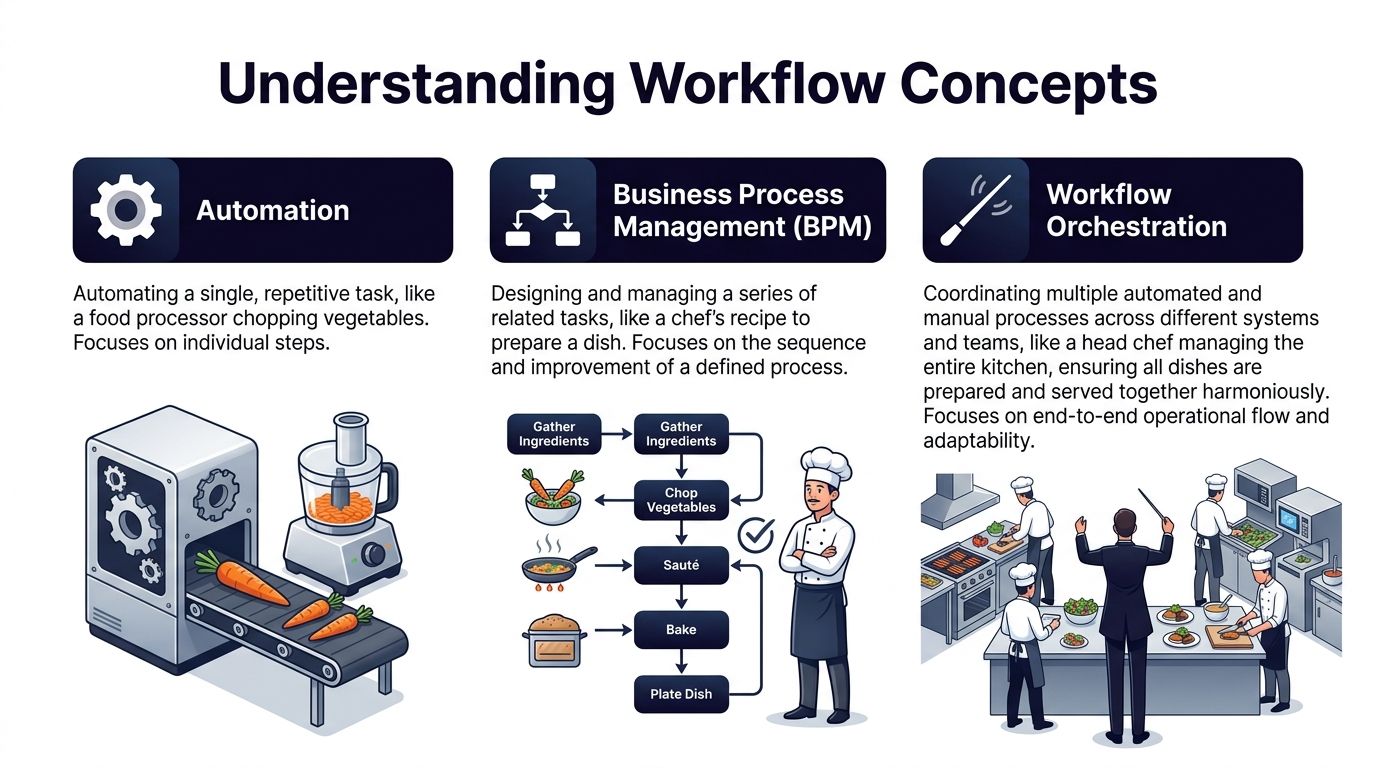
The simplest analogy is a restaurant kitchen. A food processor chops onions. A recipe defines how to make the dish. The head chef coordinates the kitchen so the steak, fries, and sauce all reach the table together.
Automation handles a single task
Automation is the easiest layer to recognize. It makes one repetitive action happen without manual effort.
Examples inside an agency:
- Proposal prep: A template tool fills in your standard introduction.
- Task creation: A web form creates a card in Asana.
- Client comms: A booking confirmation email goes out automatically.
These are useful, but they're narrow. They don't know whether the client paid, whether legal approved the scope, or whether the strategist is available next week. They just do the one thing they were told to do.
BPM designs the process
Business Process Management, or BPM, is the broader discipline of designing, documenting, and improving a business process.
In the kitchen analogy, BPM is the recipe, prep flow, and station layout. It defines how work should move. In an agency, BPM might map your onboarding process from signed agreement to kickoff call, including approvals, responsibilities, and service standards.
BPM answers questions like:
- What are the official stages?
- Who owns each stage?
- Where are approvals required?
- How should the process improve over time?
BPM is about process design and management. It gives structure, but it doesn't automatically coordinate every live handoff across all your tools.
Workflow orchestration runs the real operation
Workflow orchestration is the operating layer that makes the designed process execute across systems and people.
If automation is the food processor and BPM is the recipe, orchestration is the head chef calling the line, checking dependencies, rerouting around delays, and making sure the full order lands correctly.
A process can be well designed on paper and still fail in practice if nobody coordinates the live handoffs.
This is also where orchestration differs from native schedulers. It functions as a centralized control plane across mixed environments, while tools such as Airflow are limited to workflows inside their own native environments, as explained by BMC's guide to workflow orchestration control planes.
For an agency owner, that means something concrete. Your process probably lives across CRM, email, project management, finance, chat, docs, and sales channels. A scheduler can trigger one job. An orchestrator can coordinate the whole path.
A simple side-by-side view
Here's the practical difference in plain language:
- Automation: “Send the email.”
- BPM: “Define the onboarding process.”
- Workflow orchestration: “Only send the onboarding email after the contract is signed, the invoice is created, the project workspace exists, and the account owner is assigned.”
That's why agencies often feel they've “automated” a lot but still experience bottlenecks. They automated actions. They didn't orchestrate the flow.
How Workflow Orchestration Actually Works
Under the hood, workflow orchestration is less mysterious than it sounds. It resembles a film production.
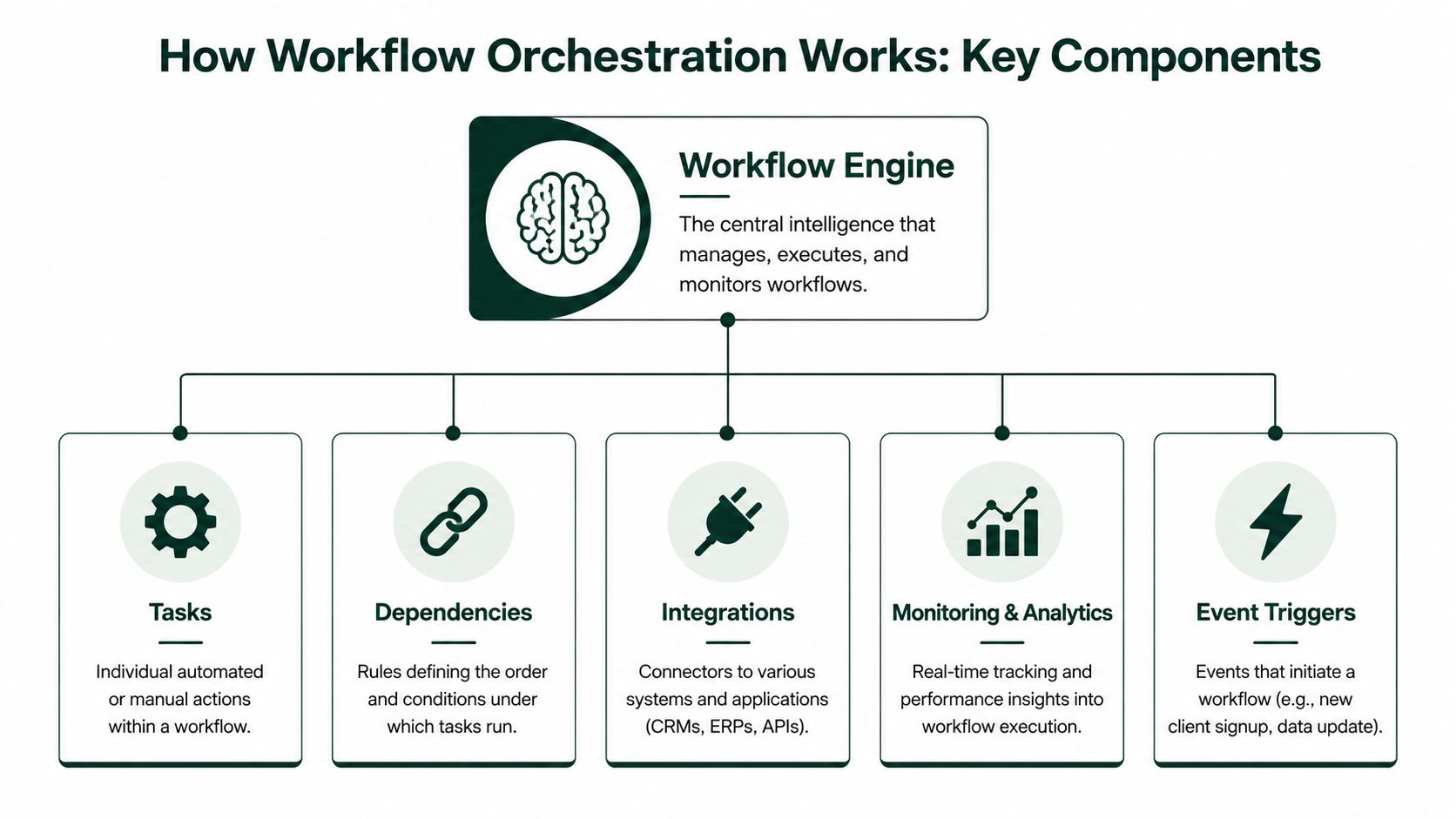
The workflow engine is the director. Tasks are the scenes. Dependencies are the shooting schedule. Triggers are the call sheet that starts the day. State management is the production tracker showing what's done, what's blocked, and what needs attention.
The engine decides what happens next
At the center is the orchestration engine. It doesn't necessarily do the work itself. It coordinates the work.
In an agency context, the engine might watch for a signed contract, then trigger invoice creation, then wait for payment status, then open a project in Asana, then notify the assigned team lead. It acts like the system brain that knows the order of operations.
The five functions that matter most
Workflow orchestration manages five core functions, according to Kissflow's workflow orchestration guide:
- Sequencing: It defines task order and what can run in parallel.
- Dependency management: It ensures Task B can't start until Task A completes successfully.
- State management: It tracks real-time status of each active workflow.
- Exception handling: It routes failed steps to humans or escalation paths.
- Visibility: It provides dashboards for completion and workflow status.
If you want a practical example of what that kind of visibility can look like in an automation stack, a n8n workflow monitoring dashboard is a helpful reference point because it makes workflow status easier to inspect at a glance.
What people usually get wrong
Many agency teams assume a workflow is running because the first task fired. That's not enough. A real orchestrated workflow has memory and rules.
For example:
- A client submits an intake form.
- The system creates a deal record.
- A missing budget field blocks proposal drafting.
- The workflow pauses and alerts the account manager.
- Once the field is completed, the workflow resumes from that exact point.
That “pause and resume” behavior is why orchestration feels more reliable than a loose chain of automations.
The real value isn't that a task starts automatically. It's that the entire process can recover cleanly when real-world mess shows up.
Why monitoring matters
Once workflows touch revenue or delivery, you need observability, not hope. You need to know which runs succeeded, which stalled, which required a human, and where delays keep recurring.
A good next read on adjacent process design is how to automate repetitive tasks, especially if you're still moving from single-step automations toward connected systems.
In practice, workflow orchestration works because it combines logic, memory, and monitoring. That combination is what turns a process from a fragile chain reaction into an operational system.
Workflow Orchestration Examples for Your Agency
Theory clicks when you can see your own agency inside it. Most agencies already have the raw ingredients for orchestration. They have leads, proposals, contracts, briefs, designers, writers, PMs, and client approvals. What they often lack is the layer that coordinates all of it.

Client onboarding without the handoff chaos
Take a new client closing a retainer.
The signed agreement arrives in DocuSign. The orchestrator sees that event and triggers the next steps in order. It creates an invoice in QuickBooks. It opens a client project in Asana. It assigns an internal owner. It sends the welcome packet. It prompts the client to book kickoff. If payment doesn't arrive, the setup steps can pause instead of moving forward blindly.
That matters because onboarding failures rarely come from one dramatic mistake. They come from small missed handoffs.
A coordinated onboarding flow might do things like:
- Gate delivery: Don't launch the workspace until the agreement is complete.
- Assign ownership: Route the account to the right strategist based on service type.
- Protect timelines: Alert operations if kickoff hasn't been booked after the onboarding email goes out.
- Keep records aligned: Sync client details across finance, PM, and CRM tools.
Content production that moves like a system
Now look at a blog production pipeline.
A strategist creates the brief. Once approved, the writer gets assigned. When the draft is submitted, the editor is notified. After editorial approval, design receives the asset request. Then SEO checks metadata and internal links. Then the CMS draft is scheduled. If any stage gets rejected, the workflow routes it back to the right owner instead of dumping it into a vague “needs changes” limbo.
This is especially useful in agencies where creative work still needs structure. Orchestration doesn't remove judgment. It removes uncertainty around who goes next.
If you're comparing operating systems for this kind of agency work, this guide to a marketing platform for agencies is a useful reference for thinking about how tools fit into a broader process, not just as isolated apps.
Upwork pipeline orchestration
Sales workflows on Upwork are one of the clearest agency examples because they combine automation and human judgment.
A lead appears. A system can identify whether it matches your target work. It can prepare a customized draft response. It can track whether the prospect replied. But if the buyer signals serious interest, that conversation often needs to move to a human closer quickly.
An orchestrated sales flow can handle that handoff in a disciplined way:
- A new job post enters your pipeline.
- Qualification logic checks fit.
- A proposal draft is prepared.
- A reply from the client triggers routing.
- A salesperson gets alerted to take over and book the call.
- If the lead goes quiet, the workflow schedules follow-up actions.
Here's a visual walkthrough that helps make that sort of handoff logic more concrete:
The important point isn't that every step must be automated. It's that the system knows when to automate, when to wait, and when to bring in a person.
Key Benefits of Adopting Workflow Orchestration
The biggest mistake agency owners make is treating orchestration like a productivity hack. It's bigger than that. It's an operating model.

When agencies grow, work doesn't just increase. Coordination complexity increases. More clients means more exceptions, more approvals, more deliverables, and more risk that something falls between tools or team members. Orchestration gives that complexity a control layer.
Scalability without constant firefighting
If your current delivery model depends on a project manager remembering every next step, growth gets expensive fast.
With orchestration, the system handles routine sequencing and routing. Your people spend less time checking statuses and more time solving real problems. That doesn't remove managers. It lets managers manage exceptions instead of babysitting process flow.
Fewer errors and better visibility
Manual handoffs create quiet failures. A file doesn't get sent. A task sits unassigned. A reply waits in the wrong inbox.
Orchestration reduces that risk because the process is tracked as a whole. You can see where work is, what's blocked, and which steps repeatedly fail. That visibility is often just as valuable as the automation itself.
Key takeaway: The strongest agencies don't just automate activity. They govern how work moves from one stage to the next.
More agility when clients change direction
Clients change scope. Timelines move. Approvals get delayed. A good orchestration layer can handle branching logic without forcing the team to rebuild the process from scratch every time something shifts.
That's one reason the governance angle matters so much. Workflow orchestration is rarely explained as an operating model for secure environments that defines how work moves, who owns it, and which data actions are permitted. That control-oriented view turns disconnected automations into a coordinated machine that measures revenue output, not just activity, as argued in GS Consulting's take on workflow orchestration in secure environments.
The tradeoff is upfront design
None of this is free. Orchestration requires process clarity. If your team can't agree on what “done” means in onboarding or what should happen after a client approves a draft, the platform won't fix that confusion for you.
Still, once the flow is clear, orchestration gives you something agencies usually struggle to achieve manually. Reliable scale.
Getting Started with Workflow Orchestration
Most agencies don't need a giant transformation project. They need one process that stops wasting time every week.
Start there. Not with every department. Not with a grand redesign. Pick one workflow where delays, handoffs, and confusion show up constantly.
Start with one high-friction workflow
A good first candidate usually has three traits:
- It crosses tools: For example, sales, finance, and project management all touch it.
- It has repeatable stages: The same sequence happens again and again.
- It hurts when it breaks: Delays affect revenue, client experience, or delivery quality.
For many agencies, that's client onboarding, content production, or inbound lead response.
Map it on a whiteboard first. Write down every step, every owner, every approval, every system touched, and every place work tends to stall.
Define the operating rules before tooling
Strong implementation starts before software setup. Expert implementation requires defining business requirements and Service Level Indicators, inventorying all tasks and dependencies, and ensuring observability is operational before instrumentation begins, according to AIOps School on workflow orchestration implementation.
In agency language, that means:
- Decide what success looks like.
- Identify which step starts the workflow.
- Define what must happen before the next step can begin.
- Decide what should trigger a human escalation.
- Make sure you can see whether the workflow succeeded or failed.
If you're reviewing the broader stack that supports this kind of operational maturity, this overview of advertising agency software can help frame where orchestration fits among your existing tools.
Roll out in phases
Don't try to automate every exception on day one. Build the mainline path first.
A practical rollout often looks like this:
- Phase one: Connect the trigger, the core sequence, and the final outcome.
- Phase two: Add alerts, ownership rules, and pause conditions.
- Phase three: Add exception handling and reporting.
- Phase four: Expand the same logic to the next workflow.
A workflow is ready for orchestration when you can answer three questions clearly: what starts it, what blocks it, and who owns the exception.
Choose tools like an operator
When evaluating a platform, look past flashy templates.
Focus on whether it can:
- Connect your stack: CRM, project tools, finance tools, forms, and communication apps.
- Handle mixed work: Automated steps plus approvals and human tasks.
- Show state clearly: You need to know what ran, what failed, and what's waiting.
- Scale with your agency: Today's onboarding flow can become tomorrow's delivery and sales system.
That's how you keep workflow orchestration practical. Start narrow. Make it visible. Prove it works. Then expand.
Your Workflow Orchestration Questions Answered
Can I use workflow orchestration for creative processes
Yes. Creative work still has structure even when the output requires judgment. Brief approval, drafting, review, design handoff, client approval, revision routing, and publication are all steps that benefit from clear sequencing and ownership.
How much technical skill do I need to start
The effort is less than often imagined, if you start with a clearly mapped process. The hard part usually isn't coding. It's defining triggers, dependencies, owners, and exception paths clearly enough that a system can manage them.
Is workflow orchestration only for large enterprises
No. The concept came from complex enterprise operations, but the need shows up much earlier. If your agency uses multiple tools, has repeated client workflows, and loses time to manual coordination, orchestration is already relevant.
If your agency wants a more consistent way to capture and convert Upwork opportunities, Earlybird AI helps automate proposal drafting, message handling, follow-up, and team workflows so your sales process runs with less manual effort and faster response times.




