
← Back To Blog
A Modern Guide to Working with Upwork and Scaling Your Agency

Getting serious about Upwork means you have to stop thinking like a lone freelancer and start operating like a business. Your whole approach needs a strategic overhaul, from building a client-magnet profile to hunting for top-tier projects and writing proposals that scream "hire me."
When you get this right, your profile stops being a static resume and becomes your best salesperson, working for you 24/7.
Building an Agency Profile That Attracts High-Value Clients
Think of your Upwork profile as the front door to your business. If it’s generic or looks thrown together, high-value clients will walk right on by. But a sharp, strategically built profile will pull them in. Before you even think about sending a single proposal, your agency's presence on the platform has to be absolutely airtight.
This means you need to go way beyond just listing what you do. You have to craft an agency overview that speaks directly to a client’s biggest headaches. Don't just list services; frame them as the exact solutions they've been looking for.
Crafting a Compelling Agency Overview
The best agency overviews are all about the client. It’s the difference between "We're a web development agency" and "We build high-performance e-commerce sites that turn your traffic into sales, helping you break through revenue plateaus." See the difference? One is about you, the other is about them. That small change makes an instant connection.
You have to remember the scale of the marketplace you're playing in. Upwork is massive, with over 18 million freelancers. And for those of us in tech, about 34% of all the work on the platform is in web, mobile, and software development. It's crowded, for sure, but also packed with opportunity. Knowing the landscape is key, and you can dig into more Upwork statistics to really sharpen your strategy.
Pro Tip: Your agency overview is basically your website's homepage. It needs a hook—a strong headline, a clear value proposition, and a subtle nudge that gets clients clicking through to see your work and meet your team.
Showcasing Value Through Your Portfolio and Team
Your portfolio is where the rubber meets the road. This is where you prove you can do what you say you can. Don't just throw up a few screenshots and call it a day. Build out mini-case studies for your best projects.
Lay out the client's original problem, walk them through the solution you delivered, and—most importantly—show them the results. Did you increase their sales by 20%? Cut their bounce rate in half? Use real numbers.
Make sure your portfolio is well-rounded to show off your agency's range:
- The Big Guns: Showcase those high-budget, complex projects that prove you can handle the heavy lifting.
- Your Sweet Spot: Feature work that highlights your deep expertise in a specific industry or technology. This is what makes you a specialist, not a generalist.
- Quick Wins: It's also smart to include a few smaller projects. These show you're efficient and can deliver quality work on a tight timeline.
Finally, don't neglect the individual profiles of your team members. Every single person should have a professional headshot and a sharp, concise bio that highlights what they bring to the table. When a potential client sees a cohesive team of experts, it builds a ton of confidence and makes them far more likely to hire you.
To pull it all together, think of your profile as a puzzle. Each piece needs to fit perfectly to create a compelling picture for potential clients.
Key Elements of a Winning Upwork Profile
Getting these elements right isn't just about looking good; it's about building a system that consistently brings high-quality leads directly to you.
How to Find and Qualify the Right Job Opportunities
The Upwork job feed is a firehose of new postings. If you're not careful, you can burn through your "Connects" and a ton of time applying for duds. The real key to winning on Upwork isn't just applying—it's developing a sharp eye for finding and qualifying the right opportunities.
The goal here is to stop chasing every job and start focusing only on great jobs. This means you need a system to cut through the noise and pinpoint clients who are serious, have a real budget, and are a perfect fit for what you do. It all starts with getting smart about your search.
Deciding on your overall strategy—whether you're flying solo or building an agency presence—is the first step. This choice directly impacts how you'll approach finding and landing work.
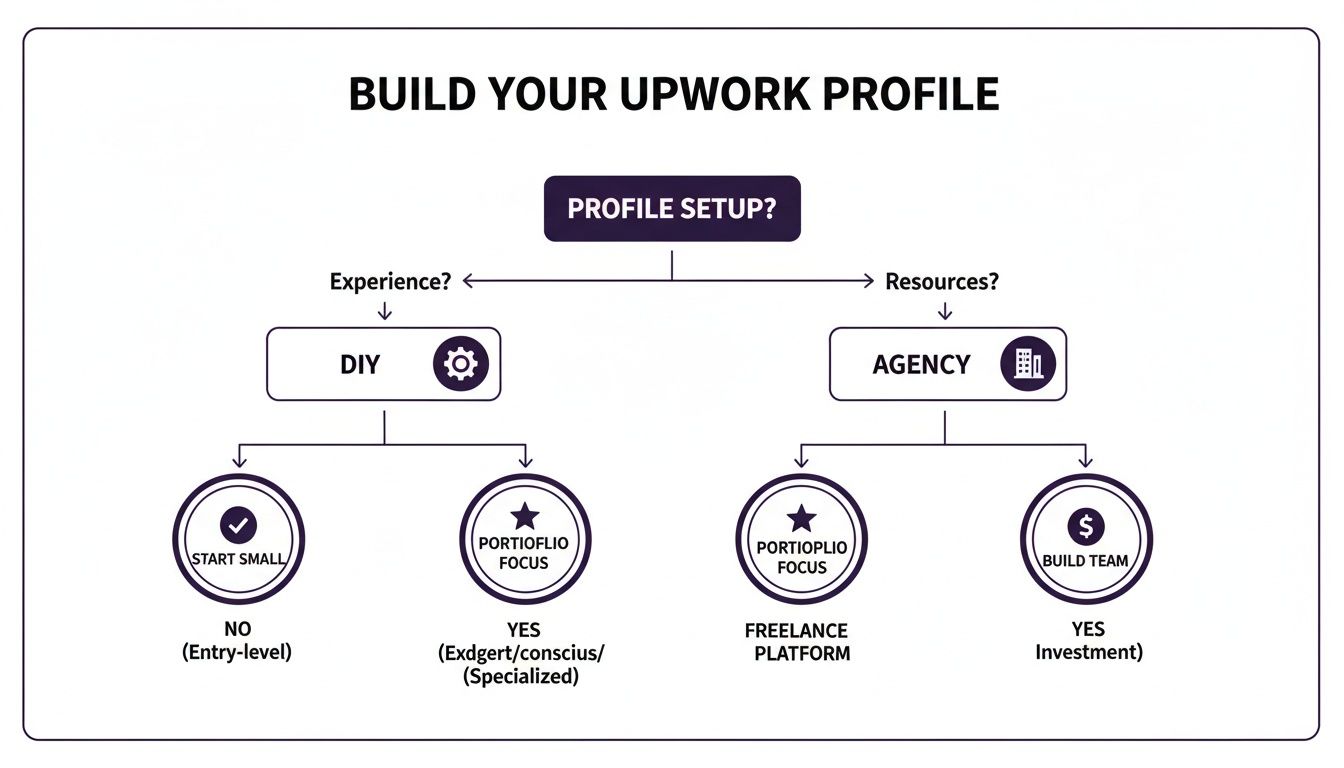
No matter which path you take, a structured approach is non-negotiable, and that discipline is most critical when you're hunting for leads.
Mastering Your Search Filters
Don’t just type a keyword into the search bar and cross your fingers. Upwork's advanced filters are your best friend for building a high-quality job feed. Get in the habit of creating saved searches with specific filter combinations to make your daily hunt quick and effective.
Here are a few filter combinations I've found essential:
- Payment Verified: This is my number one rule. Don't even look at jobs from clients without a verified payment method. It’s the simplest way to protect yourself from scams and non-paying clients.
- Client History: I always look for clients who have a track record of hiring and leaving good feedback. A client with 5+ hires and a 4.5-star rating or higher is usually a good bet. It shows they know how the platform works and value their freelancers.
- Budget & Rates: Filter out the noise. Set the filters to only show projects that meet your minimum rates. There's no point in even seeing jobs that are way below what you're willing to accept.
- Job Type: Are you looking for fixed-price or hourly? Filter for what you prefer. Many agencies I know lean towards fixed-price projects because the deliverables are clear and payments are tied to milestones.
Saving these searches turns the chaotic job feed into a hand-picked list of solid leads you can review in minutes.
Reading Between the Lines of a Job Post
Once you have a shortlist, it’s time to vet the actual job descriptions. This is where you learn to spot red flags before you waste a single Connect. Vague descriptions or completely unrealistic expectations are tell-tale signs of a client who will be a nightmare to work with.
A great job post is specific. It clearly outlines the problem, the desired outcome, and the required skills. A post that just says "Need a new website" without any details about their business, target audience, or specific features is a major red flag.
Look for a client who put some thought into their post. It’s a good sign they’re invested in the project and respect your time. On the flip side, run from posts with crazy-low budgets, impossible deadlines, or a laundry list of demands for pennies. These are posted by clients who don't get the value of your work, and your energy is much better spent elsewhere.
Crafting Proposals That Actually Get Replies

Let's be blunt: a generic, copy-pasted proposal is the fastest way to get your bid ignored on Upwork. Clients often get slammed with dozens of templated responses that all sound the same ("Dear Sir/Madam..."). To stand out, you have to break that pattern from the very first word.
Think of your proposal as a direct sales pitch, not a cover letter. Your job is to show the client you've actually read their post, understood their problem, and can deliver immediate value. It's all about crafting a targeted message that makes your agency the only logical choice.
Hook Them in the First Two Sentences
Most clients only see the first couple of lines of your proposal in their dashboard. That tiny preview is your entire audition. If you waste it on generic greetings or talking about yourself, they’ll just scroll on by.
This is your moment to prove you've paid attention. Lead with their problem. Start by directly addressing a pain point you pulled from the job description. It's a simple move that shows you're already thinking about their specific needs.
Winning Opening Example: "I see you're looking for a Squarespace developer to fix your mobile menu issues and reduce that high bounce rate. I've helped two other e-commerce clients solve this exact problem in the last month, boosting their mobile conversions by over 15%."
An opener like this changes the game. It screams expertise, hones in on their core issue, and dangles a tangible result—all within the first few seconds.
Prove Your Expertise with Insightful Questions
Once you've grabbed their attention, the rest of your proposal needs to build on that connection. Resist the temptation to just list your skills—that’s what your profile is for. A much savvier strategy is to ask intelligent, clarifying questions about the project.
This does two critical things at once. First, it demonstrates your expertise without you having to brag. Asking thoughtful questions about their goals, audience, or technical hurdles shows you understand the work on a much deeper level. Second, it shifts the dynamic from a one-way pitch to a two-way conversation, making a reply feel like the natural next step.
Here’s a simple framework for a proposal that gets results:
- Acknowledge Their Goal: Restate their main objective in your own words. It shows you're on the same page.
- Ask Strategic Questions: Pose one or two sharp questions that showcase your experience. If they need a logo, ask about their brand positioning or key competitors.
- Connect to Your Portfolio: Bring up a specific, highly relevant project. Don't just attach it—explain it. Say something like, "The project I attached for 'Client X' had a similar goal of reaching a younger demographic, and we nailed it by..."
This approach keeps the focus squarely on the client's needs while subtly weaving in your qualifications. If you need more inspiration, these cover letter examples for Upwork are a great resource for seeing this structure in action.
Close with a Clear Call to Action
The final piece of the puzzle is a clear, confident call to action (CTA). Don't leave the client hanging or wondering what to do next. You have to guide them.
A passive sign-off like "I look forward to hearing from you" is a dead end. Be more direct and suggest a simple, low-commitment next step.
Powerful CTA Examples:
- "Are you available for a quick 15-minute call tomorrow to discuss your project goals in more detail?"
- "I have a few initial ideas on how we could approach the backend architecture. Would you be open to a brief chat to explore them?"
This proactive approach makes it easy for them to say yes, nudging the conversation off the platform and into a real sales discussion. When you combine a powerful hook, smart questions, and a clear CTA, you’ll stop hoping for replies and start expecting them.
Managing Client Contracts and Communication Like a Pro

So, you’ve won the job. Great! But the real work starts now. Winning the proposal is just the beginning; what separates the top earners from the rest is how they manage the relationship after the contract is signed. This is your chance to turn a one-off project into a long-term partnership that pays dividends.
The moment a client hits "hire," your focus needs to pivot immediately to setting up the project for success. The first big decision? The contract type.
While both hourly and fixed-price contracts have their place, I've found that most experienced freelancers and agencies gravitate towards fixed-price projects. Why? They offer incredible clarity. Payments are tied to specific milestones you define, and the client has to fund each one in escrow before you start working. It’s a powerful way to protect yourself and keep the project focused on results.
Hourly contracts, on the other hand, mean using Upwork's Desktop App to track your time. It works, especially for projects where the scope is a bit fluid. But honestly, many find the constant monitoring and screenshots a little intrusive. The choice is yours, but for most projects, fixed-price is the cleaner, safer route.
Setting Clear Expectations from Day One
Vague instructions and unspoken assumptions are the fastest way to kill a project. Before you write a single line of code or design a single graphic, you need to establish a rock-solid foundation. This kickoff phase isn't optional—it's essential for preventing headaches down the line.
Your kickoff conversation, whether it’s a call or a detailed message, should nail down a few key things:
- Communication Hub: Where will you talk? Keep everything in Upwork Messages if you can. If you have to use Slack or email, make sure everyone agrees on one primary channel.
- Response Times: Set a simple rule, like promising to reply within 24 hours on business days. This simple boundary prevents a client from getting anxious if you don't respond in five minutes.
- Revision Policy: This one is huge. Define exactly how many rounds of revisions are included for each milestone. This prevents the dreaded "endless feedback loop."
- Milestones and Deadlines: Break the project into bite-sized pieces. Each piece gets a clear deliverable and a firm due date. This makes the project feel manageable for both of you.
Taking the time to do this shows the client you're a professional who has their act together. It builds confidence from the get-go.
Here's a pro tip that has never failed me: Under-promise and over-deliver. If you think a milestone will take five days, tell the client it will take six. Then, deliver it on day five. It’s a small thing, but it consistently wows clients and is a secret weapon for earning those glowing five-star reviews.
Navigating Feedback and Scope Creep
No matter how well you plan, things will come up. The two biggest challenges you'll face are dealing with client feedback and the inevitable "scope creep." That's when the client asks for "just one more little thing" that was never part of the original deal.
When you get feedback, don't get defensive. Stay professional, listen, and see it as a chance to make the final product even better. It’s a collaboration, not a battle.
But when scope creep rears its head, you have to address it immediately—politely but firmly. Circle back to the original contract and point out what was agreed upon. You can say something like, "That's a great idea! It falls outside the scope of our current milestone, but I'd be happy to create a new milestone for that work." This approach protects your time, respects the original agreement, and reinforces your value. It keeps the relationship fair for everyone.
Scaling Your Upwork Operations with Smart Automation
Let's be honest: manually searching for jobs, vetting clients, and writing custom proposals on Upwork can feel like a full-time job on its own. If you're running an agency and serious about growth, this manual grind quickly becomes a bottleneck. You can only pursue so many opportunities in a day.
This is where smart automation changes the game. Think of it as your always-on sales team, scaling your lead generation while you sleep.
Modern platforms can spot your ideal jobs and fire off highly personalized proposals just minutes after a client hits "post." That speed is a massive competitive advantage. It’s all about letting technology handle the repetitive, time-sucking tasks so your team can focus on what really matters—client strategy and delivering incredible work.
The Role of Safe and Smart Automation
The word "automation" can sometimes sound sketchy, especially when it comes to platforms like Upwork. But we're not talking about spamming clients with generic bots. Safe, smart automation is about using sophisticated tools that work securely and effectively, almost like a human assistant.
Compliant automation tools are built to protect your account. Here’s how:
- They mimic human behavior. The software avoids robotic patterns that trigger red flags, operating at a pace and in a way that looks completely natural.
- They use clean regional IPs. All activity appears to come from your real location, which is crucial for maintaining your account's integrity.
- They integrate securely. The right tools connect to your account using safe methods that never compromise your login credentials.
The goal is to automate the most tedious parts of the sales process, like finding the right jobs and drafting the initial proposals. To get a better handle on the basics, it's worth exploring what sales automation is and how it fits into lead generation. By automating the top of your sales funnel, you free up your team to jump into high-value conversations and actually close deals.
Staying Ahead in a Booming Freelance Economy
When you build a business on Upwork, you’re operating at the center of a massive global shift toward freelance talent. The scale is staggering. In 2024 alone, freelancers generated about $1.5 trillion in earnings worldwide. And it's not slowing down; projections show that by 2027, more than half of the U.S. workforce—a whopping 86.5 million people—will be freelancing.
This trend means two things for your agency: competition is only going to get fiercer, but client demand for specialized, flexible talent will also keep rising. You can dive deeper into these trends with the future of freelancing from Upwork's research.
In this environment, efficiency isn't just a nice-to-have. It’s a survival tactic.
Automation gives your agency a constant presence on the platform. You’ll never miss out on a perfect-fit project just because you were busy or offline. It systematically puts your proposals in front of more qualified clients, boosting your chances of landing high-value contracts without you having to work more hours.
Ultimately, it’s about working smarter, not just harder, to claim your spot in a crowded market. Let technology handle the volume and the grunt work, so your team can do what they do best: build relationships and deliver amazing results.
Common Questions About Working on Upwork
Even the most seasoned agencies run into questions when navigating the day-to-day of Upwork. You’ll inevitably face unique situations around payments, client disagreements, and managing your reputation. Let's tackle some of the most frequent concerns head-on.
How Does Upwork Payment Protection Work?
This is one of the biggest reasons to use the platform. Upwork’s payment protection is solid, but you have to follow the rules to benefit from it. It works differently for the two main contract types.
For hourly jobs, protection hinges on using the official Upwork Desktop App. You have to log your time through it, complete with work diaries. The app periodically snaps screenshots of your screen, creating a verifiable record of your work. This ensures every hour you track is an hour you get paid for.
For fixed-price projects, it all comes down to escrow. Before you even start, the client has to fund the first milestone. Upwork holds that money securely. Once you deliver the work for that milestone and the client approves it, Upwork releases the funds to you. This system basically kills the risk of a client ghosting you without paying.
What’s the Best Way to Handle a Client Dispute?
Honestly, the best way to handle a dispute is to avoid it in the first place. A crystal-clear contract and constant, open communication will prevent 99% of potential problems.
But sometimes, disagreements just happen. If one pops up, your first move should always be to talk to the client directly and professionally. See if you can find a compromise.
If you can't work it out together, Upwork has a formal dispute resolution process.
- For fixed-price contracts: If there's money in escrow, you can file a dispute. An Upwork mediator will join the conversation to help you and the client find a fair solution.
- For hourly contracts: A client can dispute the hours you've logged. This is where those detailed work diaries from the desktop app become your best friend. They serve as concrete proof of your work.
Keep your communication logs and project files organized. It's your best defense if you ever find yourself in one of these sticky situations.
A common question we see is whether Upwork is a dependable platform for serious business. The answer is a resounding yes, but success depends on understanding its systems. For a deeper dive, check out our guide on if Upwork is legit and how to make it work for you.
Can I Use Automation Tools Safely on Upwork?
Yes, but you have to be smart about it. Upwork’s Terms of Service are very clear: they hate bots that scrape the site, spam clients, or otherwise break their rules. Using a sketchy automation tool is one of the fastest ways to get your account permanently banned.
Safe automation platforms, however, are built specifically to play by Upwork's rules. They work by mimicking real human behavior, using clean IP addresses, and integrating securely. A compliant tool can handle the tedious parts of your workflow—like finding the right jobs and drafting initial proposals—in a way that looks and feels completely natural.
Always, always choose tools that are upfront and transparent about how they keep your account safe.
How Important Is the Job Success Score?
Your Job Success Score (JSS) is everything. It's one of the first things a potential client sees, and it heavily influences their decision to even click on your profile. Think of anything below 90% as a red flag. Staying above that threshold is essential to be competitive and earn the coveted "Top Rated" badge.
Improving your JSS isn't complicated, but it does require discipline. Focus on delivering fantastic work, every single time. Hit your deadlines without fail. Communicate proactively.
When a project wraps up, gently encourage your happy clients to leave feedback. A string of positive reviews, especially on bigger contracts, will steadily push your score higher. If you get a bad review (it happens), don't panic. Treat it as a learning experience and make sure your next few projects are absolutely perfect to offset the impact.




