
← Back To Blog
How to Follow Up with Prospects: Convert More Leads

You send a strong Upwork proposal. It's customized, fast, relevant, and you know the client should at least reply.
Then nothing happens.
That silence is where most freelancers and agencies lose deals. Not because the proposal was bad, but because they treat the first message like the whole sales process. On Upwork, it rarely is. Clients get busy, compare options, shortlist vendors, reopen old tabs, and delay decisions for reasons that have nothing to do with your fit.
That's why learning how to follow up with prospects matters so much. Good follow-up doesn't mean pestering people. It means staying visible during a short decision window, adding value instead of pressure, and knowing when to push for a call versus when to move on.
The Upwork twist is what most generic sales advice misses. A lot of first contact now happens through automation, saved searches, and rapid proposal workflows. That creates a real operational gap. You can automate bidding, but if your follow-up is random, slow, or robotic, you still leak qualified opportunities.
Why Your Upwork Proposals Need a Follow-Up Strategy
The usual pattern looks like this. An agency submits proposals every day, wins some replies, and assumes the rest were bad-fit jobs. In reality, many of those “lost” leads were never worked after the first touch.
That mistake gets expensive fast.
Across B2B sales, 80% of sales typically require an average of five follow-up calls after the initial meeting, while around 44% of salespeople give up after only one follow-up attempt and only about 8% follow up more than five times, according to Invesp's sales follow-up data. The takeaway is simple. Many stop before the buyer is ready.
The proposal isn't the close
On Upwork, agencies often overestimate what the proposal is supposed to do. A proposal doesn't need to close the deal. It needs to start a conversation.
That distinction changes how you work the inbox. Instead of writing one perfect message and hoping it carries the whole sale, you build a sequence:
- First contact starts the thread. Your proposal gets attention and shows fit.
- Follow-up deepens relevance. You clarify the scope, remove friction, and answer the question the client hasn't asked yet.
- Later touches create momentum. A short nudge can bring your proposal back to the top at the exact moment the client is reviewing vendors.
Practical rule: If a client hasn't replied yet, silence usually means “not now,” not automatically “no.”
Upwork creates a special follow-up problem
Traditional B2B follow-up advice assumes a cleaner sales environment. Upwork isn't clean. It's noisy, asynchronous, and compressed. A client may post a project, receive a flood of proposals, shortlist a few vendors, pause for internal reasons, then come back days later.
That's why generic sales playbooks fall short here. As Converse Digital notes in its discussion of prospect follow-up, for agencies using automation on freelance marketplaces like Upwork, there is a lack of clear guidance on follow-up. Decision windows are often short and buyers may not expect ongoing follow-up from an automated bidder, making it hard to know when to be persistent versus when a prospect is unresponsive.
That's the core issue. Not whether follow-up matters, but how to do it without sounding like a bot.
What works and what doesn't
What works on Upwork is a structured system. Every proposal gets a defined next step. Every client reply gets handled quickly. Every silent lead gets a few useful follow-ups, then a clean exit.
What doesn't work is one of these two extremes:
- No follow-up at all. You disappear after sending the proposal.
- Low-value chasing. You send repeated “just checking in” messages that add nothing.
A follow-up strategy gives you a middle path. You stay present, but professional. That's usually where the deal lives.
Mastering Follow-Up Timing and Cadence on Upwork
Timing decides whether your follow-up feels sharp or annoying. On Upwork, that matters more than on a normal outbound channel because the client is often making a decision inside a short window and comparing multiple providers at once.
There are really two clocks you need to manage. The first is the active conversation clock. The second is the silent prospect clock.
When a client replies, speed wins
If a client sends a message, don't “get back to them later” unless you have to. Fast replies create momentum and signal that you'll be responsive once the project starts.
Research on lead response behavior shows that reaching out within five minutes of an inquiry can make a prospect 100 times more likely to convert, and leaving a three-day gap before the first follow-up email can increase response rates by around 31% according to Growth List's follow-up statistics roundup.
Those are two different situations, and they should shape two different behaviors:
- If the client has engaged, answer as fast as possible.
- If the client is silent, don't crowd them immediately.
A practical cadence for silent prospects
For Upwork leads that haven't replied, a simple sequence beats improvisation. You don't need a huge enterprise cadence. You need something disciplined.
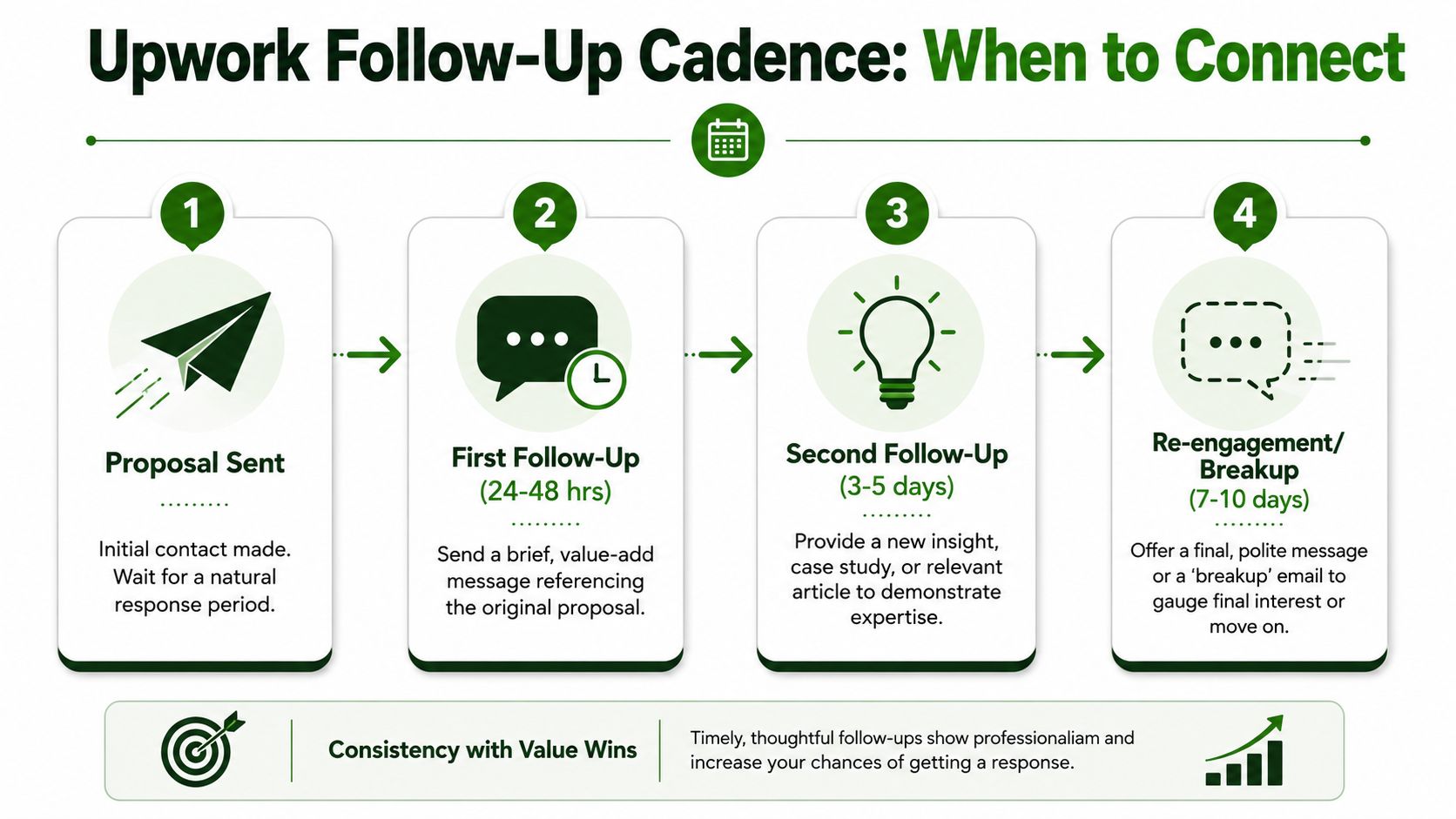
A solid working pattern looks like this:
- Touch one. Send the proposal and wait through the natural review period.
- Touch two at 24 to 48 hours. Send a short follow-up tied to the original brief. Keep it concise.
- Touch three around day 3 to 5. Add new value. Mention an idea, risk, deliverable clarification, or implementation detail.
- Touch four around day 7 to 10. Send a polite re-engagement note or breakup message.
This keeps you visible without flooding the thread.
How to choose between 3 touches and 6
Not every lead deserves the same sequence. Use deal quality as the filter.
Go shorter when:
- The budget is weak and the brief is vague.
- The client shows low buying intent.
- The role is heavily commoditized and there's no sign they want expertise.
Go longer when:
- The client has hiring history and a credible budget.
- The brief is specific and suggests a real project.
- You fit the requirement closely and can add customized insight over multiple messages.
For additional outreach ideas that fit this kind of motion, the effective outreach strategies guide from Earlybird AI is useful reading, especially if you're structuring outreach around saved searches and rapid proposal submission.
Fast response is for engaged prospects. Measured spacing is for silent ones. Agencies get in trouble when they confuse the two.
What automation should actually do
Automation should handle timing, not replace judgment.
The right setup triggers an immediate response when a client messages, then places non-responders into a paced sequence. The message timing can be automated, but the copy still needs to sound like a person who read the job post.
That's where many slip. They automate the send, then forget to automate the logic. A good system doesn't blast every prospect with the same reminders. It separates warm conversations from cold threads and adjusts cadence accordingly.
Writing Follow-Up Messages That Actually Get Replies
Most follow-up messages fail because they ask for attention without earning it.
“Just checking in” is the usual culprit. It gives the client nothing new, makes you sound interchangeable, and forces them to do the work of restarting the conversation. Better follow-up does one of three things: it adds clarity, adds insight, or lowers the friction of saying yes.

High-performing systems don't rely on generic nudges. Benchmarks for warm B2B prospects put strong follow-up programs at email open rates above 40–50% and response rates above 10–15%, and the difference comes from insight-driven touches rather than generic check-ins, as explained in Quick Cold Calls' guide to follow-up strategy.
What every Upwork follow-up should include
A useful follow-up message usually has four parts:
- A clear callback. Reference the project, pain point, or deliverable from the original post.
- One new piece of value. Add a suggestion, question, or risk the client may not have considered.
- A low-friction CTA. Ask something easy to answer.
- A calm tone. Sound helpful, not needy.
If you need inspiration for first-contact language that transitions cleanly into follow-up, this Upwork message to client sample collection gives you a practical starting point.
Templates that feel professional, not automated
Use these as patterns, not scripts.
The reminder follow-up
Send this after the proposal has had time to breathe.
Hi [Client Name], I sent over a proposal for your [project type] role and wanted to add one quick thought. Based on the brief, the biggest risk looks like [specific risk]. If helpful, I can outline how I'd handle that in the first phase.
Why it works: it references the project and adds a useful point instead of asking whether they saw your message.
The value-add follow-up
This is the strongest second touch for serious leads.
Hi [Client Name], one detail stood out in your post. If you're hiring for [specific goal], I'd suggest deciding early whether you want [option A] or [option B], because that usually affects scope, timeline, and handoff. Happy to send a short recommendation based on your setup.
Why it works: it sounds like consulting, not chasing.
The proof-oriented follow-up
Use this when the client seems interested in expertise but hasn't engaged.
Hi [Client Name], another quick note on your project. Teams usually run into trouble with [common issue] unless the workflow is defined before buildout starts. If you want, I can send the delivery approach I'd use so you can compare it against other proposals.
This one helps you compete on process instead of price.
A lot of agencies also layer in voice touches outside the platform when that fits their sales process. If you use phone follow-up in adjacent channels, this guide on how to enhance customer interaction with voicemail is a practical resource for keeping voice messages concise and human.
The breakup message most people avoid
A breakup message is useful because it gives the client an easy way to re-engage without pressure.
Hi [Client Name], I'll close the loop after this message so I don't crowd your inbox. If the project is still active and you want a second set of eyes on scope, timeline, or execution, feel free to reply here and I'll jump back in.
That message does two things well. It shows respect, and it removes the awkwardness of replying late.
Here's a useful walkthrough on keeping follow-up copy concise while still moving the conversation forward:
What not to send
Avoid these patterns:
- “Just checking in” messages. They create work for the client and don't advance the sale.
- Long mini-proposals. If every follow-up is a wall of text, clients will skip them.
- Pushy deadline pressure. Unless there is a real deadline in the brief, fake urgency weakens trust.
- Copy that sounds mass-generated. If the wording could fit any job post, it probably won't get a reply.
Good follow-up sounds like a thoughtful vendor returning with one more useful observation.
Turning Objections into Opportunities for a Call
When a client objects, that's progress. Silence is harder. An objection means they read your message, considered your offer, and saw enough potential to respond.
Treat that as an opening.
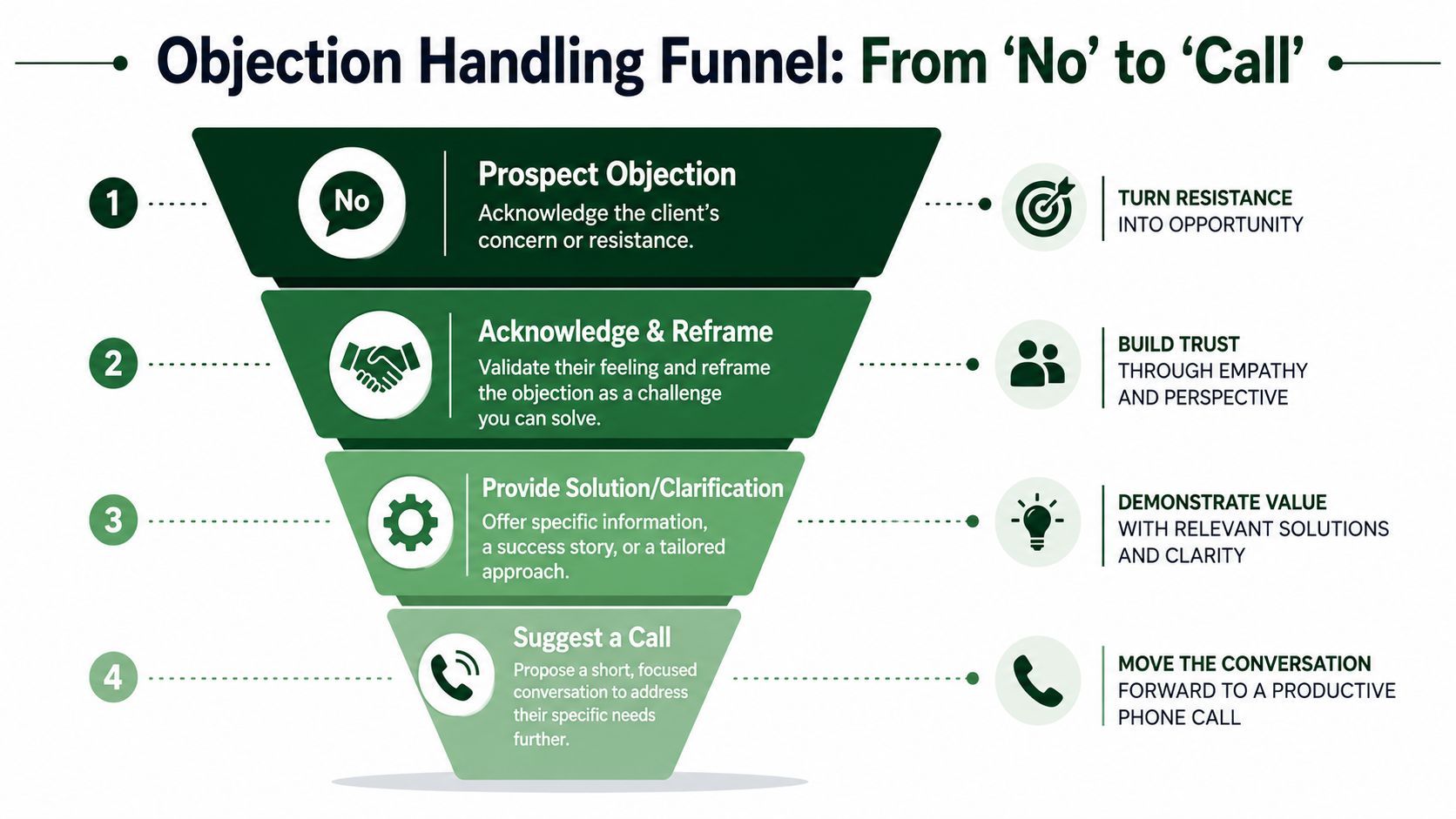
On Upwork, the goal of objection handling isn't to win a text debate. It's to move the conversation into a short call where nuance, credibility, and fit are easier to establish.
Objection one, your price is too high
Don't race to discount. Price objections often mean the client doesn't yet see the difference between vendors.
A stronger reply looks like this:
Totally fair. If budget is the main constraint, it helps to compare offers by scope control, communication load, and revision risk, not just the initial quote. If useful, I can break down exactly what my process includes so you can compare apples to apples.
That response keeps your positioning intact. It also nudges the client toward evaluating total delivery quality, not just sticker price.
Objection two, we're reviewing other proposals
This is usually not a brush-off. It's a buying stage.
Reply with something like:
That makes sense. Since you're comparing options, one thing worth checking is how each freelancer plans the first stage of the project. That's usually where timelines slip. If you want, I can send the kickoff structure I'd use, or we can cover it on a quick call.
You're not asking them to stop reviewing. You're giving them a smarter way to review.
Objection three, we went in a different direction
Sometimes that's final. Sometimes it just means another vendor got to the next step first.
Try this:
Understood. Thanks for the update. If priorities shift, or if you want a backup option in case the project needs additional support, feel free to reach out. If helpful before you lock things in, I'm also happy to share a quick perspective on scope or execution.
This keeps the relationship intact and leaves room for return business.
Why the call matters
Text is a weak place to resolve uncertainty. Calls are better for handling scope confusion, explaining trade-offs, and building trust quickly.
A low-pressure pivot works best:
- Keep it short. Offer 15 minutes, not a broad “consultation.”
- Make it specific. Tie the call to one decision or blocker.
- Reduce commitment. Position it as a fit check, not a sales meeting.
For example:
I can explain this faster than I can type it. If you want, we can do a 15-minute call and map the scope, budget range, and rollout so you can decide cleanly.
That kind of language works because it respects the client's time.
Some agencies use instant message routing and templated objection handling so a lead gets a timely, consistent response before the conversation cools off. Used carefully, that can help move more threads from inbox chat into scheduled calls.
How to Measure and Optimize Your Follow-Up Success
If you don't track follow-up, you'll misdiagnose the problem.
Most agencies look only at proposal volume and jobs won. That hides the leak. You need to know where conversations stall, how many touches a lead receives before replying, and whether your sequence is helping or hurting.
The core numbers that matter
Start with a small set of practical metrics:
- Reply rate. How many proposals or follow-ups get any response at all.
- Meetings booked per proposal. This tells you whether your outreach creates actual sales conversations.
- Touches to reply. Useful for deciding whether you're giving up too early.
- Touches to close. This reveals how long your sales motion really is.
- Objection-to-call rate. Out of prospects who push back, how many still agree to talk.
These numbers don't need to be complicated. They need to be consistent.

How to read the signals
Here's how I'd interpret the usual patterns.
If your reply rate is low, the issue is usually one of three things: weak targeting, weak proposal positioning, or follow-ups that don't add value.
If your replies are decent but calls are low, your objection handling or CTA is probably too soft, too vague, or too text-heavy.
If leads reply after later touches, that's a sign you were previously stopping too soon. That lines up with broader sales data. According to Salesgenie's compiled follow-up statistics, a sequenced follow-up cadence can increase prospect response rates by up to 160 percent compared to relying on a single touchpoint.
Track the stage where momentum dies. Don't guess. The fix is usually obvious once the drop-off is visible.
What to test next
Optimization works best when you change one variable at a time:
- Test timing. Compare a faster first follow-up against a slightly later one.
- Test the message angle. One sequence can focus on expertise, another on risk reduction.
- Test the CTA. “Want me to send a plan?” and “Open to a 15-minute call?” produce different behaviors.
- Test by job type. A design client and a dev client often respond to different framing.
This is also the one place where a tool mention makes sense. Earlybird AI can automate Upwork proposals, client replies, and follow-up workflows while giving agencies visibility into response patterns and sequence performance. Used well, that reduces manual tracking and makes message testing easier.
Your Automated Upwork Sales Playbook Realized
A workable Upwork sales process isn't complicated. It's disciplined.
You send relevant proposals quickly. You respond to engaged clients fast. You follow up with silent prospects on a measured cadence. You write messages that add something useful. You treat objections as openings, not dead ends. You watch the numbers and adjust.
The hard part is doing that consistently across dozens or hundreds of opportunities without turning the whole operation into a manual grind.
The real trade-off
Manual follow-up gives you control, but it breaks at volume. Someone forgets to reply. Someone sends the same stale template to every lead. Someone follows up too aggressively on one thread and not at all on another.
Automation solves the consistency problem, but only if the system is built around good sales behavior. Bad automation just scales bad follow-up.
That's why the process matters more than the tool. The tool should enforce the playbook you'd want a disciplined sales rep to follow anyway.
What the playbook looks like in practice
A healthy system usually includes these pieces:
- Fast first contact tied to the right saved searches and job filters.
- Immediate handling of client replies so warm leads don't cool off.
- A short, value-based sequence for silent prospects.
- Objection paths that move text conversations toward a call.
- Analytics that show where your sequence is breaking.
If you're refining the last stage of that process, this guide to closing sales deals is worth reading because it focuses on the transition from interest to decision, which is where many Upwork conversations stall.
For agencies that want to operationalize the full workflow, this Upwork lead automation guide is relevant because it connects proposal speed, follow-up cadence, and inbox management into one system.
The point isn't to sound more automated. It's to make your process more reliable while keeping your messages human.
A lot of agencies already know how to write a decent proposal. Far fewer know how to run the follow-up machine behind it. That's usually the difference between a busy inbox and a predictable pipeline.
If you want to turn this playbook into a repeatable system, Earlybird AI helps automate Upwork proposals, message replies, and follow-up workflows so your team can stay responsive, consistent, and organized without managing every thread by hand.




