
← Back To Blog
Upwork Lead Automation That Actually Works
Think of Upwork lead automation as your own personal client-finding system. It's a way to use smart software to spot the right jobs, draft compelling proposals, and even handle the initial back-and-forth with clients. Essentially, it takes the repetitive, time-sucking parts of Upwork and turns them into an efficient machine that brings you clients. This whole approach is designed to give you your time back and, more importantly, get your proposal in front of a client before your competition even sees the job post.
Moving Past the Manual Upwork Grind
If you've ever felt like your day is just a blur of endlessly scrolling the Upwork job feed and firing off proposals into a black hole, you're definitely not alone. So many talented freelancers and agencies are stuck on this manual treadmill, a thankless task that pays less and less the more crowded the platform gets. Let's be honest: the old way of hunting for jobs is broken if you're serious about growing your business.
This manual process isn't just a time-waster; it’s a massive opportunity cost. Every hour you spend digging through job listings is an hour you're not billing a client or working on scaling your operation. Think about the real price you're paying for that grind: promising projects you missed, income you never earned, and the sheer mental exhaustion from facing constant rejection.
The True Cost of Manual Bidding
The hidden price tag on manual bidding goes way beyond just lost hours. When you're searching by hand, you’re almost always late to the party. You're finding job posts that are already hours old and buried under a mountain of other proposals. On Upwork, speed is a critical advantage. The first handful of proposals a client sees are the ones that get the most serious consideration.
By the time you stumble upon a great project, take the time to write a thoughtful proposal, and finally hit 'submit,' you’ve already been beaten to the punch by dozens of competitors, many of whom are using automation. This isn't about working harder; it’s about understanding the game is rigged against those doing it all by hand.
On top of that, the manual slog naturally pushes you toward a "spray and pray" approach. To save a few minutes, it’s all too tempting to copy-paste a generic template that feels cold and fails to connect with what the client actually needs. This just leads to terrible response rates, wasted Connects, and a demoralizing cycle of frustration. You're not just losing time; you're actively hurting your chances of getting noticed.
A Necessary Shift in Mindset
To really win consistently on Upwork, you have to change how you think about finding leads. Stop seeing it as a boring, administrative chore and start treating it like a strategic system. This means switching from a reactive mindset—just scrolling and hoping—to a proactive one, where you're automatically filtering for the best jobs and reaching out instantly. The goal is to build an engine that finds your ideal projects and gets your proposal in front of the client before most people even know the job exists.
Embracing Upwork lead automation is about taking back your time and putting your energy where it actually makes a difference. You let technology do the boring, repetitive work so you can focus on the things that actually grow your business, like:
- Strategy and client communication: Talking to warm leads and actually closing deals.
- Delivering exceptional work: Building a killer reputation that brings clients to you.
- Business development: Planning your long-term growth instead of just worrying about where the next project is coming from.
This shift turns your Upwork activity from a constant hustle into a predictable, scalable way to get new clients. It's the classic difference between working in your business and working on it. By building a smarter system, you set yourself up to land the best projects consistently, not just when you get lucky.
How to Build Your Automated Outreach System
Let's move past the manual grind and build an intelligent engine that does the heavy lifting for you. This isn't about blasting out hundreds of generic, spammy messages. It’s about creating a predictable, fine-tuned pipeline that consistently brings high-value leads straight to your inbox. The whole system rests on a simple foundation: knowing exactly who you want to work with, teaching your tools how to find them, and then engaging them with personalized outreach that actually gets a response.
Most freelancers get stuck in a frustrating loop: endless scrolling through the job feed, sending off hopeful but random proposals, and watching great opportunities slip by.
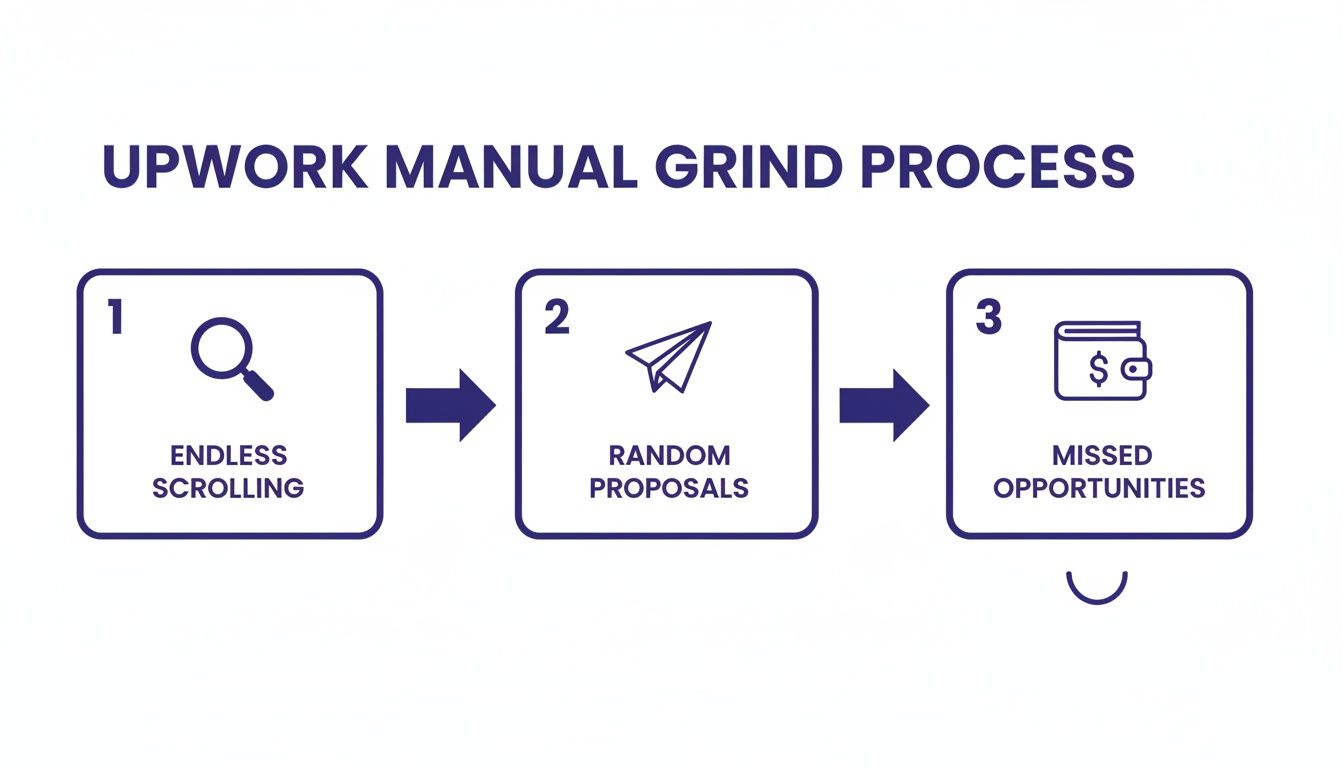
This is the path of burnout. It’s where your time, energy, and money go to die. By building an automated system, you can sidestep this entire mess and pour your focus into what really moves the needle—closing deals and doing fantastic work for your clients.
Define Your Ideal Project Signals
First things first: you have to stop thinking about landing "any client" and laser-focus on your ideal client. An automation system, no matter how powerful, is only as good as the instructions you feed it. If you're vague with your targeting, you'll get a feed full of junk jobs and burn through your Connects.
The best place to start is by looking back at your most successful projects. What did they have in common? Hunt for those common threads and turn them into concrete "signals" that a machine can actually understand. And don't just think about the work itself—dig into the client's behavior and the project's setup.
Here are the core signals you need to lock in:
- Budget and Rate Filters: This is your first line of defense against low-ballers. Set non-negotiable minimums for both fixed-price jobs (say, over $2,000) and hourly rates (like $75/hr or more). This one simple move will filter out a massive amount of noise.
- Client History Metrics: You want to work with clients who know how to hire and value talent. Look for signals like a solid hire rate (over 50%) and a history of significant spending (for example, $10k+ total spent).
- Keyword Targeting: Get specific. Instead of broad terms like "web design," use intent-driven keywords that signal a quality project. Think "Figma to Webflow," "Shopify Plus developer," or "B2B SaaS content strategy."
- Negative Keywords: Telling your system what you don't want is just as crucial. If you’re a developer, you’ll want to exclude terms like "internship," "unpaid," or "content writer" to keep your results relevant and clean.
By building out this detailed profile, you're essentially creating a blueprint for your automation tool. Now it can sift through thousands of job posts with surgical precision, flagging only the opportunities that are a perfect fit.
Train Your AI with Simple Feedback
With your initial filters in place, the real work begins. Modern automation tools use AI that actually learns from you. This isn't some complex coding exercise; it's a simple feedback loop, kind of like telling Netflix you like or dislike a movie.
As the system surfaces job matches based on your signals, your job is to give it a quick "thumbs up" or "thumbs down." That's it.
This ongoing feedback is absolutely critical. Every time you interact, you're teaching the AI the nuances of what makes a project great for you. It starts to pick up on patterns that go way beyond your initial keywords and filters—things you might not even consciously notice.
For instance, you might find yourself consistently giving a "thumbs down" to jobs that use phrases like "tight deadline" or "quick turnaround." Over time, the AI learns to associate those terms with projects you don't want and starts filtering them out on its own. On the flip side, when you approve jobs looking for a "long-term partnership," it learns to bump those to the top of your list. This feedback loop makes your job feed sharper and more accurate over time.
Craft Personalized Proposals at Scale
This is where things get really exciting. One of the biggest game-changers in Upwork automation is the ability to generate truly personalized proposals without writing every single one from scratch. We're moving way beyond those stale, copy-paste templates that clients can spot from a mile away. A good system will use AI to read and understand each job post, then draft a unique proposal that speaks directly to that client's needs.
Your portfolio and profile are fuel for this engine. The AI can pull your most relevant case studies, skills, and past wins to build a pitch that feels completely custom. If a new job asks for a WooCommerce expert, the system should automatically grab your best e-commerce projects and highlight them in the proposal. You can learn more about how to automate Upwork proposals and really dial in your outreach.
In the cutthroat world of Upwork, the old manual approach has been a costly grind. Freelancers and small agencies often spend over $500 a month just to send out 150-250 proposals. Automation is changing that equation entirely. Tools like Earlybird AI now let users send over 400 highly tailored proposals in minutes, slashing costs and skyrocketing efficiency. This isn't just about sending more; it's about being faster and more precise, cutting proposal time from days down to 10 minutes and landing in the client's inbox first.
Automate Your Follow-Ups
Getting that first reply is a huge win, but it's only half the battle. So many promising conversations die on the vine simply because the client gets busy. An automated system makes sure no warm lead ever gets forgotten. You can set up smart follow-up sequences that re-engage clients who viewed your proposal or replied but haven't moved forward.
These aren't just annoying "just checking in" pings, either. A smart system can send helpful, context-aware messages. For example:
- Offering to clarify any specific points in your proposal.
- Sharing a relevant case study that drives home your expertise.
- Suggesting a few times for a quick call to discuss the project.
The point of automated follow-ups is to gently keep the conversation going without you needing to manually track dozens of threads. That little bit of persistence is often what turns a forgotten proposal into a closed deal, transforming your outreach into a reliable client-generating machine.
Using Data to Optimize Your Upwork Presence
Winning on Upwork consistently isn't just about sending out a ton of well-written proposals. It's about building a profile and a strategy that actively pulls in the clients you actually want to work with. This is where Upwork lead automation really shines—it’s not just an outreach tool, but a powerful engine for strategic refinement. You can finally stop guessing and start making decisions based on real data.
Automation tools give you a constant stream of performance data, acting like a real-time report card on your entire outreach process. Instead of wondering why you’re not getting replies, you can see exactly which proposals are hitting the mark and which are falling flat. This feedback loop is the secret to getting better and better over time.

With this constant flow of information, you can iterate on your messaging incredibly fast. You're no longer stuck using the same proposal template for months, just hoping it works. Now you can adapt your approach based on what the data shows is most effective right now.
A/B Testing Your Way to More Wins
Once you have that steady stream of data coming in, you can start A/B testing different parts of your proposals. The idea is simple: systematically compare two versions of a single element to see which one performs better. It’s a game-changer for turning your outreach into a finely tuned conversion machine.
So, what should you test? Here are a few ideas to get you started:
- Proposal Headlines: Does a benefit-focused headline like "Expert Shopify Developer to Boost Your Sales" get more clicks than a straightforward one like "Shopify Development Services"?
- Opening Lines: Try a question-based opener ("Have you considered how a faster site could impact your conversion rates?") against a direct value statement ("I've helped 10+ e-commerce stores like yours achieve a 20% increase in load speed.").
- Calls to Action (CTA): Pit a softer CTA ("I'd be happy to discuss this further") against a more direct one ("Can we schedule a brief 15-minute call next week to map out a plan?").
This process of making small, continuous adjustments can lead to massive gains. By letting the data guide you, you're systematically cutting out what doesn't work and doubling down on what does.
Turning Performance Data into a Magnetic Profile
The insights you get from proposal analytics are gold, and they're useful for more than just writing better proposals. They give you a clear roadmap for optimizing your entire Upwork profile so it starts attracting high-quality invitations on its own. Your profile shouldn't be a static resume; it's a dynamic sales tool that needs to reflect your most successful positioning.
By analyzing which types of projects you win most often and what language in your proposals gets the best responses, you uncover the precise value propositions that resonate with your ideal clients. This is the raw material for a profile that sells.
For example, if your data shows that proposals mentioning your expertise in "B2B SaaS" have a 40% higher reply rate, that keyword should be front and center in your profile title and bio. If case studies about e-commerce revenue growth consistently lead to interviews, those are the projects you need to feature in your portfolio.
This data-backed approach really works. We've seen that simple A/B testing of proposal formats can lead to an 18% boost in project wins. For freelancers in crowded fields like design, marketing, and development, this kind of optimization can turn a generic profile into a magnet for great leads. Some agencies have even seen double-digit reply rates and ditched their full-time sales development reps entirely.
This process also helps you get inside the head of your potential clients. For instance, if you notice you often win projects after a client has viewed your profile multiple times, it’s a clear signal that a strong portfolio and solid reviews are doing the heavy lifting. For more on this, check out our guide on how to get valuable client feedback on Upwork. Ultimately, using data turns your profile from a passive listing into an active, intelligent lead-generation tool.
Scaling Automation for Your Entire Agency
For a solo freelancer, automating Upwork leads is a game-changer. For a growing agency, it’s a necessity. The moment you have more than one person sending proposals, things can get messy—fast. Without a unified system, you’re stuck with inconsistent messaging, dropped leads, and no real idea of what’s actually landing you clients.
To truly scale on Upwork, you have to move beyond individual efforts and build a cohesive, systemized sales engine. This involves setting up a multi-user workflow that doesn't just speed things up, but also reinforces your brand and plays to your team's strengths. The real goal is to create a well-oiled machine where everyone knows their part and every move is tracked.

This shift turns your Upwork channel from a bunch of separate accounts into a single, predictable revenue stream. It’s how you maintain quality and control, even as you bring on more people and ramp up the number of proposals you send.
Establishing a Central Command Center
The bedrock of any scalable agency workflow is a central dashboard. Think of it as your mission control for all things Upwork. It eliminates the chaos of scattered spreadsheets and confusing Slack threads by giving you a single source of truth. From this one spot, you can manage multiple Upwork profiles, see every proposal that's gone out, and track every client conversation.
A centralized hub immediately solves some of the biggest headaches for agencies:
- Consistency: It guarantees every proposal, no matter who hits "send," reflects your agency's voice, value, and standards.
- Visibility: Owners and sales leads get a bird's-eye view of the entire pipeline, from the first bid to the final contract.
- Collaboration: Your team can finally work together smoothly, pulling from shared proposal templates, client notes, and performance data.
This setup is crucial for presenting a professional, unified front. To a potential client, you look like a polished, coordinated agency—not a disjointed group of freelancers. It also makes it much easier to connect your outreach to the rest of your business operations, a topic we dive into in our guide on choosing the right Upwork CRM tool.
Defining Roles and Responsibilities
Once you have your command center, you can start assigning clear roles. Dividing the labor lets everyone focus on the part of the process where they can make the biggest impact. A common and highly effective agency workflow breaks down into three key roles.
The Strategist (Agency Owner/Sales Lead)
This person sets the big-picture direction. They're in charge of:
- Defining the ideal client and what a perfect project looks like.
- Creating and tweaking the master proposal templates.
- Analyzing performance data to make strategic adjustments.
- Keeping an eye on the team's overall ROI and success metrics.
The Bidder (Sales Development Representative)
Bidders are your frontline troops, handling the day-to-day outreach. Their job is to:
- Review and approve the jobs flagged by the automation.
- Add a personal touch to the approved templates before submitting.
- Handle the first few client replies and qualify the incoming leads.
The Closer (Account Executive)
When a lead is hot and ready to talk specifics, the Closer steps in to get the deal signed. They focus on:
- Leading in-depth client calls and discovery sessions.
- Negotiating scope, pricing, and project timelines.
- Finalizing the contract and officially kicking off the project.
This separation of duties creates an incredibly efficient handoff process. Automation finds the lead, the bidder warms them up, and the closer brings them home. It’s an assembly line for sales that allows each person to master their stage of the cycle.
Monitoring Performance and Maintaining Quality
A central dashboard isn't just for keeping things organized—it's your key to optimization. It gives you the power to monitor both individual and team performance with surgical precision. You can track crucial metrics like how many proposals each bidder sends, their reply rates, and their interview-to-win ratios.
This data is gold. For instance, if you see one bidder's reply rate is lagging, you can look at their sent proposals and see if they’re personalizing the templates enough. This kind of data-driven coaching is infinitely more effective than generic feedback and ensures your quality stays high across the entire team.
Ultimately, this structure lets your agency scale its Upwork lead automation without losing the human touch that wins clients. You're building a repeatable, measurable process that transforms Upwork into a predictable—and highly profitable—engine for new business.
Automating Safely on Upwork
Let's address the elephant in the room. The number one fear I hear from agencies considering Upwork lead automation is getting their account suspended. It’s a completely valid concern. Upwork has strict rules, and the last thing you want is to jeopardize your hard-earned reputation.
But here’s the thing: there's a world of difference between a cheap, spammy bot and a professional automation platform built from the ground up with compliance in mind.
Those crude bots are like sledgehammers—they send proposals at inhuman speeds, often from shared, flagged IP addresses that scream "scammer." A sophisticated system, on the other hand, is designed to be a scalpel. It mimics natural human behavior, protecting the account you’ve worked so hard to build.
What Safe Automation Actually Looks Like
When you're vetting an automation tool, safety isn't just a feature; it's the feature. A platform designed for long-term, compliant use will have very specific safeguards baked in. It’s less about raw speed and more about operating intelligently within Upwork’s framework.
Here are the non-negotiable safety features I always look for:
- Human-Like Pacing: The system absolutely must have randomized delays between actions. It should never operate faster than a real person could type and click. This simple feature is crucial for preventing your activity from looking robotic.
- Dedicated Regional IP Addresses: This is a big one. Using a clean, dedicated IP address that matches your actual geographic location makes your automated activity look exactly like your manual sessions. It’s the best way to avoid getting flagged for suspicious logins from halfway across the world.
- Airtight Password Security: A trustworthy platform will never ask for or store your Upwork password. Full stop. It should rely on secure, industry-standard methods like browser cookies to manage your session, just like any other browser extension you use.
A professional automation tool isn't trying to cheat the system. Its real job is to handle the repetitive, tedious tasks you'd be doing anyway—just far more efficiently. Think of it as an extension of your own workflow, not a replacement for genuine, high-quality engagement.
Best Practices for Staying Off the Radar
Even with the best tool on the market, how you use it is what truly keeps you safe. The goal is to supercharge your outreach, not to build a low-quality spam cannon. Always start by setting sensible daily limits on how many proposals you send. Don't go from sending 5 a day to 50 overnight.
Most importantly, keep your standards high. Every proposal and message should still be personalized and reflect your agency's quality. A great system helps you create tailored proposals at scale, but you should always be the final checkpoint, reviewing and approving communications to ensure they hit the mark.
By pairing smart technology with a firm commitment to genuine client communication, you can confidently grow your business without ever putting your Upwork account at risk.
Frequently Asked Questions About Upwork Automation
If you're thinking about automating your Upwork lead generation, you probably have a few questions. I get it. It sounds like a big leap, and freelancers and agency owners often ask me if it's genuinely effective, what the real cost is, and if it's just too complicated to get right. Let's break down these common concerns.
The whole point of automation isn't to replace your expertise. It's about offloading the mind-numbing, repetitive tasks so you can focus on what actually makes you money: talking to qualified leads, closing deals, and doing phenomenal work for your clients.
Is Automation Really More Effective Than Bidding Manually?
This is the million-dollar question, isn't it? And the answer is a hard yes—but only when you do it the right way. Manually hunting for jobs is a grind. You're constantly fighting the clock and hundreds of other freelancers, hoping you stumble upon the perfect project at the exact right moment.
A good automation setup completely changes the game. Here's how:
- You get a massive speed advantage. An automated system can spot a perfect-fit job and fire off a tailored proposal within minutes of it going live. If you're doing it by hand, you might not even see that job for a few hours. By then, the client is already buried in applications.
- It’s always working. Your system is on the clock 24/7, so you never miss a great project that gets posted late at night or over the weekend.
- You make data-driven decisions. Instead of just guessing which proposals are hitting the mark, you get hard data on what’s working. You can see your reply rates and win rates, allowing you to constantly tweak and improve your approach.
Honestly, manual effort just can't keep up with the speed and consistency of a well-oiled automation system. It turns your lead generation from a daily chore into a predictable pipeline.
Will Using Automation Get My Upwork Account Banned?
This is a huge, and very valid, concern. It’s crucial to understand the difference between cheap, spammy bots and professional automation platforms designed for safety. The low-quality bots that blast out hundreds of generic proposals from shared IP addresses? Yeah, those are a one-way ticket to getting your account suspended.
A professional system, on the other hand, is built from the ground up to be safe. It’s designed to mimic natural human behavior with randomized delays between actions. It always uses a clean, dedicated IP address that matches your physical location, and it never, ever stores your password.
The goal isn't to fool Upwork. It's simply to perform the same tasks you would—searching, filtering, and applying—just far more efficiently. When you combine a compliant tool with a smart strategy that prioritizes quality over quantity, the risk is incredibly low.
How Much Does Upwork Lead Automation Actually Cost?
Costs can vary, but it's a mistake to look at this as just another expense. Think of it as an investment. What's the alternative? The countless hours you sink into manually searching and applying, the money you burn on Connects for proposals that go unanswered, and the lost revenue from high-value projects you never even had a chance to bid on.
For many agencies, landing just one new client through automation pays for the service for an entire year. In many cases, it completely replaces the need for a full-time sales development rep (SDR), which can save you thousands of dollars every single month. Once you factor in the time saved and the higher win rates, the ROI usually becomes a no-brainer.
Think of it this way: if automation helps you land just one extra project a month that you would have otherwise missed, it has already paid for itself many times over.
Is This Only for Big Agencies?
Absolutely not. While agencies see huge benefits from scaling their outreach with multi-user workflows, solo freelancers are arguably the ones who need this the most. As a freelancer, your time is literally your money.
Every hour you're not spending on prospecting is another hour you can put toward billable client work. Upwork lead automation levels the playing field, giving you the same speed and efficiency as a larger team. It helps you compete for the best projects on the platform without having to work yourself into the ground.
As Upwork continues to grow as a B2B lead source, intelligently scoring and targeting leads is no longer a luxury—it's essential. Manual efforts just can't cut through the noise, but the right tools can help you pinpoint the best buyers for long-term partnerships. To see how this works in practice, you can learn more about why filtered automation is essential for building a predictable pipeline.
Ready to stop scrolling and start closing? Earlybird AI transforms your Upwork presence into an automated client-acquisition machine, placing your proposals in front of ideal clients minutes after they post. See how our members are winning more projects with less effort. Get started with Earlybird AI.




