
← Back To Blog
The Upwork CRM Tool That Automates Your Agency Growth
So, what exactly is an Upwork CRM tool? Think of it less like a traditional CRM and more like an automated sales machine built specifically for the chaos and speed of the Upwork marketplace. It's a specialized platform designed to handle the entire client-finding process—from spotting the perfect job and crafting proposals to keeping track of all your conversations and performance data.
A generic CRM is great for storing contact info, but that's about it. It's a passive database. An Upwork CRM, on the other hand, is an active system designed to help you win.
Decoding the Upwork Sales Engine

For freelancers and agencies serious about growth, Upwork is more than just another platform—it's a core revenue stream. But let's be honest: the daily grind of finding jobs, bidding, and tracking everything can be a massive time-suck. It’s easy to feel like you're on a treadmill, putting in a ton of effort just to stay in the same place.
A traditional CRM is like a digital Rolodex. It’s perfect for keeping tabs on clients you’ve already won, logging their contact details and conversation history. But it can't go out and hunt for new leads for you on Upwork. It’s a completely passive tool that just wasn’t built for the unique project-bidding workflow.
That's where a dedicated Upwork CRM tool comes in. It’s a completely different beast, built from the ground up to tackle the specific hurdles of the platform.
The Problem with Traditional Tools
If you've ever tried to manage your Upwork pipeline with a spreadsheet or a standard CRM, you know the frustration. Spreadsheets quickly become a clunky, error-prone mess that needs constant manual babysitting. A conventional CRM just doesn't integrate with the Upwork ecosystem, leaving you to do all the heavy lifting yourself.
This disconnect causes a few major headaches:
- Missed Opportunities: The best jobs on Upwork are often snapped up by the first few people who submit a great proposal. If you're searching and applying manually, you're already behind.
- Inconsistent Proposals: Without a single source of truth, your team members might be sending out bids with conflicting messaging, pricing, or quality. This hurts your brand and sinks your win rate.
- Wasted Hours: All that time spent copying and pasting job links, proposal text, and updating statuses is time you could be billing clients.
An Upwork CRM isn't just a contact manager; it's a high-performance engine for winning projects. It's engineered for the speed and precision required to succeed in a fiercely competitive environment.
A Smarter, Automated Approach
A true Upwork CRM tool is designed to eliminate these problems. It's not a passive database; it’s more like an automated sales rep working for you 24/7. It constantly scans the marketplace for jobs that fit your exact criteria, using powerful filters that go way beyond Upwork's native search.
When a great opportunity pops up, the tool helps you whip up a personalized, high-impact proposal in minutes, not hours. This speed is your secret weapon. Being one of the first to apply with a compelling bid massively boosts your odds of getting noticed.
For those running teams, this kind of efficiency is non-negotiable. If you want to learn more about scaling your operations, check out our guide for agencies on Upwork.
Ultimately, a specialized tool like this changes the game. It turns your client acquisition from a reactive, manual chore into a smooth, automated system. You end up bidding smarter, responding faster, and winning more work without the burnout.
Why Spreadsheets Are Holding Your Agency Back
If you’re running a growing agency or freelancing business on Upwork, chances are your client management journey started with a spreadsheet. It’s the default tool for a reason—it feels simple, it's free, and for a little while, it actually works. A few columns for job links, proposal status, and client names feel like a huge upgrade from pure chaos.
But as you start winning more work, that trusty spreadsheet begins to fray at the edges. What was once an organizational lifesaver quickly morphs into a bottleneck. It becomes a source of endless manual drudgery that actively slows you down. This isn't just a minor annoyance; it’s a hard ceiling on how much you can earn and how fast you can grow.

Picture this all-too-common scene: an agency owner is trying to coordinate three team members using a shared Google Sheet. One person is updating the status of a bid they just sent. At the same time, another is pasting in new job links, and a third is desperately trying to find the proposal text we used for a similar project last week. The sheet lags, it's a mess, and no one is 100% sure they're even looking at the latest version.
This manual mess comes with hidden costs that are easy to brush off but can be devastating to your growth.
The High Cost of Manual Data Entry
Every single minute your team spends copying and pasting job details, updating a status column, or digging through rows to find an old proposal is a minute they aren't spending on billable work. This administrative tax adds up incredibly fast. Studies have shown that employees can spend up to 20% of their time on non-essential, repetitive tasks like manual data entry. For a small, hungry agency, that’s a massive resource drain.
It's not just about the time you lose, either. It’s about losing momentum. The best jobs on Upwork are often snapped up by the fastest, most prepared bidders. While you’re fumbling with spreadsheet tabs, a competitor with a proper Upwork CRM tool has already fired off a polished, personalized proposal and is starting a conversation with the client.
Using a spreadsheet to manage your Upwork pipeline is like trying to run a modern logistics company with a paper map and a telephone. It works for a while, but you’ll never be able to compete on speed, accuracy, or scale.
The Inevitability of Human Error
No matter how careful you are, manual processes are magnets for human error. It’s just a fact of life. A single typo in a job link sends a team member on a wild goose chase. Forgetting to update a status leads to the cringeworthy mistake of two people bidding on the same project—or even worse, letting a perfect, high-value lead go completely cold.
These little errors create a ripple effect of chaos. They result in inconsistent messaging, missed follow-ups, and a general vibe of disorganization that potential clients can often sniff out. You simply can't build a repeatable, scalable sales process on a foundation as shaky as a manually managed spreadsheet.
The Pain Points of a Manual System
Let's get specific. Here are the real-world limitations that put a hard cap on your growth when you’re leaning on spreadsheets:
- No Real-Time Updates: Spreadsheets are static. They don’t sync with Upwork on their own, which means you're always working with old information unless someone remembers to refresh it constantly.
- Lack of Automation: There’s no way to automate the grind. You can't set up alerts for your ideal projects or have the system automatically trigger follow-up reminders. It's all on you.
- Poor Collaboration: Trying to get a team to work together in a spreadsheet is a recipe for disaster. Version control becomes a nightmare, leading directly to conflicting information and duplicated work.
- Zero Actionable Insights: A spreadsheet is just a bucket of data; it doesn't give you any intelligence. You can't easily see your proposal win rate, figure out which proposal templates are actually working, or track your team's performance over time.
Ultimately, clinging to spreadsheets traps your agency in a reactive cycle. You're forever playing catch-up, plugging holes, and putting out administrative fires. To truly scale and break through to the next level, you need a system built for proactive growth—and that means leaving the limitations of manual tracking behind for good.
The Must-Have Features in a Winning Upwork CRM
Not every tool is built for the unique hustle of Upwork. A true Upwork CRM tool isn't just about blasting out more proposals; it’s a smart system built with specific features to solve the platform's biggest headaches. These capabilities work together to turn the manual grind of client acquisition into a predictable, revenue-generating machine.
Think of it like this: you could try to build a house with just a hammer and a saw. But having a full toolkit with power drills, levels, and nail guns makes the job faster, safer, and gives you a much better result. The right features are your power tools for Upwork, each one designed to tackle a specific challenge with precision.
Without the right setup, you're just automating bad habits. Let's break down the non-negotiable features that separate a truly effective system from a simple gadget.
Automated Job Searching with Smart Filters
The first step to winning more work is finding the right jobs before the competition piles in. Upwork’s built-in search is a decent starting point, but a top-tier Upwork CRM tool takes this to a whole new level. It acts like an intelligent scout, working for you 24/7.
This feature goes way beyond basic keyword matching. It lets you build sophisticated, multi-layered filters to zero in on your ideal client.
- Client History Analysis: Automatically screen for clients with verified payment, a high average hourly rate paid, and a solid hiring history. This weeds out low-quality leads from the get-go.
- Job Detail Specifics: Set rules to find jobs needing specific skills, posted from certain countries, or that explicitly exclude freelancers from your competitor's region.
- Budget and Scope Targeting: Instantly target projects that fall within your ideal budget range, so you only spend time on opportunities that are actually worth it.
This kind of precision means your pipeline fills up with high-quality, pre-vetted leads. You can finally focus your energy on bidding and closing, not endless scrolling.
AI-Powered Proposal Generation
On Upwork, speed is critical, but quality is what actually closes the deal. The most powerful feature of a modern Upwork CRM tool is its ability to generate high-quality, personalized proposals in minutes. This isn't about spamming generic templates; it's about using AI to amplify your own expertise.
The system learns from your inputs—your case studies, your skills, your past proposals. More importantly, it learns from your feedback. A simple "thumbs up" or "thumbs down" on a generated draft helps the AI refine its approach, getting smarter with every bid and better at capturing your unique voice and strategy.
This directly tackles the "first-applicant advantage." By submitting a well-crafted, relevant proposal just moments after a job goes live, you secure a top spot in the client’s inbox before they get buried under dozens of other applications.
The goal of AI proposal writing isn’t to replace your expertise, but to scale it. It lets you produce the quality of a manually written bid at the speed of automation—giving you a massive competitive edge.
The freelance economy is quickly embracing these technologies. A recent Upwork report found that 61% of Gen Z freelancers are already using generative AI, a huge signal of where things are heading. With 28% of all skilled knowledge workers now freelancing, the pressure to adopt smarter tools has never been greater.
A Unified Dashboard for Tracking and Analytics
At the end of the day, you can't improve what you don't measure. A spreadsheet gives you zero intelligence, but a dedicated Upwork CRM tool provides a unified dashboard that turns your bidding activity into real, actionable data. For agencies managing multiple bidders, this isn't a nice-to-have; it's essential.
This central hub should track every key metric that matters, including:
- Proposals Sent: See your total outreach volume at a glance.
- Reply Rates: Instantly know which proposals are hitting the mark.
- Win Rates: Connect successful contracts back to the proposals that won them.
- Performance by Team Member: Understand which bidders are your top performers and what strategies are driving their success.
This data empowers you to make smarter decisions, tweak your proposal strategies, and optimize your entire sales process. For those running digital marketing teams, understanding these metrics is key. You might also be interested in our guide on the best software for a digital marketing agency.
Building Automated Workflows That Win More Projects
Let’s move from theory to practice and see how an Upwork CRM tool can actually reshape your entire sales process. This isn't just about shaving a few minutes off your day; it's about building an automated engine that consistently finds high-value leads and engages them effectively—often while you’re busy with something else. This kind of system is what separates the agencies that struggle from the ones that scale predictably.
So, how do these automated workflows actually function in the real world? Let's walk through it.
For a solo freelancer, this means creating a system that bids on your ideal projects overnight. Seriously. Imagine logging off after a full day of client work and waking up to an inbox full of interested replies from high-quality leads. That’s the power of a well-tuned automated workflow.
For a multi-person agency, the benefits multiply. An Upwork CRM tool lets you manage multiple bidders from one central dashboard, making sure every proposal hits the right notes and reflects a consistent brand voice. You can track individual performance, see what’s working, and tweak your approach based on hard data, not guesswork. It gets everyone on the same page and working toward a single goal: winning more projects.
This simple three-step visual shows the core process: the tool automates the search for jobs, writes the proposals, and then tracks all your performance data in one place.
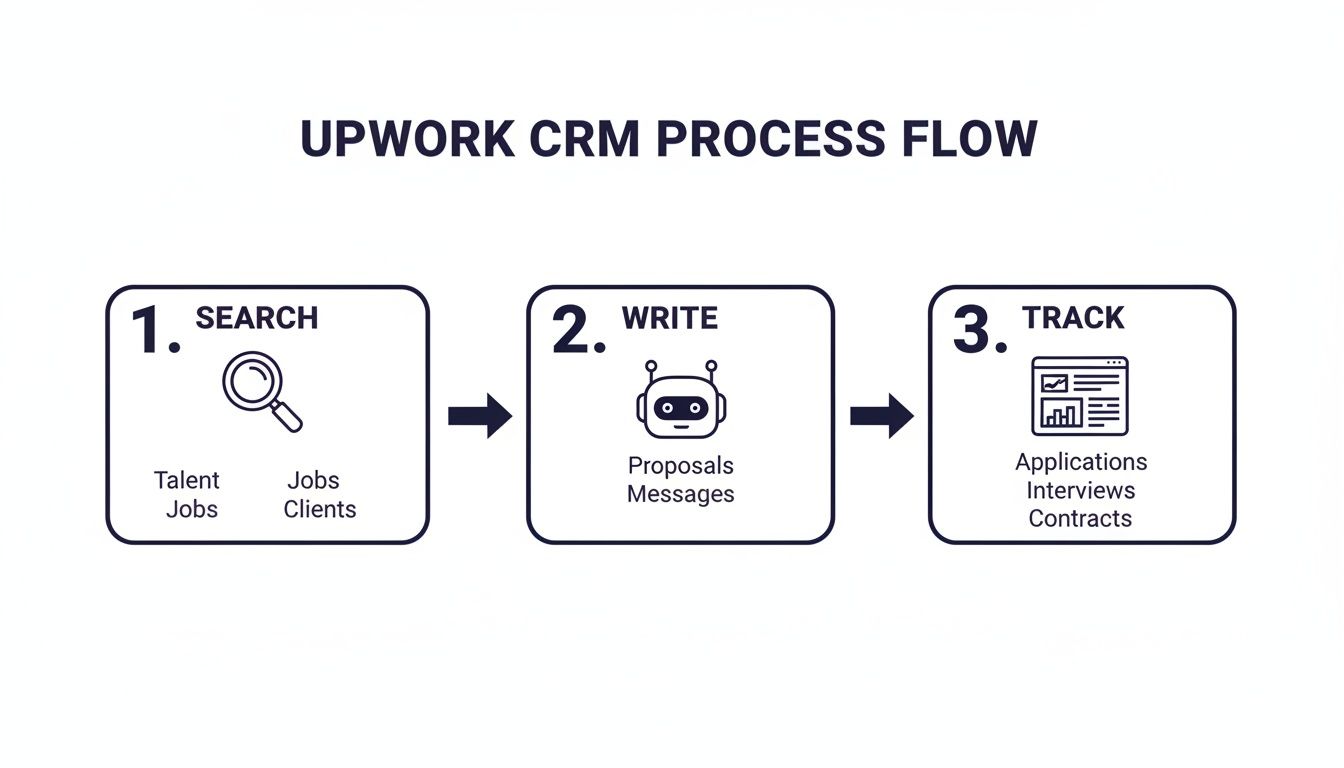
The real magic here is how each automated step builds on the last, creating a smooth and incredibly efficient way to bring in new clients.
Automated Bid Submission and First Response
The heart of this entire workflow is automated bidding. Once you’ve set up your smart filters to pinpoint your perfect client and project type, the system takes over. When a matching job gets posted, the tool's AI instantly drafts a personalized proposal using your proven templates and unique selling points.
This isn't about spamming clients with robotic, one-size-fits-all bids. A good Upwork CRM tool analyzes the job description, pulls out the key requirements, and crafts a response that speaks directly to the client's needs. That gives you a massive head start.
Speed is a huge competitive advantage on Upwork. Being one of the first qualified freelancers to apply dramatically increases the chances a client will open your proposal and start a conversation. To get a better handle on how this works, you can check out our guide on what sales automation is and how it transforms outreach.
Intelligent Follow-Up Sequences
Winning a project rarely happens with just one message. This is where intelligent, automated follow-ups become a total game-changer. As soon as a client replies, the workflow can kick off a pre-defined sequence of messages designed to nurture that lead without you having to lift a finger.
For instance, the system can:
- Acknowledge Immediately: Send a quick reply to the client's message, letting them know you've seen it and will get back to them shortly. It makes you look professional and responsive from the get-go.
- Answer Common Questions: Use AI to spot common pre-sale questions and provide instant, accurate answers, which helps move the conversation along much faster.
- Book a Call: If the chat is going well, the system can automatically send your calendar link to schedule a discovery call, moving the lead to the next stage of your sales funnel without any back-and-forth.
The Impact on a Crowded Marketplace
The freelance economy on Upwork is absolutely exploding. The market is projected to hit $8.39 billion by 2025 and an unbelievable $16.89 billion by 2029. With about 1 million new freelancers joining the platform every year, the competition is fiercer than ever.
In this kind of environment, manual methods just can't keep up. Automation becomes essential for any agency looking to grow without hiring a full-time sales team. You can dive deeper into these trends by exploring the booming freelance market in this detailed analysis.
Ultimately, these automated workflows do more than just save you time. They create a reliable, repeatable system for generating leads and starting client conversations. This consistency frees you from the classic feast-or-famine cycle, giving you a predictable pipeline of opportunities and the headspace to focus on what you do best: delivering exceptional work.
How Earlybird AI Becomes Your Upwork Sales Engine
So, how does a real-world tool stack up against that ideal Upwork CRM checklist? While plenty of platforms can handle parts of the process, Earlybird AI was built from the ground up to be your agency's dedicated sales engine on Upwork. Think of it less as a simple automation tool and more as a digital sales development representative (SDR) that works 24/7.
The goal here isn't just about firing off more proposals. It's about sending smarter ones, getting them in front of clients faster, and then handling the crucial follow-up until a meeting is on the calendar. Earlybird AI does this by acting like a true partner, learning what works for your specific business.
Your Always-On Sales Team
Imagine having a system that never sleeps. It’s constantly scanning Upwork for projects that are a perfect fit and getting high-quality proposals ready the second they pop up. That’s what Earlybird AI is designed to do. But it goes way beyond just filling in a template; it actually learns from you.
The platform has a pretty unique feedback loop that makes all the difference. When it drafts a proposal, you give it a simple thumbs-up or thumbs-down. With every click, you're teaching the AI your tone, your style, and what makes your proposals win. Over time, it starts crafting bids that sound just like you wrote them yourself, capturing the little details that set your agency apart.
Earlybird AI isn't just another bidding bot. It’s a learning system designed to become an extension of your own sales gut, helping you scale your outreach without losing the personal touch that actually closes deals.
Speed and Persistence That Wins Deals
Let's be honest, the Upwork marketplace is a battleground. You're competing with over 18 million freelancers for the attention of nearly 800,000 active clients. In that kind of environment, speed is everything. We’ve seen it time and again in the data: the first good proposal a client sees often wins the job. For more on this, check out the stats on Upwork's competitive landscape.
Earlybird AI is built for this reality. It gets polished bids submitted in under 10 minutes of a project being posted, securing you a top spot in the client’s inbox. But it doesn't just stop at the first message. Once a client replies, the system kicks in with intelligent, automated follow-ups to keep the conversation moving until a call is booked. This completely shortens your sales cycle and saves you from the tedious back-and-forth.
Members see real results from this approach:
- Doubled Reply Rates: Being first with a relevant message is often the single biggest factor in getting a response.
- Replacing Full-Time Staff: The system is so efficient at finding and nurturing leads that it often delivers the same output as a full-time SDR, but without the overhead.
- Predictable Lead Flow: It turns the unpredictable nature of freelancing into a reliable stream of good opportunities.
Built for Trust and Safety
Handing over the keys to your Upwork account is a big deal, and we get that. Earlybird AI was designed with account safety as the absolute number one priority.
The system works quietly in the background, mimicking natural human activity so it never raises red flags. It uses clean, regional IP addresses, which makes your activity look completely normal to Upwork. Most importantly, Earlybird AI never stores your Upwork password. Your credentials stay with you, period. This focus on security means you can take advantage of powerful automation without ever putting your account or your client relationships at risk. It's all about giving you peace of mind so you can focus on what you do best.
Your Questions About Upwork Automation, Answered
Jumping into automation can feel like a big step. It’s totally normal to be excited about the idea of saving time but also a little cautious about your Upwork account's safety. That's a smart way to be.
To help you get comfortable, we've pulled together the most common questions freelancers and agencies ask about using an Upwork CRM tool. We’ll give you straight, honest answers so you can move forward with confidence.
Is It Really Safe to Use an Automation Tool on Upwork?
Yes, but with a big caveat: you have to choose a tool that puts safety first. The best platforms are built to act like a human, not a robot. They deliberately avoid the kind of high-speed, spammy actions that set off red flags and put your account in jeopardy.
Think of it as smart automation, not just more automation. Quality over quantity is the name of the game.
Here’s what to look for to keep your account safe:
- Clean, Regional IP Addresses: This is a must. It makes all activity from the tool look like it’s coming directly from you on your own computer.
- Human-Like Activity: The system shouldn't be firing off proposals 24/7 or acting faster than a person ever could. It needs to operate within normal human working hours and at a realistic pace.
- No Password Storage: This is non-negotiable. A secure tool will never ask for or store your Upwork password. Your credentials should always stay in your control, period.
When a quality Upwork CRM tool follows these rules, it boosts your efficiency without ever putting your hard-earned reputation at risk.
Can an AI Tool Actually Write a Good Proposal?
Absolutely, but the magic happens when you see it as a partnership. This isn't about using generic, fill-in-the-blank templates. Modern AI proposal writers are sophisticated systems that are designed to learn directly from you.
You start by feeding the system your best stuff—your case studies, details about your services, and what makes you unique. But that's just the beginning.
A great AI proposal writer doesn't just spit out text; it adapts. By giving it simple feedback, like a 'thumbs up' or 'thumbs down' on its drafts, the AI learns your voice, your style, and the strategies that win you jobs. It gets smarter and more like you over time.
The goal isn't to replace you but to scale your best work. This lets you send out highly relevant, personalized proposals at a speed you could never match by hand, giving you a serious competitive advantage.
Is an Upwork CRM Tool Only for Big Agencies?
Not at all. While big agencies love the collaborative features and performance tracking, an Upwork CRM tool is a total game-changer for solo freelancers and small teams, too.
For the solo freelancer, it’s like having the perfect virtual assistant. It takes over the most draining parts of finding clients, like searching for jobs and writing those first drafts. This frees up huge chunks of your time so you can focus on what you do best: billable client work.
For small, ambitious agencies, it provides the exact framework you need to build a professional and consistent sales process. It’s like having a dedicated sales development rep (SDR) on your team without the hefty salary and overhead.
How Is an Upwork CRM Different from a Regular CRM?
This is a really important question. A regular CRM like HubSpot or Salesforce is fantastic for managing a traditional sales pipeline once you already have a lead's email or phone number. But it's just not built for the unique, fast-moving world of Upwork.
A standard CRM can hold notes and track your deals, but it can't do any of this:
- Search the Upwork marketplace for new jobs as they get posted.
- Read a job post and figure out if it's a good match for you.
- Draft and send a proposal directly through the Upwork platform.
A specialized Upwork CRM tool is built from the ground up for this specific workflow. It connects directly to the marketplace to handle the entire top of your sales funnel—from finding the lead to bidding and making that first contact. It's a capability that generic CRMs just don't have.
Ready to stop the manual grind and build a predictable client acquisition engine on Upwork? Earlybird AI acts as your 24/7 sales team, finding your ideal projects and sending personalized proposals in minutes. See how our members are doubling their reply rates and winning more work with a lot less effort.




