
← Back To Blog
How to Improve Response Time and Win More Client Bids
You know the pattern. A strong-fit project lands on Upwork. The client is clear, funded, and looking for exactly the kind of work your team does well. You see it, think “I'll reply after this call,” and come back to find the client already engaged two or three other freelancers who moved first.
That loss usually gets filed under bad luck. It isn't. It's a response-time problem.
On competitive marketplaces, clients reward momentum. They want proof that you're available, organized, and easy to work with before they know whether you're the most talented option in the stack. Fast response is the first signal. Everything after that, proposal quality, credibility, price positioning, only matters if you stay in the conversation long enough to use it.
Why Your Response Time Is Costing You Clients
Freelancers often treat reply speed like admin work. That's the wrong frame. Response time is a sales function. If you're slow, you're not just a little less efficient. You're giving the buyer a reason to keep shopping.
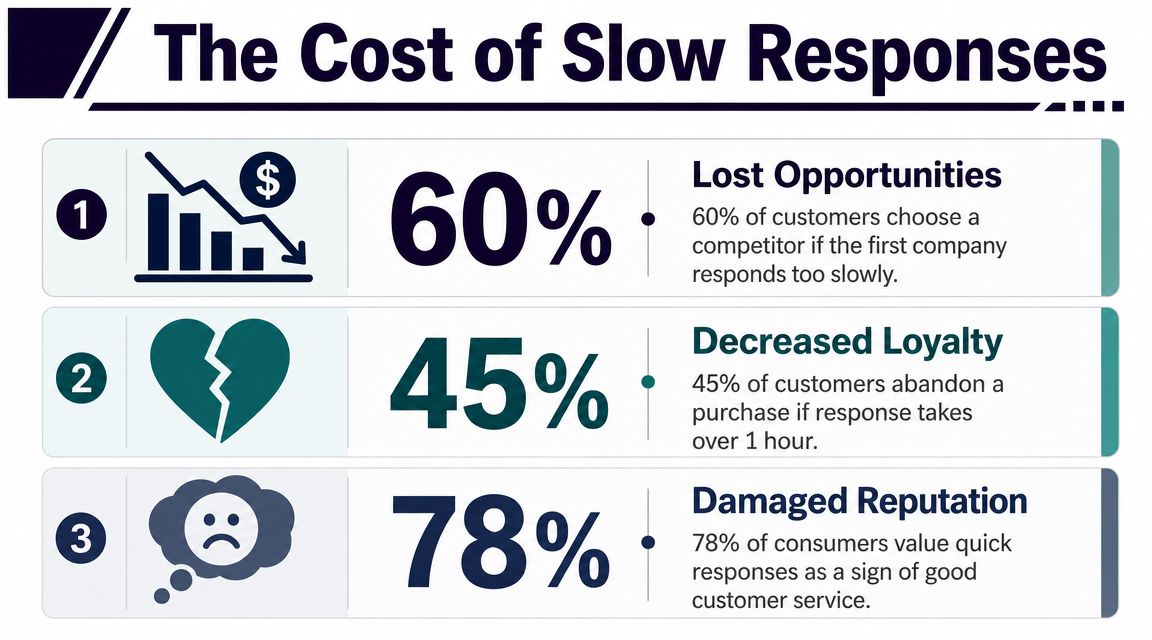
The benchmark that matters is severe enough to change how you run your intake. According to lead response time benchmarks summarized here, responding within 1 minute can increase conversions by 391% compared with responding after 2 minutes, and leads contacted within 5 minutes are 21 times more likely to convert than those contacted after 30 minutes.
That's why marketplace selling feels brutal when your system is loose. The first credible response often gets the next reply. The next reply gets the brief. The brief gets the call. By the time a slower freelancer sends a thoughtful message, the buyer may already be mentally committed elsewhere.
Fast wins attention before skill wins trust
On Upwork and similar platforms, buyers usually don't evaluate every option with equal depth. They triage. They answer the people who appear present, relevant, and easy to move forward with.
That means slow response creates three problems at once:
- You lose position early because the client starts interacting with someone else first.
- You look harder to work with because delay gets read as busyness, disorganization, or weak follow-through.
- You reduce your own closing chances before your expertise even enters the conversation.
Practical rule: If a lead is a fit, treat the first reply like the opening move in a live sales call, not like inbox maintenance.
The mistake I see most often is trying to improve close rate while ignoring speed to lead. Teams rewrite proposals, tweak profiles, and debate pricing while leads sit untouched. If you want a broader system for turning attention into booked calls, this guide on how to improve sales conversion rate pairs well with response-time work.
The real cost of waiting
A delayed reply doesn't only hurt one lead. It changes team behavior. People stop checking notifications aggressively because the habit already feels broken. Good opportunities pile up beside weak ones. Urgent messages get handled with less context because everyone is catching up.
That's why learning how to improve response time has less to do with typing quickly and more to do with operating with intent. Fast teams don't rely on memory. They build a system where the next action is obvious.
Measure Your Speed and Set Winning Targets
A freelancer replies in 3 minutes and swears they are fast. Then they pull the last 30 Upwork conversations and find half the replies went out hours later, usually after context switching, review delays, or missed notifications. That gap matters because marketplace selling is won by the clock as much as by the proposal.
Start with a baseline you can trust. Two weeks is enough to expose the pattern, and simple tools are fine. Use a spreadsheet, Notion table, Airtable, HubSpot, Pipedrive, or your marketplace inbox export. The job is straightforward: log when the lead arrived, when someone took first action, and when the first useful reply was sent.
Track these fields for every inbound opportunity:
- Lead source: Upwork invite, direct message, job post, referral, website form
- Arrival time: When the lead came in
- First action time: When someone claimed, tagged, or acknowledged it
- First reply time: When your first meaningful response was sent
- Owner: Who was supposed to reply
- Outcome: No reply, conversation started, discovery call booked, lost
Add one more field if you want the true reason your speed slips: delay cause.
That single note usually shows the problem faster than any dashboard. On small teams, slow replies rarely come from typing speed. They come from fuzzy ownership, scattered context, and the habit of waiting for the “right” person to answer. If you need a tighter intake standard before setting targets, build it into your process with a simple lead qualification framework for sales teams.
Set targets by lead value, channel, and buying intent
One response-time target for every inquiry sounds neat and works badly in practice. An Upwork invite from a client with hiring history should not sit in the same queue as a vague low-budget message. Strong teams set service levels by lead quality, not by arrival order.
A practical setup looks like this:
- Tier A leads
High-fit invites, repeat buyers, ideal-budget projects, and accounts you actively want. Give these the shortest reply window. - Tier B leads
Solid opportunities with some uncertainty around scope, budget, or timeline. These still move fast, just not ahead of Tier A. - Tier C leads
Low-fit projects, unclear briefs, or work outside your sweet spot. Keep a response path, but do not let these consume your best selling hours.
Harvard Business Review has reported that firms that contacted web leads within an hour were far more likely to qualify them than firms that waited longer, which supports what many agencies already see in practice on marketplaces too. Speed creates access to the conversation, and access creates options.
Use two speed metrics instead of one average
Average response time hides the problem. One instant reply and one eight-hour delay can still look acceptable on paper.
Track two numbers:
- First seen to first action
- Inbound to useful reply
The first shows whether alerts, ownership, and coverage are working. The second shows whether your actual sales process can keep up once a real prospect appears. On Upwork and similar platforms, I care more about the second metric because a fast “Got it, will reply soon” message only helps if it is followed by a real answer quickly.
Review this once a week. Break it down by lead source, time of day, and owner. If evenings lag, add coverage or safer automation. If invites get answered faster than open job posts, that is fine if the close rate supports it. The goal is not equal speed everywhere. The goal is fast response where revenue is most likely.
Triage and Prioritize Leads Like an Agency Pro
Not every inbound lead deserves the same response path. That's where many freelancers get trapped. They answer in arrival order, not in value order, and call it fairness.
That approach feels organized. It isn't. It's expensive.

Route first, write second
The bottleneck is often upstream from the reply itself. As noted in this analysis on workflow redesign and ownership clarity, slow internal routing and context switching often hurt response time more than the speed of the responder. Clarifying ownership and triaging instantly can cut wait time more effectively than adding more people.
That matches what happens inside agencies. A project arrives. One person flags it in Slack. Another asks if it's design-led or dev-led. Someone wonders whether the client is serious. Meanwhile, nobody has answered.
A lightweight triage model solves that.
A simple scoring model that works
Score each lead on a few practical signals:
- Budget fit: Is the budget inside your normal range, obviously under it, or unclear?
- Scope clarity: Does the buyer know what they want, or are they fishing?
- Client quality: Existing spend, clear communication, real timeline, sane expectations.
- Strategic value: Good portfolio logo, repeat work potential, or entry into a target niche.
- Delivery match: Does your current team have the right specialist available?
You don't need software to do this. A color label system works. Red for urgent and high value. Yellow for solid but not critical. Gray for low priority.
If you want a stronger qualification framework before the response goes out, this article on how to qualify sales leads is useful for tightening your criteria.
Ownership beats shared vigilance
Shared inboxes create a false sense of safety. Everyone can see the message, so everyone assumes someone else will handle it.
Use named ownership instead. Every lead should have one person responsible for the first useful reply. Not five people “aware of it.”
A clean agency rule looks like this:
- The account owner handles repeat clients.
- New leads in a service line go to the line lead.
- Ambiguous projects go to one triage owner, who assigns them immediately.
- If nobody claims a lead within your internal window, it escalates visibly.
Here's a useful walkthrough on organizing that handoff logic in practice:
Slow teams usually don't have a writing problem. They have an ownership problem.
Once triage is in place, you stop wasting prime response time deciding who should think about the lead.
Build a High-Speed Communication Workflow
A lead lands on Upwork at 9:07. By 9:20, the client has heard from three other freelancers and already decided who feels easiest to work with.
That gap is usually not a talent problem. It is a workflow problem.
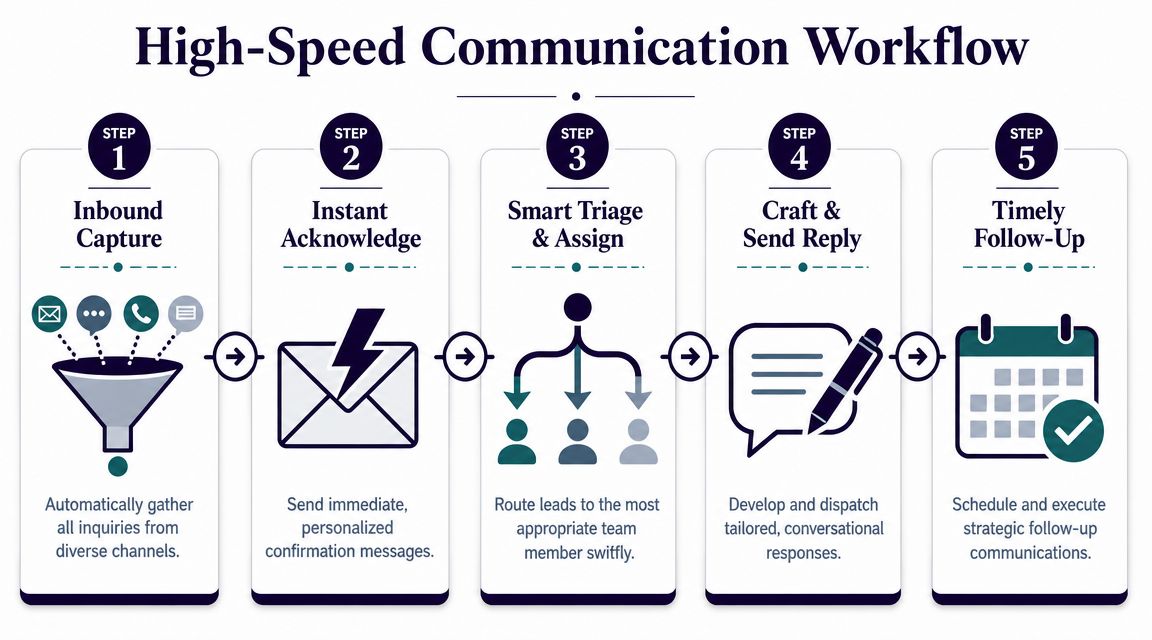
A high-speed communication workflow cuts the steps between lead arrival and first useful reply. For freelancers and small agencies, that matters more on marketplaces than almost anywhere else. You are not only selling skill. You are selling responsiveness, clarity, and low-friction buying.
Centralize intake into one operating lane
If Upwork messages sit in one tab, email alerts in another, and internal discussion happens in Slack DMs, response time slips for a simple reason. The person who should reply does not see the lead fast enough, or sees it without the context needed to act.
Put inbound activity into one visible lane your team checks all day.
For a small agency, that usually means:
- One Slack channel for inbound opportunities and message alerts
- One shared view for platform conversations
- One tracker for lead stage, owner, and deadline
- One escalation rule when the owner misses the internal response window
One lane is enough. More tools usually create more hiding places.
Build a reply system, not a folder of scripts
The fastest teams do not write from scratch each time. They also do not paste generic templates that sound like a bot farm.
Use modular reply blocks instead of full canned messages. That gives your team speed without killing judgment. A practical library usually includes:
- Short acknowledgment openers for new inquiries
- Service-specific questions for design, dev, ads, SEO, or retainers
- Next-step prompts such as a quick review, scope check, or call
- Common objections around budget, timeline, and fit
- Proof snippets tied to each service line
Store those blocks where the team already works. Notion, Google Docs, TextExpander, and built-in canned replies all work. The real requirement is maintenance. If your offer changed, your templates need to change with it.
I prefer giving account managers short approved components they can assemble fast. That keeps the message human and keeps junior team members from freezing on simple replies.
Use automation for speed, and keep judgment with humans
Automation helps after the manual workflow is clear. If the process is messy, automation just helps you make mistakes faster.
For Upwork-heavy freelancers and small agencies, the safe layer to automate is the repetitive admin around the conversation:
- Instant alerts when a qualified lead arrives
- Automatic assignment by service line or account owner
- Context pulled into the thread so the responder has project history
- Reminder nudges when no reply goes out on time
- Draft support for common response types
That setup scales better than asking someone to watch notifications all day.
Some teams build this with Zapier, Make, Slack, HubSpot, and canned response tools. Some use marketplace-specific tools. Earlybird AI is one option in that category. It connects to an Upwork account, helps teams search for relevant projects, draft personalized proposals, and reply to client messages automatically. For a broader operational setup, this guide on automating repetitive tasks in agency workflows covers the handoff points worth automating first.
Set a clear rule for what automation can and cannot do. Auto-route, remind, pre-fill, and draft. Let humans make the call on fit, pricing, nuance, and risk.
That is how response speed becomes a sales weapon instead of another chore.
Craft First Replies That Actually Start Conversations
Fast replies fail when they read like placeholders. Clients can tell when you sent something instantly but didn't properly process their request.
The better target is time to useful response. Customer experience guidance summarized in this discussion of useful first responses makes the point clearly: speed matters, but clients are sensitive to generic replies, repeated transfers, and having to restate the issue. The best first message acknowledges the request, sets expectations, and moves the conversation forward.

What a strong first reply does
A useful first response usually covers three things:
- Recognition
Show the client you understood the ask. Mention the platform migration, design refresh, ad account cleanup, landing page build, or whatever they need. - Direction
Ask one smart question or state the likely next step. Don't send a wall of discovery questions. - Confidence
Make it easy for the client to continue. Offer a review, a short call, or a fast outline of approach.
Here's the difference.
Weak:
Thanks for reaching out. We'd love to help. Let us know a good time to discuss.
Better:
Thanks for sending this over. I read the part about cleaning up the tracking setup before launch. We handle that kind of pre-launch analytics work regularly. The first thing I'd want to confirm is whether the issue is in tag configuration, attribution, or reporting. If you want, send the current setup details and I'll tell you where I'd start.
The second message is still fast. It just feels informed.
Use templates with movable parts
The easiest way to stay fast without sounding canned is to template the structure, not the final wording.
Keep these variables flexible:
- The client's stated problem
- One specific observation
- One clarifying question
- One concrete next step
That lets a bidder or account manager personalize the message in under a minute without writing from scratch.
A first reply doesn't need to close the deal. It needs to earn the next message.
Keep the ask small
Many first replies die because they ask the client for too much. Full brief. Full budget. Full stack. Full timeline. Portfolio review. Meeting booking. That's too heavy for an opening touch.
Start smaller. Ask one question that proves competence. Offer one path forward. Buyers respond when the conversation feels easy to continue.
That's the balance people miss when they think about how to improve response time. The goal isn't maximum speed at any cost. It's useful momentum.
Monitor and Refine Your Response System
A response system degrades subtly. Templates get stale. Owners change. Notification rules break. One channel starts lagging and nobody notices until good leads stop turning into calls.
That's why response time work needs a review loop, not a one-time cleanup.
Watch the metrics that reveal friction
You already know to track response speed. That isn't enough by itself.
Review these signals together:
- First response time: Your basic speed metric.
- Reply rate: How often your first message gets a response back.
- Conversion by lead source: Which channels turn into real conversations and calls.
- Time to close: Whether faster starts are producing smoother sales cycles.
- No-owner or reassigned leads: A direct sign of routing weakness.
Look at them side by side. If response time improves but reply rate drops, your messages may be getting faster and less useful. If one account owner converts better with similar speed, study their first-message structure. If one source is slow every week, fix the intake path.
Audit the misses, not just the wins
Teams often only review booked calls. Review the stalled leads too.
A simple weekly audit works well:
- Pick recent lost or silent leads
- Check how long they waited
- Read the first reply
- Identify the failure type
Common failure types show up quickly:
- The lead sat unassigned
- The reply was generic
- The message asked for too much too early
- The wrong person handled it
- The follow-up never happened
Once you categorize misses, your next improvements become obvious.
Refine one part of the system at a time
Don't change templates, automation rules, ownership, and triage labels all in the same week. You won't know what helped.
Change one variable, then watch the effect:
- revise the first-reply template for one service line
- tighten assignment rules for invites
- add reminders for unreplied conversations
- shorten internal approval steps for high-fit leads
That operating rhythm matters more than any single trick. Professional agencies don't win because they reply fast once. They win because they keep tuning the system that makes fast, relevant replies normal.
If you're serious about learning how to improve response time, treat it like pipeline infrastructure. Measure it, protect it, and improve it continuously. That's what turns responsiveness from a personal habit into a repeatable sales advantage.
If you want help building that kind of always-on response system for Upwork, Earlybird AI is built for it. It automates project discovery, personalized proposals, client replies, follow-up, and analytics so freelancers and agencies can respond faster without relying on someone being online every minute.




