
← Back To Blog
Lead Generation Software: The 2026 Buyer's Guide
A major client disappears on Monday. By Friday, the founder of a four-person agency has inherited a stale pipeline and needs qualified conversations before month-end. The team has contacts scattered across spreadsheets, inboxes, LinkedIn, and an old CRM, but nobody has enough time to research every account, write every follow-up, and route every response to the right closer.
That's the operating problem lead generation software is built to solve. It turns disconnected prospects into prioritized opportunities, automates repetitive research and outreach, and gives a small agency a repeatable way to create pipeline without immediately hiring a full SDR team.
The buying decision isn't really about collecting the longest feature list. It's about deciding whether you need to replace manual prospecting, scale an Upwork channel, or assemble a custom revenue stack. The right answer depends on where your leads come from, how much operational complexity your team can absorb, and whether the software can create a closed loop from signal to conversation.
What Lead Generation Software Actually Does for Your Agency
Lead generation software automates three jobs agencies routinely struggle to perform consistently: finding prospects, qualifying them, and handing them to a closer. Some platforms focus on one job, while others combine prospect databases, enrichment, outreach, scheduling, and analytics in a single workspace.
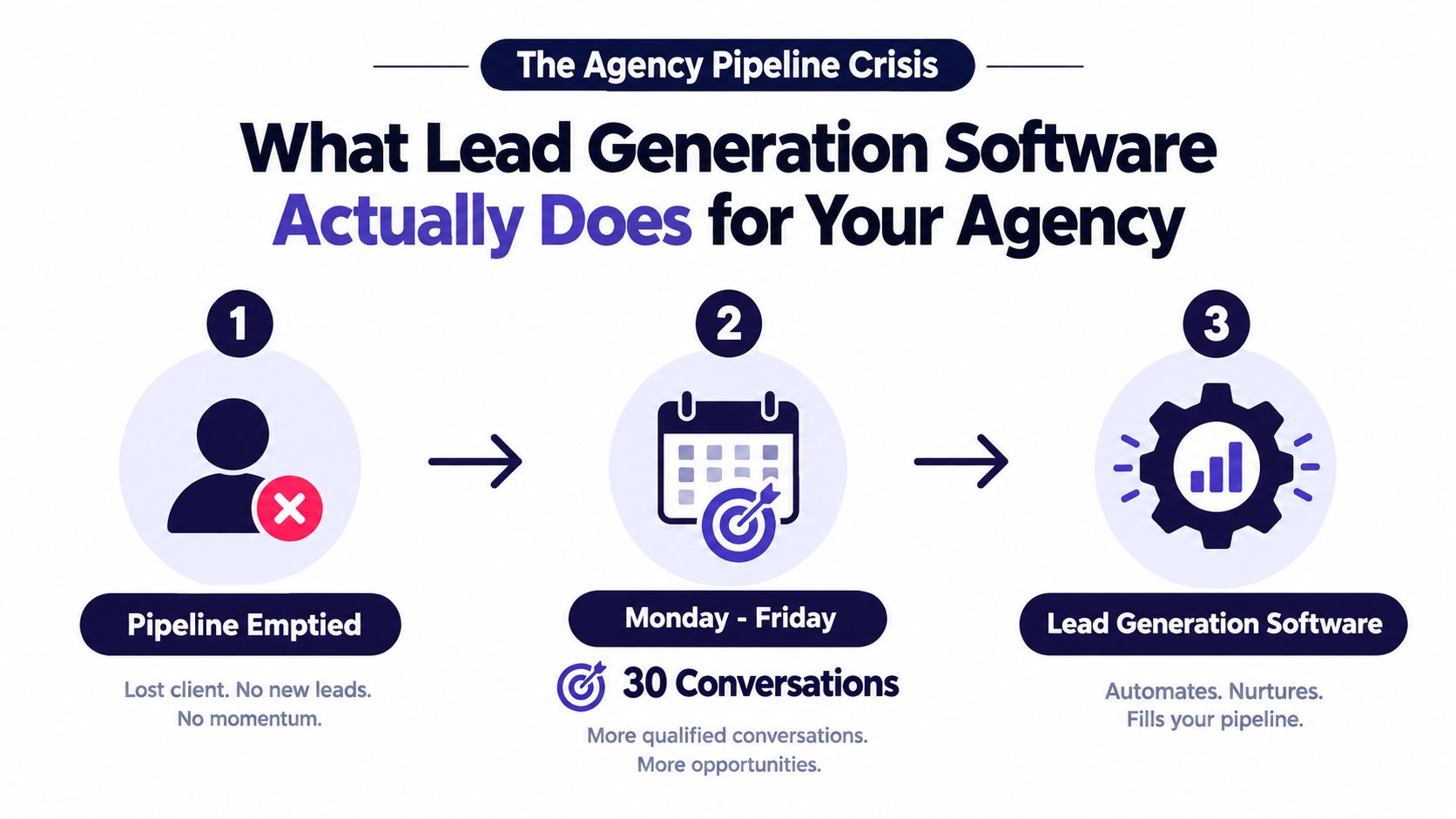
A CRM is different. It stores relationship history, deal stages, notes, activities, and customer records. Marketing automation usually nurtures people who have already entered your ecosystem through forms, content, events, or campaigns. Lead generation software sits upstream. It fills the funnel those systems manage.
Start with the job, not the vendor
When pipeline pressure hits, use this sequence:
- Define the prospect. Identify the industries, roles, company characteristics, and buying situations that fit your agency.
- Capture the signal. Collect form submissions, job posts, website behavior, replies, or other indicators of active need.
- Qualify the opportunity. Separate a plausible fit from a contact who only matches a broad demographic filter.
- Route the lead. Send the opportunity to the person who owns that service line, territory, account, or channel.
- Trigger the next action. Create a personalized email, proposal, call task, calendar invitation, or follow-up sequence.
The important point is that automation doesn't remove selling. It removes the repetitive work that prevents sellers from selling, such as list building, record cleanup, status updates, reminders, and first-draft preparation. Agencies still need positioning, judgment, discovery, and account strategy.
A capture system can help you capture and qualify more prospects, but the tool only matters if the captured contact reaches a human with useful context. A chatbot that produces another unworked inbox won't repair a broken pipeline.
Why This Category Grew Into a Multi-Billion Dollar Market
Lead generation software has become a substantial global category. One independent estimate places the market at USD 8.76 billion in 2025, with a projection of USD 23.08 billion by 2032 and a 14.82% CAGR across that period, while a separate estimate places the market at USD 5.88 billion in 2025 and projects USD 8.9 billion by 2030 at an 8.4% CAGR (360iResearch market analysis). The estimates differ in scope, but both point to sustained expansion rather than a niche sales-tool trend.
That growth follows a clear technology lineage. CRM systems first gave businesses a structured place to store leads and relationship history. Marketing automation added forms, email workflows, and scoring. Modern AI-enabled tools now add prospect research, enrichment, personalization, routing, and execution on top of that installed foundation.
The layers haven't replaced one another. They've accumulated, which explains why an agency can have a CRM, an email platform, a data provider, a scheduling tool, and separate workflow automation while still lacking a dependable lead handoff.
| Era | Dominant Tool Type | Core Capability Added | Limitation It Created |
|---|---|---|---|
| Early CRM adoption | Contact databases and CRM systems | Centralized relationship records and pipeline history | Stored information without creating enough new demand |
| Marketing automation | Email workflows and scoring platforms | Nurture sequences, forms, behavioral tracking, and basic prioritization | Required clean rules and significant setup to maintain relevance |
| AI-assisted prospecting | Data, enrichment, and outreach platforms | Faster research, personalization, routing, and multichannel execution | Increased concerns about data quality, governance, and reliability |
| Connected GTM platforms | Unified revenue workflows | Synchronized prospecting, enrichment, engagement, and attribution | Can trade specialist depth for convenience and create vendor dependence |
CRM adoption shows how lead handling has entered ordinary business operations. A 2026 industry summary reports that the global CRM market crossed USD 100 billion in 2026, that 32% of CRM usage focuses on lead generation and customer satisfaction, and that sales is the largest CRM application. The same summary reports CRM implementation at 74% of businesses in the United States and generative AI adoption in CRM at 65% of businesses (CRM statistics summary).
The current buying problem is therefore paradoxical. More capability is available, but more layers create more operational choices. Agencies must decide whether connected workflows are worth giving up best-of-breed control, and whether AI execution is safe enough for their data, reputation, and client relationships.
The Four Tool Types and Which One You Actually Need
Most agencies don't need a giant platform on day one. They need to identify the missing job in their pipeline and buy the tool type that performs it.
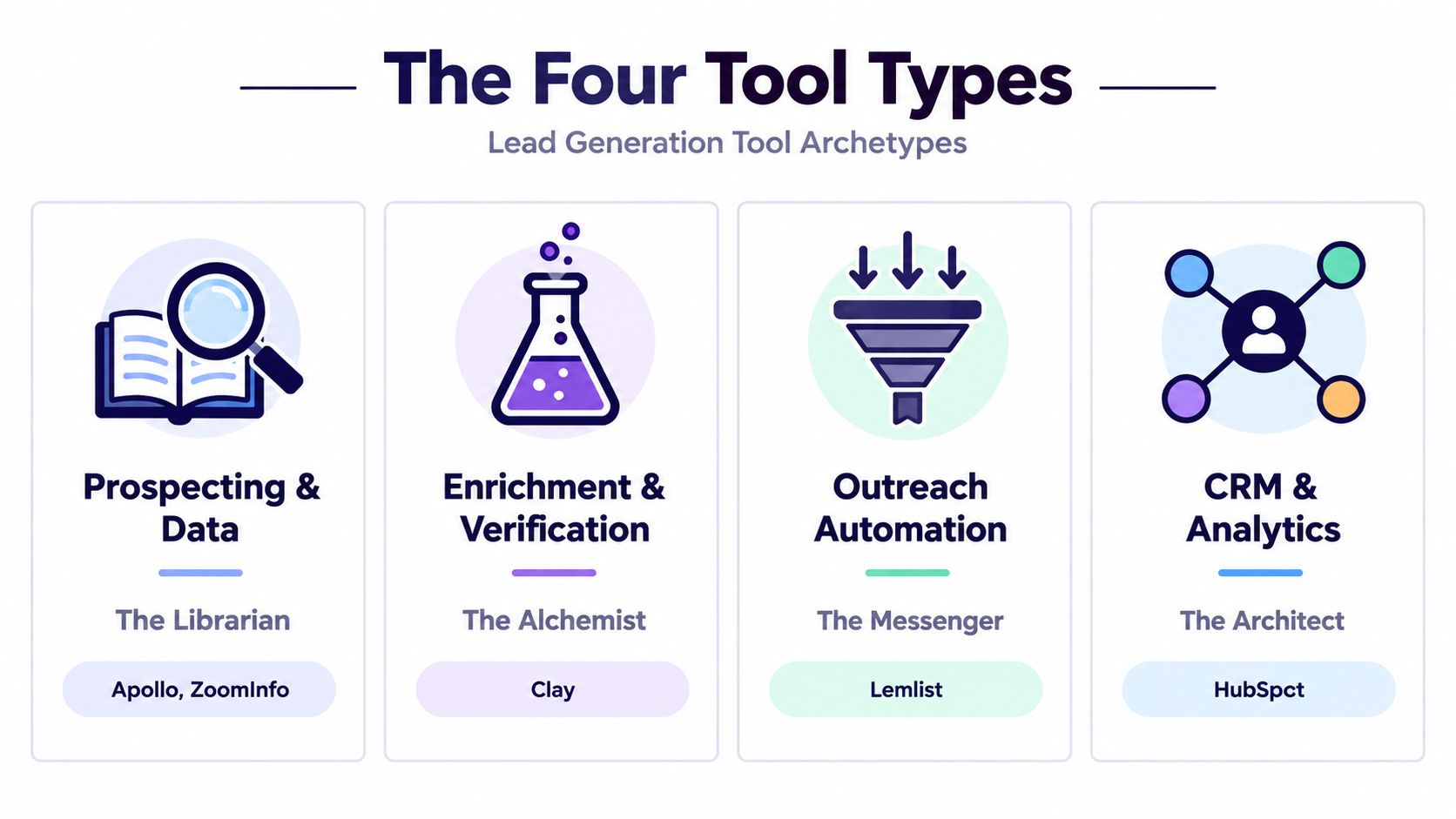
Prospecting and data tools
Apollo, ZoomInfo, and similar platforms act as the librarian. They help you find companies, contacts, roles, and business details, then export or sync those records into a workflow. Choose this archetype when the agency's main problem is an empty cold pipeline.
Data tools are useful for building a defined market list. They're less useful when your team hasn't agreed on an ideal customer profile, because a larger database only produces a larger version of an unfocused list.
Enrichment and intent platforms
Clearbit, Bombora, 6sense, and Clay function more like a research analyst. They append firmographic details, technology information, buying signals, and other context to records you already have.
This category matters when your agency receives enough inbound or outbound contacts but can't distinguish timing, fit, and urgency. Signal-based scoring is increasingly important because static rules lose value when buyer behavior and privacy conditions change. Data quality still determines the outcome, so enrichment shouldn't be treated as a substitute for verification.
Outreach and engagement sequencers
Lemlist, Instantly, and Smartlead act as the messenger. They schedule email and social touches, manage follow-up tasks, and help teams maintain a consistent cadence.
Use this archetype to reactivate an aged list or operationalize outbound after the targeting and data work is sound. Don't use it to compensate for weak positioning. More automated messages won't make an irrelevant offer persuasive.
Conversation and scheduling tools
Chili Piper, Calendly, and Qualified play the receptionist. They qualify inbound interest, offer scheduling options, and route conversations to the right person while intent is still fresh.
Most agencies need two tool types, occasionally three, and rarely all four at the beginning. A prospecting tool plus an outreach sequencer fits cold pipeline creation. A capture and scheduling layer plus enrichment fits inbound demand. For a broader comparison of platforms and use cases, review Bazzly's take on lead generation software. Agencies evaluating outreach-specific workflows can also examine outreach tool options.
Core Features That Move the Needle in a Real Pipeline
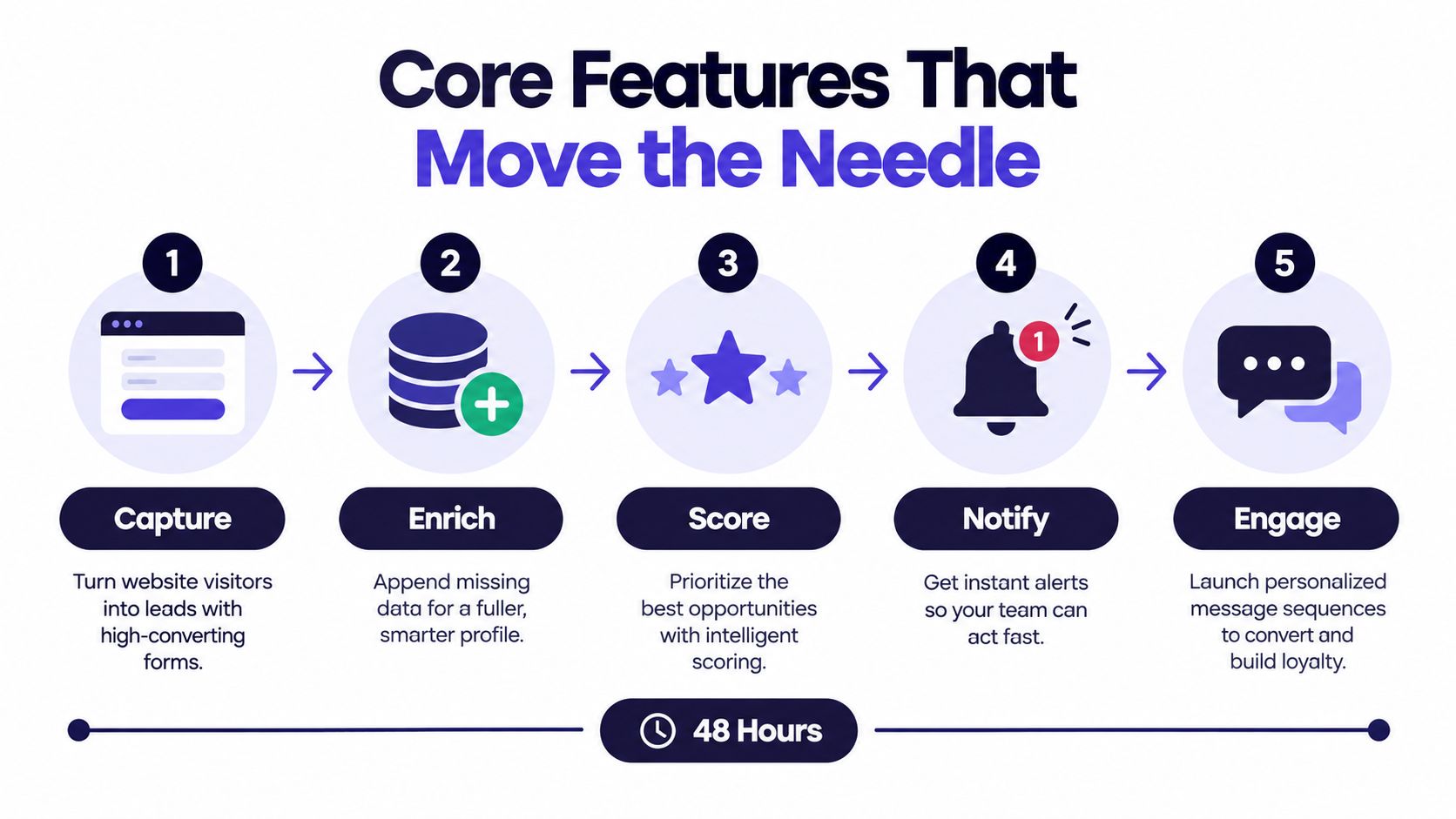
A coaching prospect submits a landing-page form on Monday morning. The form captures the person's role, company, email, service interest, and stated problem. That's only the beginning. The stack earns its cost by deciding what happens next.
The first pass turns identity into context
The system enriches the record with company size, industry, role, contact details, technology signals, and relevant activity. A scoring model then separates a strong fit from a low-intent inquiry.
Rule-based scoring is easier to audit. You can assign points for service fit, seniority, location, source, or a requested project. Predictive scoring can identify patterns your team hasn't explicitly defined, but it requires trustworthy historical data and ongoing oversight. Neither model fixes an unclear qualification standard.
Routing comes next. The lead might go to the coach-services specialist, the account owner with available capacity, or the salesperson responsible for that territory. The CRM should record the assignment, while Slack or another team workspace can deliver the alert and a calendar system can make the next action obvious.
The second pass creates a behavior-led response
Suppose the prospect opens the first email and returns to a service page. That behavior should change the workflow. The system can create a call task, trigger a follow-up, offer a relevant scheduling path, or pause an automated sequence when a human begins a conversation.
Multichannel capability can include email, LinkedIn tasks, SMS, chat, and dialing. The channel matters less than the trigger. Outreach that ignores behavior burns attention and can damage deliverability, while a workflow that reacts to meaningful intent gives the seller useful timing and context.
Practical rule: Buy the features that shorten the distance between a real signal and a relevant human response.
Agencies often overpay for elaborate ABM dashboards and generic AI copywriters. They usually get more operational value from accurate enrichment, clear scoring, reliable routing, CRM synchronization, Slack alerts, and calendar handoffs. A pipeline tracking workflow is only valuable when the team follows it, so keep the system simple enough for daily use.
The ROI Math That Proves It Pays for Itself
An agency that answers a qualified inquiry in minutes can create more gross profit without adding another SDR. The business case for lead generation software rests on protecting intent before a prospect goes cold, not on a vague promise that AI saves time.
The available benchmarks show why response latency matters. One 2026 study reports leads contacted within 5 minutes closing at 32%, compared with 12% after 24 hours. A separate dataset covering more than 15,000 leads across six companies found that contacting someone within five minutes made teams up to 100 times more likely to reach the lead and 21 times more likely to qualify it than waiting thirty minutes (speed-to-lead analysis).
Top-of-funnel conversion remains tight. Cross-industry visitor-to-lead conversion is about 2.9%, while MQL-to-SQL conversion is about 13% in a 2025 Salesforce dataset covering 5,500 sales professionals across 27 countries (B2B lead-generation benchmarks).
Build the model from observed inputs
Track these measures before buying:
- Lead volume: Count inbound and outbound opportunities entering the workflow.
- Qualification rate: Measure how many become sales-ready under your agreed definition.
- Response latency: Record the time from signal to first relevant action.
- Meeting quality: Separate booked meetings from attended, qualified meetings.
- Revenue value: Use actual average contract value and gross margin.
- Operating cost: Include seats, enrichment credits, deliverability tools, integrations, and administration.
The calculation is direct:
Incremental gross profit = additional qualified opportunities × close rate × gross profit per client
For example, suppose an agency processes 100 leads, produces an 13% MQL-to-SQL rate, closes 25% of qualified opportunities, and earns $4,000 gross profit per client. That produces 13 qualified opportunities, about 3.25 clients, and $13,000 in incremental gross profit. If software and operating costs total $3,000, the net software return is $10,000.
Net software return = incremental gross profit minus software and operating costs
Use the model to test each automation lever separately. Faster routing reduces delay, scoring cuts wasted seller time, nurture preserves opportunities that are not ready, and scheduling reminders can improve attendance. Remove overlap so one improvement is not counted twice.
For a second opinion on assumptions used in a lead-generation model, consult B2B lead-generation benchmarks, but base the final decision on your own pipeline evidence.
Fragmented Stack vs Unified Platform, Choosing Your Architecture
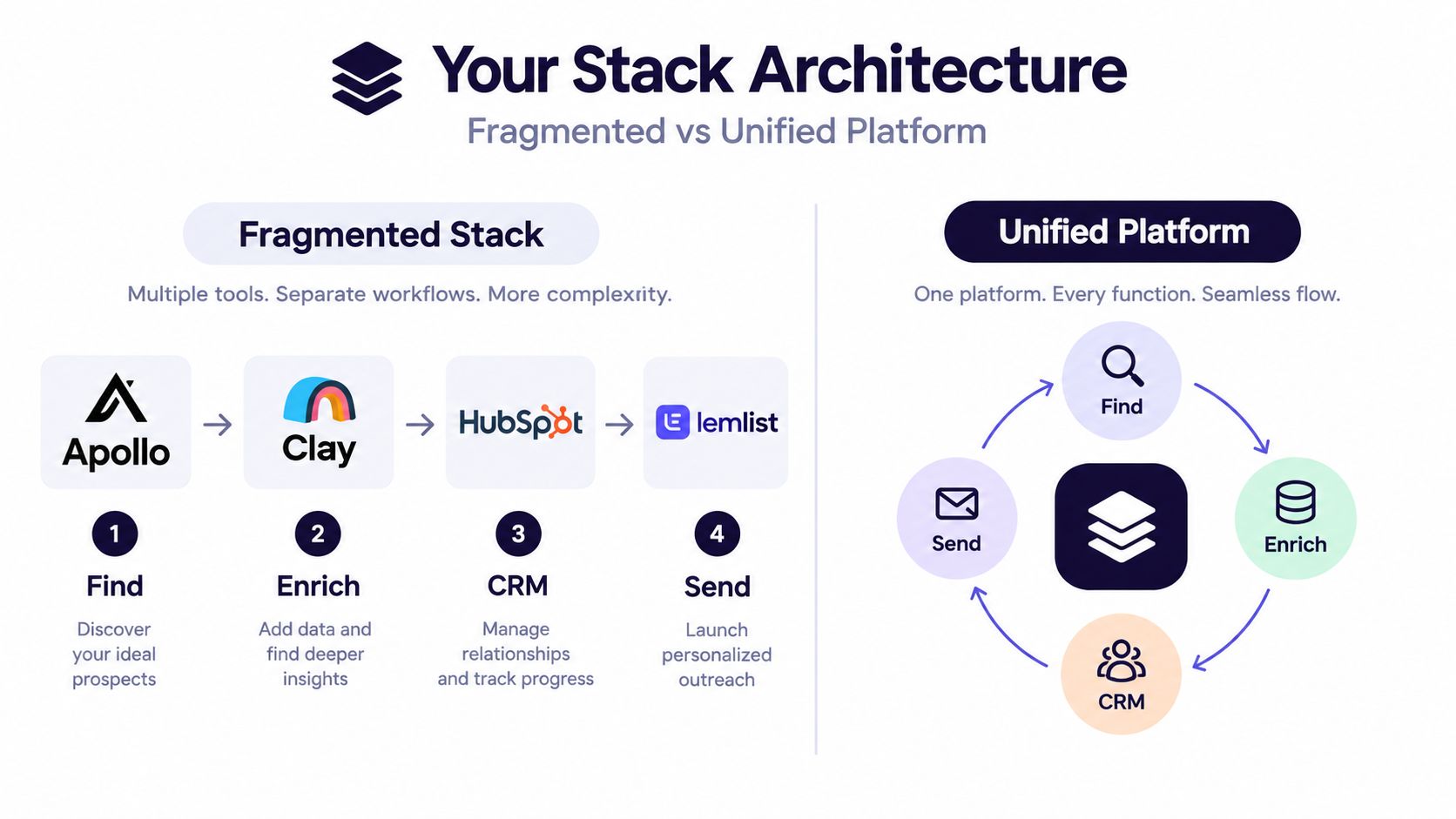
The fragmented stack gives every job its own specialist. Apollo can handle prospecting, Clay can enrich records, HubSpot can hold CRM data, Lemlist can run sequences, and Chili Piper can manage routing. This approach offers deeper features and more control, but every connection creates maintenance, permissions, failure points, and another contract to manage.
A unified platform makes the opposite trade. HubSpot Marketing Hub, Salesforce Marketing Cloud Account Engagement, and Zoho Marketing Plus bring more functions into one environment. Onboarding is usually easier for non-technical operators, reporting has fewer seams, and the team has a clearer system of record.
The operating trade-off matters more than the feature count
A specialist stack works well when the agency has enough volume and process maturity to justify optimization. It also makes it easier to replace one component without rebuilding the entire revenue system. The downside is integration debt. If enrichment stops syncing, routing fails. If sequence activity doesn't write back to the CRM, attribution becomes unreliable.
A unified platform reduces those seams, but its workflows may be less flexible. You can end up paying for bundled modules you don't use or compromising on a specialist capability that directly affects deliverability, data coverage, or channel execution.
My recommendation is practical:
- Small agencies with fewer than 10 people usually benefit from a unified platform, because integration maintenance can consume more time than customization is worth.
- Agencies serving more than 25 clients or operating with more than 30 reps may benefit from a fragmented architecture, because specialization can compound when someone owns the operations layer.
- Most growing teams should choose the hybrid path: one unified CRM, one specialist enrichment tool, and one specialist outreach tool.
Don't choose architecture based on technical ambition. Choose it based on who will repair failed syncs, audit data, manage permissions, and train the team after launch.
Where Upwork Automation Slots Into a Modern Lead Gen Stack
Upwork is a specialized prospecting channel, not a substitute for every other source of demand. An agency targeting Upwork should treat it as a parallel lane alongside email, LinkedIn, referrals, paid acquisition, and inbound content.
The difference is the signal. Traditional prospecting starts with a contact or account record and asks whether that person might have a need. Upwork starts with a posted project, an expressed requirement, and a marketplace context. That makes the workflow category-specific, even though the commercial objective is the same, create a qualified conversation and move it toward a sale.
Keep the two pipelines distinct
Tools such as Apollo, Lemlist, and HubSpot work with contact data, account records, sequences, activities, and CRM stages. Upwork-native automation works around job monitoring, project matching, proposal drafting, replies, follow-up, and call booking.
Earlybird AI can search Upwork projects, use feedback to learn which opportunities fit, draft personalized proposals, and reply to client messages automatically. It belongs beside a broader lead generation stack, not inside the assumption that one system owns every record.
Pipeline rule: One agency can run one revenue strategy across two operational pipelines, but it shouldn't pretend the data models are identical.
Maintain a clear boundary between the Upwork workflow and the external outbound workflow. Give each channel its own source field, owner, status definitions, and reporting view. If an Upwork client also enters your CRM, mark the origin and preserve the marketplace context so another seller doesn't send a disconnected cold sequence.
Use deduplication before creating a second touch. Establish rules for who handles a cross-channel opportunity, which system becomes authoritative after a call is booked, and when automation must stop. A marketplace proposal and a cold email shouldn't compete for the same prospect's attention.
Agencies managing multiple bidders should also separate account access, permissions, proposal activity, and client communication. The operating goal is not to merge every screen. It's to prevent duplicated work while preserving the advantages of each channel. A focused Upwork lead automation workflow can sit alongside traditional prospecting without forcing the entire agency stack into one system.
Your 90-Day Evaluation Plan and What to Do Next
A lead generation software evaluation should end with evidence, not enthusiasm from a polished demo. Give the process a defined sequence and disqualify vendors that create operational risk before you debate secondary features.
Weeks 1 to 2, map the actual problem
Document where leads originate, who qualifies them, where records live, how assignments happen, and what sellers do after a signal appears. Interview the people who work the pipeline daily, not only the executive sponsor.
Write down the failure you're trying to correct. It might be poor data coverage, slow response, weak routing, inconsistent follow-up, or a lack of visibility into which channel creates revenue.
Weeks 3 to 6, shortlist and score vendors
Score each platform against the work your agency must perform:
- Enrichment coverage: Can it supply the fields and signals your qualification process needs?
- Routing logic: Can it assign leads by service line, territory, capacity, source, or account ownership?
- Deliverability support: Does it help the team operate outreach responsibly?
- Integrations: Can it sync with the CRM, Slack, calendars, and reporting tools you already use?
- Contract flexibility: Can you change seats, usage, or modules without creating unnecessary lock-in?
Disqualify vendors that lack API access, hide pricing behind vague packaging, offer only one enrichment source, or exclude core workflow features from their service commitments. A cheap platform that requires manual exports and spreadsheet repair isn't cheap.
Weeks 7 to 10, run a paid pilot
Use a small, representative lead set. Test capture, enrichment, scoring, routing, outreach, CRM write-back, reporting, and failure recovery. Ask the team to document every manual step that remains.
Weeks 11 to 12, make the go-or-no-go decision
Compare the pilot against the baseline you recorded before the evaluation. Review qualified opportunities, response latency, seller hours, meeting quality, data accuracy, and total operating cost. If the system creates more administrative work than it removes, stop.
Your next move should be concrete: book two vendor demos, write a pilot brief, or audit your current stack against the four tool archetypes above. Don't buy another platform until you can name the pipeline failure it will fix.
Earlybird AI provides Upwork-focused automation for agencies and freelancers, including project search, personalized proposal drafting, client-message replies, follow-up, and call booking. If Upwork is an important revenue channel for your agency, visit Earlybird AI to evaluate how that specialized workflow could operate alongside your broader lead generation software stack.




