
← Back To Blog
What Is an Outreach Tool? a Guide to Scaling Your Sales

If you're running an agency, you probably know the routine. A new lead appears, someone copies a template, swaps in a name, pastes a portfolio link, sets a reminder in a spreadsheet, and hopes someone follows up at the right time. By Friday, half the conversations live in inboxes, the other half sit in Slack, and nobody is fully sure which prospects got a second touch and which ones were forgotten.
That manual grind gets expensive before it looks expensive. You don't just lose time. You lose speed, consistency, and the ability to learn from your own pipeline. One rep writes strong follow-ups. Another forgets them. One freelancer answers a client in minutes. Another replies after lunch and misses the window.
That mess is why the outreach category has grown so quickly. The global outreach software market was valued at about USD 9.6 billion in 2024 and is projected to reach USD 35.7 billion by 2032, with a 14.0% CAGR during 2026 to 2032, according to Verified Market Research's outreach software market analysis. That kind of growth tells you something simple. Outreach tools aren't a niche add-on anymore. They're becoming standard operating infrastructure.
Introduction Beyond the Manual Grind
A common agency problem looks small at first. You have enough leads coming in to stay busy, but not enough predictability to grow with confidence. So you add process. Then another process. Soon, client acquisition depends on people remembering tiny repetitive tasks all day.
One agency owner I know described it like this: the team wasn't bad at sales. They were bad at remembering sales. Messages needed to go out, replies needed categorizing, and follow-ups needed timing. None of that work was strategic, but all of it determined whether deals moved forward.
Where manual outreach breaks
Manual outreach usually fails in four places:
- Lead handling slips: A qualified opportunity sits untouched because nobody saw it fast enough.
- Follow-up discipline fades: Good prospects go cold when the second or third message never gets sent.
- Personalization gets rushed: Reps rely on tired templates that sound copied, because they don't have time to tailor every note.
- Reporting becomes guesswork: You know activity happened, but you can't clearly tie it to meetings or revenue.
That last point matters more than most owners realize. When outreach lives across inboxes, docs, spreadsheets, and memory, you can't improve it systematically. You can only react to it.
Manual outreach doesn't usually collapse in one dramatic moment. It leaks performance in small missed actions all week.
An outreach tool solves that by turning scattered activity into a managed workflow. Instead of asking a person to remember every next step, the system tracks who to contact, when to contact them, what message to send, and what to do after a prospect engages.
For agency owners trying to get time back, the broader lesson is straightforward. If a task repeats every day and follows a pattern, it should probably be systemized. That's the same logic behind automating repetitive tasks in client operations. Outreach just happens to be one of the most impactful places to apply it.
Core Concepts What an Outreach Tool Actually Does
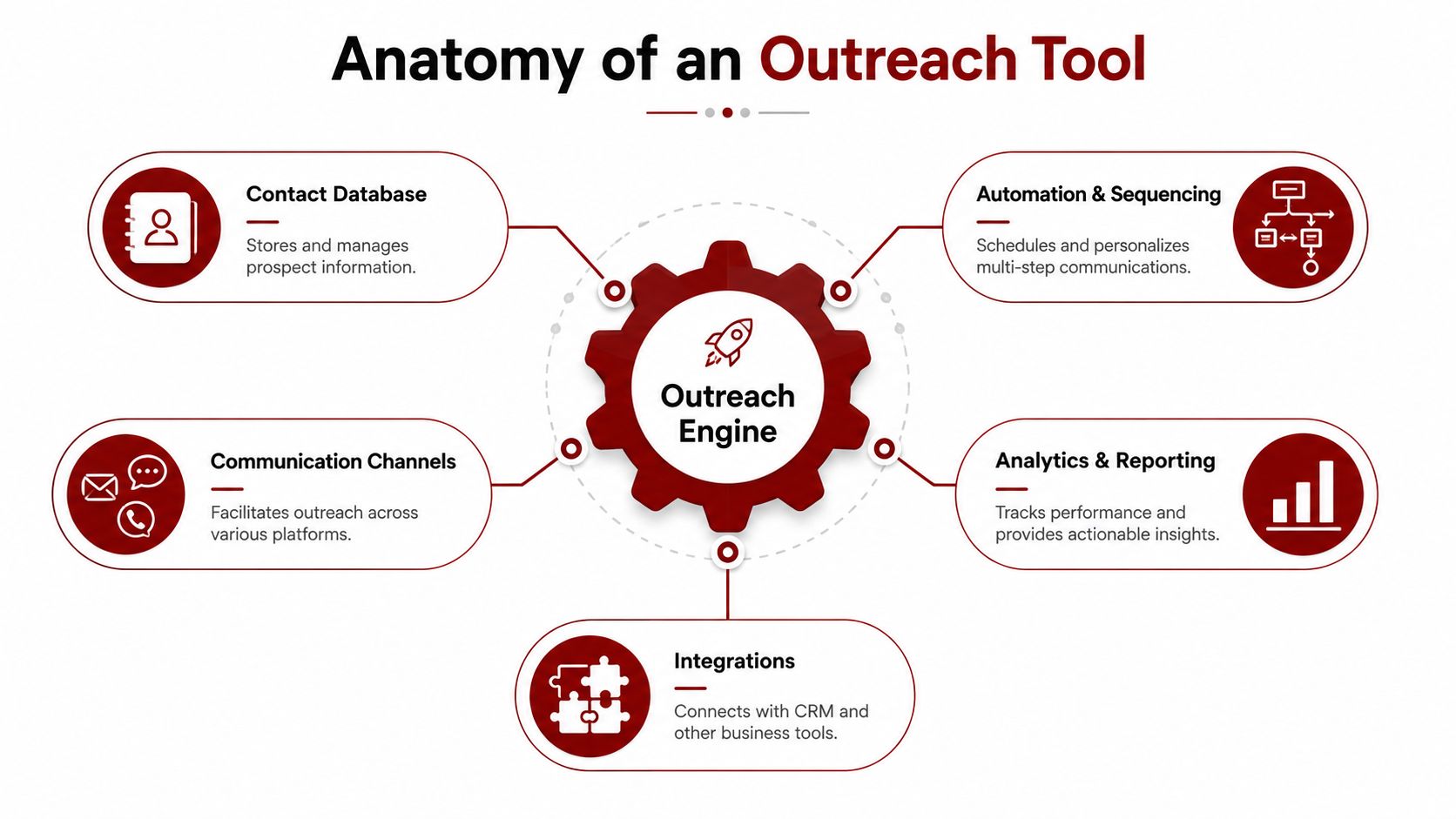
The easiest way to understand an outreach tool is to think of it as an automated assembly line for conversations. You load in contacts, rules, and messaging. The system moves each prospect through the right steps without forcing your team to rebuild the process every time.
The three layers under the hood
Modern enterprise outreach tools rely on three core functions: deliverability management, sequence automation with conditional logic, and AI-driven personalization at scale using dynamic variables and data enrichment integration, as outlined in GTM Engineering's breakdown of outreach tools.
This means in plain language:
- Deliverability management: This is the infrastructure layer. It helps your messages land where they should instead of disappearing into spam or platform noise.
- Sequence automation: This is the workflow layer. You build a series of actions, and the tool decides what should happen next based on behavior.
- AI personalization: This is the relevance layer. The tool uses available data to tailor each message without forcing a rep to write from scratch every time.
How the workflow actually runs
A basic outreach process usually works like this:
Store the contact
A prospect enters the system with whatever data you have. Name, company, role, project type, channel, stage.Assign a sequence
A sequence is a prebuilt set of steps. For example: intro email, follow-up two days later, LinkedIn touch, final check-in.Insert dynamic variables
These are fields that change automatically for each recipient. Think first name, company name, service category, or project context.Apply rules
If the prospect replies, the sequence pauses. If they click but don't respond, the next step might change. That's conditional logic.Measure outcomes
The system shows who replied, who booked, who stalled, and which messaging performed best.
If you want a broader primer on how this connects to CRM and workflow design, this guide on what sales automation is and how it works is useful background.
Practical rule: If your team has to ask "what should I do next?" more than once per deal stage, your outreach process isn't systemized enough.
A lot of readers also confuse an outreach tool with a bulk sender. That's too narrow. A strong platform doesn't just send messages. It manages timing, sequencing, data, response handling, and channel coordination. That's why many operators also study resources like this 2026 playbook for sales teams, which shows how list quality, process discipline, and personalization need to work together.
Comparing Major Types of Outreach Tools
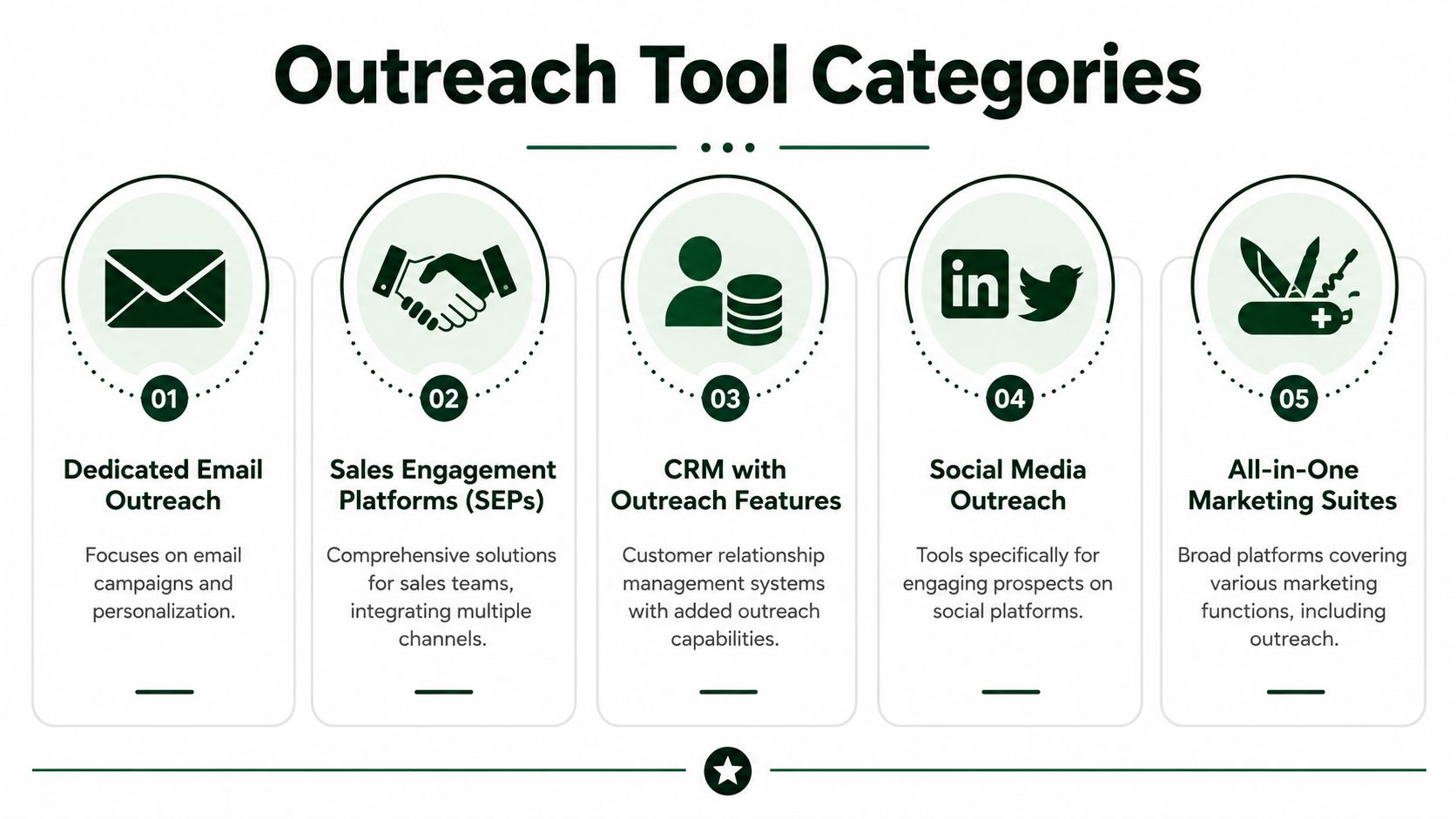
Not every outreach tool solves the same problem. That's where agency owners often get stuck. They compare products that look similar on the homepage but operate in completely different environments.
Dedicated email outreach tools
These tools are built primarily for cold email. Their strengths are sequencing, inbox management, deliverability controls, and personalization at scale. If your sales motion depends on finding decision-makers and emailing them directly, this category often gives you the cleanest setup.
They're good for agencies selling services to founders, marketing leaders, or operations teams outside a marketplace. They're less useful when your lead source isn't email-first.
Typical fit:
- Outbound agencies: Teams booking meetings for clients through cold email.
- Niche service firms: Shops targeting a clear list of companies and buyers.
- Lean operators: Small teams that want a focused workflow without a larger platform.
Sales engagement platforms
Sales engagement platforms go wider. They combine email with other channels, often inside a more structured sales workflow. You may get phone tasks, social touches, pipeline visibility, rep coaching, and tighter CRM coordination.
This category works well for agencies with dedicated sales staff, multiple touchpoints, and a more formal handoff from prospecting to closing. If you're comparing broader systems and want an overview, this article can help you discover AI for sales teams.
A practical difference is orchestration. Email tools help you send. Sales engagement platforms help you run a sales motion.
A good category choice removes friction before you ever optimize copy. The wrong category forces you to fight the tool every day.
Platform-specific outreach tools
This is the category most general guides miss.
A marketplace like Upwork isn't just another channel. It's a separate environment with its own discovery mechanics, timing pressure, client behavior, and safety constraints. You're not uploading a contact list and emailing a prospect. You're reacting to live job posts, competing for attention in a ranked feed, and trying to sound customized at speed.
That changes what "outreach" means.
A platform-specific outreach tool needs to handle things a classic email platform doesn't:
- Fast opportunity detection: You need to act when the job appears, not after a manual review queue builds up.
- Proposal generation: The output isn't a cold email. It's a job-specific bid.
- Reply workflow inside the platform: Conversations happen within the marketplace, not your mailbox.
- Account-safety-aware behavior: Automation has to respect platform norms and avoid patterns that look reckless.
This is why a generic category comparison often misleads agency owners. If your business wins clients through a marketplace, you don't need a prettier email sequence. You need software built for that terrain. For a broader view of adjacent categories, this list of best sales automation tools for growing teams helps frame where outreach fits.
How to Choose the Right Outreach Tool for Your Business
Choosing an outreach tool isn't really about features first. It's about motion. How do leads appear, how does your team respond, and what has to happen between first contact and booked call?

Start with your primary sales channel
If most of your opportunities come from direct outbound, email-first tooling may be enough. If your team works across several channels with dedicated sales reps, a broader engagement platform often makes more sense. If you win through marketplaces, choose software that was designed for marketplace behavior.
That sounds obvious, but owners skip it all the time. They buy a polished general tool, then bolt on manual workarounds because the system doesn't match the way prospects enter the funnel.
Ask yourself:
- Where does the first touch happen
- Who sends it
- Where does the reply come back
- What behavior has to happen quickly to stay competitive
Then map the team, not just the tool
A solo freelancer can tolerate more manual review than a multi-account agency. A team with several bidders, account managers, and closers needs visibility, permission controls, and shared workflow. The wrong setup creates duplicate work, inconsistent messaging, and missed replies.
Another useful filter is operational complexity. If you're evaluating modern outbound systems, this perspective on Salesmotion for sales growth is helpful because it frames the software around team process rather than just feature lists.
Here are the questions I tell agency owners to answer before they buy:
- What has to be automated: Drafting, follow-ups, routing, enrichment, reply handling, or all of it.
- What still needs a human: Final approval, message editing, qualification, or handoff to a closer.
- What must connect elsewhere: CRM, inboxes, calendars, analytics, or internal communication tools.
- What outcome matters most: More replies, faster responses, cleaner team coordination, or better meeting volume.
The next layer is practical evaluation. Watch a live walkthrough and pay attention to how the workflow feels in use:
Don't buy for features you won't operationalize
A long feature list can hide a weak fit. If your team won't use call coaching, don't pay for it. If nobody is going to review sequence branches, advanced conditional logic won't save you. If your outreach depends on being first to a new opportunity, speed and workflow control matter more than decorative reporting.
The best outreach tool is the one your team can run consistently. Consistency beats sophistication that's never adopted.
Outreach Tools in Action Real World Use Cases
Theory gets clearer when you watch the tool inside a real workflow. Different businesses use outreach tools for different bottlenecks. The software matters, but the job it's hired to do matters more.
A B2B SaaS team booking demos
A SaaS company selling to operations leaders usually needs structured, repeatable outbound. Their sales team might load target accounts into a platform, assign personas, run coordinated sequences, and route replies to reps based on territory or segment.
In that case, the outreach tool acts like an operating system for prospecting. It keeps every rep on the same process and makes coaching easier because managers can see what was sent, how prospects responded, and where deals stalled.
A service agency landing retainers through direct outreach
Now take a branding or paid media agency selling retainers. Their problem often isn't lack of expertise. It's inconsistent top-of-funnel activity. One week the founder sends ten thoughtful emails. The next week client delivery takes over and outreach disappears.
An outreach tool fixes that inconsistency. The agency can define its ICP, build message tracks for different buyer types, and run a follow-up process without relying on memory. Reps then spend their energy on replies and sales calls, not on rebuilding the same list and message flow every Monday.
An Upwork agency competing on speed and relevance
Marketplace outreach is a different beast. A client posts a job. Multiple agencies see it. The early proposals often shape who gets read first. Speed matters, but relevance matters just as much because generic bids blend together fast.
A strong workflow in this environment usually combines automation with a human checkpoint. The system monitors opportunities, prepares a custom proposal draft, and helps manage replies inside the platform. Then a human reviews, adjusts the opener or angle, and approves.

That hybrid model isn't just a comfort blanket for cautious teams. It reflects how performance tends to improve when humans and agents work together. Upwork's Human+Agent Productivity Index found that human and agent collaboration increased completion rates on simple projects by up to 70% compared to agents operating alone, according to Upwork's HAPI announcement.
The best automation doesn't remove humans from client acquisition. It moves them to the moments where judgment matters most.
For agencies on Upwork, those moments are easy to spot:
- Job selection: Deciding whether the opportunity fits your offer.
- Proposal angle: Choosing the strongest opening and proof point.
- Reply handling: Reading subtext in client messages and adjusting tone.
- Call conversion: Turning an interested thread into a booked conversation.
That's why the practical win isn't "full autopilot." It's faster execution with human oversight in the right places.
Common Pitfalls and How to Avoid Them
A lot of teams assume the biggest outreach risk is weak copy. It isn't. The bigger risk is using automation in a way that makes buyers suspicious or platforms uncomfortable.
Over-automation creates obvious signals
When every message sounds machine-made, prospects notice. When every action fires with the same pattern, platforms notice too. Outreach tools can speed up work, but they can also magnify bad habits.
The safest approach is controlled automation. Let the system handle repetitive tasks, but keep humans responsible for judgment-heavy moments like qualification, final edits, and nuanced replies.
Compliance and trust aren't side issues
Recent developments in 2024 to 2026 show that mistrust and bias are major barriers to AI adoption in service sectors, and there is still little independent guidance on how automated bidding tools can be audited for diversity and transparency or aligned with platform safety policies, as discussed in this analysis on AI and underserved communities.
That matters more than it might seem. If an outreach system targets the same types of jobs in the same way, or if it creates patterns that look too uniform, your operation can become brittle. You may not notice the problem until reply quality drops or a platform starts pushing back.
What good restraint looks like
A healthier setup usually includes:
- Human review points: Someone checks tone, targeting, and fit before a message goes live.
- Clear targeting rules: The team defines what a good opportunity looks like instead of letting the system chase everything.
- Transparent workflows: You can explain why the tool selected a lead, drafted a message, or triggered a follow-up.
- Platform-aware pacing: The system behaves in a way that matches normal user patterns rather than forcing aggressive volume.
If your outreach feels too fast, too broad, or too identical, the problem usually isn't ambition. It's missing guardrails.
The best tools don't just automate action. They make restraint operational.
Measuring Success Tracking Your Outreach ROI
Too often, the wrong numbers are tracked initially. Professionals watch opens, sends, and activity counts because those metrics are easy to pull up. But an outreach tool only earns its place when it improves business outcomes.
Focus on outcome metrics
The metrics that matter most are the ones closest to revenue:
- Reply quality: Are the responses positive, relevant, and moving toward a conversation?
- Meetings booked: Is outreach producing sales calls, not just inbox activity?
- Conversion by stage: Which messages turn into qualified conversations and which die early?
- Revenue created: Which campaigns or channels lead to clients?
That's the shift good operators make. They stop asking, "How much did we send?" and start asking, "What did the system create?"
What strong implementation can change
Organizations deploying AI-powered outreach tools have reported a 340% improvement in cold-outreach conversion rates and 6.3x more qualified meetings per rep-equivalent in production deployments, according to AI SDR adoption statistics for 2026.
Those numbers are large because the gain doesn't come from one thing. It comes from several compounding improvements happening at once:
Faster execution
Prospects hear from you while interest is still fresh.More consistent follow-up
Good opportunities don't disappear because someone forgot the next touch.Better personalization at scale
The team can tailor outreach without reducing capacity to a crawl.Cleaner rep allocation
Humans spend more time on live opportunities and less on repetitive admin.
Track the point where automation hands off to revenue. That's where ROI becomes obvious.
The clearest way to judge an outreach tool is simple. Compare what happened before and after implementation. Not in raw activity, but in qualified replies, booked calls, and closed business. If those numbers move, the tool is a revenue engine. If they don't, it's just a faster way to stay busy.
If your agency wins business on Upwork and you want an always-on system for finding jobs, drafting customized proposals, managing replies, and supporting a safer hybrid workflow, take a look at Earlybird AI. It's built for realities general outreach tools often miss, especially when speed, multi-user coordination, and platform-aware automation decide who gets the client conversation.




