
← Back To Blog
Unlock Upwork Success: Real Time Notifications 2026
You open Upwork, search your saved keywords, and find a project that fits your agency perfectly. Good budget. Clear scope. The client sounds serious. Then you see the timestamp. It was posted a while ago, and the job already has a crowded proposal list.
That moment is brutal because you didn't lose on capability. You lost on timing.
For most freelancers and small agencies, that's the core problem real time notifications solve. They're not just little pop-ups on a phone. They're a way to close the gap between “a client needs help” and “your team is already responding.”
The Agony of Being Second Place
A lot of agency owners think they have a proposal quality problem when they have a speed problem.
Here's the common pattern. You or a team member checks Upwork between meetings. You refresh a search. You scan a few jobs. You shortlist one. Then you tell yourself you'll come back to it after lunch, after a client call, or after you finish delivery work. By the time you return, the client has already started reading earlier proposals.
That's what second place looks like on Upwork. It often starts long before anyone compares your offer to a competitor's. The delay happens at discovery.
The missed-job pattern
If you've ever said any of these, you already know the pain:
- “That was exactly our niche.” The fit was right, but the timing was wrong.
- “We would've had a real shot at that one.” Maybe. But only if you were seen early.
- “I can't sit there refreshing Upwork all day.” You shouldn't have to.
Real time notifications solve that by turning job discovery from a manual habit into an immediate signal. Instead of hunting for opportunities on a schedule, your system tells you when something important happens.
Practical rule: On Upwork, speed matters most when the opportunity first appears, not when you finally get around to checking for it.
For a non-technical way to think about it, compare a waiter and a restaurant buzzer. With the waiter model, you keep asking, “Is my table ready yet?” With the buzzer model, the restaurant tells you the moment it's time. One model burns attention. The other preserves it.
That same shift matters when you're trying to win work. If the right job appears and your team learns about it immediately, you get a chance to be early with a thoughtful response. If you learn about it later, you're already reacting to a crowded room.
What Are Real-Time Notifications
At the simplest level, real time notifications are alerts delivered when something happens, not long after.
That sounds obvious, but many people blur together three different experiences:
- You manually check for updates.
- A system checks every so often and then tells you.
- An event happens and the system tells you right away.
Only the third one feels truly real time.
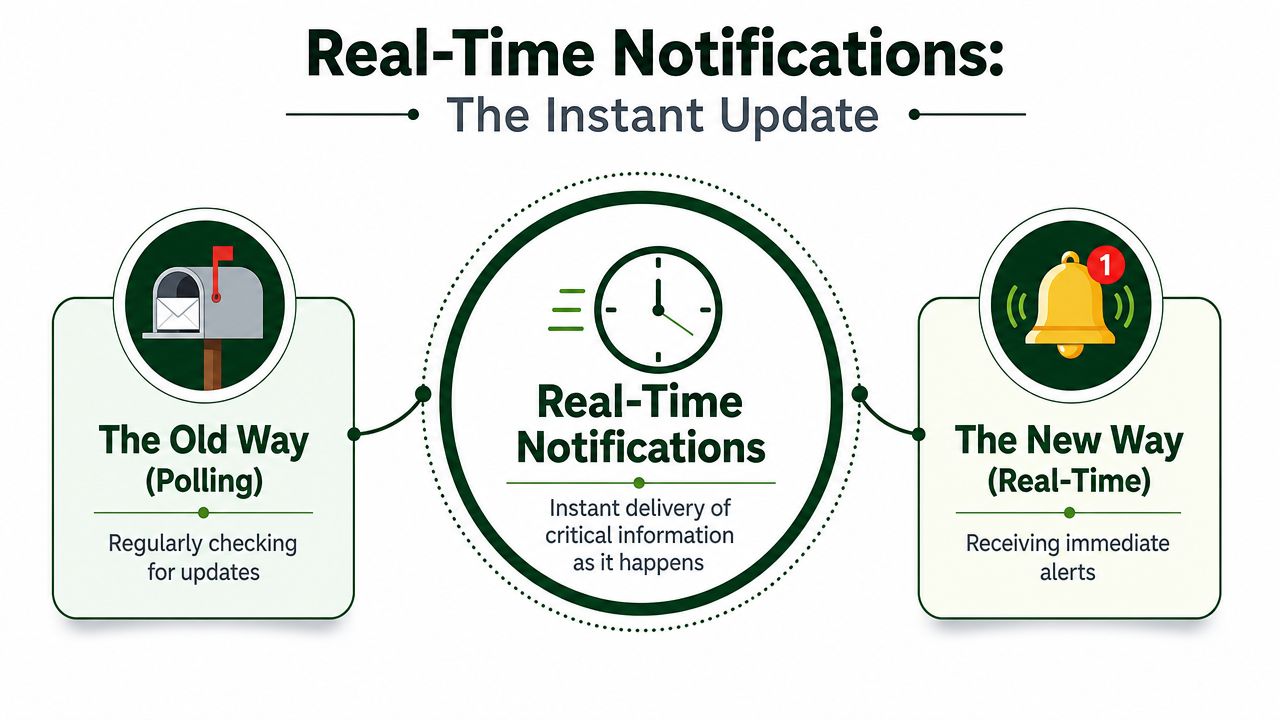
The mailbox versus the doorbell
Think of old postal mail. If you wanted to know whether anything arrived, you had to walk to the mailbox and check. That's the old model. You pull information toward you.
Now compare that with a courier ringing your doorbell when a package arrives. You don't keep checking the porch. The event triggers the alert. The information comes to you.
That's the difference between ordinary updates and real time notifications.
For an agency owner, this matters because checking Upwork manually is like walking to the mailbox over and over. It burns time and still leaves gaps. A real time alert is the doorbell. A good-fit job posts, a client replies, or a key status changes, and you know immediately.
Why this matters beyond convenience
This isn't only about moving faster. It's about protecting attention.
Business of Apps reports that the average U.S. smartphone user receives 46 app push notifications per day, with overall opt-in rates averaging 60%, and median opt-in rates of 81% on Android and 51% on iOS. The same research reports reaction benchmarks of 4.6% on Android and 3.4% on iOS, plus notes that segmentation adoption rose from 65% in 2015 to 85% in 2017, and that basic personalization can improve open rates by 9%. That's why modern notification systems focus on targeting and timing instead of blasting everyone with the same message (Business of Apps push notification statistics).
The Upwork takeaway is simple. A useful alert isn't “everything that happened.” It's “the few events you should interrupt your day for.”
- New matching jobs should arrive fast.
- Client replies should surface immediately.
- Low-value noise should wait, batch, or disappear.
The best notification system doesn't shout more often. It interrupts at the right moment.
That's the mental model to keep. Real time notifications are not a flood. They're a filter with a bell attached.
How Notification Technology Actually Works
Once you understand the business value, the tech gets much less intimidating. Under the hood, most systems use some combination of polling, webhooks, and push notifications.
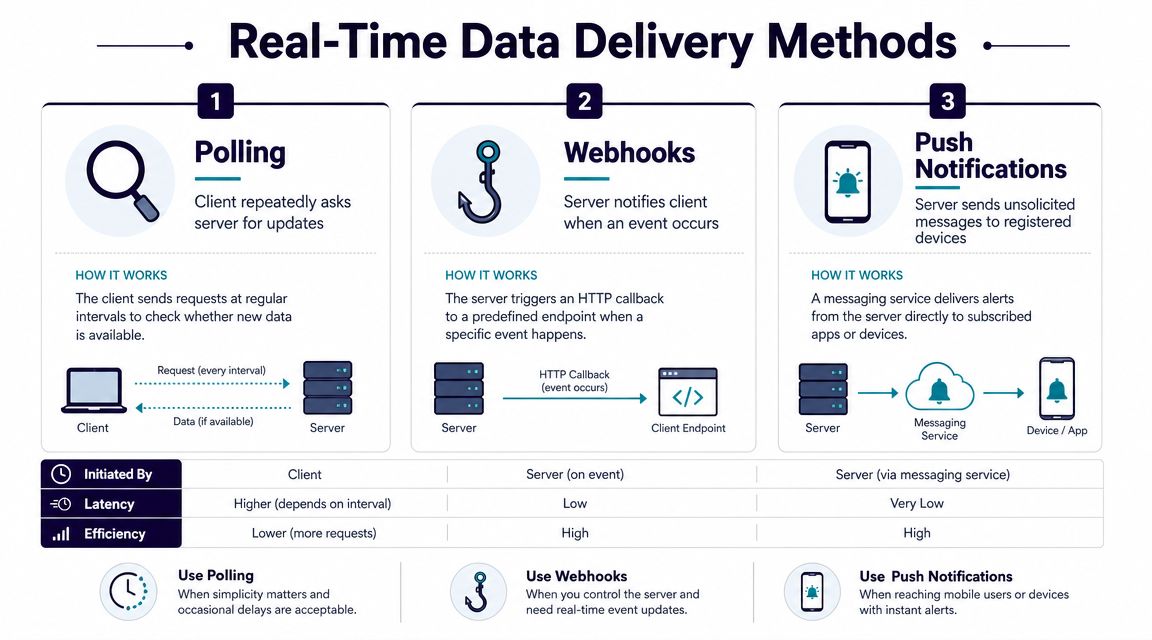
Polling
Polling is the easiest concept to grasp because it's what people already do manually.
It's like a child in the back seat asking, “Are we there yet?” every few minutes. Nothing new may have happened. The question still gets asked.
In software, polling means one system keeps checking another system for updates. “Any new jobs?” “Any new messages?” “Any change yet?” It works, but it's inefficient. You spend time and compute checking for things that often haven't changed.
For an Upwork workflow, polling can still be useful for low-priority tasks. If something only needs occasional checking, polling may be good enough.
Webhooks
A webhook is closer to a direct phone call between systems.
One system says, “When this event happens, call me at this address.” Then the instant the event occurs, the sending system posts the data over. No repeated checking. No “are we there yet?” loop.
That makes webhooks a strong fit for operational alerts and workflow automation. If a client action or job event should trigger another step, webhooks are often the cleanest pattern.
Push notifications
Push notifications are what end users usually see. They're the message on your phone, desktop, or browser that says something changed.
A push notification isn't the whole pipeline. It's the final delivery step to a person. If webhooks are system-to-system communication, push notifications are system-to-human communication.
Here's a simple way to separate them:
- Polling means you ask repeatedly.
- Webhooks mean one system tells another system when an event occurs.
- Push notifications mean a system tells a person.
A practical example is an Upwork desktop app workflow that surfaces job or message activity as it happens, rather than waiting for you to reopen tabs and refresh pages.
Later in the flow, the architecture often looks less like scheduled reporting and more like a live processing loop.
Why event-driven systems changed the game
Historically, real-time notifications became more important as companies moved from batch reporting to event-driven systems. Confluent says event-driven alerts let organizations respond to anomalies and risks in seconds rather than minutes or hours, and states that implementations typically achieve a 75% faster mean time to resolution with a 60%–80% reduction in incident impact (Confluent on building real-time alerts).
That sounds operational, but the business lesson is easy to translate. Batch thinking says, “We'll review later.” Event-driven thinking says, “When something important happens, act now.”
If a system has to wait for a report, a human is already late.
There's also a deeper technical pattern behind strong notification systems. In distributed systems research, one important idea is deadline-aware event propagation. A supplier can map an event deadline to a timeout quality-of-service setting so lateness is treated as a failure condition, not just a delay (deadline-aware event propagation in real-time notification services).
For a non-technical owner, the plain-English version is this. A late alert can be functionally worthless. If the opportunity is time-sensitive, “eventually delivered” isn't good enough.
The Business Case for Speed on Upwork
Agency owners usually ask one fair question after hearing all this: does speed really matter that much?
Yes, because Upwork isn't a static marketplace. It behaves more like a live queue. Early visibility changes who gets read first, who gets short-listed first, and who gets the first reply.
Why a few seconds can change the outcome
In low-latency alerting pipelines, systems are typically built as continuous stream-processing loops rather than batch jobs. Live data is ingested, processed, and evaluated for conditions or anomalies in milliseconds, then an alert mechanism triggers immediate notification. Delays of even a few seconds can materially change outcomes in domains like fraud detection and competitive bidding, so the practical goal is minimizing end-to-end detection-to-notification latency rather than maximizing throughput alone (Milvus on real-time alerting in data streams).
Competitive bidding is the key phrase for Upwork.
A good proposal written late often loses to a good-enough proposal written early, especially when the client is still forming a first impression of the candidate pool. Clients don't read in a vacuum. They read in order, in context, and often under time pressure.
What speed changes for an agency
If your team gets notified early, several business advantages stack together:
- Faster first contact means your proposal lands while the client is still actively reviewing the need.
- Shorter internal handoff means account managers or bidders can act before delivery work crowds out prospecting.
- Better reply rhythm means client questions don't sit unanswered while a more responsive competitor takes the lead.
This isn't about sending rushed proposals. It's about protecting the first window of attention.
The simple business analogy
Think about a shop owner who answers the phone on the first ring versus one who returns calls after the customer has already called three competitors.
The second owner may be just as skilled. The market never gives them the same chance.
That's how real time notifications affect Upwork sales. They don't write your capability for you. They make sure capability shows up while the client is still listening.
Practical Use Cases That Win More Work
Often, the concept of “notifications” immediately brings to mind new job alerts. That's useful, but it's only one use case.
On Upwork, several moments matter because each one changes what your team should do next.
New matching jobs
This is the most obvious use case and still the most important.
A strong system watches for jobs that fit your service, budget range, client type, and keywords. The alert should arrive quickly enough that you can review, decide, and respond while the posting is still fresh.
If the notification is too broad, it becomes noise. If it's too slow, it becomes trivia.
For teams trying to cut the delay between posting and action, a faster job alert workflow for Upwork can reduce the amount of manual search and tab-refreshing your bidders do every day.
Client messages
Many agencies focus so hard on new jobs that they forget message speed also affects wins.
If a client replies with a question and your account sits quiet while your team is on other work, momentum drops. Fast message awareness helps you keep the conversation alive while the client is still in decision mode.
Proposal and activity signals
Some teams also track signals around proposal activity and account monitoring. Even if a signal doesn't always deserve an interruption, it can still matter in a live dashboard or priority queue.
That's where a notification system becomes more than an alert feed. It becomes an operating layer for sales actions.
What an integrated workflow looks like
Here's a plain-language example of how this works in practice:
- A new job appears that matches your agency's target profile.
- The system flags it immediately instead of waiting for someone to refresh search results.
- A draft response gets prepared based on your service focus and prior feedback.
- Your team reviews or automates the next step depending on how hands-on you want the process to be.
- The client replies, and the message triggers another fast action.
That's where tools start to matter. One option agencies use is Earlybird AI, which connects to an Upwork account, learns preferred jobs from feedback, and automates parts of searching, proposal drafting, and client reply handling. In this context, the important point isn't hype. It's that a single real-time event can trigger a chain of sales actions instead of just producing a passive alert.
A notification is useful. A notification that starts work is better.
For a small agency, that's the shift that changes capacity. You stop treating each alert as another thing to remember. You treat it as the start of a workflow.
Best Practices for Smart Notification Strategy
Teams often don't fail because they lack alerts. They fail because they get too many, trust too few, and eventually ignore almost all of them.
That's the problem known as alert fatigue.
Healthcare research shows that too many alerts can create saturation and reduce response quality. The practical lesson is that real time notifications work best when they're selective and actionable rather than universal, otherwise they become a productivity drain (alert fatigue research in healthcare settings).
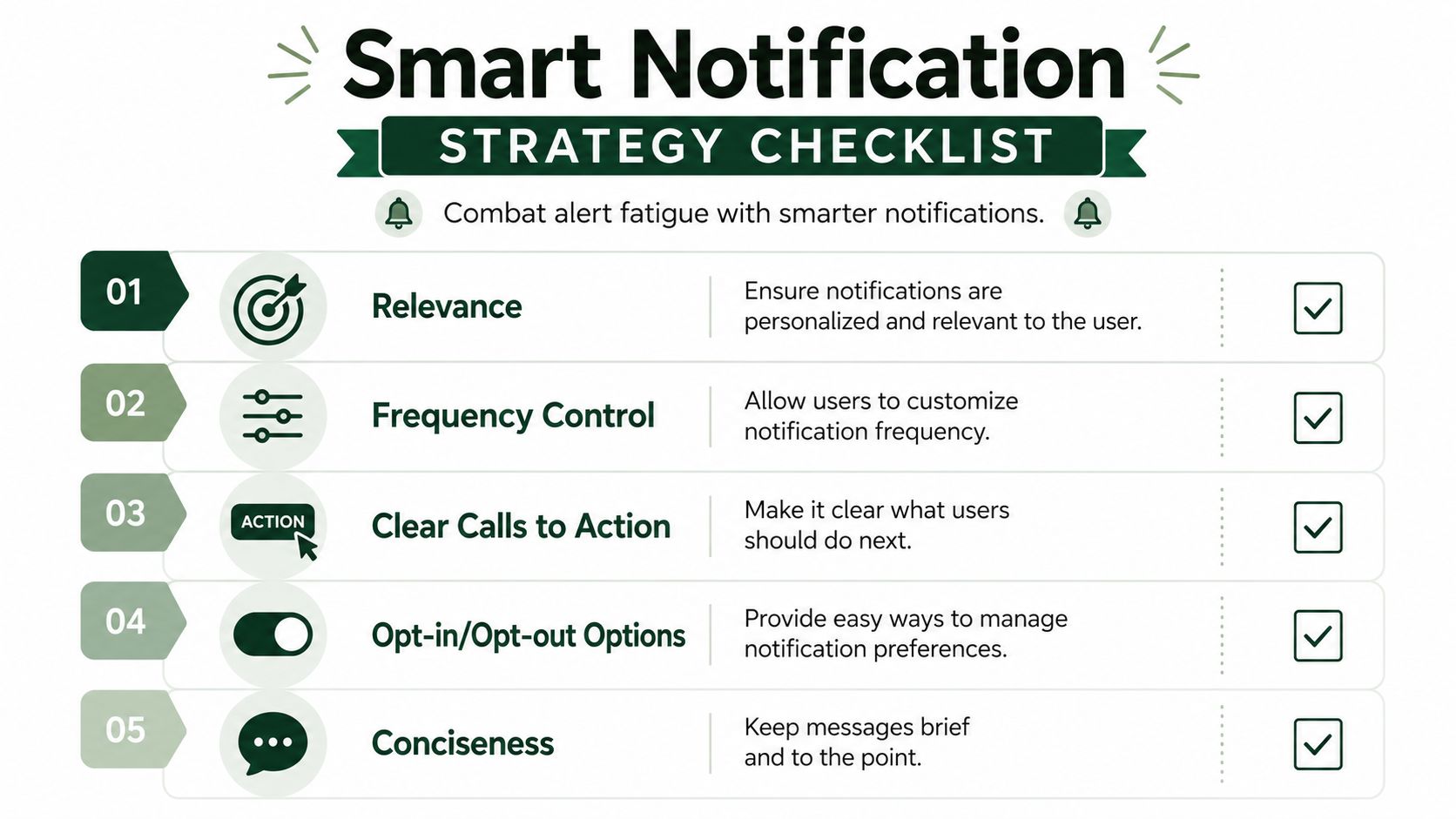
Relevance beats volume
If you run an agency that only wants design retainers from established clients, you shouldn't get interrupted for every small one-off task outside your niche.
Set notifications around fit, not possibility.
- Filter by service match. Don't alert on jobs your team would never accept.
- Use budget and client cues. A weak-fit lead can wait for manual review.
- Separate urgent from informative. Some events belong in a dashboard, not a push alert.
Timing matters too
Not every signal deserves the same delivery method.
A client message may deserve an immediate ping. A weekly trend in proposal analytics may be better as a digest. A low-confidence match may deserve a queue for later review.
Many agencies overbuild. They assume “real time” means “instant for everything.” It doesn't. It means the system can react instantly when instant action is truly valuable.
Build for action, not awareness
Every notification should answer one question: what should the team do next?
If the answer is unclear, the notification probably isn't good enough.
- Make the next step obvious. Review, reply, approve, skip, or delegate.
- Keep the message compact. Long alerts get scanned badly.
- Route by responsibility. A bidder, closer, and delivery lead don't need the same interruptions.
A more automated setup, such as an Upwork automation workflow, only helps if the notification logic is clean first. Otherwise you're just automating noise.
The right notification should feel like a tap on the shoulder from a sharp operator. Short, relevant, and tied to a decision.
The Future Is Instantaneous
The main shift is simple. On Upwork, “I'll check later” is often another way of saying “someone else will get there first.”
Real time notifications matter because they replace delay with awareness, and awareness with action. The technical side can involve polling, webhooks, push delivery, and event-driven systems. The business side is easier to understand. You see opportunities sooner, respond while the client is engaged, and waste less time digging through noise.
The agencies that win consistently usually aren't just better at writing proposals. They're better at building response systems. They know which events deserve immediate attention, which ones should trigger follow-up work, and which ones should be ignored.
If you want a practical starting point, audit your own response path. How long does it take your team to notice a strong-fit job, reply to a client message, or move from signal to proposal? That gap is where work gets won or lost.
If you want to tighten that gap, Earlybird AI is one option for turning Upwork activity into faster, structured action. It helps agencies automate job discovery, proposal drafting, and client replies so fewer good opportunities sit unseen while the team is busy elsewhere.




