
← Back To Blog
Sales Outreach Automation: Proven Workflows & Tips for 2026
You're staring at a queue of half-finished proposals, three inbox tabs, and a spreadsheet of follow-ups you meant to send yesterday. That's usually the point where manual outreach stops feeling “hands-on” and starts feeling like unpaid operations work. Sales outreach automation exists to break that ceiling, but the main win isn't sending more messages, it's building a system that keeps up with your pipeline without making your account look robotic.
Why Manual Outreach No Longer Scales
The first time manual outreach breaks, it rarely fails loudly. It fails in the gaps, the prospect you meant to reply to after lunch, the proposal you rewrote from scratch because the last one was slightly off, the lead you forgot to follow up with because three new jobs came in before you closed your browser. If you sell on Upwork or juggle agency bids across multiple accounts, that grind turns every new client into more admin.
That ceiling is why the historical baseline matters. McKinsey's research showed that about one-third of sales and sales-operations tasks can be automated with today's technology in their sales automation research. Once that became credible, automation stopped being a narrow scheduling aid and became a way to redesign prospecting, follow-up, and pipeline hygiene around repeatable workflows.
What manual work actually consumes
The pattern is familiar. You write the same intro with minor variations, check whether a client viewed the proposal, then remember to follow up again later. Across a week, those tasks eat the time you expected to spend on actual selling.
Manual outreach doesn't usually fail because the message is bad. It fails because the workflow depends on memory.
A practical starting point is to treat repetitive outreach like an operations problem, not a creative one. If a task can be standardized, queued, triggered, or handed off without losing context, it belongs in an automated flow.
For a useful overview of this shift, the outbound sales automation guide gives a solid framing of how outreach moves from one-off execution to a repeatable system. The point isn't to copy someone else's sequence. It's to stop rebuilding the same process every time a lead arrives.
Why the ceiling shows up so fast
Manual outreach scales linearly. More prospects means more drafting, more monitoring, more follow-up tracking, and more context switching. That's fine when volume is low. It becomes a bottleneck when you're trying to run several active conversations at once, especially when each account needs timely responses.
The agency owners who get stuck usually don't have a lead problem. They have a labor problem. Sales outreach automation changes that by separating the work of deciding from the work of executing. Once the decision logic is mapped, the system can do the repetitive parts consistently while you keep control of voice, timing, and escalation.
Core Components of Sales Outreach Automation
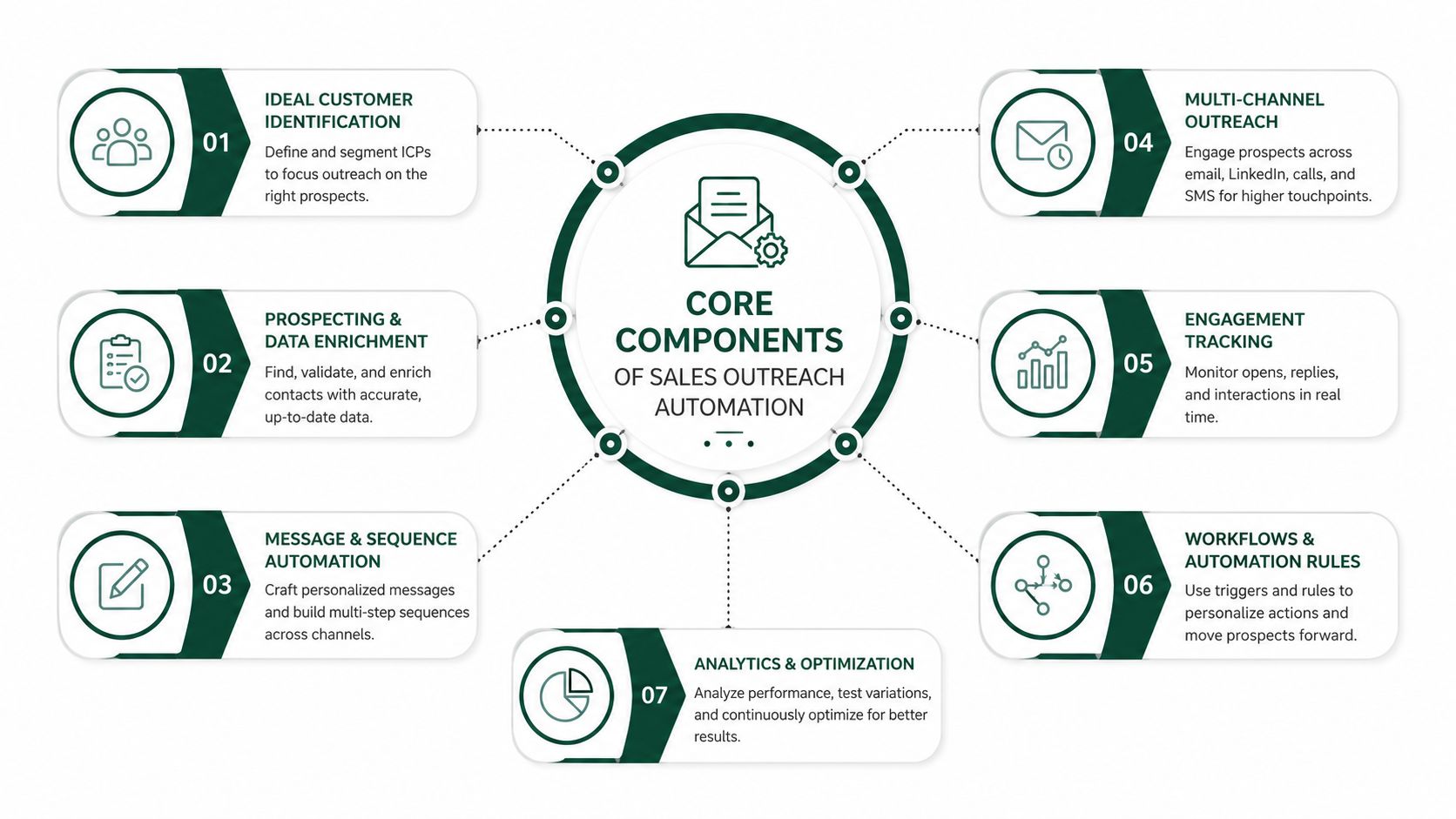
A strong outreach stack behaves less like a blasting tool and more like an always-on assistant that never forgets a step. It knows who got the first email, who clicked, who replied, and who needs a different next action. That matters because the best systems don't just send, they coordinate.
The core of the system is multi-step sequencing paired with conditional triggers and CRM synchronization. ZoomInfo's outreach automation overview explains how platforms can send emails, schedule follow-ups, log calls, and trigger next steps based on opens, clicks, or replies, which keeps pipeline data current in real time through outreach automation workflows. That's the practical difference between a tool and a process. A tool sends messages. A process remembers what the prospect did and reacts accordingly.
Sequencing is the skeleton
Sequences give outreach shape. Without them, every follow-up becomes a separate decision, and people either forget to send it or send it too late. With them, you can map touchpoints across email, calls, and social follow-up so the workflow continues even when the rep is busy.
The sequence should not feel like a robot chain. It should feel like a controlled conversation. That means spacing matters, the message types should vary, and replies need to stop the automation immediately.
Triggers and sync make the system responsive
Triggers are what make automation useful after the first send. Opens, clicks, replies, and site visits can all route a contact into the next path. If someone replies, the sequence should pause. If they click a case study, the follow-up should reflect that behavior. If they ignore the first touch, the system should move on without you manually checking every inbox.
CRM sync is the quiet part people underestimate. It keeps notes, status, and activity current without forcing reps to re-enter data. That reduces friction and prevents the common problem where outreach data lives in one place and pipeline status lives in another.
For platform selection, the best sales automation tools roundup is useful because it highlights the difference between basic sending features and systems built around orchestration. If you're comparing tools, also check the internal outreach tool overview to see how workflow design, follow-up logic, and account handling fit together in practice.
AI personalization adds context
Modern outreach platforms increasingly use real signals, job changes, company news, and prior interactions, to shape messages. AI-assisted research can shrink prospect research from the 15-20 minutes per account often required manually to seconds, according to the guide on AI automation for sales outreach. That speed matters only if the data is good and the follow-up is still controlled by a human-approved workflow.
The useful test is simple. If the platform helps you decide the next best action without forcing you to babysit every send, it's doing real work. If it only batches emails, it's just a prettier mailbox.
Business Benefits and Measurable ROI
Many outreach software packages promote the same fantasy: more volume, less effort, and an instant pipeline. The narrower and more useful truth is that good automation saves time, keeps data clean, and improves response quality when the workflow is disciplined.
Recent benchmark data points to that shift. Industry research reports that AI-assisted outreach can generate 18–22% email reply rates, compared with roughly 8–10% for generic outbound, while some sources place average cold-email reply rates at 3.43% across campaigns. Those numbers come from the 2025–2026 benchmark set summarized in AI SDR and outbound automation trends. The takeaway is not that every campaign will hit the high end, it's that personalization and timing now matter more than raw send volume.
Time savings show up first
The fastest ROI usually comes from eliminating repetitive work. Sales automation statistics published in 2026 report that automated workflows can save reps 2 hours 15 minutes per day and increase revenue by 13–15% when implemented well, while another benchmark notes that reps spend 30% of their time on manual tasks and automation can reduce manual work by 50%. Those numbers are from sales automation statistics and sales prospecting data. If your team is still manually logging activity, those savings aren't theoretical.
The clearest operational gain is in prospect research and personalization. Automation can pull context from company signals, then use that context to draft more relevant outreach without starting from scratch every time.
Market growth confirms the category is mature
This isn't a niche experiment anymore. Market estimates cited in industry research put the global sales automation market around $9.25–$9.3 billion in 2022–2024, with projections to about $17.94 billion by 2030 or $19.5 billion by 2030, depending on the forecast set, and CAGR estimates in the 8.7% to 10.4% range. Those projections appear in the AI SDR and outbound automation trends source set. In plain English, buyers are spending because they expect measurable operational payoff.
If your outreach still depends on constant manual intervention, your real cost isn't software. It's lost selling time.
The right ROI story is simple. Automation should reduce admin, improve response quality, and make outreach predictable enough that your team can scale without hiring purely to keep up with follow-up.
Implementation Roadmap and Process Design
Most automation failures happen before the first sequence goes live. The team buys software, writes a few templates, then discovers that the underlying process is messy, the data is inconsistent, and the handoffs are unclear. Once that happens, automation just amplifies the chaos.
Start with the workflow, not the tool. Map every touchpoint, from the first prospect search to the point where a qualified conversation becomes a call. Document touchpoint frequency, message types, decision points, and handoff procedures before you automate anything. That approach is consistent with the implementation guidance in outreach sales automation planning.
Clean the data before you scale
Automation only works as well as the contact record behind it. Duplicate entries, stale job titles, and mismatched fields create bad personalization and wrong routing. If your platform is going to send at speed, you need standardized contact data first.
That means validating email quality, cleaning duplicates, normalizing fields, and checking segmentation logic. You don't need to make the database perfect, but you do need it consistent enough that the workflow can trust it. If the system can't tell whether a contact is a fit, the handoff breaks down.
Build controlled sequences
Good outreach sequences are persistent without becoming annoying. Space touches deliberately, vary the content type, and define what happens when someone replies. The goal is to create a conversation that looks human because the system respects context.
A practical rollout usually looks like this:
- Map the current process: List every step your team takes today, including follow-ups, reminders, and manual data entry.
- Standardize contact data: Fix duplicates, fill in missing fields, and verify that segmentation rules match the actual account list.
- Define the handoff: Decide when a lead moves from automation to a human rep, and write that rule down.
- Set review checkpoints: Have someone approve copy and logic before the first live send.
- Start with a small pilot: Launch on a limited set of prospects, then expand only after deliverability and reply patterns look stable.
Keep human review in the loop
Practical rule: if a sequence can embarrass your account when it misfires, it needs a human checkpoint before launch.
Safe sending intervals matter because speed without restraint usually looks like spam. The best implementations use automation to control timing and consistency, not to remove judgment. That's especially true for teams managing multiple accounts, where one bad workflow can create a pattern that affects more than one seller.
If you want a product that blends workflow design with guided automation, Earlybird AI is one option that connects to Upwork accounts, learns project preferences from feedback, and handles proposals and replies inside a controlled workflow. The useful part isn't just sending, it's making the sequence visible enough that you can review, adjust, and scale it without losing operational control.
Marketplace Compliance and Account Safety
Automating outreach on a marketplace is not the same as automating a newsletter. Platforms watch for behavior that looks mechanical, especially when messages go out too fast, copy reads too similarly, or logins appear inconsistent. If you're working inside Upwork, that safety layer is part of the system, not an afterthought.
The common mistake is assuming compliance is only about message content. It isn't. Account safety depends on how the tool sends, where it routes activity, how much human-like spacing it uses, and whether it avoids password handling that creates unnecessary risk. That's why safety architecture should be a buying criterion, not a feature checkbox.
What platform-safe automation should look like
A safer automation setup mimics real operator behavior. That means realistic timing, clean session handling, and a workflow that doesn't fire dozens of identical actions in a tight window. If multiple team members manage separate accounts, each account should behave like an actual person with its own pace and context.
The Upwork message automation guide is useful here because it focuses on message handling and the compliance-sensitive side of follow-up. On a practical level, the rules are straightforward. Don't reuse identical templates without adaptation, don't blast submissions in a way that creates obvious patterns, and don't treat login security as an afterthought.
What to look for in a safety-first setup
- Human-like timing: Messages and follow-ups should be spaced in a way that doesn't create suspicious bursts.
- Password-free architecture: The platform should avoid storing credentials directly when possible.
- Clean account separation: Multi-user teams need clear boundaries so activity from one account doesn't leak into another.
- Reviewable actions: You should be able to inspect what the system plans to send before it goes out.
- Response pausing: If a lead replies, the automation should stop and route the conversation correctly.
Compliance isn't a blocker to automation. It's the design constraint that keeps the account usable.
The important shift is mental. On marketplaces, automation should reduce repetitive labor while preserving account credibility. If a system speeds you up but makes the account look unnatural, it's the wrong system.
Metrics and Benchmarks That Actually Matter
Emails sent is a vanity metric. It tells you almost nothing about whether your workflow is useful. The numbers that matter are the ones tied to attention, response quality, and pipeline movement.
Start with reply rate, then look at conversion into real conversations. Benchmarks help here, but only if you read them in context. A source cited in the 2026 statistics set reports an average cold-email reply rate of 3.43% across campaigns, with poor performers below 1%, while AI-assisted outreach benchmark data shows 18–22% reply rates in stronger workflows. Those figures come from sales automation statistics and the earlier AI SDR benchmark set. The gap is a signal that messaging quality, relevance, and timing matter more than volume.
Watch deliverability before everything else
One source in the 2026 benchmark set says 87% of implementations fail when deliverability infrastructure is not in place, which is a useful warning even if your workflow is otherwise well designed. That figure is from sales automation statistics. If your emails aren't landing, personalization won't save you.
Deliverability has to be stable before you judge the sequence. If inbox placement is weak, the data you collect will mislead you. If it's healthy, then response patterns become much easier to interpret.
Measure what changes behavior
The right dashboard should show whether the workflow is helping the rep, not just the sender. Use metrics that tie directly to action.
- Reply rate: Shows whether the message earns attention.
- Time to response: Tells you whether follow-up timing is working.
- Conversion to call: Separates polite replies from real opportunities.
- Unsubscribe or opt-out behavior: Signals fatigue or poor fit.
- Pipeline velocity: Shows whether automation is helping deals move faster.
A low reply rate doesn't automatically mean the system is broken. Sometimes the list is weak, sometimes the offer is weak, and sometimes the timing is off.
The market is also moving toward more conservative workflows. Recent practitioner guidance points to longer spacing, LinkedIn-first logic in some cases, and pausing sequences immediately on replies. That shift makes sense in a crowded environment where prospects are tired of aggressive sequencing. Sales outreach automation still works, but the winning model is more controlled and less noisy than the old volume-first playbook.
Real-World Applications for Freelancers and Agencies
A solo freelancer doesn't need a giant SDR stack. They need a system that finds the right jobs, drafts a relevant proposal, and keeps follow-up moving without making the account feel automated. That's where sales outreach automation becomes practical rather than abstract. The Upwork lead automation guide is a useful reference for how lead handling can work inside a marketplace workflow.
For freelancers, the main advantage is time. Instead of manually scanning every posting and rewriting every pitch, the workflow can surface matching work, prepare the first draft, and queue the follow-up path. The freelancer still makes the strategic call, but the repetitive execution no longer eats the day.
Agencies need coordination more than volume
Agency owners usually have the opposite problem. They've got multiple bidders, several active inboxes, and different people touching the same pipeline. Without process design, one account over-messages while another goes quiet.
That's where multi-user workflow design matters. Each bidder needs clear ownership, consistent timing, and a shared view of what's already been sent. A good system prevents overlap, keeps messaging aligned, and gives the owner visibility without micromanaging every account.
The cleaner the handoff, the less likely your outreach looks like a rushed team trying to hit quota.
Growing teams need a path from simple to structured
The right rollout for a growing team starts small. Use automation for profile optimization, proposal handling, and reply routing first, then layer in analytics and more complex sequencing once the team trusts the process. That progression keeps the system usable while it matures.
The biggest operational win is not replacing people. It's letting a small team act like a larger one without losing control over tone or account safety. If the workflow can do the repetitive work and still leave room for judgment, it's doing the job.
If you want to see how this looks in a real Upwork workflow, visit Earlybird AI and review how it handles proposals, replies, follow-up, and multi-user coordination inside one system. It's a practical place to start if your current outreach is still depending on memory, tabs, and late-night follow-up sprints.




