
← Back To Blog
Upwork Message Automation: A Guide to Scaling Your Agency
Let's be honest, the manual grind on Upwork can be brutal. You spend hours crafting the perfect proposal, hit "send," and then... crickets. That's where Upwork message automation comes in. It's a system that uses smart software to send strategic, personalized follow-up messages to potential clients after you've submitted your initial proposal.
This isn’t about spamming every job post in sight. It’s about making sure your carefully written application stays top-of-mind by automating the crucial—and mind-numbingly tedious—task of tracking and re-engaging with potential clients. Think of it as a way to scale your outreach intelligently, without chaining yourself to your inbox.
What Is Upwork Message Automation Anyway?
Imagine you’re a fisherman trying to land a big client. The manual approach is like using a single fishing line: you cast it out and just hope for the best. You send one proposal and wait. Now, what if you had a fleet of smart boats that knew exactly when and where the fish were biting, automatically dropping lines and pinging you the moment you get a bite? That’s the power of Upwork message automation.
At its core, it’s a strategic system for managing your proposals and follow-ups way more efficiently. Once you submit a bid for a job, an automation tool can take over the follow-up sequence. It sends perfectly timed, personalized messages to keep your name in front of the client, freeing you from the endless cycle of tracking conversations in spreadsheets and setting calendar reminders.
This Isn’t Just a Simple Bot
It's really important to draw a hard line between smart automation and a basic spam bot. A spam bot just blasts out generic, copy-pasted messages to anyone and everyone. That’s a fast track to getting your account suspended and annoying potential clients. True Upwork message automation is way more sophisticated.
It works with your manual proposal efforts, not in place of them. It enhances your communication, acting like a personal sales assistant who never sleeps.
This kind of system helps you compete on a platform where speed is everything. The best jobs often get flooded with dozens of proposals within the first hour. If you’re not quick with a follow-up, your initial proposal can easily get lost in the noise.
How It Works in Practice
The whole process is designed to feel natural and seamless. You find a job you’re perfect for, write a thoughtful proposal like you always do, and then let the automation kick in.
Here’s a look at a typical workflow:
- You Submit Your Proposal: This part is still all you. You send your personalized pitch.
- The First Automated Follow-Up: If the client hasn't responded after a day or two, the system sends a polite follow-up. It could be a simple check-in or an offer to provide more information.
- Ongoing Nurturing: You can set it up to send another follow-up a few days later, maybe with a link to a relevant case study or a piece from your portfolio.
The goal here is to be persistent without being pushy. By automating these touchpoints, you make sure no opportunity slips through the cracks just because you got busy and forgot to follow up.
For freelancers juggling multiple projects or agencies looking to grow, this is a huge shift. Instead of spending hours managing your pipeline, you can put that time back into high-value work: client strategy, project delivery, and actually closing deals. It's the next logical step for anyone tired of the manual hustle and ready to scale their Upwork business.
Why Automation Is a Game Changer for Your Agency
Let's move past the idea that automation is just about saving a little time. When done right, Upwork message automation can fundamentally change how your agency operates, directly boosting your bottom line. It’s not about doing the same things faster; it's about building a predictable, scalable machine for winning new clients.
Think of it as shifting from constantly hunting for your next meal to cultivating a garden that consistently produces. You're no longer stuck in that reactive cycle. Instead, you're proactively building a pipeline of leads, which is the key to sustainable growth and freeing yourself up to work on the business, not just in it.
Slash Your Manual Outreach Hours
The most obvious win here is the sheer amount of time you get back. Manually hunting for jobs, crafting proposals, and keeping track of every conversation is a massive time sink. Any freelancer or agency owner knows you can easily burn hours every single day on this stuff—hours that aren't billable.
Bringing in Upwork message automation completely changes that equation. The tasks that used to eat up your day can be handled in a fraction of the time. This efficiency boost often means you can delay or even avoid hiring a dedicated sales rep (SDR), saving you thousands of dollars in salary every month. If you want to dig deeper into this idea, our guide on what sales automation is breaks it down further.
Speed Up Your Sales Cycle
On a marketplace as crowded as Upwork, speed is everything. The best jobs get flooded with proposals within the first hour. If your proposal isn't one of the first ones a client sees, it might as well be invisible. Automation puts you at the front of the line, every time.
This isn't just about sending the first proposal, either. It’s about shortening the entire sales cycle. Automated follow-ups keep your name in front of the client, nudging them to reply and preventing your message from getting lost in their inbox.
By engaging leads consistently and professionally, you can get from that first message to a booked client call in hours, not days or weeks. This shortens your time to revenue and keeps your project pipeline full.
This kind of system is crucial if you want to scale. We've seen agencies that use automation on Upwork cut their manual outreach from 40 hours a week down to under 10. At the same time, their proposal success rates jumped from an average of 12% to an impressive 35%. These powerful agency efficiency gains show the full picture of how it works.
Create a Superior Client Experience
First impressions are critical, and automation helps you make a great one, every single time. A prompt reply and a polite follow-up immediately tell a potential client that you're organized, on top of your game, and serious about their project. That's how you build trust from the very first click.
Imagine a design agency that used to struggle to respond to every inquiry. With automation, they can guarantee every single lead gets a timely, professional touchpoint, even when the team is swamped with client work.
The knock-on effect is huge:
- You Look More Professional: Clients see your agency as reliable and buttoned-up.
- Engagement Goes Up: Consistent communication keeps leads warm and much more likely to convert.
- You Build Stronger Relationships: A positive client relationship starts long before any contract is signed.
We saw this exact agency double its project pipeline without adding a single person to the team. It just goes to show that Upwork message automation isn't just a tool for efficiency—it’s a driver of real profit and a better experience for your future clients.
How to Use Automation Without Getting Your Account Banned
Let's get straight to the biggest question on everyone's mind: Upwork message automation. It sounds great, but is it safe? The fear of getting your account suspended is completely valid. After all, Upwork's Terms of Service are pretty clear about cracking down on spam and bots that mess up the experience for everyone.
So, how do you reap the benefits of automation without landing in hot water? It all comes down to understanding the massive difference between a blunt, spam-blasting bot and a smart, sophisticated automation tool.
Think of it this way: a prohibited bot is like a firehose set on full blast, spraying the same generic, soulless proposal at every single job post it can find. That’s exactly the kind of thing Upwork rightfully wants to eliminate. It’s noisy, low-value, and hurts clients and serious freelancers alike.
A safe, intelligent automation platform, on the other hand, is more like a highly efficient executive assistant. It doesn't replace your brain or your expertise; it just handles the repetitive follow-up tasks after you’ve already sent a thoughtful, personalized, manual proposal. This isn't spam—it's just smart, persistent communication that respects the client and the platform.
What Safe Automation Actually Looks Like
When you're looking at any tool for Upwork message automation, your number one priority has to be account safety. Not all automation is built the same, and picking the wrong tool can have devastating consequences for your business. A truly safe tool is designed from the ground up to act like a human, making its activity virtually impossible to distinguish from your own.
It starts with how the tool even interacts with the platform. Aggressive bots hammer Upwork's servers with hundreds of requests a minute, which is a massive red flag. A compliant tool works at a human speed, building in natural, randomized delays between every action. It clicks, scrolls, and types in a way that perfectly mirrors how you would navigate the site yourself.
This principle of human mimicry is the absolute bedrock of account safety. A system that gets these little nuances right is far less likely to trigger any automated warnings or a manual review from the Upwork team.
The Importance of Secure IPs and a Local Presence
Here’s another critical piece of the safety puzzle: using a secure, regional IP address. Every time you log into Upwork, you do it from an IP address tied to your city or region. A shady automation tool might run from a shared, blacklisted IP in a data center halfway across the globe—an instant alarm bell for Upwork’s security systems.
A top-tier automation platform will set you up with a clean, dedicated IP address from your local region. This makes it look like all the activity on your account is coming directly from you, maintaining a consistent and trustworthy digital footprint.
This is a non-negotiable feature. It ensures the tool's actions are identical to your own, protecting your account from being flagged for suspicious logins.
The Must-Ask Questions for Any Provider
Before you even think about connecting a tool to your Upwork account, you have to do your homework. Your agency's main pipeline of new clients is on the line.
Here are the essential questions you need to ask any provider:
- How do you mimic human behavior? Get specific. Do they randomize the delays between actions? Do they simulate real mouse movements and typing speeds?
- What’s your approach to IP management? You need to hear that they provide a clean, dedicated, and regionally appropriate IP address. If they use shared or data center IPs, run.
- Do you store my Upwork password? The answer must be no. A secure platform will never ask for or store your password. They should use more secure methods, like session cookies, that don't put your credentials at risk.
- What's the plan when Upwork updates its platform? A responsible company actively monitors Upwork and updates its software to stay compliant. This prevents service interruptions and, more importantly, keeps your account safe.
By asking these tough questions, you can confidently find an Upwork message automation partner that helps you scale safely. It shifts automation from being a source of anxiety to becoming a powerful, compliant engine for growing your agency.
Building Your First Automated Messaging Workflow
Alright, let's move from theory to action. This is where the magic really happens. Setting up your first automated messaging workflow has nothing to do with complicated code; it’s all about creating a smart, repeatable process that consistently brings qualified leads through the door. Think of it as designing the blueprint for your agency's client-finding machine.
The whole point is to build a system that takes care of the tedious, soul-crushing follow-ups and re-engagement messages. That frees you up to focus on the things that actually matter—strategy, delivering great work for existing clients, and hopping on calls to close new deals.
Let's walk through exactly how to build a solid workflow from scratch.
Define Your Core Strategy and Triggers
Before you write a single word, you need a plan. The entire foundation of effective Upwork message automation is built on knowing the right moments—or "triggers"—to reach out. A trigger is just a specific event that tells your system, "Okay, go time!"
Start by thinking through your ideal client's journey on Upwork. When would a follow-up actually be helpful instead of annoying? What are the common scenarios you can automate without sounding like a robot?
Here are a few of the most effective triggers to build your workflow around:
- Initial Proposal Submitted: This is the most obvious one. If a client hasn't so much as looked at your proposal within 24-48 hours, a gentle, automated nudge can pop your message right back to the top of their inbox.
- Client Views Proposal, No Reply: This is a huge signal of interest. A follow-up here is much warmer because you know they've seen your pitch. It's the perfect time to address a potential question or offer to jump on a quick call.
- Archived Proposals (Re-engagement): Sometimes a client archives your proposal but leaves the job open. It happens. A quick message a week later can reignite that conversation, especially if they’re still struggling to find the right person.
Choosing the right triggers is what separates smart, strategic automation from spam. It ensures every message you send is timely and relevant, not just more noise.
Craft Compelling and Personalized Message Templates
Once you know when you’ll be sending messages, it’s time to figure out what you’ll be saying. The secret to making this work is achieving personalization at scale. Your templates need to feel like they were written specifically for each client, even though they’re automated.
The best way to do this is with custom fields, also known as variables. These are basically little placeholders that your automation tool swaps out with real details from the job post or the client’s profile.
Think of it like a mail merge, but for your Upwork outreach. Instead of a bland "Hello," you can automatically send a message that says, "Hi [Client Name], just following up on your [Job Title] project." That one small detail can make a massive difference in whether you get a reply.
Getting started can be tricky, so it helps to see what’s already working for others. You can find some fantastic, proven examples in this guide covering the best Upwork message to client samples.
As you set all this up, keeping your account safe is paramount. The whole process hinges on three core pillars.
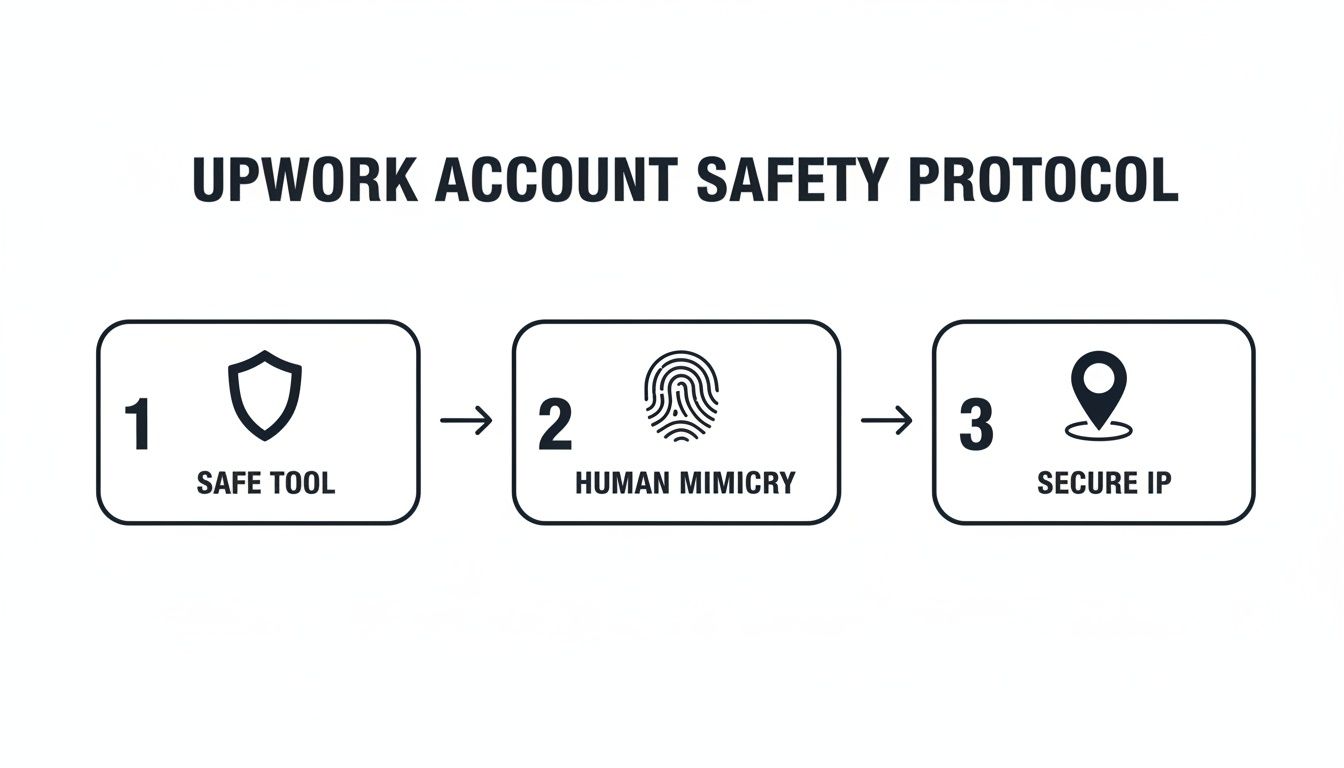
This really boils it down: a safe tool, human-like activity, and a secure IP address are the non-negotiables for keeping your automation strategy effective and, most importantly, compliant.
Launch and Monitor Your Workflow
With your templates polished and your triggers in place, it’s time for the final connection. You'll link your automation tool to your Upwork account and set the workflow live. A secure connection here is non-negotiable. Any trustworthy tool will use safe methods like session cookies and will never ask you for your Upwork password.
But once it’s live, you’re not done. Far from it. The final—and most crucial—step is to watch what happens. You have to monitor your performance to see what’s working, what’s flopping, and where you can make improvements.
Keep a close eye on these key performance indicators (KPIs):
- Reply Rate: What percentage of clients are actually responding to your automated messages? This is your number one sign of whether your messaging is hitting the mark.
- Interview Rate: Of those replies, how many are turning into a scheduled call or interview? This tells you if you're attracting high-quality, interested leads.
- Conversion Rate: This is the bottom line. How many of those interviews become paying contracts? This metric shows you the real ROI of your entire system.
By checking these numbers regularly, you can start A/B testing different message templates, tweaking your follow-up timing, and refining your triggers. This is how your workflow evolves from a simple "set it and forget it" tool into a dynamic, ever-improving engine for sustainable growth.
Seeing the Real-World Impact on Your Bottom Line
Workflows and best practices are nice, but let's be honest—it all comes down to the bottom line. How does Upwork message automation actually put more money in your pocket? The impact goes way beyond just saving time. We're talking about a clear, measurable return on investment (ROI) that can directly fuel your growth.
Let's get out of the clouds and look at two concrete, real-world scenarios. These examples show how automation can completely change the financial picture for both a growing agency and a solo freelancer.

Case Study 1: The Marketing Agency
Picture a mid-sized marketing agency that counts on Upwork for a steady flow of leads. They have a full-time Sales Development Representative (SDR) whose entire week is eaten up by hunting for jobs, writing proposals, and sending manual follow-ups. That SDR is costing the agency around $4,000 per month in salary and benefits.
By bringing in an Upwork message automation tool, they completely overhaul this process. The SDR can now laser-focus on high-value conversations and closing deals, while the software handles the initial outreach and persistent follow-ups.
This one strategic shift lets the agency eliminate the need for a full-time manual outreach role. Even after paying for the automation software, they're looking at a net savings of over $3,500 every single month. That's more than $42,000 back into the business annually.
The financial results here are huge. Many agencies find they get a 3-7x return on investment (ROI) once they implement tools to handle these repetitive tasks. By automating the low-value messaging, their team can pour their expertise into building relationships and making strategic decisions—the stuff that actually closes deals.
Case Study 2: The Solo Web Developer
Now, let's look at a solo web developer. She's a master of her craft but struggles with the sales side of things. She sends out great proposals but, because she's swamped with client work, she rarely follows up consistently. Because of this, her client reply rate is stuck at a frustrating 8%.
Then she sets up an automated follow-up sequence, and the game completely changes. Now, every single proposal gets a series of polite, timely nudges. Potential clients who might have missed her first message are re-engaged, and her name stays top-of-mind.
This simple change has a massive effect:
- Reply Rate Doubles: Her reply rate jumps from 8% to over 16% within the first month.
- Pipeline Explodes: This surge directly leads to more client conversations and project opportunities than she's ever had before.
- ROI is Instantaneous: Landing just one new $3,000 project—a direct result of an automated follow-up—pays for her automation tool for the entire year, with plenty of profit to spare.
Whether you're running a team or you're a one-person shop, the math is compelling. Smart automation is a direct path to higher revenue. Our detailed guide on how to succeed as one of the top agencies on Upwork dives deeper into integrating these strategies for maximum impact. These scenarios are tangible proof that investing in Upwork message automation isn't just another expense; it’s a powerful engine for profitability.
Alright, let's get down to brass tacks. Setting up your first automated workflow is a great start, but the real magic happens when you start refining it. This is where you graduate from basic follow-ups to building a finely tuned system that consistently brings in high-quality leads.
Think of it less like "set it and forget it" and more like a continuous improvement project. The goal is to move from simply saving time to actively creating a predictable pipeline of work.
This next phase is all about the data. Instead of guessing which messages work, you'll be actively testing, measuring, and tweaking your approach. By treating your outreach like a series of small experiments, you can see huge improvements in your reply rates, the number of interviews you land, and, of course, the projects you win.
A/B Testing: Find Out What Actually Works
One of the best ways to improve your results is through A/B testing. It sounds technical, but the concept is simple: you create two slightly different versions of a message (an A version and a B version) and send them to similar prospects to see which one gets a better response.
You can test just about anything to find the perfect formula:
- Your Opener: Is it better to be direct and get straight to the point, or does a more casual, conversational opening work better for your niche?
- The Ask (CTA): Does asking for a "15-minute chat" get more bites than suggesting a "formal discovery call"? The wording matters more than you think.
- Message Length: Should you keep it super short and punchy, or does providing a little more detail upfront build more trust?
By keeping a close eye on the reply rates for each version, you’ll quickly get a feel for what your ideal clients respond to. These small, data-backed tweaks can add up to a massive increase in your overall success rate.
Your Profile is Part of the Funnel
Here’s something a lot of freelancers forget: your automation strategy doesn’t operate in a silo. It’s deeply connected to your entire Upwork presence. When a potential client gets your automated follow-up and their interest is piqued, what's the very first thing they do? They click on your profile.
Think of your automated messages as the hook that grabs their attention. Your profile is the landing page that needs to close the deal.
If your profile isn't set up to convert that initial curiosity, even the most brilliantly crafted follow-up message will go to waste.
Make sure everything aligns. If your message talks about your expertise in "Shopify speed optimization," your profile title, overview, and portfolio had better be filled with proof. You need social proof, case studies, and clear examples that scream, "Yes, this person is the expert they claim to be." This kind of consistency builds instant trust and makes it a no-brainer for a client to hit that "reply" button.
Got Questions About Upwork Automation? Let's Clear Things Up.
Diving into automation on Upwork can feel like a big step, so it’s totally normal to have some questions. Most people worry about things like account safety, whether it actually works, and how complicated it is to set up. Let's tackle those concerns head-on so you can feel confident about what comes next.
Think of this as the last sanity check before you build a much smarter, more scalable way to find clients. We’ll cover the biggest questions we hear from freelancers and agencies every day.
Is This Going to Get My Upwork Account Banned?
This is easily the most important question, and the answer isn't a simple yes or no. Upwork's rules are very clear about one thing: they hate spam. They strictly forbid bots that scrape job postings or send out hundreds of generic, low-effort proposals. Using one of those is a surefire way to get your account suspended.
But that’s not what we’re talking about here. A smart Upwork message automation tool for post-proposal follow-ups is a different beast entirely. It’s not meant to replace your thoughtful, personalized proposals; it’s designed to enhance them. By sending relevant follow-ups to clients you’ve already contacted, mimicking real human behavior, and using secure IP addresses, it acts more like a personal assistant than a spam bot. The trick is to use a tool that puts compliance and safety first.
How Is This Really Better Than Just Following Up Manually?
Look, sending follow-ups by hand is definitely better than doing nothing. But let's be honest—it’s impossible to keep up when you're busy. Between juggling proposals and managing current projects, some conversations are bound to fall through the cracks. It’s not about a lack of effort; it's just human bandwidth.
Automation, on the other hand, gives you 100% consistency. Every single proposal you send gets a polite, perfectly timed nudge to keep you on the client’s radar. That little bit of persistence is often what separates you from everyone else buried in a client's inbox. It turns your outreach from a game of luck into a reliable system.
When Upwork rolled out its own AI assistant, Uma, and made it more prominent, user engagement shot up by a whopping 340%. This proves a key point: when automation is easy to use and implemented correctly, people will jump on it to make their lives easier. You can read more about the impact of feature visibility on Upwork.
What Do I Actually Need to Start?
Getting this up and running is probably easier than you think. You don't need to be a coding whiz or a tech genius. All you really need is a solid idea of who your ideal client is and a basic plan for your follow-up messages. The best platforms out there are built to be intuitive, walking you through the entire setup.
Here's the short list of what you'll need:
- An active Upwork profile that’s in good shape.
- A clear picture of the jobs you want to land.
- A few solid message templates you can use for different follow-up situations.
A good tool will take care of all the technical heavy lifting. Your job is to focus on the strategy.
Ready to stop leaving money on the table and build a predictable client pipeline? Earlybird AI acts as your dedicated sales team, sending hyper-personalized proposals and follow-ups within minutes. Stop the manual grind and let automation win your next client. Get started with Earlybird AI today.




