
← Back To Blog
8 Scams on Upwork and How to Avoid Them
You've just received an attractive Upwork offer. The client wants the project started today, promises unusually high pay, and asks to continue the conversation through Gmail “for faster communication.” A few messages later, they request a sample, suggest an alternative payment method, or add work that wasn't in the original brief. Each request seems small. Together, they remove the protections that were supposed to keep you paid and your account safe.
The strongest warning signs in scams on Upwork are behavioral patterns, not just low rates. Pressure to leave Upwork, unclear scope, implausible budgets, unusual payment activity, requests for unpaid work, and sudden changes to agreed terms all deserve scrutiny. Upwork's Trust and Safety guidance says suspicious activity can appear in profiles, portfolios, projects, job postings, and messages.
Use a repeatable response: identify the operating pattern, examine the red flags, preserve evidence, stop exposure, and report the account or project through Upwork. Freelancers and agencies should keep contracts, messages, milestones, approvals, and delivery records inside the platform whenever possible.
1. Fake Escrow and Payment Interception Scams
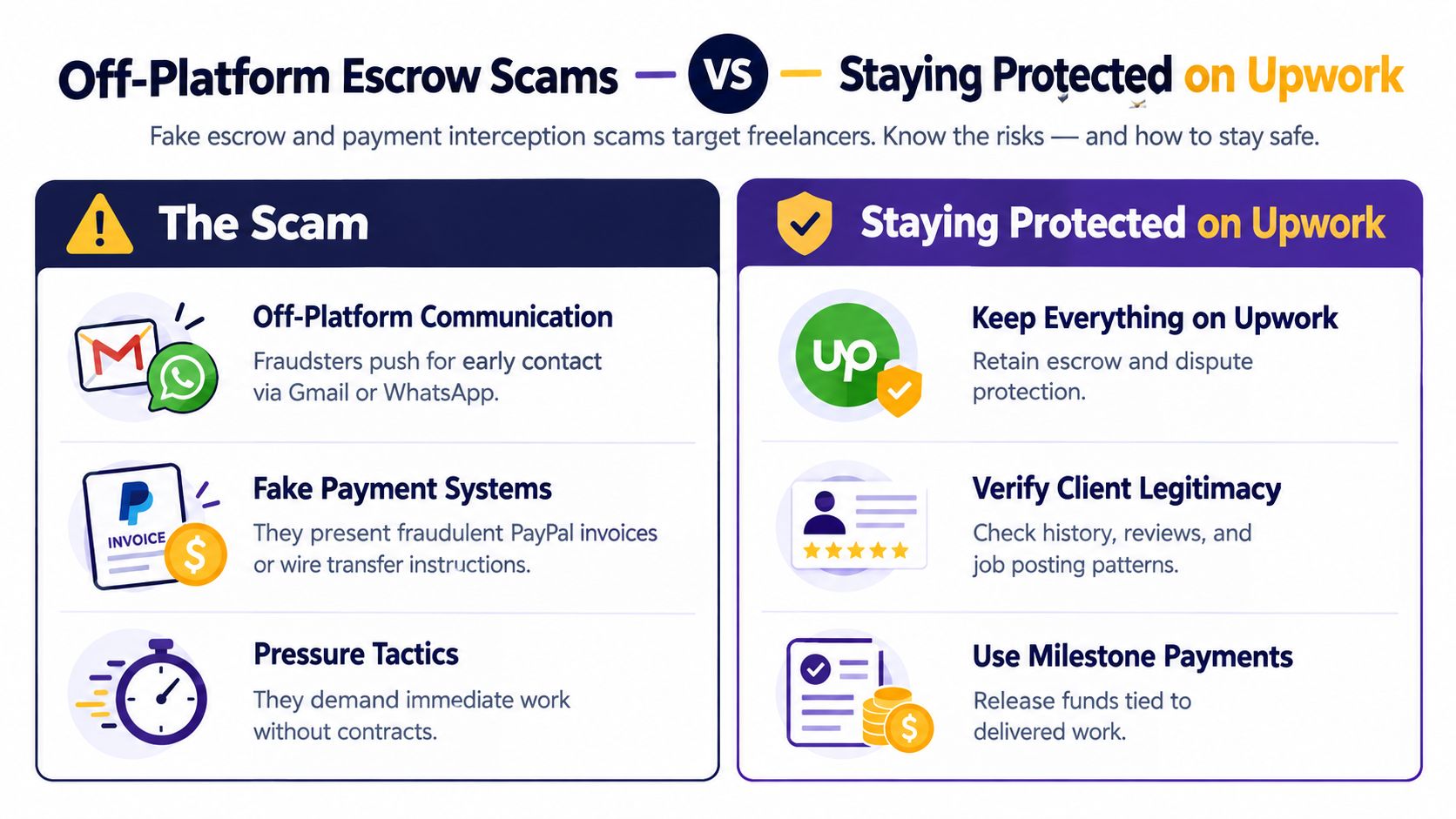
The manipulation starts with convenience. A client says Upwork fees are unnecessary, asks you to move to Gmail, and promises a faster payment through PayPal, a bank transfer, or another service. The client may present as a marketing agency CEO, offer 50% above the market rate for content writing, or send a convincing payment notice after you finish the work.
The payment notice is often the trap. A fake PayPal invoice or an external “escrow” page can collect your banking details, request an upfront transfer, or create the appearance that funds are secured. After delivery, the client disappears. Because the transaction bypassed Upwork, you may lose the platform's payment processes and practical dispute support.
Upwork says freelancers should keep communication and payments on the platform. Its guidance specifically flags requests to move contact off-platform before a contract starts and requests to pay outside Upwork as suspicious behavior.
Practical rule: A higher rate doesn't compensate for losing control of the contract, payment record, and evidence trail.
Stop the bypass before work begins
Check the client's Upwork history, reviews, payment status, and job-posting behavior before accepting. Keep the conversation in Upwork Messages until a contract exists and the relevant payment protection conditions are satisfied. For fixed-price work, use funded milestones tied to defined deliverables rather than relying on a promise sent in an external app.
If a client asks for Gmail, Telegram, direct bank transfer, or a fake escrow link, save the messages and any attached invoices or URLs. Don't click suspicious links or submit personal information. Use Upwork's reporting controls on the profile, job post, or message, including the “Flag as inappropriate” option.
For a practical overview of the platform's safety considerations, review this guide to whether Upwork is safe. Agencies should also require every team member to use one approved payment workflow. No bidder should authorize external payment instructions on behalf of the agency.
2. Low-Ball Bids With Scope Creep Manipulation
A low budget isn't automatically a scam. The danger appears when the client uses a small initial project to secure a large amount of unpaid labor. A website redesign advertised at $300 as “simple updates” can turn into custom functionality, integrations, and ongoing support. A $50 logo project can expand into brand guidelines, social media templates, and favicon creation.
The client keeps the pressure social and incremental. “Just one more thing” sounds harmless when each addition arrives separately. By the time you object, you've already invested hours and may feel that refusing will damage the relationship or review.
Write the scope before accepting the contract. A useful scope names the deliverables, file formats, deadlines, dependencies, revision limits, and approval process. Avoid vague promises such as “full website support” or “all assets needed for launch.”
Make extra work trigger a new decision
Use milestones to separate work and payment. For a design engagement, one milestone might cover the initial concepts, another the selected direction, and another the final files. A development project should separate discovery, implementation, testing, and launch support where those stages carry different responsibilities.
Set the boundary in Upwork Messages: three rounds of revisions are included, and additional revisions require a written change request with an adjusted budget and timeline. If the client adds functionality, stop and document the change before continuing.
A clear project scope definition gives both sides a reference point when requests change. Keep every scope discussion in the platform, even if a client later summarizes the change in a call. Agencies should route change approvals through one project owner so a freelancer doesn't perform work based on an informal message that another team member never approved.

3. Stolen Credit Card and Chargeback Fraud
This scam can look like a successful project. A new client hires a developer for a $2,000 website, the developer completes the work, and the client appears satisfied. Later, the cardholder disputes the transaction because the card was stolen. The client keeps the completed website while the payment is reversed or placed under review.
A similar pattern can affect creative work. A graphic designer might complete three logo projects totaling $1,500 before learning that the funding source was fraudulent. The freelancer has supplied valuable work and may face a payment problem that wasn't visible during delivery.
Upwork has disclosed pressure from transaction losses. A reported investigation noted that Upwork increased provisions for transaction losses in 2022, tied to heightened fraud, back losses, and bad losses in its Enterprise Solutions business. That doesn't mean every new client is dangerous. It does mean payment activity deserves attention, especially when a new account immediately offers high-value work.
Reduce exposure on unusually large first engagements
Start with a smaller milestone when a client has little history or immediately awards multiple contracts. Ask for clear written specifications and preserve client approvals in Upwork Messages. Monitor your account for payment disputes, reversals, or status changes instead of assuming that an initial credit is final.
Record the work delivered, the date of delivery, the files provided, and the client's response. This evidence won't eliminate chargeback risk, but it gives you a documented timeline for support or dispute review. Agencies should assign one person to monitor contract and payment notifications across team accounts.
Use a payment-monitoring service such as rapid chargeback alerts only as a supplemental workflow. It can't replace Upwork's contract records or careful milestone controls. For broader payment practices, see this guide to getting paid on Upwork, and don't release a high-value final package solely because a client says payment has cleared.
4. Profile Cloning and Account Impersonation
Profile cloning attacks trust. A scammer copies an established freelancer's name, portfolio, biography, and visible reputation, then uses the imitation account to win work or collect deposits. The client thinks they hired the recognized designer or writer. The legitimate freelancer may not discover the theft until a client reports missing work or a suspicious payment request.
For example, a top-rated UI/UX designer's portfolio can appear on a duplicate profile that collects deposits for projects never started. A copywriter with five-star reviews may be impersonated by an account that accepts 10 projects and disappears after taking initial payments.
The scam harms both sides. Clients send money or confidential information to the wrong person, while the genuine freelancer faces reputational damage and confusion about which account represents their work.
Verify identity at the profile level
Search for your name, portfolio titles, and distinctive project descriptions on Upwork. If you find a suspected clone, capture the profile URL, screenshots, copied portfolio items, messages, and any client reports. Report the profile promptly through Upwork's Trust and Safety channels.
Complete Upwork's available identity-verification steps and keep your public profile details consistent. Tell regular clients to confirm your Upwork profile URL before accepting a new invitation. An agency should maintain an approved list of freelancer profile URLs and require account managers to check the list before assigning a contract.
A polished portfolio proves that someone copied polished work. It doesn't prove that the person behind the profile created it.
You can also use an AI image detection guide for fake profiles as one part of an identity review. Treat visual similarity as a signal to investigate, not as conclusive proof. Report the evidence to Upwork rather than confronting the suspected account with personal information.
5. Test Project Exploitation and Non-Payment
A “test” can be legitimate only when the client treats it as paid work. Fraudulent clients use the language of evaluation to obtain deliverables without a contract or payment. They may request a sample blog post, promise a larger writing engagement, and then disappear without paying the $100 invoice. A designer may accept a $150 test design, only to see the client use it without starting the promised full project.
The manipulation targets ambition. Freelancers want to prove their skill, particularly when a client hints at recurring work. The client benefits by collecting multiple samples from multiple applicants, then combining the free submissions into a usable project.
Don't send production-ready work for free. Show relevant portfolio examples, answer focused proposal questions, or offer a paid test with a defined brief and delivery limit.
Treat every deliverable as billable work
Use a funded milestone for a test project, even when the assignment is small. State the payment trigger in writing: payment is due upon delivery, whether the work is labeled a test or a full project. If the client requests several unrelated samples, ask why each sample is needed and how the client will use it.
Reject requests for credentials, paid access to a tool, equipment purchases, or personal information disguised as onboarding. Upwork's scam guidance identifies requests for payment, personal information, unusually high pay for little work, and unpaid tests as red flags.
Preserve the brief, submitted files, timestamps, and any promise of future work. If the client publishes or uses the test without paying, report the messages and job post. Agencies should prohibit unpaid speculative work unless a director explicitly approves a paid evaluation contract.
6. Intellectual Property Theft and Content Resale
Some clients don't want the stated service. They want a library of assets they can reuse, resell, or publish under another name. A client may hire a copywriter for “website content,” republish the articles under their own name on Medium, and sell access to the material. A designer may be told the work is for a fictional branding project, only to find the designs resold as templates on a marketplace.
The risk isn't limited to lost payment. You can lose control over how the work is presented, whether it remains associated with your name, and whether the client uses it to compete with your own service. Agencies face an added risk when a subcontractor creates work without knowing the client's resale plan.
Define rights before creating the asset
Put ownership terms in the project description and contract. Specify whether the client receives exclusive rights, a license for a defined use, or permission to modify and resell the work. Identify when rights transfer, such as after full payment, and distinguish final approved work from unused concepts, source files, templates, and reusable frameworks.
Ask direct questions before accepting:
- Intended use: Where will the client publish, distribute, or sell the work?
- Exclusivity: Does the client need exclusive ownership, or will a limited license meet the requirement?
- Resale rights: Can the client package the work as a template, course, product, or service?
- Portfolio rights: Can you display the completed work after launch, or must it remain confidential?
Maintain copies of original files, version histories, delivery receipts, and approvals. Don't send editable source files before the agreed payment and rights conditions are satisfied. If a client requests “evaluation” work without a clear use case, treat that request as a commercial risk, not a casual audition.

7. Fake Dispute Claims and Payment Reversal Abuse
This pattern starts after apparent success. The client approves a completed website in Upwork Messages, then later claims that the site doesn't work. A content writer delivers 10 articles as requested, receives no immediate objection, and then faces a dispute after a month alleging that the quality wasn't what the client expected.
The client may be seeking a refund while retaining the deliverables. A vague complaint is difficult to resolve because it replaces the original acceptance criteria with a new standard. If the freelancer's evidence lives in personal email, a private call, or an unrecorded screen share, the response becomes weaker.
Build an approval record as you deliver
Ask the client to approve each milestone in writing. Keep the original brief, specifications, revision requests, submitted files, and approval messages together. For web development, capture a recording or screenshots showing the completed pages and tested functions. For writing and design, preserve delivery versions and the client's comments.
Use Upwork's Work Diary and time-tracking tools for eligible hourly work. Upwork's guidance says hourly payment protection depends on conditions including use of the Upwork desktop app, a verified client billing method, work aligned with the contract, and compliance with the weekly hour limit. Hourly protection doesn't cover bonuses or fixed-price projects, so don't treat those payments as covered by the same rules.
Break large projects into milestones with approval gates. Include a written revision window and a defined acceptance process. If the client changes the standard after approval, stop work and respond through Upwork Messages with the original requirement and approval record.
Report suspicious conduct with screenshots or chat transcripts. Upwork provides reporting options for profiles, portfolios, job postings, and messages, so evidence preservation should begin before a dispute appears.
8. Automated Bot Bidding and Bid Stuffing Manipulation
Not every unproductive job post is a scam, but repeated artificial activity can waste your proposal time and distort your judgment. A client may post the same marketing consulting project 20 times in one week, changing only a few words. A freelancer may repeatedly lose work to accounts with no portfolio or reviews that appear to undercut every serious bid.
The operating pattern is bid fishing or artificial competition. The poster may be collecting free strategy, testing demand, or using repetitive listings to create the appearance of active hiring. In other cases, automated or fictitious accounts make legitimate freelancers spend proposal effort on work that never advances.
Qualify the client before writing
Review the client's project history, account activity, reviews, payment verification, and completed hires. Compare the current posting with earlier versions. Repeated descriptions, inconsistent requirements, a vague budget, or a client that never interviews or hires should lower its priority.
Set an internal bid threshold. For solo freelancers, that might mean applying only when the brief contains a specific problem, a credible deliverable, and a client response pattern worth pursuing. Agencies should record which accounts produce interviews, contracts, and completed work, then stop routing proposals to accounts that repeatedly collect submissions without meaningful engagement.
Report suspicious posting patterns to Upwork rather than trying to manipulate the bidding process yourself. Keep proposals customized and avoid copying sensitive client strategy into an unpaid response. A verification guide for Upwork can support your review process, but the final decision should come from the client's behavior and contract logic.
Build relationships with legitimate clients after a successful contract, while still keeping future Upwork work compliant. The objective isn't to bid everywhere. It's to spend proposal time where the project, client, and payment workflow make sense.
Turn Suspicion Into a Safer Upwork Workflow
Scams on Upwork become easier to manage when your team follows the same response sequence every time. Start by pausing before you reply. Urgency benefits the person applying pressure, not the freelancer who needs time to verify the client, project logic, and payment conditions.
Keep communication and payment on Upwork. Upwork's own scam guidance identifies phishing, promised reimbursement, paid or leased account fraud, off-platform payment requests, and requests to work outside its channels as core scam patterns. Never buy equipment, send money, accept gift cards, share sensitive personal information, or rent out your account because a client promises reimbursement or future earnings.
Use this operating sequence:
- Review the client: Check the client's Upwork history, reviews, payment verification, job-posting pattern, and stated business identity.
- Test the project logic: Confirm that the budget, scope, timeline, deliverables, and requested access fit together.
- Define the contract: Write numbered deliverables, revision limits, milestones, approval gates, ownership terms, and change-order rules.
- Preserve the record: Keep messages, specifications, approvals, files, timestamps, screenshots, and delivery receipts in an organized project folder.
- Stop exposure: Pause work when the client changes payment terms, expands scope without approval, requests personal information, or asks you to leave the platform.
- Report promptly: Use the in-product reporting controls for profiles, portfolios, job posts, and messages. Include screenshots or chat transcripts when contacting support.
Agencies need a second layer of control. Standardize screening questions, prohibit external payment instructions, require written approval for scope changes, and give every team member the same evidence-preservation process. Assign an owner to monitor account notices and disputes, and review suspicious leads before a freelancer invests proposal or delivery time.
Earlybird AI can be a relevant workflow option for qualifying opportunities and reducing time spent on suspicious leads. Use it to support disciplined screening, not to bypass Upwork rules or assume that automation can identify every scam.
Faster bidding is valuable only when it operates alongside disciplined qualification and account-safe processes. Protect the contract before you protect the opportunity, because a quick proposal is worthless if it leads to unpaid work, stolen information, account exposure, or an avoidable payment dispute.
Earlybird AI helps freelancers and agencies find Upwork opportunities, create personalized proposals, and respond to leads from their own account while supporting multi-user workflows. Visit Earlybird AI to evaluate whether its qualification and outreach tools fit your safer Upwork operating process.




