
← Back To Blog
Upwork Payment Schedule: Get Paid Faster
You finish your first Upwork contract, open your dashboard, and see money in a status that isn't quite money yet. Maybe it says Pending, maybe it's In Review, maybe it isn't in your bank at all even though the client already “paid.” That's the moment most new freelancers start wondering whether the upwork payment schedule is complicated, slow, or both.
It feels confusing at first because there are really two clocks running at the same time. One clock is when Upwork releases your earnings. The other is when your withdrawal method puts that money in your bank or wallet. If you mix those together, every payment feels late. If you separate them, the system starts to look predictable.
That predictability matters more than people realize. Once you understand the rhythm, you can plan rent, subcontractor payments, software bills, and your own draw from the business with a lot more confidence. For agencies, it's even more important because one misunderstanding can affect multiple freelancers at once.
Cracking the Code of Your Upwork Earnings
Most freelancers ask the same question in slightly different ways: “I did the work. When do I get paid?” The answer depends first on how the contract is set up.
Hourly contracts follow a weekly cycle. Fixed-price contracts follow milestones and escrow. After that, you still have to move the money out of Upwork using a withdrawal method. Those are separate stages, and the gap between them is where most confusion lives.
Practical rule: Don't treat “client approved” and “money in my bank” as the same event. They're different steps.
The good news is that the system isn't random. It's rule-based. That means you can forecast it.
Here's the mindset shift that helps most: stop seeing the upwork payment schedule as a waiting game, and start seeing it as a cash flow calendar. If you know your contract type, your review window, your security hold, and your withdrawal setup, you can usually predict when funds become available and when they'll land outside the platform.
That matters whether you're a solo freelancer writing blog posts or an agency owner juggling several active contracts. A predictable payment cycle lets you decide when to start a new milestone, when to request approval, and when to schedule withdrawals.
Three questions tell you almost everything:
- Contract type: Is this hourly or fixed-price?
- Funds status: Are the earnings under review, in security hold, or already available?
- Withdrawal setup: Are you withdrawing weekly, monthly, or manually?
Once those three are clear, the rest gets much easier.
How Upwork Hourly Payments Work
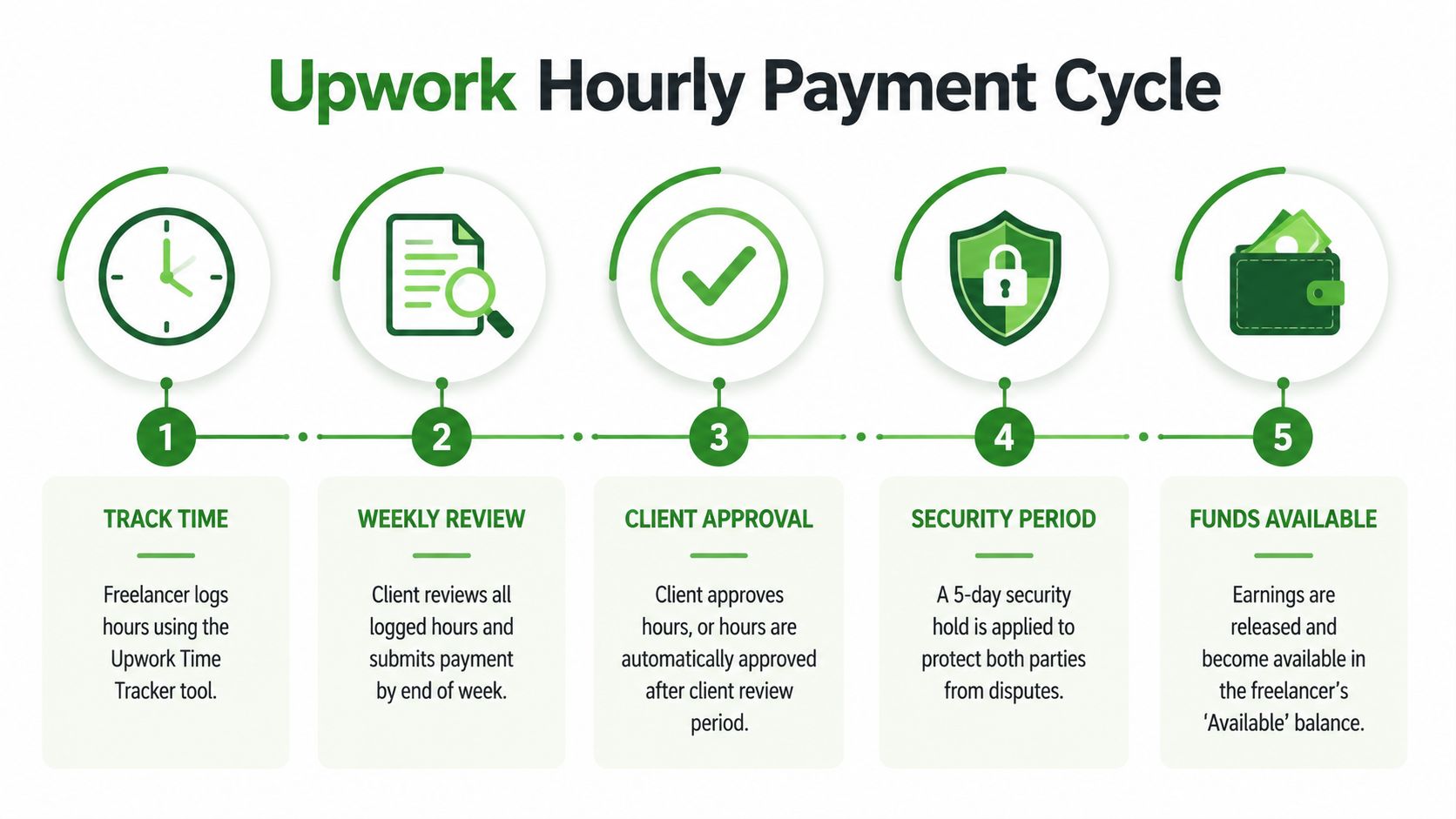
Hourly contracts are the easiest place to build confidence because the timing follows a set weekly pattern. Upwork's official process says freelancers track hours from Monday through Sunday (UTC), those hours are invoiced on the following Monday, clients have until Friday 11:59 PM UTC to review or dispute, and if there's no dispute, earnings become available the following Wednesday after a five-day security hold, which makes the standard cycle 10 days after the weekly period ends according to Upwork's hourly payment rules.
The weekly rhythm
Think of hourly payments in three chunks.
- You work and track time
You log hours from Monday through Sunday in UTC. If you use the Time Tracker, your work diary, screenshots, and activity levels support those hours. If you want a cleaner understanding of the tracker itself, this guide to the Upwork desktop app helps connect the tool to the payment process. - The client gets a review window
On Monday, Upwork invoices the tracked hours. The client can then review the work diary until Friday night UTC. During that period, they can approve or dispute time. - Upwork applies the security hold
If there's no dispute, the earnings move through the hold period and become available the following Wednesday.
Memory shortcut: Monday to Sunday work. Monday invoice. Friday review cutoff. Wednesday payout.
A simple example
Let's say you tracked time during one full week.
- Week 1: You work from Monday through Sunday
- Week 2 Monday: Upwork invoices the client
- Week 2 Friday: Client review period closes
- Week 3 Wednesday: Funds become available if nothing is disputed
That's why new freelancers often feel like hourly pay is “late.” It isn't late. It's just following a schedule that starts after the week closes, not the day you worked.
What trips people up
A few details matter more than people expect:
- UTC timing matters: If you work late Sunday in your local time zone, check how that maps to UTC.
- Weekly limits matter: Hours above the weekly cap can appear in the diary but won't be auto-billed.
- Manual time needs care: If you're not using the tracker, your protection can differ, so accuracy matters.
When you understand the weekly cycle, you stop asking “Where's my money?” and start asking “Which Wednesday does this week's work land on?”
That's the point where the upwork payment schedule becomes useful. You can line up proposal work, delivery work, and your own bills around that Wednesday release pattern instead of waiting anxiously after every shift.
Understanding Fixed-Price Milestones and Escrow
Fixed-price contracts feel different because the payment doesn't depend on tracked time. It depends on funded milestones, delivery, and client review. Upwork says clients pre-fund milestones into escrow, then when you submit work, a 14-day review period begins, and after approval or automatic release, a five-day security hold applies before funds become available. That means the total time from submission to availability can range from 5 to 19+ days according to Upwork's milestone and escrow rules.

What escrow actually means
Escrow is the safety layer. The client puts money in before work starts on that milestone, and Upwork holds it while the work is being completed. That protects both sides in a different way than hourly billing does.
With hourly, the system protects payment through tracked time and a review cycle. With fixed-price, the system protects payment through pre-funded milestones and formal submission.
The timeline after you submit work
The part that confuses people is that “funded” doesn't mean “withdrawable today.”
Here's the sequence:
- Milestone funded: The money sits in escrow while you work.
- You submit the deliverable: The status moves into review.
- Client reviews: They can approve, request changes, or do nothing.
- Automatic release can happen: If they take no action for 14 days, the funds are released.
- Security hold starts after release: Then the five-day hold applies.
- Funds become available: Only after that hold finishes.
Why fixed-price can feel slower
Fixed-price can pay very quickly if the client approves right away. It can also take much longer if the client waits, asks for revisions, or the work gets resubmitted. Every resubmission can effectively restart the review window, so turnaround depends heavily on client behavior and how tightly you manage milestones.
That's why experienced freelancers usually avoid one giant milestone unless the project is very small or very simple.
A better structure often looks like this:
- Discovery milestone: Small first deliverable, fast approval
- Execution milestone: Main project work
- Final milestone: Wrap-up, handoff, or final revisions
Fixed-price rewards clean scope. The clearer the deliverable, the faster the approval tends to be.
What this means for your money
Hourly pays on a platform-set calendar. Fixed-price pays on a submission and approval calendar. If you want steadier cash flow, that difference matters.
A milestone you submit on Monday might become available relatively soon if the client approves immediately, but it could also stretch much longer if the client sits on it. So when you estimate cash flow from fixed-price work, don't budget from the day you started the task. Budget from the day you will submit, plus the review and hold time.
That one habit prevents a lot of stress.
Withdrawing Your Funds from Upwork
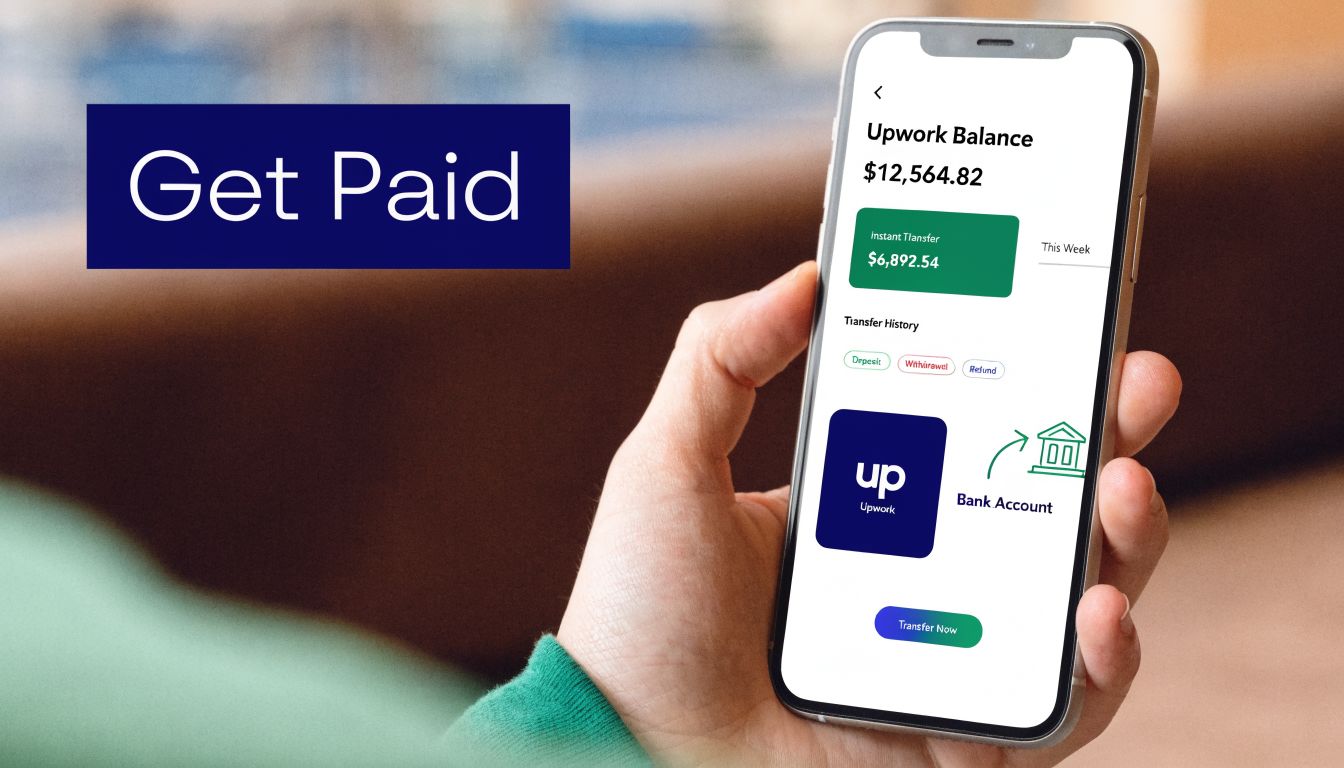
Getting paid by Upwork and getting money into your bank are not the same thing. Once earnings are in your Available balance, the next step is your withdrawal setup. Upwork allows weekly, bi-monthly, monthly, or quarterly automatic withdrawals, and transfer speed then depends on the method you use. Upwork's payment schedule documentation says PayPal can be instant, free U.S. direct deposits take 1-3 days, local bank transfers cost $0.99 and take 1-4 days, and wire transfers cost $30 and can take over 5 days. The same source says weekly auto-withdrawals can improve capital turnover by 15-25% compared to monthly schedules in Upwork's payment schedule help section.
First choose your withdrawal rhythm
At this stage, freelancers accidentally create their own delays.
If your hourly earnings become available on Wednesday, but your auto-withdrawal is set to monthly, your money may sit there until your scheduled withdrawal date. Nothing is wrong. Your settings are just doing exactly what you told them to do.
Many freelancers prefer weekly withdrawals because they match the platform's natural rhythm better. If you want a broader overview of payout options, this guide on how to get paid on Upwork is useful alongside your Upwork financial settings.
Then choose the actual transfer method
Different methods solve different problems.
- PayPal: Good if speed matters most and it's supported well in your region.
- U.S. direct deposit: A solid low-friction option for U.S. freelancers.
- Direct to local bank: Often practical for international freelancers who want straightforward bank delivery.
- Wire transfer: Usually better reserved for situations where a wire makes sense despite the higher fee.
Your best method isn't always the fastest one. Sometimes the better choice is the one with lower costs and more predictable arrival timing for your country and bank.
A quick visual walkthrough can help if you're setting this up for the first time:
Don't forget the new-method delay
When you add a new withdrawal method, Upwork applies a three-day delay for fraud checks before you can use it. That catches people off guard because they often add a method only after funds become available.
Takeaway for planning: Set up and verify your withdrawal method before you need it, not on payday.
What this means in practice
Your upwork payment schedule doesn't end when earnings become available. It ends when the money lands where you can use it.
That final leg depends on your own choices. If you want tighter cash flow, align three things: your contract type, your withdrawal frequency, and your transfer method. When those work together, your earnings feel much more predictable.
Why Is My Upwork Payment Delayed?
Most payment “delays” aren't true delays. They're usually one of a few specific situations that look like a problem from the outside. One of the biggest is the mismatch between when Upwork releases funds and when your own withdrawal schedule sends them out. Upwork notes that this mismatch, combined with withdrawal method delays of 1-5 business days, can create real cash flow gaps in its weekly billing cycle guidance.
Delay type one, the money isn't actually available yet
This is the classic dashboard misunderstanding.
For hourly contracts, earnings can still be inside the review or hold stages. For fixed-price, the milestone may be in review or still waiting on release after submission. In both cases, the funds may exist inside the system but still not be withdrawable.
What to do:
- Check the status label: Look for terms like In Review, Pending, or Available.
- Match status to contract type: Hourly and fixed-price move through different stages.
- Use dates, not feelings: Compare the current date to the expected review and hold windows.
Delay type two, your own withdrawal settings are spacing it out
You may have funds available, but your auto-withdrawal cadence is set less frequently than you assumed.
This happens a lot with monthly withdrawals. A freelancer sees money become available mid-month and expects an immediate bank transfer, but the scheduled withdrawal doesn't happen until the end of the month.
What to do:
- Open payment settings: Confirm whether you chose weekly, bi-monthly, monthly, or quarterly.
- Check manual withdrawal options: If eligible, a manual withdrawal may solve the issue faster.
- Review your bank method timing: Even after withdrawal, the transfer still needs processing time.
If funds are available on Upwork but not in your bank, your first question should be “Has withdrawal started yet?”
Delay type three, the client took an action
Client actions can extend the timeline in different ways.
For hourly, a dispute or review issue can slow release. For fixed-price, a revision request can delay payment because the milestone hasn't reached final approval or auto-release yet.
What to do:
- Read the contract activity carefully: Don't rely on memory.
- Respond inside Upwork: Keep the record attached to the contract.
- Resubmit cleanly on fixed-price work: Make it obvious what changed and what now meets the milestone.
Delay type four, the payment method itself needs attention
Sometimes the issue has nothing to do with Upwork's release schedule. A new payment method may still be under review, or the receiving bank may take longer than expected.
A few checks help:
- Verify the method is active
- Confirm account details are correct
- Allow extra time around bank processing windows
When you diagnose the exact stage, most “delays” stop being mysterious. They become logistics.
How to Improve Your Upwork Cash Flow
Freelancers who feel calm about money on Upwork usually aren't luckier. They're structuring work around the payment system instead of fighting it.
The first move is to design contracts for faster release. On fixed-price work, that often means breaking large projects into smaller milestones so you're not waiting on one big approval at the end. On hourly work, it means tracking time cleanly and avoiding anything that gives the client a reason to question the work diary.
Build a faster payment habit
The upwork payment schedule works best when your client experience is easy to approve.
Try these habits:
- Submit milestones with clarity: Show exactly what was delivered, where to find it, and how it matches the agreed scope.
- Ask for prompt review politely: A short note after submission can keep a milestone from sitting untouched.
- Use smaller milestones for long projects: Smaller approvals tend to create steadier cash flow than one large final payment.
- Choose a withdrawal cadence that matches your business: Weekly often feels easier to manage than letting balances accumulate.
Use faster options when they fit
Upwork says some eligible hourly contracts offer faster payments, which can reduce the standard cycle to around 5 days by shortening the security hold, according to Upwork's payments and fees information.
That won't apply to every contract, so treat it as a bonus, not your baseline. Your baseline should be a business model that still works on the normal schedule.
A few strategic choices help:
- Keep your account history clean: Reliable work habits make everything smoother over time.
- Don't wait to set payout methods: Admin done late often feels like a payment problem.
- Know your fee picture: This breakdown of Upwork fees for freelancers helps when you're deciding how much cash actually reaches you after platform and withdrawal costs.
The freelancers with the healthiest cash flow usually don't chase every dollar faster. They build a system where payment timing is predictable.
Think like a business owner, not just a contractor
This is a significant upgrade. Once you know how long hourly work takes to clear, how long milestones can sit, and how your withdrawal method behaves, you can forecast income more realistically.
That changes how you price, how you schedule delivery, and even how much buffer you keep in the business. The point isn't just to get paid faster. It's to make your money flow predictable enough that you can make better decisions.
Mastering Your Financial Rhythm on Upwork
A freelancer who understands the upwork payment schedule has an edge. Not because the rules change, but because confusion stops eating up energy.
Hourly contracts run on a predictable weekly rhythm. Fixed-price contracts depend on funded milestones, submission, review, and release. After either one, withdrawal settings and transfer method determine when the money reaches you.
That's the part many people miss. Upwork has one schedule. Your bank has another. Your settings sit in the middle.
Once you treat payment timing as part of running the business, things get easier. You can estimate when income becomes available, spot normal waiting periods before they feel alarming, and choose contract structures that support steadier cash flow.
That's what seasoned freelancers do. They don't just complete the work. They learn the rhythm of how the work turns into usable money.
If you want more control over the business side of Upwork, Earlybird AI helps freelancers and agencies automate proposal outreach, manage conversations faster, and build a more predictable pipeline so cash flow doesn't depend on manual bidding alone.




