
← Back To Blog
Your Upwork Profile Picture: A Guide to Getting Hired
Most freelancers treat their Upwork photo like a setup chore. That's a mistake. A November 27, 2023 INFORMS study found that when a profile photo makes a candidate “look the part,” hiring managers may give that signal more weight than weaker ratings or fewer reviews than close competitors, which means visual presentation can override objective metrics early in the decision process, as reported by Phys.org's summary of the study.
That changes how you should think about your Upwork profile picture. It isn't decoration. It's your first proof that you understand the market you sell into. Before a client reads your proposal closely, before they inspect your portfolio, they've already formed a rough expectation about whether you seem credible, easy to work with, and aligned with the role.
A strong photo doesn't need studio polish. It needs intention. Framing, expression, clothing, background, and technical quality all signal whether you belong in the category you're targeting. Get those signals right and you reduce friction. Get them wrong and you make the rest of your profile work harder than it should.
Why Your Upwork Profile Picture Is Your Most Important Asset
Clients make a judgment in seconds, and on Upwork your photo usually gets judged before your headline, portfolio, or proposal. Earlier, I mentioned research showing that when a candidate appears to “look the part,” that visual cue can influence hiring decisions early. On Upwork, that matters because the platform is crowded, clients scan fast, and small trust signals decide who gets the click.
Your photo shapes three decisions at once. Does this person seem credible? Do they fit the kind of work I need? Do they feel safe to message?
That third question gets overlooked.
A profile picture is not only about looking polished. It is about reducing uncertainty. Clients are hiring a stranger from a grid of strangers. If your photo looks inconsistent with your role, overly edited, poorly lit, or fake, the client has to spend extra mental energy resolving that doubt. Many will not bother. They move on to the next freelancer whose profile feels easier to trust.
That is why generic advice like “smile and look professional” is too shallow. A strong Upwork photo works because it matches buyer expectations for your category. A conversion copywriter can look sharp, warm, and commercially aware. A cybersecurity consultant can look more reserved and precise. A UX designer usually benefits from a modern, approachable look. The goal is not to imitate a stereotype. The goal is to send the fastest accurate signal that you belong in the client's short list.
First impressions are filtered through role fit
Clients do not read photos objectively. They interpret them through the job they need done.
A tax accountant with moody nightclub lighting looks careless. The same lighting on a music producer may feel on-brand. A brand strategist in a stiff passport-style photo can look harder to connect with than a strategist with natural light, direct eye contact, and a clean but slightly expressive frame. Context changes the meaning of the same image choices.
This is also why dark-mode optimization matters more than many freelancers realize. A photo with a muddy gray background, weak face separation, or low contrast can look flat on dark interfaces. A clearer subject-background separation usually holds up better and keeps your face readable at thumbnail size. If clients have to work to see your expression, you lose some of the advantage a good photo is supposed to create.
Practical rule: Your photo should lower cognitive friction. The client should understand who you are and what kind of professional you seem to be without effort.
The other issue is authenticity. Fake-looking portraits trigger suspicion fast, especially now that synthetic headshots are common. Upwork prohibits fake or AI-generated profile photos, and the visual tells are often subtle enough to create unease even when a client cannot name the problem. This breakdown from AI Image Detector on spotting fakes is useful if you want to see what gives artificial portraits away.
Your profile picture changes how the rest of the profile gets read
I have seen average profiles get more interviews than stronger competitors because their presentation made the client feel comfortable continuing. The opposite happens too. A skilled freelancer can have good reviews, a solid portfolio, and a weak click-through rate because the photo introduces hesitation at the top of the page.
That is the main job of the image. It sets the frame for everything after it. If the picture creates trust, clients read your overview more generously. If it creates doubt, every other part of the profile has to compensate.
For a full review of how the photo, headline, overview, and proof elements need to align, this guide on Upwork profile optimization is a useful companion.
Mastering Composition and Lighting for a Professional Headshot
Most freelancers don't need a photographer. They need a simple system that makes a phone camera produce a clean, believable headshot.

Start with composition that feels natural
A strong Upwork profile picture usually looks simple because the choices behind it are disciplined.
The easiest place to start is the rule of thirds. Instead of centering your head with no thought, frame yourself so your eyes and upper face sit near the upper third line. That creates balance and keeps the shot from looking cramped or accidental. Keep the camera at eye level or slightly above. If the camera points up from below your chin, the image feels awkward and less approachable.
Use a straight-on posture or a slight angle of the shoulders. Both work. What doesn't work is twisting too far, leaning back, or shooting from arm's length with visible wide-angle distortion.
A reliable setup looks like this:
- Camera height: Eye level
- Crop: Head and upper shoulders
- Headroom: A little space above the head, not too much
- Lens choice: Your phone's standard camera, not an exaggerated wide selfie view
- Distance: Far enough away to avoid facial distortion, then crop in
Light the face before you think about anything else
Lighting matters more than the camera. A recent phone with soft light will beat an expensive camera in bad light every time.
The simplest setup is to face a window. Don't stand with the window behind you. Don't stand under a harsh ceiling light. Face the window so the light falls evenly across your face. If the sun is too direct, use a sheer curtain or step back until the light softens.
If you want a more detailed breakdown of home setups, this professional portrait lighting guide does a good job of showing how soft, directional light changes a face without making the image feel overproduced.
The goal isn't drama. The goal is a face a client can read in one second.
Avoid mixed lighting when possible. If daylight hits one side of your face and a yellow lamp hits the other, skin tones look inconsistent. That creates a cheap, muddy result even if everything else is right.
Background and framing should stay quiet
Your background should support the face, not compete with it. A plain wall works. A clean office corner can work. A shelf full of clutter, a bed, a kitchen, or a bright outdoor scene usually hurts more than it helps.
If you want to compare your final shot against examples that are closer to what converts on marketplace profiles, look through these Upwork profile samples. It helps to calibrate your eye before you upload the first image that seems “good enough.”
A useful final check is this: if someone squints at the photo, do they mostly see your face, or do they notice the room?
Dressing the Part and Matching Your Expression to Your Role
What you wear in your Upwork profile picture should match the kind of buyer you want, not the kind of photo you personally enjoy.

A software developer, a paid media strategist, and a brand designer don't need identical photos. They need photos that feel coherent with the service they sell. Clients don't expect a costume. They expect a match between appearance and role.
Different roles benefit from different signals
Take a freelance developer targeting startup founders. A clean crewneck, oxford shirt, or simple smart-casual look usually works well. The message is competence, clarity, and low drama. A loud patterned shirt or overly formal suit can feel off unless that person mainly targets enterprise consulting work.
Now take a creative consultant or brand strategist. That same restrained look can still work, but there's more room for visual personality. Glasses with character, a sharper color choice, or a slightly more stylized jacket can signal taste. The key is control. Creative doesn't mean chaotic.
For client-facing marketers and account managers, warmth often wins. A relaxed blazer, neat top, or crisp shirt paired with an approachable expression tells clients, “I can present ideas and communicate with stakeholders without friction.”
Expression changes the kind of client you attract
Most profile photo advice often becomes too generic. “Smile” isn't always the right answer.
If you work in collaborative roles like content, account management, customer support, recruiting, coaching, or social media, a friendly expression usually helps. Clients in those categories often want responsiveness and ease. A small, natural smile does that.
If you work in technical or analytical roles, a neutral but engaged expression can be stronger than a broad smile. That doesn't mean looking stern. It means looking focused and composed.
Don't force a personality into the frame that clients won't experience in a call.
A useful test is to ask, “If a client hired me after seeing this photo, would my actual demeanor feel consistent with it?” If the answer is no, change the expression.
Clothing should support trust, not steal attention
A few simple rules work across most categories:
- Choose solid colors: They keep the eye on your face.
- Avoid busy patterns: Fine stripes, loud florals, and dense prints can look messy in a small square image.
- Stay within your market: Corporate finance buyers expect different cues than DTC founders or design teams.
- Keep grooming deliberate: Hair, beard, makeup, and accessories should look intentional, not rushed.
Later, review how your visual identity aligns with your speaking style too. A short video can reveal whether the profile photo and your live presence match.
From Camera to Crop The Technical Side of Your Profile Picture
Clients often decide whether a profile feels trustworthy before they read a single line of copy. The technical side of your photo affects that first judgment more than freelancers think, because Upwork reduces your image to a small square where weak files lose detail fast.
Meet the platform requirements first
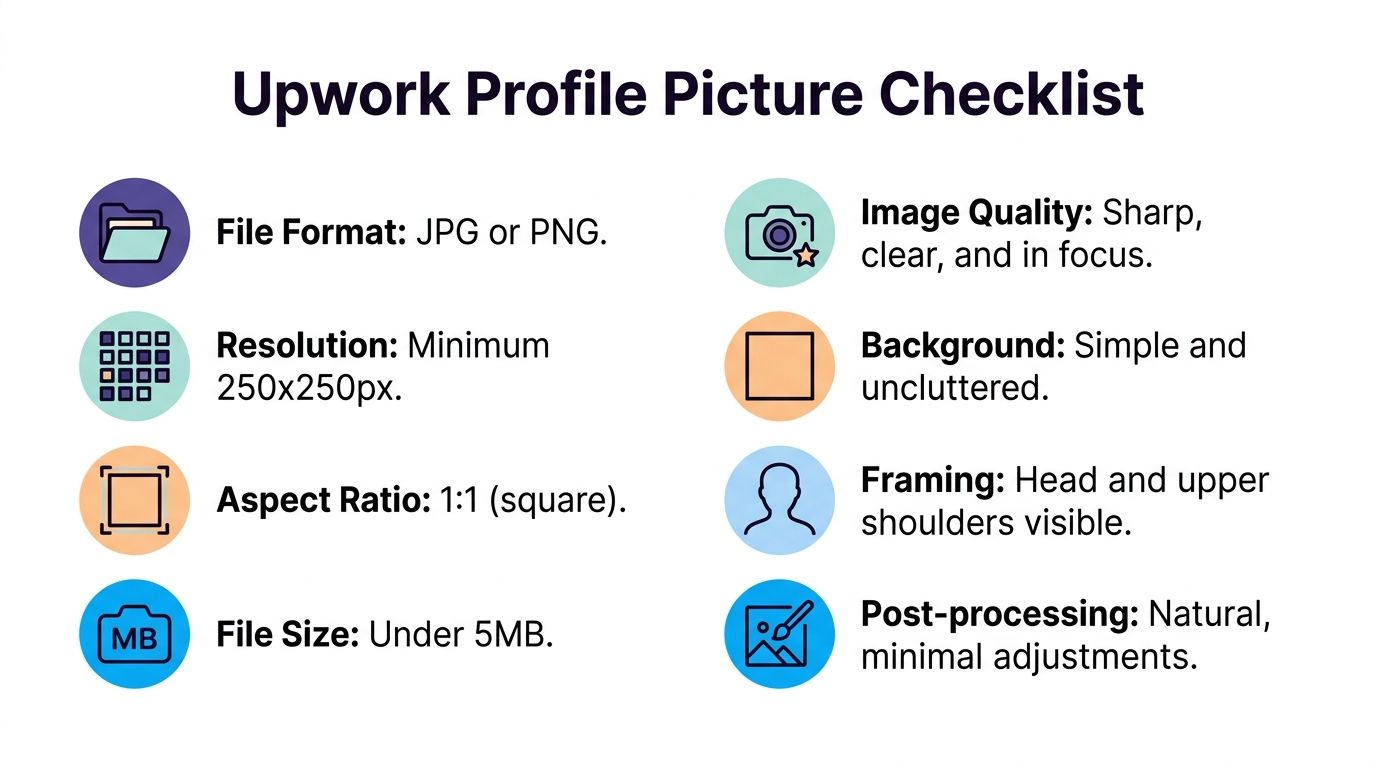
Upwork requires a real, close-up photo of your head and shoulders with your face clearly visible. The platform accepts .jpeg and .png files, with a minimum resolution of 250 x 250 pixels, a maximum of 4,000 x 4,000 pixels, and a file size up to 5 MB. It also prohibits AI-generated or fake profile photos, as explained earlier in Upwork's profile picture guidance.
That is a platform rule, but it also lines up with client psychology. Buyers use the photo as a quick identity check. If your face is partially hidden, cropped too aggressively, or softened until it looks synthetic, you introduce doubt before the client even reaches your proposal history.
Crop for recognition at thumbnail size
A strong Upwork crop is tighter than what works on LinkedIn, Instagram, or a conference bio page. Upwork thumbnails are small, and small images reward clarity, contrast, and facial recognition. Wide environmental portraits usually lose.
Data-backed profile photo guidance consistently points in the same direction. Head-and-shoulders crops with a plain background tend to perform much better than full-body photos because they keep attention on the face, which is the cue clients scan first.
I tell freelancers to test the image the way a client sees it. Shrink it to about 80 to 100 pixels wide. If the eyes disappear, the jawline blends into the background, or the face takes up less than half the frame, the crop is too loose.
Use this checklist before uploading:
- Face visibility: Your face should read clearly in a tiny square, not only in the full-size file.
- Shoulder-level crop: Head-and-shoulders framing usually wins because it maximizes recognition.
- Square preview: Pre-crop to 1:1 so Upwork does not make a bad decision for you.
- Edge separation: Hair, jawline, and shoulders should stay distinct from the background, especially in dark mode.
- Role fit: Designers and marketers can get away with slightly more visual style. Finance, legal, and operations profiles usually perform better with a cleaner, more conservative crop.
Export for clarity, not just compliance
A file can meet the upload rules and still look weak. Compression is the usual reason.
Start with the highest-quality original you have. Make your edits on that file, then export a square version that stays sharp without pushing file size to the limit. Over-compressed JPGs create muddy skin texture and soft eyes. That costs trust because clients read blur as low quality, even if they cannot explain why.
Retouch lightly. Adjust brightness, contrast, white balance, and minor distractions. Skip aggressive skin smoothing, fake background blur, beauty filters, and anything that makes your face look less real on close inspection.
Background cleanup is often the highest-return edit. A plain light backdrop usually creates better subject separation inside Upwork's interface, and it also holds up better across light and dark UI. If you need a fast way to create multiple visual variations for side projects or branded assets, tools that generate bulk gaming username art show how batch image workflows can save time, but your Upwork headshot itself still needs to stay real and platform-compliant.
Before you finalize, check the uploaded image on desktop and mobile. Then view it in both light and dark mode if possible. A photo that looks polished in your camera roll can lose impact once Upwork compresses it and places it against a dark interface. Sharp eyes, clean face-to-background contrast, and a crop built for small thumbnails are what survive.
Advanced Tactics to Make Your Profile Picture Unforgettable
Clients make snap judgments in thumbnail view, not full-screen. That changes what an effective Upwork photo looks like.
Strong profile pictures win because they are easy to process fast. Buyers scanning proposals are not studying lighting technique or color theory. They are deciding, in a second or two, whether this person looks credible, clear, and relevant to the job. The best photos reduce friction in that decision.
One pattern shows up often in high-performing profiles I review. Freelancers in tech, product, and design usually benefit from brighter, higher-contrast headshots that stay visible inside dark interfaces. If your background is too dark, your thumbnail can sink into the UI and lose edge definition around your hair, jawline, and shoulders. That weakens recall.
Optimize for interface psychology, not just aesthetics
A memorable image has one job. It should help a client recognize your face instantly the next time your name appears in search, proposals, messages, or invitations.
That is why dark-mode performance matters. Upwork's interface often places your photo in small, visually crowded areas. Photos with strong face-to-background separation hold up better there. Photos that look cinematic in a portfolio often lose impact once reduced to a tiny circle or square.
Role matters too.
A brand designer can get away with a little more visual style if the face is still clear. A fractional CFO, legal consultant, or project manager usually gets better results from a cleaner, more conservative image because clients in those categories read polish as lower risk. A developer or cybersecurity specialist does not need to look warm in the same way a customer support freelancer does. They need to look competent, steady, and easy to trust.
Tactics that actually improve memorability
Use these to make the photo easier to recognize, not just nicer to look at:
- Create one dominant focal point: Your eyes should be the first thing a client notices.
- Keep background contrast obvious: Light neutral backgrounds usually perform better than moody ones in small thumbnails.
- Match expression to buying context: Friendly works for client-facing roles. Calm and precise works for technical specialists.
- Use a signature visual cue sparingly: Glasses, a consistent shirt color, or a recognizable framing choice can help repeat recognition across sessions.
- Check how the image looks beside competitor profiles: Memorability is relative. If everyone in your category uses dark, low-contrast photos, a cleaner brighter image stands out faster.
I also recommend evaluating your picture the same way you evaluate client engagement metrics. If a new image gets more profile views, more replies, or more invitations without any major profile rewrite, the picture is probably doing its job.
There is a broader branding lesson here. Visual recognition depends on contrast, context, and repeat exposure. The same principle shows up even in stylized assets such as generate bulk gaming username art, where the image has to stay readable inside busy digital spaces. Upwork is simpler visually, but the attention test is similar.
The photo clients remember is usually the clearest one, not the most artistic one.
How Agencies Can A/B Test and Measure Picture Performance
An agency shouldn't treat profile pictures as one-time branding assets. Treat them like conversion assets.
The cleanest approach is controlled testing. Change one thing at a time across similar bidder or freelancer profiles, then watch what happens. If you change clothing, crop, background, and expression at once, you won't know what drove the outcome.
What to test without creating noise
A practical agency workflow looks like this:
- Pick one variable: Test a lighter background versus a darker one, or a tighter crop versus a wider crop.
- Keep everything else stable: Don't rewrite the overview or overhaul the portfolio during the same test window.
- Use comparable accounts: Similar service category, similar proposal volume, similar client market.
- Run the test long enough: You need enough incoming exposure to see a pattern, not just a lucky week.
What to measure after the change
Agencies should focus on behavior that reflects buyer interest, not vanity.
Track:
- Profile views: Did the new photo improve curiosity after proposals or search impressions?
- Invitation rate: Are more clients initiating contact?
- Initial reply rate: Are more prospects responding after seeing the profile?
- Interview conversion: Are conversations moving forward more often?
- Sales efficiency by rep or account: Which visual treatment performs best by role type?
A good metrics framework matters here because the photo is only one part of the funnel. If your team already tracks outreach performance, proposal response, and client movement through stages, this guide to client engagement metrics can help tighten the measurement side.
For agencies, the advantage is scale. One freelancer can guess. A team can learn systematically. After a few disciplined tests, you'll usually see that different roles need different visual treatments, and that a profile picture performs best when it matches both the service and the interface where clients encounter it.
If your team wants help turning Upwork into a more consistent pipeline, Earlybird AI is built for that. It helps freelancers and agencies automate job discovery, proposal drafting, follow-up, replies, and profile optimization while giving you clearer analytics on what drives interviews and booked calls.




