
← Back To Blog
Upwork Work Diary: A Complete 2026 Guide for Freelancers
Sunday night is when new Upwork freelancers start second-guessing everything. The tracker was on. The work was real. The client seemed happy in chat. But the question still sits there: did the diary capture the work in a way that protects payment?
That anxiety gets worse inside an agency. One freelancer forgets a memo. Another logs time under the wrong task. A third leaves the tracker running while reviewing unrelated tabs. By itself, each mistake looks small. Put them across several accounts, and the upwork work diary turns from safety net into risk surface.
Used correctly, the Work Diary is one of the best systems Upwork has for aligning freelancers and clients. Used carelessly, it creates disputes you could have avoided. The difference usually isn't talent. It's process.
Most beginner guides treat the Work Diary like a timer with screenshots. That's too shallow. In practice, it's a billing record, a compliance record, and a trust record all at once. Clients read it to decide whether your hours make sense. Agencies depend on it to keep multiple contributors coordinated. Upwork relies on it when deciding whether tracked time qualifies for protection.
Practical rule: If a stranger reviewed your diary with no chat history, they should still understand what you did, why it mattered, and whether the work matched the contract.
That's the standard I use with team members. Clean diary habits protect payments, reduce back-and-forth, and make your agency look organized. Sloppy habits do the opposite.
Introduction The Foundation of Trust on Upwork
A new agency hire starts the tracker, does real work, and still creates billing risk before lunch. One memo is too vague. One block of time mixes two clients. One screenshot shows research that belongs to a different task. The work may be legitimate, but the diary no longer tells a clean story.
That gap is where agencies get burned.
On Upwork, hourly billing depends on records the platform can verify. Clients judge the output, but payment protection depends on what the Work Diary shows. If the diary reflects the task clearly, reviews stay simple. If it looks disorganized, you invite questions that could have been avoided.
The risk is higher at the agency level because diary quality stops being a personal habit and becomes an operating system. Several freelancers can be doing solid work on the same client account while recording it in completely different ways. The client sees inconsistency. Upwork sees inconsistency too. Internal context does not fix that after the fact.
Why this tool matters more than people think
The Work Diary shapes more than disputes. It affects how clients evaluate control, accountability, and whether your team can handle hourly work without constant oversight.
Beginner advice usually frames the diary as a timer with screenshots. For an agency, that view is too narrow. The diary is also a payment record, a supervision record, and a compliance record. Once you add multiple team members, subcontractors, shared SOPs, and automation tools, small logging mistakes turn into repeated account risk.
I train teams to treat diary entries as client-facing documentation. If a client opens a random work block, the task should make sense without extra explanation in chat.
The protection problem agencies miss
Upwork's Hourly Payment Protection can help when tracked time is recorded properly. It does not reward good intentions. It looks at whether the time was tracked in a way that meets the platform's standards.
That creates a real trade-off for agencies trying to scale. The faster you grow, the more tempting it is to standardize everything with templates, canned memos, and automated workflows. Some of that improves consistency. Some of it creates generic records that are harder to defend because they stop matching the actual work on screen.
Good agency operations keep both goals in view. Make diary habits consistent enough to manage across accounts, but specific enough that each freelancer's record still matches the contract, the task, and the screenshots. That is what protects payments and keeps preventable disputes off your desk.
How the Upwork Work Diary Captures Time
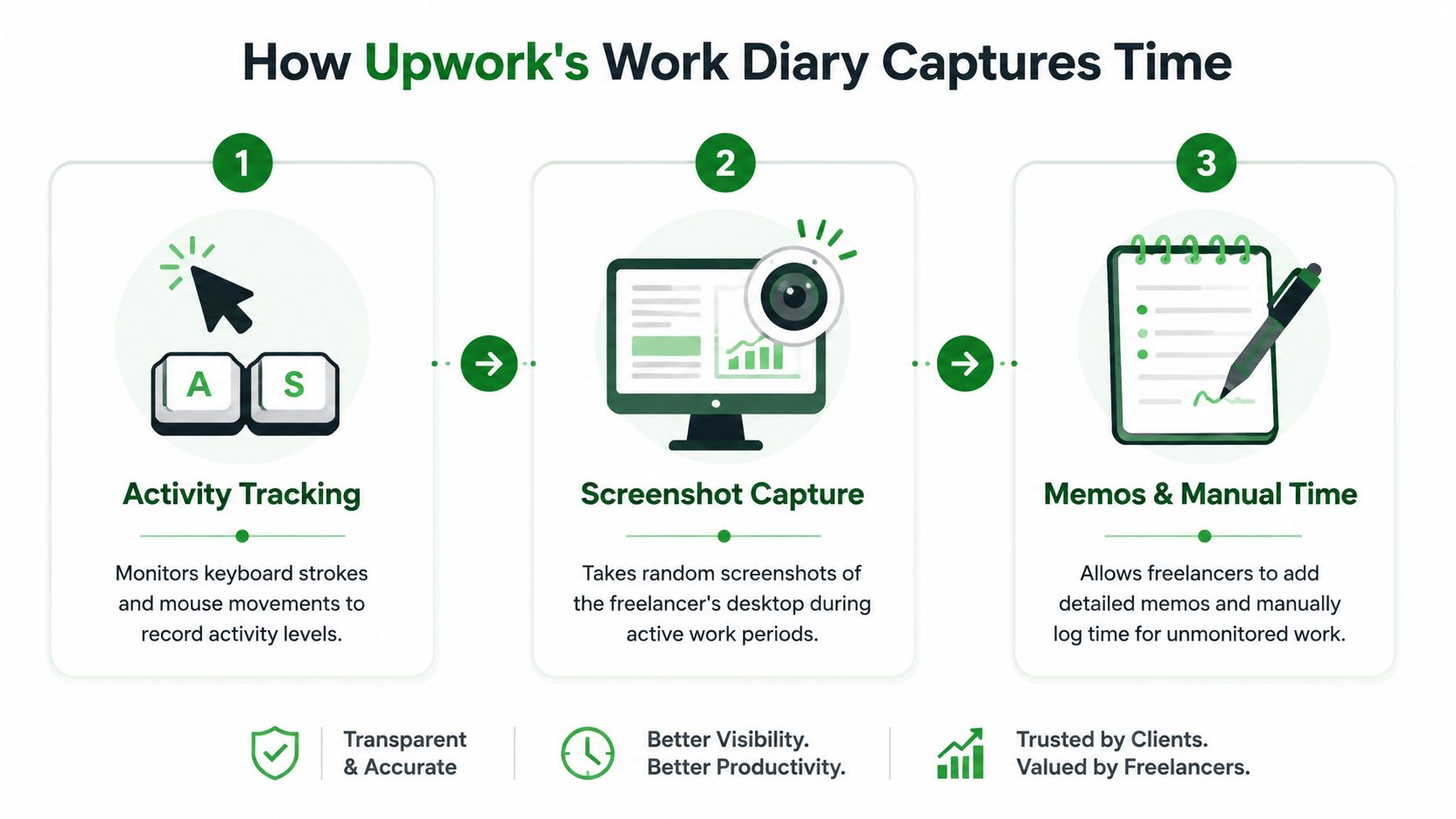
The easiest way to understand the diary is to think of it as a security camera with a motion detector. It doesn't watch your whole day in perfect detail. It samples your work in structured blocks and records enough context to show whether billed time looks legitimate.
The 10 minute billing segment
Tracked time is broken into 10-minute billing segments. That matters because your habits inside each segment affect how the record looks later. If you jump between unrelated work, pause too late, or leave the tracker running while distracted, the segment can become hard to justify.
Think in blocks, not in hours. Ask yourself what a client would see if they opened any single segment at random.
Screenshot capture and what it actually shows
When the Time Tracker is running, Upwork captures approximately six screenshots per hour and records mouse clicks, scroll actions, and keystrokes across those 10-minute blocks, according to Upwork's explanation of how clients review the Work Diary.
A lot of freelancers hear "screenshots" and assume Upwork records everything they type. It doesn't. The same support page says the system does not capture the specific content of what was clicked or typed. That's an important privacy boundary. The platform records evidence of work patterns and on-screen context, not a transcript of your keystrokes.
A screenshot should never surprise you. If it would embarrass you, confuse the client, or look unrelated, the tracker should have been off.
The activity meter
The activity meter is where many people oversimplify things. It measures interaction signals such as keyboard and mouse use. It does not measure output quality. Deep architecture thinking, outlining on paper, or reading a long brief can all be legitimate work, but the tracker only understands what it can observe.
That doesn't mean you need to perform fake busyness. It means you need to structure tracked sessions around visible, contract-related work. Research in a browser can be fine if it clearly supports the assignment. Staring at a static screen while thinking may be real work, but it's weak diary evidence.
Three habits make the system work in your favor:
- Track by task: Start the tracker when you're actively doing the job, not while warming up, chatting, or organizing your desktop.
- Keep the screen relevant: Open files, tabs, docs, boards, or code that clearly connect to the client's project.
- Stop when context changes: If you're switching to another client, taking a break, or stepping away, stop first.
Freelancers who treat the tracker like a passive stopwatch usually create problems. Freelancers who treat it like documented work rarely do.
A Freelancers Guide to Using the Work Diary
Monday morning, a client questions three hours from Friday. The work was real, but the diary shows a generic memo, a screenshot with the wrong tab open, and time logged under the wrong contract. That is how freelancers lose protected hourly time, and it gets more expensive inside an agency where several people are tracking across multiple client accounts.
Most Work Diary problems come from routine mistakes, not platform bugs. The fix is operational discipline: choose the right contract before you start, write memos that explain the task, and review your diary while you can still edit it.

Write memos that defend the invoice
A memo is part of your payment record. Treat it that way.
"Work" tells the client nothing. "Homepage hero revision in Figma" is better. "Revised homepage hero and mobile spacing from client comments" is better because it ties time to a visible deliverable and a reason for the change.
Use memos with three parts:
- Task name: "QA checkout flow" beats "testing"
- Project context: include the page, feature, campaign, or asset
- Visible match: the memo should line up with what the screenshot shows
Consistency matters even more for agencies. If five contractors describe the same kind of task five different ways, the diary becomes harder to audit, harder for the client to trust, and harder for your ops lead to review quickly. Standard memo patterns solve that. A simple format such as "deliverable + action + context" keeps records readable across the whole team.
Review time while edits are still open
The dangerous habit is waiting until the end of the billing cycle. By then, people forget what happened, mix up contracts, or realize too late that a tracked block included admin work, internal Slack, or another client's tab.
Use a weekly review rhythm instead:
- End of day: fix weak memos, check contract selection, remove accidental tracking
- End of week: scan for blocks that would look confusing to the client
- Before the edit window closes: make sure every hour tells a clean story
Teams that rely on hourly contracts should also tighten the setup before anyone starts tracking. The wrong contract selection causes more disputes than bad writing. This guide to the Upwork desktop app setup covers the practical side, but the agency rule is simple: verify contract, verify memo, then press start.
Here's a useful walkthrough for newer team members:
Work in blocks that are easy to defend
Protected hourly payments depend on diary quality, not just honest effort. If the screenshots, activity pattern, and memo all point to contract work, you are in a stronger position. If they conflict, you have created avoidable risk.
The practical rule is one task focus per tracked block. Split research, revisions, QA, reporting, and meetings into separate sessions when possible. That gives the client a cleaner record and gives your agency a cleaner audit trail.
A few examples:
- Strong entry: "Updated 12 product descriptions in Shopify and checked mobile formatting"
- Weak entry: "Content work"
- Strong entry: "Built GA4 event map for checkout funnel in spreadsheet"
- Weak entry: "Analytics"
The same standard applies to senior freelancers. Strategy time counts if the screen record supports it. If you are outlining in Docs, reviewing the client's brief, or mapping architecture in a project file, the diary can still hold up. If the screen shows email, Slack, or a random browser mix while the memo says "strategy," expect questions.
Agency teams need tighter rules than solo freelancers
Solo freelancers can sometimes recover from messy habits. Agencies usually cannot. One careless tracker user can create client distrust that affects the whole account.
Set team rules early:
- Track only client-facing production time unless the contract clearly covers something else
- Stop the timer before switching accounts, chatting internally, or handling agency admin
- Use the same memo format across all team members
- Review junior team diaries before the week closes if they are new to hourly work
Automation adds another layer. Screenshot blurring tools, privacy filters, app switchers, and desktop automations can help with security, but they also create failure points. If an automation changes windows at the wrong moment or hides the work context too aggressively, the diary becomes harder to defend. Agencies need to test these tools before rolling them out across the team.
The strongest freelancers keep their diary boring in the best way. Clear task, relevant screen, short memo, clean contract selection. That record gets approved faster, survives scrutiny better, and saves your ops team from spending Monday cleaning up preventable mistakes.
How Clients Review and Dispute Time
A client usually reviews the Work Diary when something breaks the pattern. Hours jump. A deliverable slips. The invoice lands higher than expected. At that point, they are not studying your process. They are checking whether billed time matches visible work.
That difference matters for agencies. A solo freelancer might have one set of habits to defend. An agency can have five people, five memo styles, and three different levels of discipline on the same client account. Clients do not separate those mistakes neatly. They see one invoice and decide whether they trust it.
What clients check first
Clients tend to move fast through the diary. They scan screenshots, read a few memos, and look for gaps between what was billed and what they expected to buy.
The strongest diaries answer three questions without effort:
- What was done? The memo names the task in plain language.
- Does the screen support it? The screenshot shows work tied to the contract.
- Does the timing feel reasonable? The pattern of activity matches the project pace.
If those answers are clear, approval is usually routine. If the client has to interpret vague notes or guess why unrelated apps are open, review gets stricter.
A lot of disputes start there.
What makes a client question tracked time
Clients rarely object because a screenshot looks imperfect. They object when the full record feels hard to defend.
Common triggers include:
- Generic memos such as "working," "updates," or "admin"
- Screenshots with weak context where the task is impossible to verify
- Unexpected spikes in hours without warning in messages or project updates
- Visible off-contract activity such as internal agency chat, other client work, or account switching
- Inconsistent standards across team members that make one part of the invoice look clean and another part look sloppy
Billing reflects agency operations. If one contractor tracks carefully and another leaves a messy trail, the client often reviews both more closely. Poor diary hygiene spreads scrutiny.
How disputes usually happen
Clients have a set period to challenge hourly time from the prior billing week. The practical lesson is simple. Agencies should review diaries early in the week, not after a client raises a problem.
In real work, disputes usually follow one of three paths. The client spots a few questionable blocks and asks for clarification. The client disputes a portion of the week because certain entries look unsupported. Or the client loses confidence in the invoice and starts checking everything.
The last case is the expensive one. It creates admin work, slows cash flow, and forces account managers to reconstruct what should have been obvious from the diary itself.
How to reduce dispute risk before the client reviews
The safest approach is to treat client review as an operations checkpoint, not a personal judgment call by each freelancer.
Use a simple standard across the team:
- Write memos that would make sense to someone outside your internal workflow
- Track time only on the correct contract and stop the timer during account changes
- Flag unusual hour increases before the invoice surprises the client
- Spot-check diaries before the review window becomes a recovery exercise
Automation complicates this. Agencies often use privacy filters, app-hiding tools, or workflow automations to protect sensitive data and speed up execution. Those tools can help. They can also make screenshots less useful if they hide too much context or switch windows at the wrong time. If a client cannot connect the screenshot to the memo, your team loses one of the clearest defenses for hourly billing.
A defensible diary makes review short. A messy diary turns a normal invoice into a trust problem.
Managing the Work Diary for Upwork Agencies
Monday morning, a client asks why three people logged time to the same task, one memo says "updates," another says "QA," and the third screenshot shows the wrong workspace. That problem starts long before the client opens the invoice. It starts when an agency treats the Work Diary like a personal habit instead of an operating rule.
At agency level, diary quality affects payment protection, client confidence, and account risk. One freelancer with messy tracking creates a billing question. Five freelancers doing it across linked client work creates a pattern, and patterns are what clients and platforms notice.

Where agencies lose control
The first breakdown is ownership. If nobody owns diary review, nobody catches bad memos, wrong contracts, duplicate effort, or hours logged after scope changed.
The second breakdown is inconsistency across accounts. One contractor tracks carefully. Another leaves vague notes. A third uses tools that hide too much of the screen. Each person may be trying to do honest work, but the agency still ends up with a weak record.
These are the failure points I see most often:
- No memo standard: "Work done" does not defend a billable hour.
- No review owner: Problems get discovered after the week closes.
- No contract-level monitoring: People keep logging time without checking limits, milestones, or scope drift.
- No shared task language: Similar work gets labeled five different ways, which makes staffing look sloppy and makes client review harder.
- No policy for automation tools: Window managers, privacy filters, text expanders, and workflow automations change what the diary captures. Without rules, the team creates screenshots and activity patterns that raise questions.
If you're running an agency account, Upwork agency account operations should cover diary governance alongside staffing, permissions, and delivery.
The system that holds up at scale
Agencies do not need a complicated process. They need a repeatable one.
Set memo examples by service line. A developer, media buyer, and content editor should not invent diary language from scratch every week. Assign one reviewer before the weekly lock. Check hours against contract scope and recent client requests. Keep internal work separate from client-billable work unless the contract clearly allows it.
I also recommend one rule that basic guides skip. Any tool that changes the workstation view or input pattern needs approval before the team uses it on tracked time. That includes privacy overlays, macro tools, auto-switching apps, and some AI assistants. At agency scale, "helpful" automation can create compliance problems fast because the issue repeats across multiple freelancers instead of staying isolated.
What good diary management changes
Clients never see your internal org chart. They see the output, the communication, and the invoice support behind it. A clean diary makes a multi-person agency look controlled. A messy one makes the same agency look disorganized, even if the work itself was fine.
Good diary discipline also reduces manager time. Without a standard, account leads spend Friday and Monday reconstructing who did what, whether the time belongs on that contract, and how to explain screenshots that should have been clear on their own. That is avoidable overhead.
For agencies, the Work Diary is part billing control, part compliance record, and part client-retention tool. Treat it that way from the start.
Privacy Compliance and Automation Tools
Privacy concerns around the Work Diary are legitimate. Screenshots make people nervous for a reason. You're billing from a live workstation, sometimes with client materials, internal notes, and personal distractions one tab away from each other.
The practical answer isn't panic. It's workspace discipline. Separate client work from private activity. Close irrelevant tabs before tracking starts. Keep sensitive non-project material off-screen during tracked sessions. The cleaner your environment, the less you depend on damage control later.
What Upwork is looking for now
Compliance has become more pattern-aware. As of 2025-2026, Upwork's Hourly Payment Protection scrutiny goes beyond raw activity count and examines the pattern of keyboard and mouse input. Recent policy updates flag low-variance input, reject static screens or simple automated clicks, and some user reports indicate a 15% suspension rate linked to poor activity metrics, according to Upwork's Work Diary policy page.
That changes the conversation around automation. A lot of people still think the only risk is having too little activity. That's outdated. Repetitive, artificial-looking activity can also create problems.
The line between support and violation
Agencies get themselves into trouble. They look for "safe automation" and end up thinking like evasion engineers instead of operators. That's the wrong frame.
If a tool is trying to fake work that isn't happening, it's a risk. If a workflow helps real workers stay organized, respond faster, or manage account operations without spoofing billed labor, that's a different category. The issue isn't whether software touches your Upwork business. The issue is whether software distorts the record of actual work.
For teams thinking about account safety more broadly, this guide on Upwork safety is useful context because safety isn't just about avoiding scams. It's also about avoiding behavior that makes a legitimate account look suspicious.
What actually works
The safest approach is still operational, not clever.
- Use automation around the work, not inside billed labor: Proposal workflows, lead routing, and analytics are one thing. Simulating tracked activity is another.
- Keep tracked sessions visibly real: If you are reading, researching, drafting, editing, coding, or designing, let the screen show that work clearly.
- Avoid static dead zones: Long inactive-looking stretches raise more questions than focused visible progress.
- Train teams on pattern risk: People often know they shouldn't use bots. They don't realize repetitive low-variance behavior can also look wrong.
The agencies that stay out of trouble usually have the least dramatic setup. They bill real work, document it clearly, and don't try to game the tracker.
Frequently Asked Work Diary Questions
Can I use manual time instead of tracked time
You can, if the client allows it on the contract. But manual time doesn't carry the same protection logic as tracked time. That's the trade-off.
Manual time can work for trusted long-term relationships, quick corrections, or rare situations where the tracker wasn't practical. It becomes dangerous when you rely on it routinely with clients who haven't earned that level of trust with you, and vice versa.
Use manual time carefully:
- Good use case: You forgot to start the tracker for a brief task and immediately tell the client what happened.
- Weak use case: You prefer not to use screenshots, so you log whole days manually.
- Best practice: If you add manual hours, write clear notes and message the client before invoicing surprises them.
If payment protection matters, tracked time is the stronger route.
Can the Work Diary help on fixed-price contracts
Yes, but in a different way. On fixed-price jobs, the diary isn't the same billing engine it is on hourly work. Instead, it can function as proof that work happened.
That can help if a disagreement develops around progress, effort, or whether you performed the work. For agencies, this is especially useful when a fixed-price project spans multiple contributors and the client starts questioning where the team spent its time.
Still, don't confuse "helpful evidence" with "automatic protection." The diary can support your position, but fixed-price work follows a different payment structure.
What should I do if a screenshot captures sensitive information
Act fast and stay practical. The first goal is containment. The second is preventing a repeat.
Use this sequence:
- Stop the tracker immediately so you don't collect more problematic screenshots.
- Review the affected segment while edits are still available.
- Delete the bad time segment if needed rather than hoping the client ignores it.
- Move sensitive work off the tracked screen before restarting.
- Tell the client if context is needed and keep the explanation short.
Don't build a habit around fixing bad screenshots after the fact. Build a workspace that makes bad screenshots less likely.
Sensitive screenshot problems usually come from multitasking, not bad luck.
What activity level should I aim for
Don't chase the meter mechanically. The better goal is relevant, active work that naturally produces a healthy pattern. If you're trying to optimize the number itself, you can end up with weird behavior that looks less credible than doing focused work.
Your screen, memo, and task flow should all support each other. That combination matters more than gaming any single signal.
What if I worked across several tools for one task
That's normal. Design, dev, and marketing work often moves across multiple surfaces. The important part is coherence. If the task is "landing page revision," then Figma, browser preview, notes, and client comments can all make sense together.
What causes trouble is not variety. It's randomness. Make sure your memo describes the task at a level broad enough to cover the tools you used, but specific enough that the client can understand the output.
How often should agencies review team diaries
Weekly at minimum. Daily checks are even better for larger teams or higher-risk accounts because they catch mistakes while edits are still manageable.
A strong review habit looks like this:
- Midweek spot checks: Catch wrong-contract tracking and weak memos early.
- End-of-week pass: Clean up inconsistencies before lock.
- Pre-invoice review: Make sure hours, scope, and client expectations still align.
Agency owners don't need to inspect every minute personally. They do need a process that makes sure someone does.
If your team is trying to scale Upwork without creating more admin overhead, Earlybird AI helps agencies manage outreach, multi-user workflows, analytics, and account operations with safety in mind. It's built for teams that want a cleaner system around Upwork, not more chaos inside it.




