
← Back To Blog
Web Development Proposals: The Guide to Winning Clients
You sent a thoughtful web development proposal, customized the scope, explained the stack, and priced it carefully. Then nothing happens. No reply. No follow-up question. Just silence while a lower-quality bidder gets the call.
That usually isn’t a writing problem. It’s a sales process problem.
On Upwork especially, clients move fast, briefs are often incomplete, and most sellers respond to the visible request instead of the actual business issue underneath it. Strong web development proposals don’t start when you open a doc. They start when you diagnose the problem better than everyone else, frame the work in plain language, and remove enough risk that replying feels easy.
Why Most Web Development Proposals Fail
Most failed proposals have one thing in common. They read like technical summaries, not buying documents.
Clients rarely reject a proposal because it lacked more detail about Laravel, React, Webflow, WordPress, headless CMS architecture, or API design. They reject it because they couldn’t quickly see three things: whether you understand the problem, whether your plan feels controlled, and whether the project will be easier with you than with the next bidder.
The real failure happens before the proposal
A lot of freelancers assume the fix is to “write a better proposal.” Sometimes that helps. Usually, the bigger issue is that the proposal is trying to rescue a weak discovery process.
If you didn’t uncover the business goal, the proposal turns into a feature dump. If you didn’t clarify responsibility, the scope stays fuzzy. If you didn’t identify the client’s fear, missed deadlines, SEO loss, bad handoff, expensive rework, your proposal won’t neutralize the objection that matters.
Most web development proposals lose because they answer the posted brief, not the unstated concern behind it.
On Upwork, this gets worse because briefs are compressed. A client writes “Need website redesign” and receives a pile of responses talking about page builders, turnaround time, and rates. The seller who wins is usually the one who translates that vague request into a clearer buying decision.
What bad proposals usually sound like
You’ve seen these before:
- Generic intros: “I’ve read your requirements and can do this project perfectly.”
- Unframed features: long lists of pages, plugins, integrations, and tech choices with no business context.
- Template language: everything sounds reusable because it is.
- Pricing without boundaries: the price is listed, but what triggers changes isn’t.
- No next move: the client reaches the end and still doesn’t know how to proceed.
That’s why web development proposals should function like a controlled sales conversation in document form. They should feel specific, calm, and directional.
The proposal is not the first step. It’s the written proof that your intake process was sharp.
Laying the Groundwork with a Powerful Discovery Process
Most sellers rush to solution mode. That’s the habit that creates weak proposals.
Research on redesign RFP practice notes that most web development proposals focus on deliverables and features rather than problem discovery, and that an “expository sketch” or initial discovery phase should come before formal proposals because it helps clients clarify their needs, especially when requirements are vague on platforms like Upwork, as explained in Upstatement’s website redesign RFP guidance.

A proper discovery process does two jobs at once. It gives you the raw material for the proposal, and it shows the client you think beyond implementation.
Ask for the problem before the platform
If a client says they need a Shopify rebuild, a WordPress migration, or a new Next.js app, don’t start by discussing tools. Start by finding the operational reason the project exists.
Useful questions include:
- What triggered this project now: Was it conversion problems, content bottlenecks, poor mobile performance, unreliable developers, rebranding, or internal pressure?
- What’s broken today: Ask what frustrates customers, staff, and leadership.
- What happens if nothing changes: This reveals urgency and budget logic.
- How will you judge success: Leads, sales, admin efficiency, content publishing speed, or fewer support requests.
- Who has to approve this: One stakeholder rarely buys alone, even on Upwork.
These questions do more than gather facts. They help the client hear their own priorities out loud, which makes your later framing much stronger.
Pull out what the brief didn’t say
Vague job posts usually hide the biggest risks. Those risks are what your proposal needs to manage.
Look for details around:
- Content ownership: Who writes, edits, and uploads copy.
- Migration complexity: Existing URLs, redirect concerns, SEO preservation, media handling.
- Internal dependencies: delayed approvals, missing assets, unavailable subject matter experts.
- Third-party systems: CRMs, payment tools, booking software, analytics, custom APIs.
- Post-launch realities: training, support expectations, handoff depth.
A proposal written without this layer often sounds polished but still misses the project.
Separate discovery from delivery when needed
Not every project should go straight into a full build proposal. Some should begin with a paid discovery phase.
That’s especially true when the client wants a quote for something they haven’t fully defined. In those cases, discovery is not a delay. It’s risk control.
Practical rule: If the client can describe features but can’t define priorities, responsibilities, or success criteria, sell a discovery phase first.
That phase can include stakeholder interviews, sitemap refinement, technical recommendations, feature prioritization, and implementation planning. For Upwork sellers, this is often the cleanest way to handle murky scopes without underbidding a problem you don’t yet understand.
If your current lead flow is attracting too many poor-fit projects, tighten qualification before discovery. This guide on how to qualify sales leads is a useful companion process.
Discovery questions that improve close rates
Use open-ended questions that force useful answers:
“What would make this project feel like a clear win internally?”
This gives you the language to mirror in the proposal.“Which part of the current site or system causes the most friction?”
Friction points become proposal anchors.“What must be true by launch day?”
This clarifies essential requirements.“What are you worried a new vendor might get wrong?”
This exposes buying resistance directly.“What should happen after launch that isn’t happening today?”
This shifts the discussion from pages to outcomes.
The strongest web development proposals feel obvious because the client already sees their own priorities reflected back to them.
The Anatomy of a High-Converting Proposal Structure
A proposal shouldn’t feel like a pile of sections. It should read like a case you’re building.
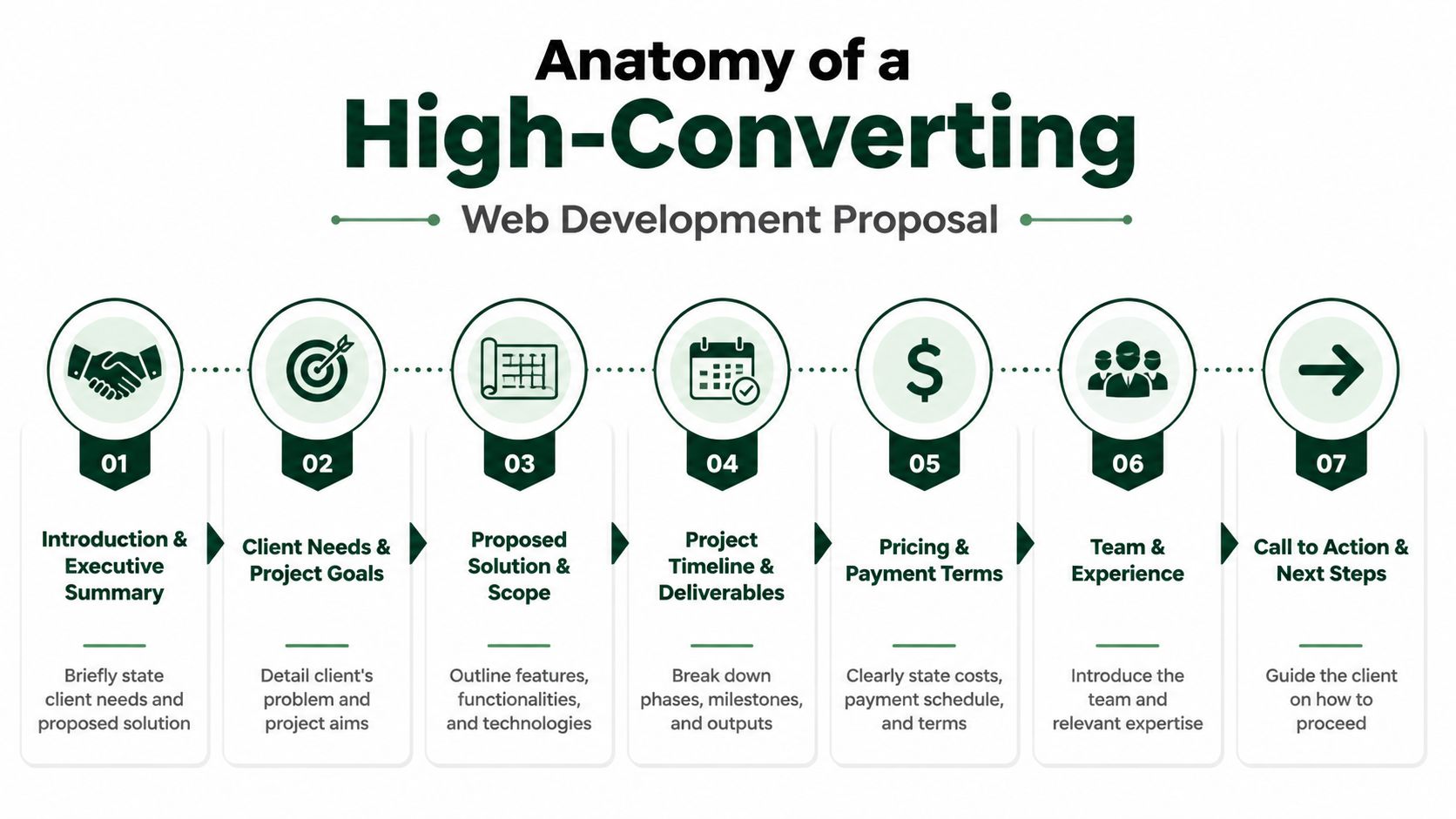
Expert proposal frameworks consistently identify 8 core structural components that shape client decisions: Introduction, Problem Statement, Proposed Solution, Project Outline, Timeline, Pricing, Terms, and Next Steps. High-performing agencies also report that when a disciplined intake process feeds those sections, the proposal becomes much harder to reject because the client is already mentally aligned from discovery, as described in GoDaddy’s web design proposal framework.
Start with alignment, not biography
The introduction should confirm the client’s situation in language they’d use themselves. Don’t lead with your agency history. Lead with their reality.
A strong opening sounds like this in practice: you’re redesigning a content-heavy marketing site that currently makes publishing slow, creates SEO risk during changes, and doesn’t support mobile users well. The proposal opens by naming that problem and stating the intended outcome.
That’s very different from “We are a full-service development team with years of experience.”
Build the middle like a narrative
The strongest web development proposals move in a clean sequence:
- Problem statement that proves you listened
- Proposed solution that links the work to business value
- Project outline that explains what will happen and in what shape
- Timeline that gives the client control and visibility
If the document skips from “about us” to “price,” the client has to do too much interpretation.
The proposal should reduce decision effort. Every section should answer the question created by the previous one.
What each section needs to do
Introduction
Keep it short. Confirm the project context, the business objective, and the high-level outcome.
Problem statement
You diagnose. Show you understand the operational, commercial, or user-side issue. If the client is facing migration risk, weak content workflows, low trust in prior vendors, or unclear requirements, say so plainly.
Proposed solution
Translate recommendations into outcomes. Don’t just say “custom CMS build.” Explain what that means for editors, maintainers, or customers.
For example, if you recommend WordPress over Webflow, or Shopify over a custom store, explain the trade-off. Better editor control, stronger ecosystem, cleaner handoff, or lower maintenance burden. Technical choices need business meaning.
Project outline
Scope is defined here. Be precise.
Include the workstreams that matter. Templates, integrations, CMS setup, migration approach, QA, launch preparation, training, and support boundaries. If something affects price, time, or responsibility, it belongs here.
Timeline
This section gets underestimated. It shouldn’t just say “4 weeks” or “8 weeks.”
Break the work into phases with milestones and dependencies. Clear phase planning helps clients visualize delivery and lowers the anxiety that comes from ambiguous timing. In practice, unclear project phases and vague deadlines are common rejection triggers, while defined deliverables and milestones support faster decisions and fewer communication gaps, as discussed in the earlier proposal framework research.
Pricing
Make the investment legible. Anchor it to what’s included and how the work is structured.
Terms and conditions
Don’t bury this. Terms protect both sides. Clarify payment triggers, revision limits, timeline assumptions, ownership, approval windows, and change request handling.
Next steps
Never let the document end passively. Tell the client exactly what happens next if they want to proceed.
The structure that works on both Upwork and off-platform
For a short Upwork attachment or linked proposal, I like this sequence:
- Brief opening summary
- Client problem in plain English
- Recommended approach
- Scope of work
- Timeline and milestones
- Investment
- Terms
- Clear next action
If you want another example of how this structure adapts to a different build category, this proposal for an app shows how the same logic transfers beyond websites.
A good structure doesn’t make proposals feel formal. It makes them easy to buy.
Pricing Your Projects to Win and Remain Profitable
A client posts a vague Upwork job, asks for a fixed quote, and expects a clear number by the end of the day. That is where a lot of margin gets lost.
Bad pricing rarely fails because the number is too high. It fails because the proposal does not show what the client is paying for, what could change the scope, and how risk will be controlled once work starts.

Fixed price, hourly, and phased pricing
Each pricing model solves a different problem.
Fixed price
Use fixed pricing when the deliverables are defined, approvals are straightforward, and the technical unknowns are low. It fits brochure sites, focused landing pages, small redesigns, and contained CMS migrations.
The trade-off is simple. The more ambiguity in the brief, the more risk you absorb. On Upwork, clients often ask for fixed bids before they have made decisions on content, integrations, or functionality. Quoting too early can win the job and kill the profit.
Hourly
Hourly pricing works better when the work will evolve during delivery. That includes maintenance, bug fixing, advisory support, and feature work shaped by live feedback.
Clients hesitate on hourly projects for a reason. They want to know who sets priorities, how time is tracked, and what prevents endless drift. If those controls are missing from the proposal, hourly feels expensive even when it is the safer model.
Phased or hybrid pricing
For larger builds, phased pricing is usually the most practical option. Start with a paid discovery, audit, or architecture phase. Price the implementation after the open questions are resolved.
This model performs well on Upwork because it handles the gap between rushed job posts and real project complexity. You do not need to pretend the scope is settled. You need a structure that lets the client buy clarity first, then commit to build with fewer surprises.
Make scope carry the price
Pricing only works when scope is specific enough to defend. Inventive AI’s review of web development proposal structure points out that proposal quality improves when sellers clearly explain the features, constraints, and responsibilities that affect cost and delivery, especially for clients who are not technical enough to spot hidden complexity on their own, as noted in Inventive AI’s web development proposal template analysis.
In practice, I separate pricing into three buckets:
- Included work: the pages, features, integrations, and deliverables covered by the quoted fee
- Conditional work: items that depend on third-party access, final content, API review, or platform limitations
- Out-of-scope requests: additions or changes that require a new estimate or change order
That one distinction protects margin. It also lowers friction later because the client can see the boundary before the project starts.
If a request can change cost, timeline, or accountability, write it into the proposal in plain language.
Show the investment in parts
Clients say yes faster when the price feels explained. A single total can look arbitrary, especially on Upwork where buyers are comparing dozens of bids in a short time.
Break the investment into meaningful parts. For example, a custom website proposal might separate strategy and UX, interface design, frontend and CMS development, QA and launch support, and project management. The exact numbers will vary by project. The structure matters more than the math on a sample quote because it shows where the effort sits and why a serious build costs more than a template installation.
Useful pricing groups include:
- Strategy and UX: discovery, sitemap, user flows, wireframes
- Design: page designs, component systems, responsive states
- Development: templates, CMS setup, integrations, custom functionality
- QA and launch: testing, bug fixing, launch checklist, short post-launch support
- Project management: meetings, feedback handling, production coordination
I also like to show optional items separately. That gives the client a clear base scope and a controlled way to expand later without reopening the entire quote.
What wins more often than being cheapest
Clients do not need perfect certainty. They need a proposal that makes the trade-offs easy to understand.
Say why a simpler CMS lowers training time. Say why preserving URLs and metadata increases the cost of a migration. Say why a third-party integration stays provisional until documentation or sandbox access is reviewed. Those details make your pricing feel grounded.
That matters even more on Upwork, where speed pushes many freelancers toward generic flat bids. The stronger play is disciplined specificity. If you use proposal automation, use it to speed up packaging, pricing ranges, and scope language. Do not use it to hide assumptions. Automation should make your pricing process faster and more consistent, not more vague.
The proposals that stay profitable are the ones that price the work, the risk, and the decision-making overhead together.
Upwork Proposal Strategies That Get Replies
General proposal advice breaks down on Upwork because the client’s inbox fills quickly and attention is shallow. Your job is not to impress at length. It’s to create enough relevance and control in the first few lines that the client wants to engage.

The first two sentences do most of the work
The preview matters more than the rest of the message. Many clients decide whether to open based on those first lines.
A useful formula is simple:
- mention two specifics from the brief
- propose one low-risk first step
For example, don’t write “I’m interested in your web development project.”
Write something closer to this in spirit: you’re migrating from WordPress to Webflow and need to preserve existing content structure. I’d start by mapping the current pages, identifying redirect-sensitive URLs, and confirming which templates can be simplified before build begins.
That sounds like someone who already sees the work.
Tailor the bid to the job type
Fixed-price jobs and hourly jobs need different positioning.
For fixed-price posts
Lead with a contained first milestone. Clients want to know you won’t disappear into a black box.
Your note should signal:
- what you’ll do first
- what the client will receive
- what decision follows that step
For hourly posts
Focus on pace, communication rhythm, and judgment. The client is buying access to your thinking as much as your production.
Mention things like overlap hours, review cadence, and how you handle blockers. That lowers uncertainty fast.
Use a reply-friendly close
Don’t end with “Let me know if you’re interested.” That creates work for the client.
Instead, offer a binary next step:
- quick call
- short written plan
- mini audit
- milestone outline
The easier the reply, the more replies you’ll get.
A strong Upwork proposal doesn’t ask the client to think harder. It gives them an easy first move.
Follow up without sounding needy
Most sellers either never follow up or follow up badly. They bump the thread with “just checking in,” which adds no value.
A better sequence is short and useful.
Follow-up one
Send a value add tied to the project. That could be a quick observation about structure, a migration consideration, a content workflow concern, or a note about launch risk.
Example approach: after reviewing the brief, one area that may need early attention is how redirects and media assets are handled during migration, since that often affects launch timing more than the page rebuild itself.
Follow-up two
Use a final check-in that lowers pressure.
Something like: if this project is still active, I can outline the cleanest first milestone so you can compare vendors on approach, not just pricing.
That keeps the conversation commercial without sounding desperate.
Here’s a useful walkthrough for visual learners:
Speed matters, but sloppy speed loses
On Upwork, timing affects visibility. Early submissions get seen first, and first contact often shapes who gets the reply. But fast doesn’t mean generic. It means having reusable building blocks that still let you personalize.
That includes:
- opening hooks by project type
- discovery prompts by stack
- scope language for common builds
- follow-up scripts for active threads
- proof assets matched to service type
This is also where automation can help if you use it carefully. Some teams use internal templates in Notion, ClickUp, or Airtable. Others use proposal workflows inside CRMs. Earlybird AI is one option built specifically for Upwork teams. It connects to an Upwork account, learns from user feedback, and automates project search, personalized proposal drafting, and client replies so sellers can respond quickly while keeping a human review loop where they want it.
The edge isn’t automation by itself. It’s preserving relevance at speed.
Proposal Templates for Freelancers and Agencies
Templates are useful when they preserve thinking. They become dangerous when they replace it.
The best way to use templates is to keep the structure fixed and swap the substance based on discovery, project risk, and the client’s buying style.
Freelancer template for a focused project
This version works well for a smaller, defined build such as a landing page set, a WordPress rebuild, a Shopify section update, or a bug-fix sprint.
Template
Hi [Client Name],
You’re looking for help with [project type], and the main need appears to be [core business problem or priority]. Based on your brief, the work should focus on [top priority one] and [top priority two] so the project stays practical and launch-ready.
Recommended approach
I’d begin with [first milestone or first phase] to confirm scope, dependencies, and acceptance criteria. From there, I’d complete [implementation summary] and keep communication focused on visible progress, blockers, and next approvals.
Scope included
- [deliverable or feature group]
- [deliverable or feature group]
- [testing, launch, or handoff item]
Assumptions
This proposal assumes [client responsibility], [tool or platform condition], and [content or access condition].
Timeline
Estimated delivery: [timeframe], subject to approval speed and access to required assets.
Investment
Total project fee: [price or pricing model]
Next step
If this matches what you need, send [required item] and I’ll confirm the first milestone.
Why this works: it stays short, gives control, and avoids pretending the project is more defined than it is.
Agency template for a larger custom build
Agency proposals need more narrative because more people are buying the decision. The structure stays the same, but the detail expands around process, accountability, and handoff.
Template
Project summary
Your team needs [project outcome]. The current challenge appears to be [diagnosed problem], which affects [commercial or operational impact].
Proposed solution
We recommend [platform / architecture / build approach] because it supports [client priority], simplifies [team workflow or maintenance benefit], and reduces risk around [migration, scale, support, or integration concern].
Project outline
Phase one covers discovery and technical confirmation, including [work items].
Phase two covers design and build, including [work items].
Phase three covers QA, launch preparation, and handoff, including [work items].
Team involvement
The project will require [roles or responsibilities] to keep design, implementation, QA, and communication aligned.
Timeline and milestones
Delivery will follow milestone approvals at [key checkpoints]. Delays in content, feedback, or access may affect timing.
Investment and commercial terms
Pricing is structured around [phase / fixed fee / retainer / hybrid model]. Any new features or change requests that affect scope, timeline, or responsibility will be quoted separately before work begins.
Next steps
Approve the proposal, confirm the primary stakeholder, and provide access to [required systems or materials] to start phase one.
The key difference between the two
The freelancer version is optimized for speed. The agency version is optimized for confidence.
In both cases, the proposal works because it reflects real discovery. If you can swap the client name and send it to someone else unchanged, it isn’t ready.
Scale Your Outreach Beyond Manual Proposals
A lot of freelancers hit the same ceiling on Upwork. They learn how to write solid proposals, start getting traction, then lose momentum because every job still depends on manual screening, manual drafting, and manual follow-up.
That approach works at low volume. It breaks once you are trying to respond fast enough to compete for good-fit projects without spending your entire day in the job feed.
On Upwork, speed affects visibility, but speed without relevance hurts reply rates. The win is a system that handles repeatable tasks fast and leaves the judgment calls to you. That means using automation to spot the right jobs, prepare a strong first draft, and keep follow-up from slipping, while you stay focused on discovery, solution fit, pricing, and closing.
A simple rule helps here. Automate the parts that depend on pattern recognition and repetition. Keep the parts that depend on business judgment and risk assessment in human hands.
Keep these human:
- discovery calls
- solution design
- pricing judgment
- negotiation
- final proposal review for larger opportunities
Automate these first:
- job monitoring
- first-pass qualification
- draft generation
- message routing
- reminder-based follow-up
I have seen this shift change proposal output without lowering quality. The teams that do it well are not sending generic copy at scale. They are using systems to remove admin work, respond while the client is still reviewing applicants, and keep personalization standards high under pressure.
If you want the practical version, this guide on automating Upwork proposals without losing personalization shows how to build that workflow.
The goal is simple. Spend less senior time on repetitive proposal labor and more of it on the conversations that win profitable projects.
Earlybird AI helps freelancers and agencies turn a manual Upwork sales process into a repeatable system. It searches for fit, drafts personalized proposals, replies quickly, and supports follow-up so your team can spend more time on discovery, pricing, and closing. If you want to see how it works, visit Earlybird AI.




